Establishing secure connection…Loading editor…Preparing document…

Order on Application for Temporary Removal of Child

This template is fully customizable. Edit the text, fill out the fields, and send it for signature. Give it a try!
Order on Application for Temporary Removal of Child

What an Order on Application for Temporary Removal of Child Is

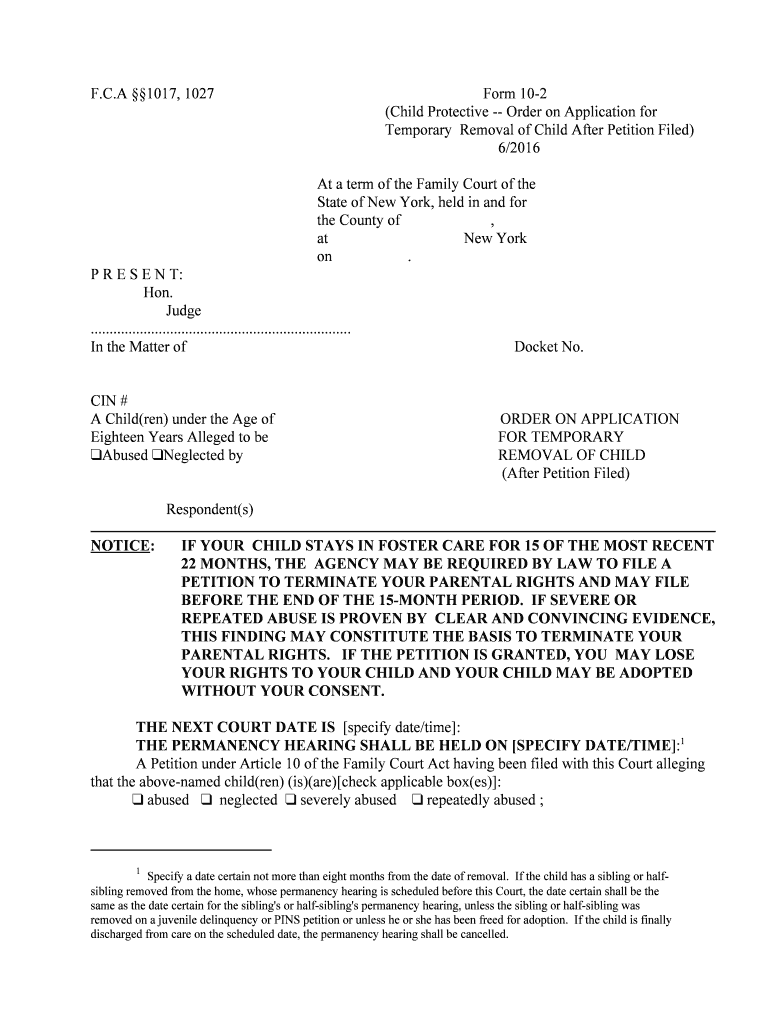
An Order on Application for Temporary Removal of Child is a court-issued directive that authorizes the temporary relocation or protective transfer of a child from a residence or guardian when immediate safety concerns arise. It typically follows an application or petition alleging imminent harm, neglect, or other emergency circumstances and may be granted ex parte when the court finds urgent risk. The order sets short-term custody, care, and placement instructions, often specifying duration, conditions for return, and any required follow-up hearings before the family or juvenile court.

Why this Order Matters for Child Safety and Due Process

The order balances urgent child protection with legal process: it provides immediate protective measures, documents court findings, and creates enforceable instructions for law enforcement, social services, and caregivers while preserving rights through prompt follow-up hearings.

Why this Order Matters for Child Safety and Due Process

Who Typically Prepares and Uses This Order

Each party has distinct responsibilities: petitioners assemble factual support, agencies ensure safety logistics, and courts safeguard due process through hearings and documented findings.

  • Family law attorneys and guardians petition the court to initiate emergency relief and present supporting evidence.
  • Child protective services or social workers file applications when they identify an imminent risk to the child's welfare.
  • Judges and court staff issue and docket the order and coordinate immediate enforcement with law enforcement and placement agencies.

Key Roles and Who Signs

Petitioner — Parent

A petitioner is a person or agency requesting temporary removal; they supply factual affidavits, contact details, and service information so the court can evaluate risk and order relief.

Judge — Family Court Judge

The judge or magistrate reviews evidence, issues the order, and signs to make it enforceable; judicial signature and court seal establish the order's legal authority.

Step-by-Step: Filing an Application and Securing Temporary Removal

Follow these core steps to prepare, file, and enforce a temporary removal order; local court rules determine minor variations.

  • 01
    Prepare Petition: Draft the application with detailed facts and attach affidavits or incident reports.
  • 02
    Attach Evidence: Include medical, police, or social worker reports supporting immediate risk findings.
  • 03
    File with Court: Submit to the family or juvenile court clerk using e‑filing or in‑person filing per local rules.
  • 04
    Serve Parties: Arrange lawful service on the respondent and provide copies to agencies and law enforcement.

Typical Filing Workflow and Configuration Details

Use this checklist to match the order and supporting materials to the court's submission and service requirements.

Field Configuration
E‑Filing Portal Use county or state family court e‑file when available
Form Number Enter local court form code or docket reference
Supporting Documents Attach affidavits, incident reports, and placement plans
Service Method Specify sheriff, private process server, or certified mail

How the Order Is Issued and Enforced

This sequence shows how an application progresses from filing to physical removal and court oversight.

  • File Application: Petitioner submits application with supporting evidence to the court.
  • Judge Review: Judge reviews for immediate risk and may grant ex parte relief.
  • Execute Order: Court signs order; law enforcement and agencies implement the removal.
  • Follow-Up Hearing: Court schedules hearing to confirm, modify, or vacate temporary removal.

Core Components Every Professional Order Should Include

A complete order contains clearly labeled elements that support enforceability, provide notice, and document the court's factual and legal reasoning.

Caption

Court caption and case number identify the jurisdiction and docket so agencies and law enforcement can confirm authority and cross‑reference records.
Parties

Full legal names and roles for petitioner, respondent, and child must appear to ensure accurate service and avoid misapplication of the order.

Findings

Factual findings describe specific evidence and observations supporting removal; these findings form the legal basis for the court's emergency decision.

Order Terms

Clear directives specify who will have custody, where the child will be placed, and any restrictions on contact or communications.

Duration

A defined effective date and expiration or hearing date prevent indefinite emergency custody and frame the timeline for due process review.

Signature Block

Judge signature, printed name, date, and an official court seal validate the order and establish enforceability by law enforcement and agencies.

Essential Identifiers and Security Elements

Court Seal: Official authentication
Case Number: Unique docket identifier
Judge Signature: Judicial authorization
Service Proof: Affidavit of service
Attachments List: Referenced documents
Expiration Date: Order end date

Common Preparation Errors to Avoid

  • Using vague or conclusory language instead of specific incident details weakens the factual basis for emergency relief and can cause denial.
  • Listing incorrect or partial legal names for parties can prevent lawful service and delay enforcement or create grounds for challenge.
  • Failing to attach contemporaneous reports, medical records, or witness affidavits reduces the court's ability to find imminent risk and justify removal.
  • Neglecting to request a clear duration and follow-up hearing date may result in extended emergency custody without timely judicial review.

Risks and Consequences of an Incorrect Order

Improper Service: Order unenforceable
Insufficient Facts: Relief reversed on appeal
Wrong Names: Service defects arise
Missing Seal: Authority questioned
Overbroad Terms: Rights violation claims
Delayed Hearing: Due process concerns

Typical Timelines and Court Deadlines to Expect

Timeframes vary by jurisdiction, but many courts treat removal applications as urgent and prioritize prompt hearings and review.

Emergency Hearing Window:

Often scheduled immediately or within 24–72 hours depending on local court practices.

Service Timeframe:

Service on the respondent should occur as soon as possible after issuance to permit enforcement.

Return Hearing Date:

Court typically schedules a full hearing shortly after removal to review evidence and set further orders.

Duration of Emergency Order:

Many orders expire at the return hearing or after a set short period defined by statute or rule.

Record Retention Deadline:

Maintain original court records according to court clerk schedules and applicable retention rules.

Key Milestones from Filing to Follow-Up

Track these sequential milestones to ensure timely enforcement, proper notice, and court oversight after removal.

01

Application Filed

Petitioner submits the application and supporting evidence to the court clerk for docketing.

02

Ex Parte Review

Judge evaluates immediate risk and may issue a short‑term removal order without respondent present.

03

Execution of Order

Law enforcement or agency effects removal and documents placement and custody arrangements.

04

Follow-Up Hearing

Court conducts a full hearing to decide continuation, modification, or termination of temporary measures.

Digital Submission, Formatting, and Integration Notes

Check local e‑filing rules, preserve original signed copies, and maintain an unalterable audit trail when transmitting documents electronically to courts or agencies.

  • File Format: Prefer PDF/A for court documents
  • E‑Filing Systems: Follow county portal upload limits
  • Integration Options: Connectors: NetSuite, Salesforce, Google Workspace

Practical Examples of How Orders Are Used

These anonymized scenarios illustrate common fact patterns and procedural outcomes where temporary removal orders are applied.

Case Study 1

A social worker documents escalating domestic incidents involving a minor

  • the court grants ex parte removal based on medical and police reports
  • at the return hearing the court evaluates placement options and schedules reunification services.

Case Study 2

A parent petitions after a severe neglect report with photographic evidence

  • an emergency order temporarily transfers custody to a relative pending investigation
  • subsequent hearing establishes a supervised visitation plan and service referrals.

Practical Tips for Accurate and Efficient Completion

Follow these best practices to reduce errors, speed processing, and protect the child's safety while preserving legal integrity.

Document Specific Facts
Record dates, times, witnesses, and immediate risks precisely; specificity strengthens the factual basis and reduces objections or reversals.
Confirm Names and IDs
Use full legal names and include aliases or DOBs to ensure correct service and avoid misidentification.
Attach Corroborating Evidence
Include police reports, medical records, or social worker affidavits to support emergency findings and enable quick judicial review.
Schedule Follow-Up
Request a clear return hearing date and state the intended temporary duration to preserve due process and avoid indefinite emergency custody.

eSignature Vendor Pricing Comparison for Supporting Documents

When assembling supporting affidavits and exhibits, compare basic pricing and capabilities for common eSignature vendors; signNow appears first for reference.

signNow DocuSign Adobe Sign PandaDoc HelloSign
Starting Price $8/user/mo $15/user/mo $14/user/mo $19/user/mo $15/user/mo
Free Trial 7-day free trial, no credit card Varies by plan Varies by plan Varies by plan Varies by plan
Bulk Send Yes Yes Yes Yes No
Audit Trail Yes Yes Yes Yes Yes
HIPAA Compliant Yes Yes Varies by plan Varies by plan Varies by plan

Frequently Asked Questions and Troubleshooting

Answers to common procedural and technical questions about preparing, filing, and enforcing a temporary removal order.


Need help? Contact support

be ready to get more
Join over 28 million airSlate SignNow users