Establishing secure connection…Loading editor…Preparing document…

Application for Leave Without Pay

This template is fully customizable. Edit the text, fill out the fields, and send it for signature. Give it a try!
Application for Leave Without Pay

What the Application for Leave Without Pay Is

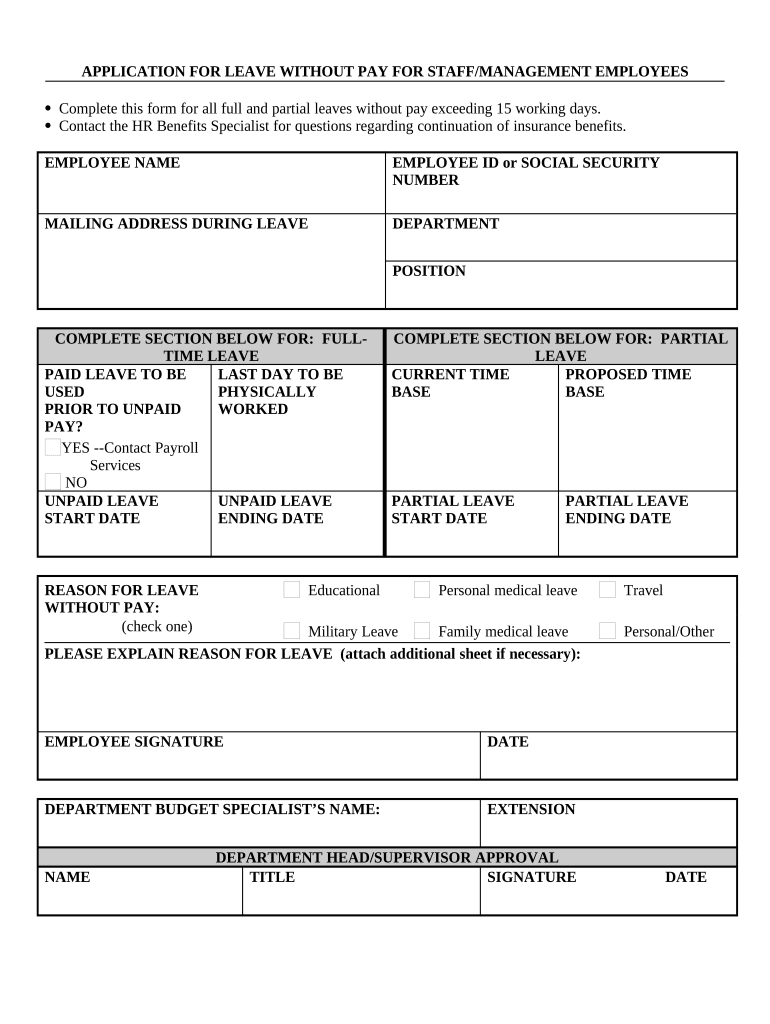
An Application for Leave Without Pay is a formal employee request to take unpaid time away from work while preserving employment status. Employers use this written record to evaluate eligibility, continue or suspend benefits, and document an agreed leave period. The form typically records employee identity, leave start and end dates, reason for leave, approval authority, and any required supporting documents. When used with compliant electronic workflows, the application becomes a reproducible record that supports audit trails, reduces processing time, and clarifies expectations for return-to-work and benefits handling.

Why a Clear Leave Without Pay Application Matters

A standardized application reduces misunderstandings, protects employee benefits where applicable, and creates an auditable record of employer decisions. It helps ensure consistent treatment, supports compliance with leave laws, and documents conditions for return-to-work or extension requests.

Why a Clear Leave Without Pay Application Matters

Who Prepares and Reviews Leave Without Pay Requests

Different roles are involved in preparing, approving, and storing leave requests depending on organizational size and sector.

  • Human resources managers who verify eligibility and coordinate benefits
  • Supervisors or managers who review operational impact and approve dates
  • Employees who complete the application and provide supporting documentation

Core Sections to Include in the Application

A professional application groups required information into logical sections for quick review and consistent decision-making.

Employee Details

Full legal name, employee ID, job title, department, and contact details to match personnel records and payroll.
Leave Dates

Clear start and anticipated end dates, with fields for partial-day or intermittent leave scheduling and return-to-work expectations.

Reason for Leave

Concise reason category (medical, caregiving, education, personal) plus an optional free-text field for context and supporting notes.

Benefits Status

Indicate whether health insurance, retirement contributions, or accruals continue, pause, or require employee action to maintain coverage.

Approvals

Signatures and dates for the approving manager and HR representative, plus conditional fields for union or executive sign-off.

Attachments

Place to attach supporting documents such as medical certification, school notices, or travel documentation when required.

Essential Security and Compliance Elements

Encryption: TLS 1.2/1.3 in transit; AES-256 at rest
Access Controls: Role-based access and least privilege
Audit Trail: Time-stamped actions and IP logging
HIPAA Considerations: BAA required for protected health information
Data Retention: Configurable retention and export
Certifications: SOC 2 Type II, ISO 27001 available

Step-by-Step: Completing the Application

Follow a clear sequence to reduce delays and ensure the request is actionable for payroll and benefits teams.

  • 01
    Prepare: Gather IDs and supporting documentation
  • 02
    Enter Dates: Specify start and expected end in MM/DD/YYYY
  • 03
    Select Reason: Pick the applicable leave category
  • 04
    Submit: Send to HR and manager for review

Configuring an Online Leave Request Workflow

Typical digital workflows use conditional routing and notifications to move requests through review and approval stages efficiently.

Field Configuration
Notification Email to manager and HR on submission
Routing Order Employee → Manager → HR → Payroll
Authentication Email link or SSO; optional SMS code
Retention Setting Archive to HR system after approval

Where to Send the Completed Application

Use consistent submission channels to ensure timely approvals and correct record placement.

  • HR Portal: Upload to the central HR case or ticket
  • Manager Review: Notify direct supervisor for operational approval
  • Payroll Notification: Inform payroll to adjust pay and benefits
  • Personnel File: Store final signed copy in employee file

Digital Signing and File Format Considerations

Choose a platform that supports common formats and integrates with HR and payroll systems.

  • File Formats: PDF, DOCX accepted
  • Integrations: Salesforce, NetSuite, Microsoft 365
  • Authentication: Email link, SSO, optional 2FA

Typical Timelines and Processing Expectations

Establish target turnaround times so employees and managers know when decisions and payroll adjustments will occur.

Employee Submission Window:

Submit as soon as leave is known; earlier notice reduces disruption

HR Review Period:

Typically 3–10 business days depending on verification needs

Benefit Continuation Notice:

Confirm health coverage changes before unpaid leave begins

Manager Response:

Operational approval usually within 5 business days

Payroll Adjustment:

Processed at next payroll cycle following approval

Common Mistakes to Avoid

  • Omitting the correct employee ID, which can misdirect approvals and delay payroll adjustments.
  • Failing to attach required supporting documents, causing HR to return the application for missing verification.
  • Using ambiguous end dates or 'TBD' without follow-up, which complicates staffing and benefit calculations.
  • Not notifying payroll or benefits teams promptly, risking coverage gaps or incorrect deductions.

Potential Risks and Legal Consequences

FMLA Noncompliance: Statutory liability
Benefit Lapses: Loss of coverage
Payroll Errors: Incorrect withholding
Privacy Breach: Protected data exposure
Discrimination Claims: Uneven policy application
Recordkeeping Failures: Regulatory penalties

Practical Tips for Accurate and Efficient Requests

Adopt standard templates, clear routing rules, and a single submission channel to reduce errors and accelerate approvals.

Use Standard Codes
Require employees to select predefined reason codes to trigger consistent benefit and payroll handling; avoid free-text-only entries that require manual triage.
Automate Notifications
Set automated alerts for pending approvals and upcoming return-to-work dates so managers, HR, and payroll act within defined windows.
Verify Identity
Confirm requester identity against HR records before approval; use SSO or two-factor sign-on for remote submissions.
Document Updates
Allow amendments with versioning so changes to leave dates or conditions are tracked and stored with original approvals.

Real-World Examples of Leave Without Pay Use

These brief case summaries illustrate how organizations handle different leave scenarios and recordkeeping needs.

Optica Ventures — COO

Optica standardized an online form to reduce processing errors and centralize records.

  • The streamlined workflow cut follow-ups by half.
  • The result improved transparency between managers and HR and reduced administrative back-and-forth while preserving a clear audit trail for each leave episode.

Xerox — NetSuite Director

Xerox integrated leave requests with HRIS to automate payroll notifications.

  • Integration eliminated manual re-entry.
  • Automation ensured payroll and benefits teams received consistent, timely data, reducing misapplied deductions and improving employee communications about coverage during unpaid leave.

Pricing and Feature Snapshot for eSignature Vendors

Compare basic starting prices and selected capabilities relevant to processing internal HR forms; signNow is listed first per comparative convention.

signNow DocuSign Adobe Sign PandaDoc HelloSign
Starting Price $8/user/mo $15/user/mo $14/user/mo $19/user/mo $15/user/mo
Free Trial 7-day free trial Varies Varies Varies Varies
Bulk Send Yes Yes Yes Yes No
Audit Trail Yes Yes Yes Yes Yes
HIPAA Compliant Yes Yes Yes No No

FAQs and Troubleshooting for Leave Without Pay Applications

Answers to common questions and solutions to frequent issues when completing or processing leave without pay applications.


Need help? Contact support

be ready to get more
Join over 28 million airSlate SignNow users