Establishing secure connection…Loading editor…Preparing document…

Payment Release

This template is fully customizable. Edit the text, fill out the fields, and send it for signature. Give it a try!
Payment Release

What a Payment Release Is and when it applies

A Payment Release is a written acknowledgment that a payer has satisfied, waived, or authorized release of a payment obligation or lien related to a specific invoice, project milestone, settlement, or contractual claim. It often appears as a receipt, lien waiver, release of claim, or conditional release tied to payment. Payment Releases can affect third-party rights (for example, subcontractor lien rights) and may be used in construction, vendor settlements, real estate closings, and commercial contract terminations. Electronic Payment Releases executed under ESIGN (15 U.S.C. ch. 96) or state UETA frameworks are generally enforceable when signature intent and record retention requirements are met.

Step-by-step: filling and finalizing a Payment Release

Follow these sequential steps to prepare, verify, and execute a Payment Release that reduces enforceability risks and supports recordkeeping.

  • 01
    Prepare Document: Identify parties, invoice or contract reference, and exact payment terms to be released.
  • 02
    Complete Fields: Populate payer/payee names, payment amount, date, and scope using the fillable-fields guide.
  • 03
    Confirm Authority: Verify signer authority and any corporate execution requirements before presenting for signature.
  • 04
    Execute and Archive: Sign, notarize if required, deliver copies to all parties, and store per retention rules.

Typical users and situations for a Payment Release

Payment Releases are used by businesses, contractors, settlement administrators, and legal teams to document that specified payments have been made or claims released.

  • Contractors and subcontractors settling progress payments or lien waivers on construction projects.
  • Accounts payable teams closing invoices after partial or full payment reconciliation.
  • Legal and claims administrators documenting settlement distributions and releases.

Use party-specific language and check for industry requirements (for example, lien waiver language in construction) to ensure the release accomplishes the intended legal effect.

Essential elements of a professional Payment Release

A clear, well-structured Payment Release reduces disputes and supports enforceability. Include sections that identify parties, describe released rights, and document payment details.

Parties Identified

Full legal names, business types, and contact details for payer and payee, plus any third parties whose rights are affected; avoid abbreviations that obscure identity.
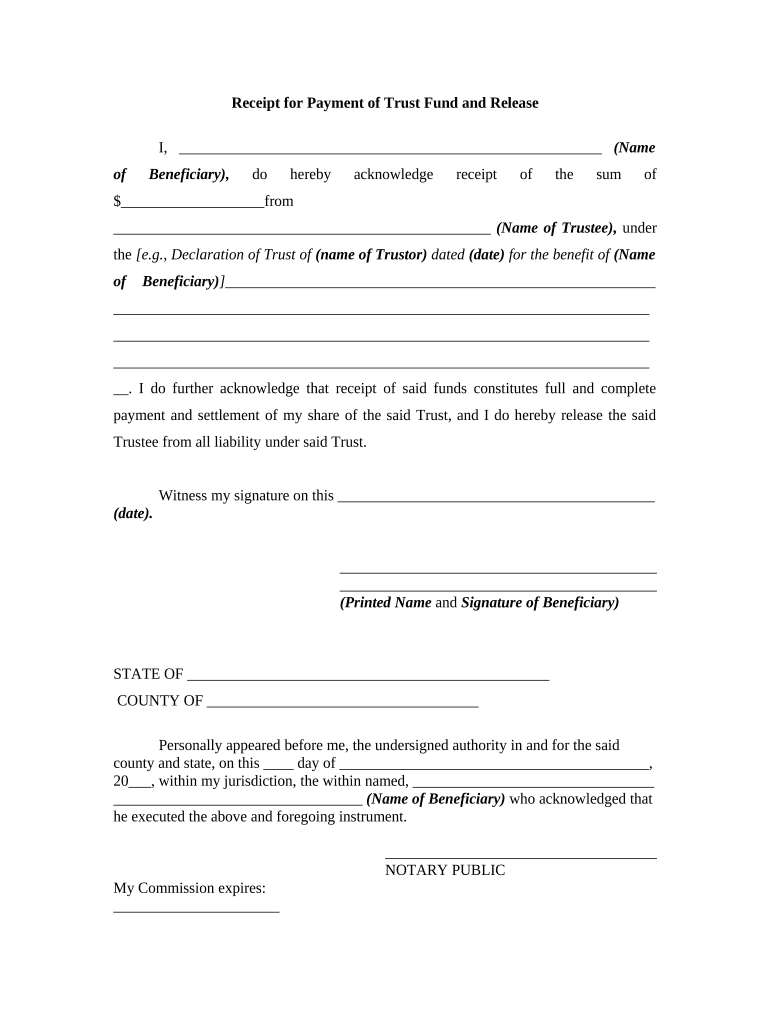
Payment Details

Exact dollar amounts, currency, payment method, and reference numbers (invoice, contract, PO); both numerals and written amounts help prevent ambiguity.

Scope of Release

Precise description of claims, dates, invoices, or work periods covered by the release; include conditional language if release is contingent on future clearing of funds.

Consideration Statement

Record what is received in exchange for the release (payment amount, credits, or settlement); explicit consideration supports contract enforceability.

Execution Block

Signature lines, printed names, titles, and dates for authorized signatories; note any witness or notary fields required by jurisdiction or contract.

Recordkeeping

A notation of document ID, version, and storage location; include a statement about electronic copies and retention policy for audit purposes.

Required information checklist

Payer Name: Full legal name
Payee Name: Full legal name
Payment Amount: Numeric and written
Payment Date: MM/DD/YYYY
Scope Description: Specific invoices/work
Signatory Details: Printed name and title

Primary risks and legal penalties to watch for

Tax Penalties: Backup withholding if TIN error (24%)
1099 Penalties: Late-file fines under IRC §6721
Contract Liability: Broad release may waive future claims
Invalid Execution: Improper signer authority can void release
Notarization Failure: Missing notary where required undermines record
Fraud Risk: False releases expose signers to damages

Common preparation mistakes to avoid

  • Using generic language like 'all claims' without date or invoice references, which can inadvertently release unrelated claims and increase litigation risk.
  • Mismatched names or incorrect taxpayer identification numbers that trigger backup withholding or delay payment clearance and tax reporting.
  • Failing to verify signer authority for corporations or trusts, resulting in challenged enforceability and possible rescission of the release.
  • Omitting conditional language when payment is by check or ACH that may be returned, leading to premature forfeiture of rights.

Timing considerations and processing expectations

Payment Releases have timing implications for payment finality, lien rights, and tax reporting; act promptly and confirm clearing before unconditional release.

Payment Clearing:

Allow bank clearance or ACH settlement before unconditional release; timing varies by payment method.

Tax Reporting:

Confirm year of payment for 1099 reporting and deadlines under IRS rules.

Conditional Releases:

Set clear expiration or cure periods for returned payments before release becomes final.

Contract Deadlines:

Match release dates to contractual milestone schedules to avoid conflicts.

Record Retention:

Store executed releases immediately to support audits and potential disputes.

Real-world examples of Payment Release use

These brief examples show how organizations use Payment Releases to finalize transactions and reduce administrative friction.

Optica Ventures LLC

A venture services firm streamlined vendor settlements with a standard Payment Release form tied to invoice numbers.

  • It reduced reconciliation errors.
  • The template standardized approvals and provided a clear audit trail for accounting and legal teams.

Martin Properties

A property management company used signed releases for tenant damage claims to document settlement terms.

  • The releases referenced repair invoices and payment receipts.
  • That practice limited recurring disputes and supported consistent accounting entries across properties.

Who is authorized to sign a Payment Release

Corporate Officer

A named officer or agent with signing authority signs for a company. Confirm corporate bylaws or board resolutions and include title and printed name to evidence authority and avoid later challenges.

Individual/Contractor

An individual payee or contractor signs for personal settlements. For businesses, ensure the signer is an authorized representative; for individuals, confirm identity with ID and, if required, a notarized acknowledgement.

Typical online workflow settings for Payment Releases

Configure your digital workflow to capture intent, authenticate signers, and preserve an auditable record of the signing event.

Field Configuration
Signature Type Electronic signature (typed, drawn, or certificate)
Authentication Email link, SMS code, or KBA where required
Notary Option Support RON or in-person notarization as needed
Storage Format Save as PDF/A with audit trail

Digital signing and distribution requirements

Use a platform that preserves audit trails, supports required authentication, and integrates with your document store.

  • Integrations: Salesforce, NetSuite, Google Workspace
  • Formats: PDF, DOCX, HTML
  • Security: TLS in transit; AES-256 at rest

Practical tips for accurate and efficient completion

Follow these best practices to reduce disputes and speed processing while maintaining compliance across jurisdictions.

Use precise, narrow release language
Draft the release to reference specific invoices, dates, or work scopes. Narrow language prevents unintended waiver of unrelated claims and reduces litigation risk by making the parties' intent clear.
Verify signer identity and authority
Confirm corporate signers through resolutions or officer lists; for individuals, match names to government ID. Consider two-factor authentication for higher-risk transactions.
Prefer conditional releases when payment is pending
If funds are not cleared, use conditional release language tied to successful settlement or a defined cure period to protect payee rights in case of returned payments.
Retain complete records with metadata
Store executed releases with payment receipts, audit trails, and correspondence in a searchable archive to support audits and dispute resolution.

eSignature provider comparison for executing Payment Releases

Common vendor features affecting Payment Release workflows include starting price, trial availability, bulk send, audit trails, HIPAA support, and envelope or session caps.

signNow DocuSign Adobe Sign PandaDoc HelloSign
Starting Price $8/user/mo $15/user/mo $14/user/mo $19/user/mo $15/user/mo
Free Trial 7-day free trial Varies by plan Varies by plan Varies by plan Varies by plan
Bulk Send Yes Yes Yes Yes No
Audit Trail Yes Yes Yes Yes Yes
HIPAA Compliant Yes Yes Yes No No

FAQs and troubleshooting for Payment Releases

Answers to common questions about validity, execution, notarization, and recordkeeping for Payment Releases in the United States.


Need help? Contact support

be ready to get more
Join over 28 million airSlate SignNow users