Establishing secure connection… Loading editor… Preparing document…
Navigation

Fill and Sign the Registration Pursuant to Section 10a 1 7 Form
Fill and Sign the Registration Pursuant to Section 10a 1 7 Form

How it works

Open the document and fill out all its fields.
Apply your legally-binding eSignature.
Save and invite other recipients to sign it.

Rate template

4.7
33 votes
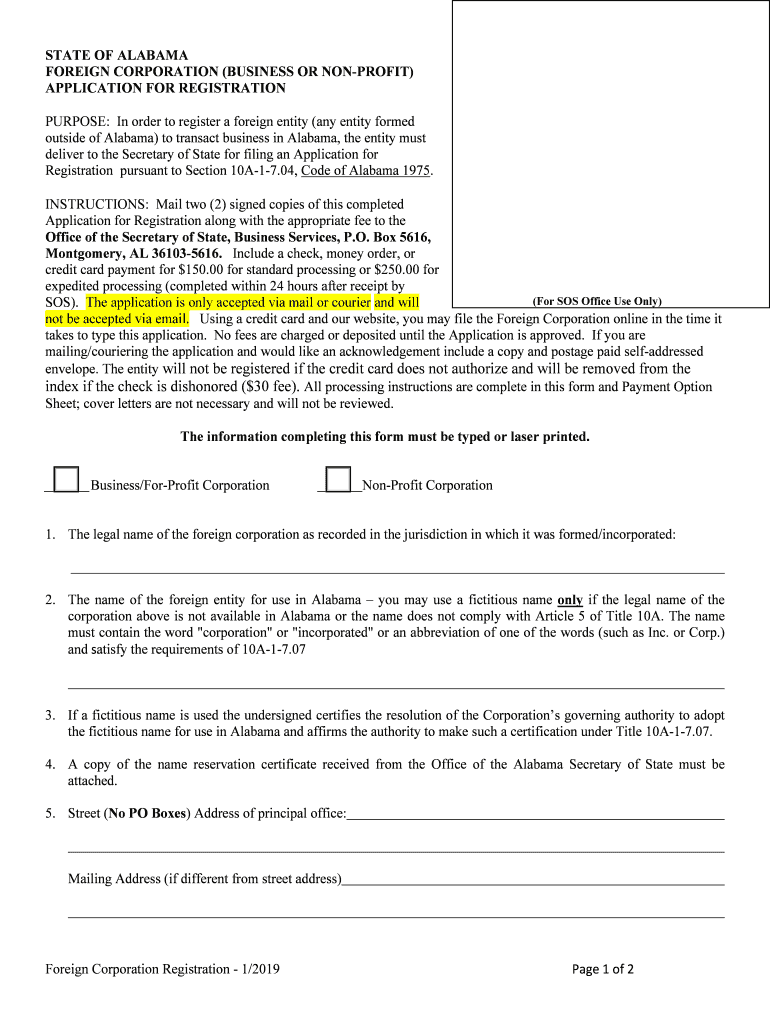
STATE OF ALABAMA FOREIGN CORPORATION (BUSINESS OR NON -PROFIT ) APPLICATION FOR REGISTRATION Foreign Corporation Registration - 1/2019 Page 1 of 2 PURPOSE: In order to register a foreign entity (any entity formed outside of Alabama) to transact business in Alabama, the entity must deliver to the Secretary of State for filing a n Application for Registration pursuant to Section 10A-1-7.04, Code of Alabama 1975. INSTRUCTIONS: Mail two (2) signed copies of this completed Application for Registration along with the appropriate fee to the Office of the Secretary of State, Business Services , P.O. Box 5616, Montgomery, AL 36103-5616. Include a check, money order, or credit card payment for $150.00 for standard processing or $250.00 for expedited processing (completed within 24 hours after receipt by SOS). The application is only accepted via mail or courier and will not be accepted via email. Using a credit card and our website, you may file the Foreign Corporation online i n the time it takes to type this application. No fees are charged or deposited until the Application is approved. If you are mailing/couriering the application and would like an acknowledgement include a copy and postage paid self-addressed envelope. The entity will not be registered if the credit card does not authorize and will be removed from t he index if the check is dishonored ($30 fee). All processing instructions are complete in this form and Payment Option Sheet; cover letters are not necessary and will not be reviewed. Th e information completing this form must be typed or laser printed. Business/For-Profit Corporation Non-Profit Corporation 1.The legal name of the foreign corporation as recorded in the jurisdiction in which it was formed/incorporated : 2.The name of the foreign entity for use in Alabama – you may use a fictitious name only if the legal name of the corporation above is not available in Alabama or the name does not comply with Article 5 of Title 10A. The name must contain the word "corporation" or "incorporated" or an abbreviation of one of the w ords (such as Inc. or Corp.) and satisfy the requirements of 10A-1-7.07 3. If a fictitious name is used the undersigned certifies the resolution of t he Corporation’s governing authority to adopt the fictitious name for use in Alabama and affirms the authority to make s uch a certification under Title 10A-1-7.07. 4. A copy of the name reservation certificate received from the Office of the Alabama Secretary of State must be attached . 5. Street ( No PO Boxes) Address of principal office: Mailing Address (if different from street address ) (For SOS Office Use Only) FOREIGN CORPORATION (BUSINESS OR NON-PROFIT ) APPLICATION FOR REGISTRATION Foreign Corporation Registration - 1/2019 Page 2 of 2 6. The undersigned certifies that the foreign entity currently exists as a valid entity of the type stated above under the laws of the entity’s jurisdiction of formation . 7. Corporation’s jurisdiction of formation: 8. Date of the corporation’s formation in state/country of jurisdiction: / / (MM/DD/YYYY) 9. Name of registered agent for service of process in Alabama (MUST be physically located in Alabama) : 10. Street ( No PO Boxes ) Address of registered office of registered agent (MUST be physically located in Alabama) : Mailing Address in Alabama (if different from street address ) 11. The date the foreign corporation began or will begin transacting business in Al abama: / / (MM/DD/YYYY) Date Typed Name and Title of Signature Below Signature of Person Authorized to Sign per 10A-1-4.01, Alabama Code In order to review the sections of the Code of Alabama 1975 referred to in the filing form you may access www.sos.alabama.gov and go to Records. Choose the Code of Alabama link to review. / / Secretary of State Payment Option Sheet : If you do not send an acknowledgement copy and a pre- addressed postage paid envelope with the filling, y ou will not receive a credit card or prepaid account receipt from the Secretary of State’s Office . Hold for pickup request – acknowledgement copy will have t he receipt attached. The document of record will be stamped showing the receipt of the filing fee and expedite fee but will not show convenience fees which will be charged; (generally these fees are betwee n 2% and 5% of the total charge ). Information MUST be typed or laser printed on a computer. Entity Name: Service Requested : $150.00 R egistration filing fee ______$4.00 Copy Fee (Only if no t submitting a dupl icate copy of the registration form). $100.00 E xpedited Processing fee Hold at Front Desk for Pick-up for: (Service providers who run couriers for pick -up – we do not have a call for pick -up service ) Check is attached - Please make one check payable for the total amount of the fees (i.e., $2 50 if you are requesting expedited service) to the Alabama Secretary of State. Charge fees to prepaid account : Account Number and Account Name Typed Name & Signature of Authorized Individual on Account Credit Card Type : (Visa, MC, Discover & AmEx) Card Number: Expiration Mo/Yr: / (MM/YY) Card Holder Name: Complete Billing Address: Street or PO City State Zip Signature of Card Holder: MUST be Signature of Card Holder ✔ STATE OF ALABAMA FOREIGN LIMITED LIABILITY COMPANY (LLC) APPLICATION FOR REGISTRATION Foreign LLC - 1/2019 Page 1 of 2 PURPOSE: In order to register a foreign entity (any entity formed outside of Alabama) to transact business in Alabama, the entity must deliver to the Secretary of State for filing an Application for Registration pursuant to Section 10A-1-7.04, Code of Alabama 1975. INSTRUCTIONS: Mail two (2) completed forms with the appropriate fee to the Office of the Secretary of State at PO Box 5616, Montgomery, AL 36103 . Include a check, money order, or credit card payment for $150.00 for standard processing or $250.00 f or expedited processing (within twenty four (24) hours a fter date of receipt). The application is only accepted via mail or courier and will not be accepted via email . Using a credit card and our website, you may file the Foreign LLC online in the time it takes to type this application. If a receipt is needed , use registered mail service or a courier service . No fees are charged or deposited until the Application is approved. The entity will not be registered if the credit card does not authorize and will be removed from the index if the check is dishonored ($30 fee). All processing instructions are complete in this form; cover letters are not necessary and will not be reviewed. The information completing this form must be typed or the filing will be re jected without review. E mailed applications will not be acknowledged, reviewed, processed, or returned. 1. The legal name of the foreign entity as recorded in the jurisdiction in which it was formed/ organized: 2. The name of the foreign entity for use in Alabama only if different from the legal name*: * A fictitious name may be used only if the legal entity name is not available for use in Alabama or the name does not contain the words “Limited Liability Company” or the abbreviation “L.L.C .” or “LLC” (10A-1-5.06). 3. If a fictitious name is used the undersigned certifies the resolution of the LLC’s governing authority to adopt the fictitious name for use in Alabama and affirms the authority to make such a certi fication under 10A-1-7.07. 4. A copy of the name re servation received from the Office of the Alabama Secretary of State must be attached . 5. Street ( No PO Boxes ) Address of principal office: Mailing Address (if different from street address ) (For SOS Office Use Only) Foreign LLC 01/201 9 Page 2 of 2 FOREIGN LIMITED LIABILITY COMPANY (LLC) APPLICATION FOR REGISTRATION 6. Entity’s jurisdiction of formation: (State or Country, if formed outside the United States, of formati on) 7. Date of the entity’s formation in state/country of jurisdiction: / / (MM/DD/YYYY) 8. The undersig ned certifies that the foreign entity exists as a valid Limited Liability Company under the laws of the entity’s jurisdiction of formation. 9. Name of registered agent for service of process ( MUST be physically located in Alabama): 10. Street ( No PO Boxes ) Address of initial registered office ( MUST be office of registered agent and physically located in Alabama): Mailing Address in Alabama of registered agent/ office (if different from street address ) 11. If the entity registering is a Non Profit LLC, Series LLC or Non-Profit Series LLC. Plea se check type below: ______ Non -Profit LLC ______ Series LLC ______ Non- Profit Series LLC 12. The foreign entity will begin or began transacting business in Alabama (a date must be provided): Began or Will begin doing business: / / (MM/DD/YYYY) / / Date (MM/DD/YYYY) Typed N ame and Title of Signature Below Signature of Person Authorized to Sign per 10A-1-4.01, Alabama Code In order to review the sections of the Code of Alabama 1975 referred to in the filing form you may access www.sos.alabama.gov and Go to Records. Choose the Code of Alabama link to review. FOREIGN LIMITED LIABILITY COMPANY (LLC) APPLICATIO N FOR REGISTRATION Secretary of Stat e Payment Option Sheet: If you do not send a n acknowledgement copy and a pre- addressed postage pai d envelope with the filing, you will not receive a credit card or prepaid account receipt from the Secretary of State’s Office. Hol d for pickup request – acknowledgement copy will have the receipt attached. The document of record will be stamped showing the receipt of t he filing fee an d ex pedite fee but will not show convenience fees which will be charged ; (generally these fees are between 2% and 5% of the total charge). Information MUST be typed or laser printed on a computer. Entity Name: Service Requested: $150.00 Registration f iling fee $100.00 Expedited Processing fee *(Processed with in 24 hours after receipt of filing)* Hold at Front Desk for Pick -up for : (Service providers who run couriers for pick -up – we do not have a call for pick -up service) ______ Check is attached - Please make one check payable for the total amount of the fees (i.e., $250 if you are Requesting expedited service) to the Alabama Secretary of State. Charge fees to prepaid account : Account Number and Account Name Typed Name & Signature of Authorized Individual on Account ______ Credit Card Type : (Visa, MC, Discover & AmEx) Card Number: Expiration Mo/Yr: / (MM/YY) Card Holder Name: Complete Billing Address: Street or PO City State Zip Signature of Card Holder: MUST be Signature of Card Holder ✔ STATE OF ALABAMA NAME RESERVATION REQUEST FORM FOR FOREIGN ENTITIES Foreign Name Reservation –1/201 9 Page 1 of 4 PURPOSE: To request reservation of entity name prior to applying for qualification to do business in the State of Alabama. Pertinent requirements are listed in Title 10A, Chapter 1, Article 5 of the Alabama Business and Nonprofit Entities Code. These requirements apply to all entity types, business and non-profit. INSTRUCTION S: Mail this completed form with the appropriate fee to the Office of the Secretary of State at PO Box 5616, Montgomery, AL 36103 . Include a check, money order, or credit card payment for $10 for standard processing or $25 for expedited processing (within twenty four (24) hours from date of receipt). The request is only accepted via mail or courier and will not be accepted via email. Using a credit card and our website, y ou may reserve the name online in the time it takes to type this request (see page 3) . The filing will not be processed if the credit card does not authorize and will be removed from the index if the check is dishonored $30. Fee; (wil l be collected prior to filing of the entity formation/registration documents if necessary). All proce ssing instructions are complete in this form; cover letters are not necessary and will not be reviewed . The information completing this form must be typed or the request will be rejected without review. E mailed request s will not be acknowledged , reviewed, processed, or returned. 1. Type of Entity (check one): Business Corporation Nonprofit Corporation Professional Corporation (PC) Limited Liability Company (LLC) Professional Limited Liability Company (PLLC) ____ Limited Partnership (LP) ____ L imited Liability Partnership (LLP) ____ L imited Liability Limited Partnership (LLLP) Employee Cooperative Corporation ____ Real Estate Investment Trust 2.Legal Name of entity in jurisdiction of formation: 3.Fictitious Name requested (may only be used if legal name is not available or does not meet naming requirements ): Please see page s 3 and 4 of this form for naming requirements under Code of Alabama 1975. (For SOS Office Use Only) For Profit General Partnership (GP) Nonprofit General Partnership (NGP) NAME RESERVATION REQUEST FOR M FOR FOREIGN ENTITIES Foreign Name Reservation –1/201 9 Page 2 of 4 4. The request for name reservation is submitted by and for the use of ( this information will appear on the certificate ): Name (entity or individual): Address: 5. The certificat e of name reservation is to be mailed to: Mailing Address (If the certificate is to be held for pick -up, Hold For Pickup must be typed in this line.) There is no call for pick-up service available. Date Signature of Requester [ 10A-1-5.11] If the request er is, a Service Provider using a prepaid account: Acct Name: Acct Number: $10.00 Standard Processing or $25.00 Expedited Processing Credit Card Payment Option (must be typed and signed ): $10.00 standard processing option $25.00 expedited processing option (g enerally processed within twenty four (24) hours from date of receipt) Card Type: (Visa, MC, Discover & AmEx) Card Number: Expiration Mo/Yr: / Card Holder Name: Complete Billing Address: Street or PO City State Zip Signature of Card Holder: Must be Signature of Card Holder. / / NAME RESERVATION REQUEST FOR M FOR FOREIGN ENTITIES Foreign Name Reservation –1/201 9 Page 3 of 4 Informational Only/Do Not Send With Request Online Service Available: The name reservation request may be fully processed in real -time online. Go to www.sos.alabama.gov and click on Business Services (below the picture). Scroll down to Name Reservation Menu. Non -subscribers pay a $28 fee with a credit card and receiv e the re servation by printing it immediately at the end of the process. . Mailing of Certifications of Name Reservation : All documents not processed online are mailed standard USPS unless preaddressed envelopes with special postage or overnight courier envelopes are included with the request. Any overnight courier envelopes must have a completed air bill showing no reference to the Office of the Secretary of State, with the billing information completed and clearly marked “bill recipient ” – if they are not completed in this manner they will be discarded. Checking the Availability of a Name: Go to www.sos.alabama.gov and click on B usiness Services(below the picture) then click on B usiness E ntity Search, you can s earch the database under the Entity Name by typing in the name that you would like to use for your entity excluding entity identifiers such as Inc., LLC, etc. and any punctuation. Do not complete any of the other boxes on the search page and the system will show all entities using the name or, in m any cases, si milar names. Entity names must be distinguishable excluding entity designations on the index from existing names [10A-1-5.03]. Performing the search may shorten th e time it tak es to get a Name Reservation completed if you file on paper by reducing rejections . If you use the Online Filing method, the search is a part of the process and it is not necessary to perform it separ ately. Name requirements of T itle 10A : Corporations: The name of a corporation must contain the word “corporation” or “incorporated”; or an abbreviation of one of those words. Exceptions are: nonprofit corporations, banks, trust companies, savings and loan associations, or insurance companies. [10A-1-5.04] Professional Corporations: The name of a professional corporation must contain the words “professional corporation” or the abbreviation “P.C.” or “P C”. [10A-1-5.08] Limited Liability Companies (LLC): The name of a limited liability company must contain the words “Limited Liability Company” or the abbreviation “L.L.C.” or “LLC”. [10A-1-5.06] Limited Liability Partnerships (LLP): The name of a limited liability partnership shall contain the wor ds Limited L iability Partnership” or the abbreviation “L.L.P.” or “LLP”. [10A -1-5.07] General Partnerships (GP or NGP): The name of the general partnership must contain the words "General Partnership" or the abbreviation "G.P." or "GP" or "Not for Profit General Partnership" or the abbreviation "N.G.P." or "NGP". [10A-1-5.10] Limited Partnerships: The name of a limited partnership that is n ot a l imited liability limited partnership must contain the phrase "limited partnership" or "Limited, " or the abbreviation "L.P.," "LP," or "Ltd." and must not contain the phrase "limited liability limited partnership" or the a bbreviation "LLLP" or "L.L.L.P.". The name of a limited partnership may not contain the following words: "bank," "banking," "banker," "trust," "insurance," "insurer," "corporation," "incorporated," or any abbreviation of such words. [10A-1-5.05] Limited Liability Limited Partnerships: The name of a limited liability limited partnership must contain the phrase "limited liability limited partnership" or the abbreviation "LLLP" or "L.L.L.P." and must not contain the phrase "limited partnership" or the term "Limited," or the abbreviation "L.P.," "LP," or "Ltd.". [10A-1-5.05] NAME RESERVATION REQUEST FOR M FOR FOREIGN ENTITIES Foreign Name Reservation –1/201 9 Page 4 of 4 Names Requiring Letters from Other Agencies: any banking entity will need a letter from the Alabama Banking Commissioner’s Office and any insurance entity will need a letter from the A labama Insurance Commissioner’s Office. Names Requiring Evidence of Alabama Licensing: any name using a professio nal designation in the name (i.e., engineering, architect, attorney).

Useful tips for preparing your ‘Registration Pursuant To Section 10a 1 7’ online

Are you weary of the troubles associated with handling paperwork? Look no further than airSlate SignNow, the leading electronic signature tool for individuals and small to medium-sized businesses. Bid farewell to the lengthy process of printing and scanning documents. With airSlate SignNow, you can effortlessly complete and sign paperwork online. Take advantage of the powerful features integrated into this user-friendly and affordable platform and transform your document management practices. Whether you need to sign forms or gather signatures, airSlate SignNow manages it all effortlessly, requiring only a few clicks.

Follow this detailed guide:

  1. Log in to your account or sign up for a complimentary trial with our service.
  2. Click +Create to upload a file from your device, cloud storage, or our template collection.
  3. Open your ‘Registration Pursuant To Section 10a 1 7’ in the editor.
  4. Click Me (Fill Out Now) to finalize the form on your end.
  5. Add and designate fillable fields for additional parties (if required).
  6. Proceed with the Send Invite settings to solicit eSignatures from others.
  7. Save, print your copy, or convert it into a reusable template.

No need to worry if you have to collaborate with your colleagues on your Registration Pursuant To Section 10a 1 7 or send it for notarization—our solution has everything you need to accomplish such tasks. Register with airSlate SignNow today and elevate your document management to a new level!

Here is a list of the most common customer questions. If you can’t find an answer to your question, please don’t hesitate to reach out to us.

Need help? Contact Support

The best way to complete and sign your registration pursuant to section 10a 1 7 form

Save time on document management with airSlate SignNow and get your registration pursuant to section 10a 1 7 form eSigned quickly from anywhere with our fully compliant eSignature tool.

How to Sign a PDF Online How to Sign a PDF Online

How to fill out and sign documents online

In the past, coping with paperwork required pretty much time and effort. But with airSlate SignNow, document management is easy and fast. Our powerful and easy-to-use eSignature solution allows you to easily fill out and eSign your registration pursuant to section 10a 1 7 form online from any internet-connected device.

Follow the step-by-step guide to eSign your registration pursuant to section 10a 1 7 form template online:

  • 1.Register for a free trial with airSlate SignNow or log in to your account with password credentials or SSO authentication.
  • 2.Click Upload or Create and import a file for eSigning from your device, the cloud, or our form catalogue.
  • 3.Click on the file name to open it in the editor and utilize the left-side menu to complete all the blank areas appropriately.
  • 4.Drop the My Signature field where you need to approve your sample. Type your name, draw, or upload a photo of your handwritten signature.
  • 5.Click Save and Close to accomplish modifying your completed form.

As soon as your registration pursuant to section 10a 1 7 form template is ready, download it to your device, save it to the cloud, or invite other individuals to eSign it. With airSlate SignNow, the eSigning process only takes a few clicks. Use our robust eSignature tool wherever you are to deal with your paperwork effectively!


How to Sign a PDF Using Google Chrome How to Sign a PDF Using Google Chrome

How to complete and sign forms in Google Chrome

Completing and signing paperwork is simple with the airSlate SignNow extension for Google Chrome. Installing it to your browser is a fast and beneficial way to manage your forms online. Sign your registration pursuant to section 10a 1 7 form template with a legally-binding electronic signature in a few clicks without switching between programs and tabs.

Follow the step-by-step guide to eSign your registration pursuant to section 10a 1 7 form in Google Chrome:

  • 1.Navigate to the Chrome Web Store, locate the airSlate SignNow extension for Chrome, and install it to your browser.
  • 2.Right-click on the link to a document you need to eSign and select Open in airSlate SignNow.
  • 3.Log in to your account with your password or Google/Facebook sign-in buttons. If you don’t have one, you can start a free trial.
  • 4.Utilize the Edit & Sign toolbar on the left to fill out your sample, then drag and drop the My Signature option.
  • 5.Insert an image of your handwritten signature, draw it, or simply type in your full name to eSign.
  • 6.Verify all the details are correct and click Save and Close to finish modifying your paperwork.

Now, you can save your registration pursuant to section 10a 1 7 form sample to your device or cloud storage, email the copy to other individuals, or invite them to electronically sign your document via an email request or a protected Signing Link. The airSlate SignNow extension for Google Chrome enhances your document workflows with minimum time and effort. Try airSlate SignNow today!


How to Sign a PDF in Gmail How to Sign a PDF in Gmail How to Sign a PDF in Gmail

How to complete and sign paperwork in Gmail

When you get an email with the registration pursuant to section 10a 1 7 form for signing, there’s no need to print and scan a document or download and re-upload it to another program. There’s a better solution if you use Gmail. Try the airSlate SignNow add-on to quickly eSign any documents right from your inbox.

Follow the step-by-step guide to eSign your registration pursuant to section 10a 1 7 form in Gmail:

  • 1.Visit the Google Workplace Marketplace and locate a airSlate SignNow add-on for Gmail.
  • 2.Set up the tool with a corresponding button and grant the tool access to your Google account.
  • 3.Open an email with an attached file that needs signing and utilize the S symbol on the right panel to launch the add-on.
  • 4.Log in to your airSlate SignNow account. Opt for Send to Sign to forward the file to other people for approval or click Upload to open it in the editor.
  • 5.Place the My Signature option where you need to eSign: type, draw, or import your signature.

This eSigning process saves time and only requires a couple of clicks. Take advantage of the airSlate SignNow add-on for Gmail to adjust your registration pursuant to section 10a 1 7 form with fillable fields, sign forms legally, and invite other parties to eSign them al without leaving your mailbox. Improve your signature workflows now!


How to Sign a PDF on a Mobile Device How to Sign a PDF on a Mobile Device How to Sign a PDF on a Mobile Device

How to fill out and sign paperwork in a mobile browser

Need to rapidly fill out and sign your registration pursuant to section 10a 1 7 form on a mobile phone while doing your work on the go? airSlate SignNow can help without needing to install additional software applications. Open our airSlate SignNow solution from any browser on your mobile device and add legally-binding electronic signatures on the go, 24/7.

Follow the step-by-step guide to eSign your registration pursuant to section 10a 1 7 form in a browser:

  • 1.Open any browser on your device and go to the www.signnow.com
  • 2.Sign up for an account with a free trial or log in with your password credentials or SSO option.
  • 3.Click Upload or Create and import a file that needs to be completed from a cloud, your device, or our form library with ready-made templates.
  • 4.Open the form and complete the blank fields with tools from Edit & Sign menu on the left.
  • 5.Put the My Signature area to the form, then type in your name, draw, or add your signature.

In a few simple clicks, your registration pursuant to section 10a 1 7 form is completed from wherever you are. When you're finished editing, you can save the file on your device, generate a reusable template for it, email it to other people, or ask them to electronically sign it. Make your documents on the go quick and productive with airSlate SignNow!


How to Sign a PDF on iPhone How to Sign a PDF on iPhone

How to fill out and sign forms on iOS

In today’s business world, tasks must be done quickly even when you’re away from your computer. With the airSlate SignNow mobile app, you can organize your paperwork and sign your registration pursuant to section 10a 1 7 form with a legally-binding eSignature right on your iPhone or iPad. Install it on your device to conclude agreements and manage documents from just about anywhere 24/7.

Follow the step-by-step guide to eSign your registration pursuant to section 10a 1 7 form on iOS devices:

  • 1.Go to the App Store, find the airSlate SignNow app by airSlate, and install it on your device.
  • 2.Launch the application, tap Create to add a template, and select Myself.
  • 3.Opt for Signature at the bottom toolbar and simply draw your autograph with a finger or stylus to eSign the sample.
  • 4.Tap Done -> Save after signing the sample.
  • 5.Tap Save or take advantage of the Make Template option to re-use this paperwork later on.

This method is so straightforward your registration pursuant to section 10a 1 7 form is completed and signed in a couple of taps. The airSlate SignNow application works in the cloud so all the forms on your mobile device remain in your account and are available any time you need them. Use airSlate SignNow for iOS to enhance your document management and eSignature workflows!


How to Sign a PDF on Android How to Sign a PDF on Android

How to fill out and sign paperwork on Android

With airSlate SignNow, it’s simple to sign your registration pursuant to section 10a 1 7 form on the go. Set up its mobile application for Android OS on your device and start boosting eSignature workflows right on your smartphone or tablet.

Follow the step-by-step guide to eSign your registration pursuant to section 10a 1 7 form on Android:

  • 1.Navigate to Google Play, search for the airSlate SignNow application from airSlate, and install it on your device.
  • 2.Log in to your account or create it with a free trial, then upload a file with a ➕ key on the bottom of you screen.
  • 3.Tap on the imported document and choose Open in Editor from the dropdown menu.
  • 4.Tap on Tools tab -> Signature, then draw or type your name to electronically sign the sample. Complete empty fields with other tools on the bottom if necessary.
  • 5.Utilize the ✔ key, then tap on the Save option to finish editing.

With an easy-to-use interface and total compliance with primary eSignature requirements, the airSlate SignNow app is the best tool for signing your registration pursuant to section 10a 1 7 form. It even operates without internet and updates all form adjustments when your internet connection is restored and the tool is synced. Fill out and eSign forms, send them for eSigning, and create re-usable templates whenever you need and from anyplace with airSlate SignNow.

Sign up and try Registration pursuant to section 10a 1 7 form
  • Close deals faster
  • Improve productivity
  • Delight customers
  • Increase revenue
  • Save time & money
  • Reduce payment cycles

