Establishing secure connection…Loading editor…Preparing document…

Rent Increase Form

This template is fully customizable. Edit the text, fill out the fields, and send it for signature. Give it a try!
Rent Increase Form

What the Rent Increase Form Is and when it applies

A Rent Increase Form is a written notice used by a landlord or property manager to notify a tenant of a change to recurring rent. The document states the current rent, new rent amount or formula, the effective date, and any lease or statutory basis for the increase. It also identifies the premises and parties, and provides space for signatures and proof of service. Rent increase notices may be standalone forms or attachments to lease amendments and are subject to federal, state and local landlord‑tenant law.

Why a clear Rent Increase Form matters

A well‑prepared Rent Increase Form reduces disputes by documenting amount, timing, and service; supports legal enforceability; and creates a record for accounting and audits.

Why a clear Rent Increase Form matters

Who typically prepares and receives a Rent Increase Form

Landlords and property managers commonly prepare rent increase notices; tenants receive and review them for compliance with lease terms and local law.

  • Independent landlords managing a few units who need a compliant, repeatable notice template.
  • Property management companies that issue high volumes of tenant notices across many properties.
  • Housing authority staff and legal counsel reviewing notice language for local ordinance compliance.

Typical signers and document owners

Property Manager

A property manager prepares and issues notices on behalf of an owner, maintains service records, and tracks effective dates. Managers often use templates and digital signing to standardize notices across units and maintain audit trails for compliance and accounting.

Independent Landlord

An independent landlord sends a rent increase directly to a tenant, documents delivery method (mail, in‑person, email where permitted), and may consult local ordinance or counsel for limits, notice periods, and allowable increase percentages before serving the form.

Core elements every professional Rent Increase Form should include

A complete form combines clear identification, precise figures, a legally valid effective date, and evidence of service to reduce disputes and support enforcement.

Notice Header

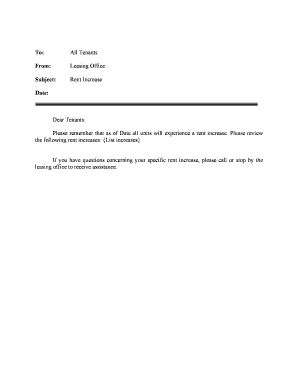
A clear title including 'Rent Increase Notice' and the date sent; indicates whether the notice is pursuant to lease terms or statutory authority and makes purpose obvious on first page.
Parties and Address

Full legal names of landlord and tenant plus the leased premises address and unit number so there is no ambiguity about which lease the notice amends.

Lease Reference

A cited lease start date or contract clause that authorizes the increase, helping to show alignment with agreed renewal provisions or periodic increases.

Current and New Rent

State the present rent, the new rent amount or formula (include cents), and whether utilities or fees are included or excluded from the base rent.

Effective Date

A precise MM/DD/YYYY effective date and the required notice period, showing when payment at the new rate starts and when the tenant must comply.

Service and Signature

Signature block for the landlord or authorized agent plus space for tenant acknowledgment and a section to record proof of service method and date.

Essential fields to include on the Rent Increase Form

Tenant Name: Full legal name(s)
Landlord Name: Owner or managing agent
Property Address: Street, unit, city, state, ZIP
Current Rent: Current amount and frequency
New Rent: New amount and frequency
Effective Date: MM/DD/YYYY format

Step‑by‑step: preparing and serving a Rent Increase Form

Follow these sequential steps to prepare a legally defensible notice and retain evidence of delivery.

  • 01
    Confirm authority: Review lease and local law before selecting amount and timing.
  • 02
    Draft notice: Populate template with names, address, old and new rent, and effective date.
  • 03
    Choose delivery: Select permitted service method (personal, certified mail, email if allowed).
  • 04
    Record proof: Keep signed copies, delivery receipts, or eSignature audit trails.

Configuring an online Rent Increase workflow

Common settings when converting the form to a digital, signable workflow.

Field Configuration
Authentication Email link or SMS code
Signature Type Typed or drawn eSignature
Reminders Automatic resend schedule
Audit Trail Capture IP, timestamp

Digital delivery and tracking for Rent Increase Forms

An efficient eSubmission flow reduces service uncertainty and centralizes proof of delivery.

  • Upload template: Start with a standard Rent Increase Form PDF or DOCX.
  • Place fields: Add name, amount, date, and signature fields for each party.
  • Assign signers: Enter landlord and tenant emails; set signer order if needed.
  • Send and track: Send notice, monitor delivery, and store audit log.

Delivery channels and technical requirements for eSubmission

Choose a platform that supports PDF/DOCX imports, audit trails, and authentication methods matching your risk profile.

  • File formats: PDF and DOCX supported
  • Authentication options: Email, SMS code, KBA
  • Integrations: CRM and cloud storage

Timing considerations and typical notice periods

Notice periods are governed by lease terms and local law; confirm the required lead time before serving an increase.

Month‑to‑month tenancy:

Many jurisdictions require at least 30 days' notice for a monthly tenancy; local law can require longer.

Large increases:

Some local ordinances require 60 days' notice for significant percentage increases or rent caps; check local rules.

Lease term renewals:

If lease specifies increases at renewal, follow the lease notice procedure and timelines.

Rent control areas:

Municipal rent control may restrict increases and require additional procedures or filings.

Effective date clarity:

State the first day new rent is due to avoid confusion and improper enforcement attempts.

Key milestones from decision to enforcement

Sequential milestones help you track legal and operational steps required before collecting higher rent.

01

Decide increase

Determine amount, legal basis, and tenant impact before drafting notice.

02

Prepare notice

Complete form with lease reference and effective date; verify accuracy.

03

Serve notice

Deliver using permitted method and record proof of service.

04

Collect or enforce

Apply new rate on effective date and maintain documentation for disputes.

Common mistakes to avoid when issuing rent increases

  • Using generic language that omits the effective date or amount, which can render the notice ambiguous and unenforceable.
  • Failing to verify and follow local notice periods and rent control rules before serving a tenant-facing increase notice.
  • Serving the notice via an improper method (e.g., email where lease or statute requires certified mail or personal delivery).
  • Neglecting to retain proof of service, signatures, and the signed final copy, leaving the landlord without evidence in a dispute.

Potential consequences of an incorrect Rent Increase Form

Unenforceable increase: Tenant may not be legally required to pay
Administrative fines: Local ordinances can impose penalties
Withheld rent: Tenant may contest and withhold payment
Eviction defenses: Improper notice can augment tenant defenses
Reputational risk: Disputes can harm landlord reputation
Legal fees: Costly litigation or counsel engagement

Real examples: how teams use digital notices

Real organizations rely on digital workflows to issue and track rent notices, preserving evidence and reducing administrative steps.

Martin Properties

Tim Martin, Founder at Martin Properties, streamlined tenant notices

  • "I can process and execute all of these documents online with 100% compliance"
  • Using an online signing workflow, Martin Properties reduced manual delivery, kept searchable proof of service, and accelerated tenant communications without in‑person meetings.

Optica Ventures

Brian Fitzgibbons, COO at Optica Ventures LLC, emphasizes usability

  • "The interface is simple and easy-to-use for our team"
  • Optica standardized notices across units and relied on electronic records to reconcile rent changes and maintain audit trails for accounting and owner reporting.

Comparing eSignature pricing and compliance for rent notices

Vendor pricing and feature availability vary; choose a solution that matches your volume, compliance, and integration needs without relying solely on price.

signNow DocuSign Adobe Sign PandaDoc HelloSign
Starting Price $8/user/mo $15/user/mo $14/user/mo $19/user/mo $15/user/mo
Free Trial 7-day free trial Varies Varies Varies Varies
Bulk Send Yes Yes Yes Yes No
Audit Trail Yes Yes Yes Yes Yes
HIPAA Compliant Yes Yes Yes No No
Envelope Cap No cap 100 envelopes/user/year Varies Varies Varies

Frequently asked questions about Rent Increase Forms

Answers to common legal and practical questions about preparing, serving, and enforcing rent increase notices.


Need help? Contact support

be ready to get more
Join over 28 million airSlate SignNow users