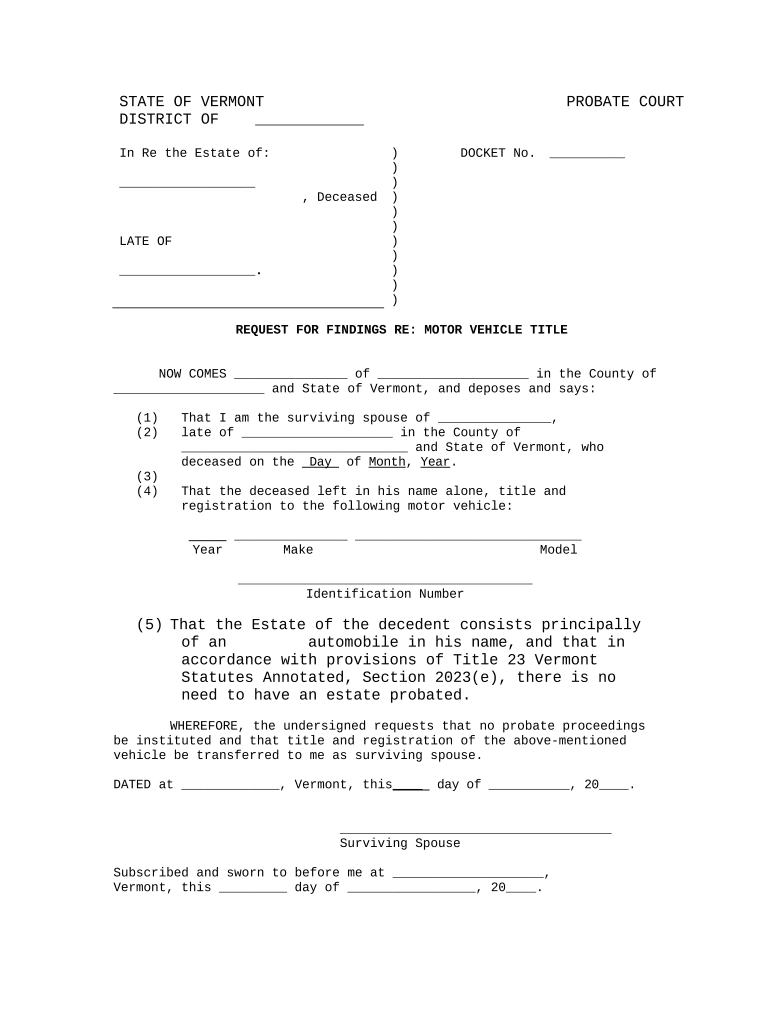
Vermont Request for Findings Regarding Motor Vehicle Title
What the Vermont Request for Findings Regarding Motor Vehicle Title Is
Why a Formal Request for Findings Matters
A Request for Findings creates an official record of title issues before transfer or financing, reduces post-closing disputes, and supports lien searches, lender underwriting, and legal due diligence under state title law and DMV procedures.
Who Typically Prepares or Requests a Findings Report
Different stakeholders prepare this request depending on the transaction or legal need.
- Dealers and brokers preparing a title clearance before sale or consignment.
- Lenders and lienholders verifying encumbrances before funding a loan.
- Attorneys or estate administrators resolving ownership or probate title issues.
Choose the requester role that best matches your position and include contact details to ensure DMV follow-up and proper routing of the response.
Step-by-Step: Completing the Request for Findings
-
01Gather documents: Collect title, registration, and any prior lien records.
-
02Identify vehicle: Record VIN, year, make, model, and current plate if available.
-
03Describe request: Explain which findings you need (liens, salvage, branding).
-
04Sign and notarize: Obtain required signatures and notary where the DMV requires it.
How to Set Up an Online Submission Workflow
| Field | Configuration |
|---|---|
| Document format | PDF/A preferred; flattened for compatibility |
| Authentication | Email plus access code or RON where accepted |
| Notary handling | Include notarized PDF or RON session record |
| Submission target | Vermont DMV email or physical address per agency instructions |
Typical Submission Flow for a Request for Findings
-
Prepare: Complete form and assemble attachments.
-
Authenticate: Sign and notarize if required by DMV.
-
Submit: Send to Vermont DMV by the accepted channel.
-
Receive: Await official findings and retain certificate copy.
Digital Platform and File Requirements
Use a platform that supports PDF, DOCX, and secure delivery to meet DMV ingestion standards.
- File types: PDF, DOCX accepted
- Authentication level: Email + access code recommended
- Integrations: CRM and cloud storage supported
Ensure the platform you use can attach notarizations, preserve audit trails, and export signed documents in immutable formats for DMV records.
Timing Considerations and Typical Timeframes
Submission window:
No universal statutory submission deadline; submit as early as practical
Processing estimate:
Processing times vary by office and request complexity
Lien holder responses:
Lenders may require 10–30 business days to respond
Appeal or correction:
Allow time for follow-up if records are incomplete
Record copies:
Retain certified findings per retention guidance
Key Milestones from Request to Final Finding
Prepare request
Assemble documents, VIN, and contact details.
Notarize as needed
Complete signatures in front of a notary or RON.
Submit to DMV
Send via the accepted electronic or physical method.
Receive findings
DMV returns official results and any certified documents.
Consequences of Errors or Incomplete Requests
Common Preparation Errors to Avoid
- Providing an incorrect VIN or partial VIN is one of the most frequent reasons requests return incomplete results and require re-submission to the DMV.
- Omitting lienholder contact information or failing to attach a release causes additional requests and can prolong the title clearance process by several weeks.
- Signing outside of a notary's presence when notarization is required will typically void the signature and force a re-execution of the request document.
- Submitting documents in unsupported formats or without required certifications (e.g., notarized PDFs) often triggers administrative rejection and manual processing delays.
How a Request for Findings Differs from Related Title Documents
| Criteria | Request for Findings | Certificate of Title |
|---|---|---|
| Primary purpose | investigative report | proof of legal ownership |
| Typical issuer | dmv upon request | dmv upon transfer or issuance |
| Use case | due diligence, lien checks | transfer, registration |
| Authentication | may require notarization | official certified document |
eSignature Vendor Pricing Snapshot for Submitting Title Requests
| signNow | DocuSign | Adobe Sign | PandaDoc | HelloSign | |
|---|---|---|---|---|---|
| Starting Price | $8/user/mo | $15/user/mo | $14/user/mo | $19/user/mo | $15/user/mo |
| Free Trial | 7-day trial | No | No | Yes, limited | Yes, limited |
| Bulk Send | Yes | Yes | Yes | Yes | No |
| Audit Trail | Yes | Yes | Yes | Yes | Yes |
| HIPAA Compliant | Yes | Yes | Yes | No | No |
Who Signs and Why
Registered Owner
The registered owner signs to authorize release of title history or to declare facts about ownership; their signature links the request to the legal custodian of the vehicle and supports authentication checks.
Authorized Agent
An agent or attorney-in-fact signs when acting under a power of attorney; include a notarized POA document and ensure the POA complies with state rules for motor vehicle matters.
Real-World Examples of Using a Title Findings Request
Optica Ventures LLC
A regional dealer requested a full title history before accepting a trade-in to confirm lien releases and salvage status.
- The findings identified an outstanding lien.
- The dealer delayed sale, secured the lien release, and avoided resale liability by documenting the DMV-certified findings with the sales record.
Martin Properties
A property manager used a findings request when disposing of fleet vehicles to confirm clear title.
- The report confirmed no active encumbrances.
- Using the certified finding allowed immediate sale at auction and provided buyers certified documentation reducing post-sale disputes.
Frequently Asked Questions About Requests for Findings
-
What if the VIN does not match?
If the VIN you submit does not match DMV records, the office will typically return the request for correction. Provide the exact 17-character VIN from the vehicle or title; incorrect characters or transposed digits are common errors and will delay processing.
-
Is notarization always required?
Notarization requirements vary by state and by the DMV's policy. Vermont often requires notarized signatures for certain attestations; check the Vermont DMV instructions before submitting to avoid rejection.
-
Can I submit electronically?
Many agencies accept electronic submissions when they preserve signature intent and identity verification. Confirm Vermont DMV's accepted electronic methods and include notarized PDFs or RON session records where required.
-
How long will the DMV take to respond?
Processing time depends on request complexity and third-party responses. Because turnaround times vary, include daytime contact details and allow additional time for lienholder replies or manual searches.
-
What supporting documents should I attach?
Attach the current title, bill of sale, lien release statements, and any power of attorney. Certified documents and notarized affidavits reduce follow-up requests from the DMV.
-
What if the findings disagree with my records?
If DMV findings contradict your documentation, submit corrected evidence and a written explanation. You may need to request a re-review or provide additional affidavits to reconcile discrepancies.