Establishing secure connection…Loading editor…Preparing document…

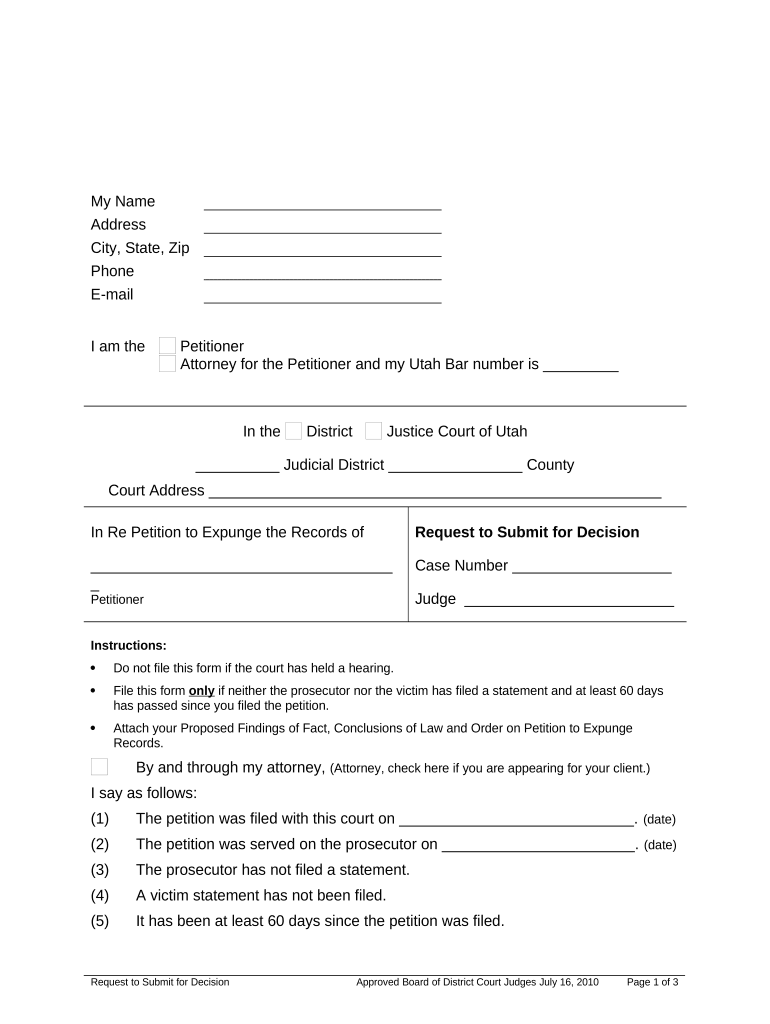
Utah Request to Submit for Decision

This template is fully customizable. Edit the text, fill out the fields, and send it for signature. Give it a try!
Utah Request to Submit for Decision

What the Utah Request to Submit for Decision Is and When it Applies

A Utah Request to Submit for Decision is a procedural filing notifying the court or administrative decision-maker that a matter is ready for final ruling based on the existing record, briefs, affidavits, and exhibits. It is used when no further oral argument or evidentiary hearing is required and the moving party asks the court to decide the matter on papers. The form typically identifies the case, the motion or issue submitted, the parties, and the filing date. Local court rules and judge-specific procedures govern acceptable formatting and where to file the request.

Why a Clear Request Helps Your Case

A properly prepared Request to Submit for Decision clarifies the relief sought, reduces procedural delays, and signals readiness for a ruling. It helps the court manage its docket and keeps deadlines clear for opposing parties and the clerk.

Why a Clear Request Helps Your Case

Who Typically Prepares and Files This Request

Common users include litigating attorneys, self-represented parties, and agency counsel who want the tribunal to rule on the written record.

  • Litigating Attorney preparing motions and supporting exhibits for judicial review
  • Self-Represented Party submitting summary judgment or dispositive motion materials
  • Agency Counsel requesting administrative decision without further hearing

Primary Signers and Filers

Filing Attorney

An attorney of record or pro hac vice counsel signs and files the request on behalf of a party, certifying compliance with local rules and service requirements. They confirm exhibits are properly numbered and any required certificates of service are attached.

Agency Clerk

A court or agency filing clerk receives and docket-stamps the submission, records service, and routes the matter to the assigned judge or hearing officer for decision. The clerk enforces formatting and filing-location rules.

Essential Security and Compliance Considerations

Encryption: TLS 1.2/1.3 in transit; AES-256 at rest
Audit Trail: Time-stamped signature events and IP metadata
HIPAA: BAA required for PHI-containing filings
ESIGN / UETA: Meets federal ESIGN and state UETA standards
21 CFR Part 11: Available for regulated records when required
Access Controls: Role-based signer authentication options

Risks and Consequences of a Flawed Request

Rejected Filing: Clerk returns or refuses docketing
Missed Deadlines: Opportunity for relief may be lost
Sanctions Risk: Court may levy costs or sanctions
Service Defects: Opposing party not properly notified
Evidentiary Gaps: Judge may decline relief lacking record
Nonbinding Submission: Improper form may delay decision

Common Preparation Mistakes to Avoid

  • Failing to attach or paginate exhibits so the record is incomplete or hard to review
  • Using incorrect case captions or failing to list all parties which can cause clerical rejection
  • Not including a certificate of service or proof of service date required by local rule
  • Submitting multiple conflicting versions of the same exhibit without version control or labeling

Step-by-Step: Prepare and File a Request to Submit for Decision

Follow these steps to assemble a concise, compliant request and route it to the court or agency in the correct format.

  • 01
    Identify Motion: Specify the exact motion or issue submitted for decision.
  • 02
    Assemble Record: Attach briefs, declarations, exhibits, and a docket index.
  • 03
    Certificate of Service: Add a dated certificate showing how parties were served.
  • 04
    File with Clerk: E-file or deliver per local filing rules and obtain a stamped copy.

Typical Routing and Decision Workflow

This outlines how a submitted request moves from filer to decision-maker in common court or agency settings.

  • Filing: Submit via e-filing portal or clerk's office per local rule.
  • Docketing: Clerk reviews format, assigns a docket number and entry.
  • Service: Certified service recorded; opposing parties receive copies.
  • Decision: Judge reviews the record and issues an order or opinion.

What a Professional Utah Request to Submit for Decision Includes

A complete filing is clear, concise, and organized so a judge can rule without further briefing. Include identification, a precise submission statement, a list of attachments, service certification, and contact information for counsel and pro se parties.

Case Caption

The full case caption with court name, docket number, judge designation, and party names exactly as shown on prior filings.
Submission Statement

A brief, one-paragraph statement identifying the motion, grounds for decision on the papers, and any requested relief.

Exhibit Index

A numbered list of exhibits with page ranges so the court can locate supporting evidence quickly.

Certificate of Service

Signed declaration stating date, method, and recipients of service consistent with local rules.

Signature Block

Printed name, bar number for attorneys, mailing address, phone number, and email for service and questions.

Formatting

Conform to local page limits, font size, margin, and e-filing PDF requirements to avoid clerical rejection.

Digital Workflow Settings for eFiling and eSignature

Configure your e-filing and signature workflow to match court rules and ensure reliable delivery, authentication, and retention.

Field Configuration
Signer Authentication Email link plus optional SMS code for added verification
Document Format PDF/A for long-term retention and court compatibility
Audit Trail Enable time-stamped events, IP logging, and signer metadata
Retention Preserve signed package and certificate for minimum required period

Technical Requirements for Digital Submission and Signing

Courts and agencies accept e-filed PDFs with authenticated signatures in many jurisdictions; confirm the specific court's e-filing and electronic signature policies before submitting.

  • File Formats: PDF, PDF/A, Word DOCX supported
  • Integrations: Common integrations: e-filing portals and document management
  • Authentication: Email, SMS, or stronger KBA options

Typical Timing and Filing Expectations

Timing for submission and opposing responses depends on local rules and the motion type; some courts permit immediate submission while others require a waiting period or reply window.

Notice Period:

Follow local rule for service; some motions require specific advance notice.

Opposition Deadline:

Opposing party typically has a set period to respond under court scheduling.

Reply Window:

Reply briefs, if permitted, are due per local rule or judge order.

Clerk Processing:

Clerk docketing may take 24–72 hours after e-filing in many jurisdictions.

Decision Timing:

Decision timing varies widely; some rulings issued within weeks, others may take months.

Key Processing Milestones from Filing to Ruling

Track these sequential milestones to confirm the request progresses and to trigger appropriate follow-up actions.

01

Prepare Record

Assemble motion, exhibits, and certificate of service prior to filing.

02

E-File Submission

Upload final PDF package and confirm accepted status from clerk.

03

Service Confirmation

Ensure service notifications were sent and received by opposing parties.

04

Await Ruling

Monitor docket for the judge's order or opinion and capture the ruling date.

eSignature Pricing and Feature Comparison for Submission Workflows

Platform pricing and key capabilities can affect per-document cost and compliance. signNow is listed first; compare starting price, trial availability, bulk send, audit trail, HIPAA support, and envelope limits across vendors.

signNow DocuSign Adobe Sign PandaDoc HelloSign
Starting Price $8/user/mo $15/user/mo $14/user/mo $19/user/mo $15/user/mo
Free Trial 7-day free trial No No Yes, limited Yes, limited
Bulk Send Yes Yes Yes Yes No
Audit Trail Yes Yes Yes Yes Yes
HIPAA Compliant Yes Yes Yes No No

Frequently Asked Questions About Submission and Electronic Signatures

Answers to common questions about whether and how to e-sign, where to file, and how to fix common problems related to a Request to Submit for Decision.


Need help? Contact support

be ready to get more
Join over 28 million airSlate SignNow users