Establishing secure connection…Loading editor…Preparing document…

Colorado Writ of Restitution

This template is fully customizable. Edit the text, fill out the fields, and send it for signature. Give it a try!
Colorado Writ of Restitution

What the Colorado Writ of Restitution Is and when it applies

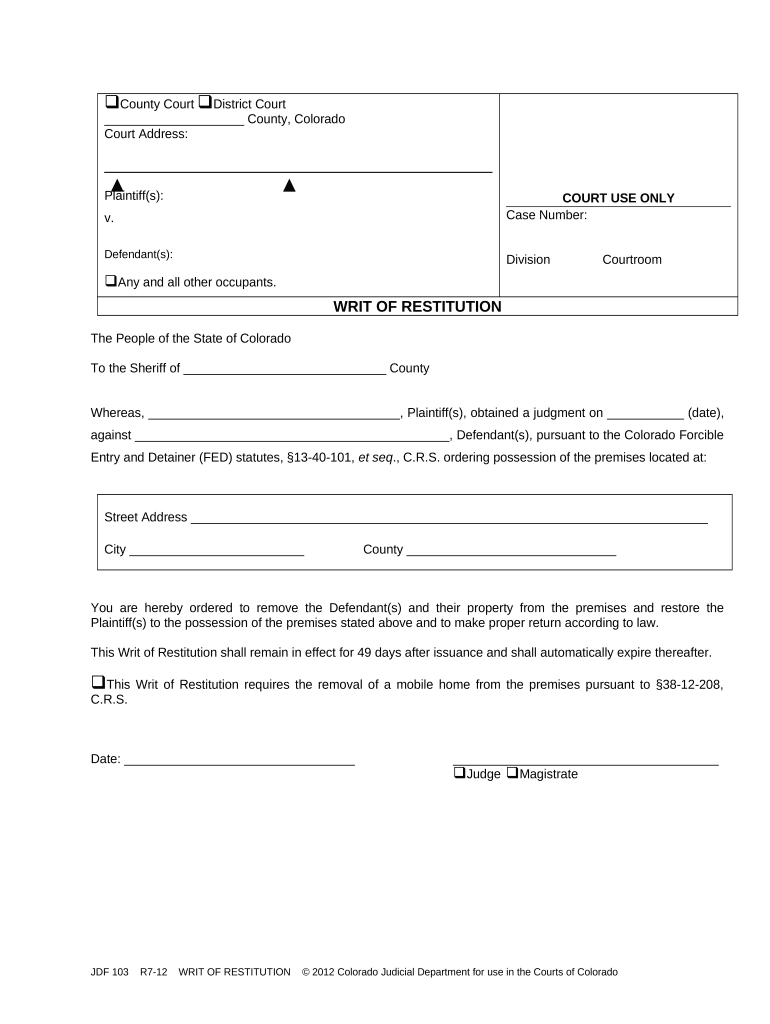
A Colorado Writ of Restitution is a court-issued order directing law enforcement to restore possession of real property to a landlord after a judgment for possession has been entered. It is issued only after the court has decided the landlord is entitled to regain possession and typically instructs the sheriff or marshal to evict occupants who refuse to vacate. The writ is a judicial enforcement instrument, not a private self-help remedy; improper use can expose a landlord to civil and criminal liability. Note that ESIGN and UETA support electronic records broadly, but court orders and official court filings are treated as special categories under many rules and may require court-specific filing or service procedures (15 U.S.C. ch. 96).

Why an accurate Writ of Restitution matters

A correct writ clarifies enforcement authority, preserves party rights, and creates a durable court record for execution by the sheriff. Proper drafting reduces delay, lowers risk of wrongful eviction claims, and helps the court enforce post-judgment obligations while maintaining evidentiary integrity.

Why an accurate Writ of Restitution matters

Primary users and stakeholders

Multiple parties interact with the writ during preparation, filing, and execution.

  • Landlords and property managers who seek enforcement after obtaining a possession judgment.
  • Eviction attorneys and legal representatives preparing the writ and supporting affidavits.
  • Court clerks and county sheriffs responsible for issuing, docketing, and executing the writ.

Each party has specific responsibilities: the filer prepares accurate paperwork, the court validates authority, and law enforcement executes the order in compliance with local process rules.

Step-by-step: preparing and obtaining a Writ in Colorado

Follow a consistent sequence to move from judgment to execution, minimizing procedural errors and enforcement delays.

  • 01
    Obtain judgment: Confirm final possession judgment is entered and recorded.
  • 02
    Prepare writ request: Complete the writ form with exact case details and execution directions.
  • 03
    Court review and issuance: Court clerk reviews the request; judge or clerk issues the writ.
  • 04
    Sheriff execution: Sheriff or marshal serves the writ and carries out eviction per local rules.

How to build a reliable digital workflow for writ preparation

Configure a secure template and routing sequence to ensure each document is complete and auditable before court filing or delivery to the sheriff.

Field Configuration
Document template Pre-fill case caption, number, and parties
Signer authentication Require signer email plus organization role
Notary option Enable remote or in-person notarization when needed
Routing Sequential: attorney → clerk copy → sheriff

Typical transfer path from preparation to enforcement

A clear transfer path ensures proofs are preserved: prepare, validate, file, then execute.

  • Prepare: Complete form and attach judgment
  • Validate: Clerk review and signature
  • File: Record in court docket or e-file
  • Enforce: Sheriff executes per writ terms

Technical considerations for electronic completion and submission

Use reliable file formats, secure authentication, and documented audit trails when preparing writs electronically.

  • File formats: PDF, DOCX accepted
  • Integrations: Salesforce | NetSuite | Google Workspace
  • Authentication: Email link, SMS code, or stronger

Verify court e-filing rules before submission; many courts accept e-filed pleadings but treat court orders and execution documents under specific procedural rules. Integrations and secure audit trails help preserve chain-of-custody and prove authenticity during enforcement.

Essential elements to include in a professional writ

A complete writ contains standardized components so clerks, sheriffs, and parties can identify authority, scope, and execution instructions without ambiguity.

Court Caption

Complete caption with court name, county, and case number so the writ is clearly tied to the judgment and docket entry.
Order Language

Explicit directive granting possession to the plaintiff and instructing law enforcement what action to take and against whom.

Execution Date

Earliest permissible date for sheriff action and any embargo periods or time-of-day constraints for execution.

Sheriff Instructions

Clear, practical instructions for service, keys or access provisions, and contacts to minimize forced-entry complications.

Service Certification

Space for sheriff or process server to certify service, list persons present, and note property disposition.

Attachments

Attach supporting judgment, service attempts, and tenant correspondence to document the factual record for the writ.

Required identification and case data

Plaintiff: Full legal name
Defendant: Full legal name
Case number: Exact docket number
Property: Full street address
Judgment date: MM/DD/YYYY
Execution notes: Sheriff instructions

Common preparation mistakes to avoid

  • Using an incorrect case number or misspelled party name causes clerk rejection and delays sheriff action by days or weeks.
  • Failing to attach the judgment or proof of service leaves the writ unsupported and may prevent issuance.
  • Providing vague execution instructions increases the chance of failed service or property damage during enforcement.
  • Attempting private removal before a writ is issued can expose the landlord to criminal and civil liability for wrongful eviction.

Legal risks and potential penalties for errors

Contempt fines: Court-imposed penalties
Wrongful eviction: Civil liability exposure
Writ invalid: Enforcement may be voided
Delay costs: Additional rent and legal fees
Sanctions: Court sanctions possible
Criminal risk: Potential criminal charges

Key timing considerations and filing windows

Monitor timing at each stage—from judgment entry through potential appeals and sheriff execution—to avoid missed deadlines that obstruct enforcement.

Judgment entry date:

Start point for enforcement actions

Writ request timing:

Request after judgment becomes final

Sheriff execution window:

Subject to local scheduling and court rules

Appeal stay period:

Filing an appeal may pause execution

Recordkeeping:

Maintain copies per retention rules

Comparing eSignature options for preparing and sharing writs

Pricing and feature availability vary across vendors; signNow is listed first for clarity. Confirm plan details and compliance options before adopting for court-related workflows.

signNow DocuSign Adobe Sign PandaDoc HelloSign
Starting Price $8/user/mo $15/user/mo $14/user/mo $19/user/mo $15/user/mo
Free Plan 7-day free trial, no card Varies Varies Varies Varies
Bulk Send Yes Yes Yes Yes No
Audit Trail Yes Yes Yes Yes Yes
HIPAA Compliant Yes Yes Yes No No

Frequently asked questions about the Colorado Writ of Restitution

Answers to common practical and legal questions about preparing, filing, and enforcing a writ in Colorado.


Need help? Contact support

be ready to get more
Join over 28 million airSlate SignNow users