Establishing secure connection…Loading editor…Preparing document…

Restrictive Covenants

This template is fully customizable. Edit the text, fill out the fields, and send it for signature. Give it a try!
Restrictive Covenants

What restrictive covenants are and where they apply

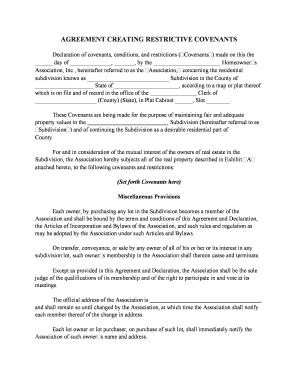
Restrictive covenants are contractual provisions that limit a party's actions after signing, commonly including noncompetition, nonsolicitation, and confidentiality clauses. They appear in employment agreements, business sale contracts, and independent contractor arrangements to protect trade secrets, customer relationships, and proprietary processes. Enforceability depends on clear scope, reasonable duration and geography, lawful consideration, and compliance with state law; poorly drafted or overly broad covenants risk being voided or narrowed by courts. Proper execution and recordkeeping preserve enforceability and make post-termination remedies more accessible.

Why clear restrictive covenants matter for businesses

Well-drafted covenants protect confidential information and customer goodwill, reduce the risk of competitor advantage after separation, and clarify post‑employment obligations. Reasonable, state‑compliant clauses lower litigation risk and support equitable remedies such as injunctive relief.

Why clear restrictive covenants matter for businesses

Who typically prepares and signs restrictive covenants

Employers, buyers and sellers in asset or business transactions, and in-house counsel commonly prepare or request restrictive covenants.

  • Employers and HR teams seeking to protect trade secrets and client lists while onboarding staff or contractors.
  • Buyers and sellers in business acquisitions who need post-closing noncompetes or nonsolicits to preserve value.
  • Outside counsel and contracting parties drafting tailored clauses for executives, sales teams, or technical staff.

These documents involve multiple stakeholders; coordinate legal review, HR, and record retention to ensure enforceability and operational clarity.

Typical signers and approvers

General Counsel

Reviews scope and enforceability across jurisdictions, confirms consideration and blue‑pencil language, and advises on state law limits and litigation exposure. Responsible for final legal signoff and retention instructions for the corporate record.

HR Director

Manages execution logistics, ensures employee receives copy at hire, coordinates witness or notarization where required, and files the signed covenant with personnel records for future reference.

Core elements to include in a professional restrictive covenant

A complete covenant balances protection and reasonableness: define prohibited activities, geographic limits, duration, consideration, remedies, and governing law.

Restricted activities

List prohibited actions precisely (e.g., competing products, solicitation of named customers), avoiding vague phrases that courts may deem unenforceable.
Geographic scope

Define concrete territories (city, county, state, or market area) tied to where the employer actually does business to improve chances of enforcement.

Duration

State a reasonable time period tied to the business interest protected — short, specific terms are more likely to be upheld than open‑ended restrictions.

Consideration

Specify the exchange (employment, promotion, severance, or sale proceeds) that supports the covenant to satisfy contract formation requirements.

Remedies

Describe available relief, such as injunctive relief and damages, and clarify whether attorney fees or liquidated damages apply for breaches.

Governing law

Choose the governing state and include a severability or blue‑pencil clause to allow courts to modify overly broad terms rather than void the entire covenant.

Essential information fields for the covenant

Parties' Names: Full legal names
Effective Date: MM/DD/YYYY
Restricted Activities: Clear short list
Geographic Scope: Named area
Duration: Fixed term
Consideration: Monetary or employment

Stepwise process to complete a restrictive covenant

Follow these steps to draft, sign, and file a compliant covenant across jurisdictions.

  • 01
    Draft or adapt: Create text tailored to role and jurisdiction.
  • 02
    Legal review: Have counsel assess reasonableness and state law.
  • 03
    Execution: Obtain signatures, dates, and any required witnesses.
  • 04
    Recordkeeping: Store signed copy in personnel and contract files.

How to configure a digital signing workflow

Set up a consistent online process so each covenant is executed, authenticated, and archived correctly.

Field mapping Preplace signature, date, and initial fields
Signer order Specify employer then employee
Authentication Enable email or SMS code
Template use Save reusable template for role types
Reminders Automatic reminders for unsigned parties

Where to send and file the signed covenant

Route executed covenants to the right parties and repositories to ensure enforceability and traceability.

  • Employee copy: Provide signed PDF to the employee
  • HR record: Keep original in personnel file
  • Legal file: Store executed version in legal contract archive
  • Transaction closing: Attach to sale documents when applicable

Digital signing and integration considerations

Choose a platform that supports secure authentication, audit trails, and archival export to preserve evidentiary value.

  • Authentication: Email, SMS, or stronger
  • Audit Trail: IP, timestamp, actions
  • Integrations: HRIS, CRM, document storage

Verify the platform can produce an audit report and export signed PDFs in ISO‑compatible formats for long‑term retention and potential litigation support.

Timing considerations and critical deadlines

Observe key dates for presentation, acceptance, and effective operation to avoid challenges to enforceability.

Offer Presentation:

Provide covenant with offer or at hire to evidence mutual assent

Effective Date:

Set the start date clearly (MM/DD/YYYY) in the agreement

Pre‑termination Review:

Review terms before performance changes like promotions

Post‑closing Attachment:

Attach to sale closing documents if covenant arises from transaction

Statute of Limitations Impact:

Preserve evidence within applicable limitation period for contract claims

Consequences of drafting or executing covenants incorrectly

Unenforceability: Covenant held void
Narrowing: Court reduces scope
Litigation Costs: High defense and discovery expenses
Monetary Damages: Potential compensatory awards
Injunctive Limits: Difficulty obtaining injunction
Reputational Risk: Employee relations harm

Common drafting and execution mistakes to avoid

  • Using overly broad geographic or activity descriptions that make enforcement unlikely and invite judicial narrowing or invalidation.
  • Failing to state or document consideration, particularly for post‑employment covenants, which can be fatal to contract formation.
  • Delivering the covenant after hiring without renewed consideration or clear mutual assent, weakening evidentiary support.
  • Ignoring state‑specific statutory limitations or public policy restrictions (for example, California's noncompete rules).

Practical drafting and execution recommendations

Adopt consistent practices that balance protection and reasonableness to maximize enforceability and limit disputes.

Tailor terms to the role and geography
Limit restrictions to what is necessary to protect a legitimate business interest tied to the employee's duties and the employer's operating area. Make geographic and activity descriptions concrete and time‑limited rather than generic to reduce risk of judicial invalidation.
Document consideration clearly
Specify the consideration provided — initial employment, promotion, or severance — and record acceptance contemporaneously. For post‑employment modifications, consider fresh consideration to support the new terms and avoid formation disputes.
Include severability and blue‑pencil language
Allow courts to modify or narrow invalid provisions rather than void the entire covenant. Explicit severability clauses and reformation provisions improve the odds that courts will salvage enforceable portions.
Maintain execution and audit records
Capture signer identity, timestamps, IP address, and the final signed PDF. Preserve audit trails and export signed documents in stable formats to support enforcement or dispute resolution.

Typical eSignature vendor pricing and capabilities for executing covenants

Vendor plans and features vary; the table compares starting price and common capabilities relevant to high‑volume covenant execution and secure recordkeeping.

signNow DocuSign Adobe Sign PandaDoc HelloSign
Starting Price $8/user/mo $15/user/mo $14/user/mo $19/user/mo $15/user/mo
Free Trial 7-day free trial Varies by vendor Varies by vendor Varies by vendor Varies by vendor
Bulk Send Yes Yes Yes Yes No
Audit Trail Yes Yes Yes Yes Yes
HIPAA Compliant Yes Yes Yes No No

Frequently asked questions about restrictive covenants

Answers to common legal and execution questions about drafting, signing, and enforcing restrictive covenants in the United States.


Need help? Contact support

be ready to get more
Join over 28 million airSlate SignNow users