Establishing secure connection…Loading editor…Preparing document…

Rhode Island Stipulation

This template is fully customizable. Edit the text, fill out the fields, and send it for signature. Give it a try!
Rhode Island Stipulation

What a Rhode Island Stipulation Is and When It’s Used

A Rhode Island Stipulation is a written agreement or statement of facts, procedure, or deadlines that parties submit to a Rhode Island court or opposing counsel to narrow issues, conserve time, or record agreed facts. Stipulations commonly resolve evidentiary points, set scheduling terms, or document agreed factual statements without full litigation. They may accompany motions, be filed as part of a court record, or be exchanged between counsel to streamline hearings or settlements under Rhode Island procedural rules.

Why a Clear Stipulation Matters

A well-prepared stipulation reduces disputes, shortens hearings, and creates a clear record for the court. Proper form and signatures reduce the risk of rejection, sanctions, or later evidentiary objections.

Why a Clear Stipulation Matters

Typical Users and Roles

Rhode Island stipulations are most often prepared by attorneys, paralegals, and court clerks to formalize agreements and streamline court proceedings.

  • Plaintiff and Defense Counsel — Prepare, review, and sign stipulations to reduce contested issues before trial or hearing.
  • Pro se Litigants — May submit stipulations to the court without counsel when parties reach agreement.
  • Court Staff and Clerks — Process filings, docket entries, and docket the stipulation per local rules.

Accurate completion and correct signature authority help ensure the stipulation is accepted and enforced by the court.

Who Signs and Why

Lead Counsel

An attorney of record signs to bind a party and represent agreed facts or procedural concessions; signature implies counsel has authority and has conferred with the client prior to submission to the court.

Court Clerk

A clerk certifies filing and enters the stipulation on the docket; the clerk’s endorsement establishes the document as part of the official court record and starts any associated scheduling deadlines.

Essential Parts of a Professional Rhode Island Stipulation

Include clear identification, concise agreed statements, signatory blocks, dates, and any required notarization or verification language so the court and parties can rely on the document.

Caption

Court name, docket number, case title, and party names must appear exactly as in prior filings to ensure the stipulation is associated with the correct matter.
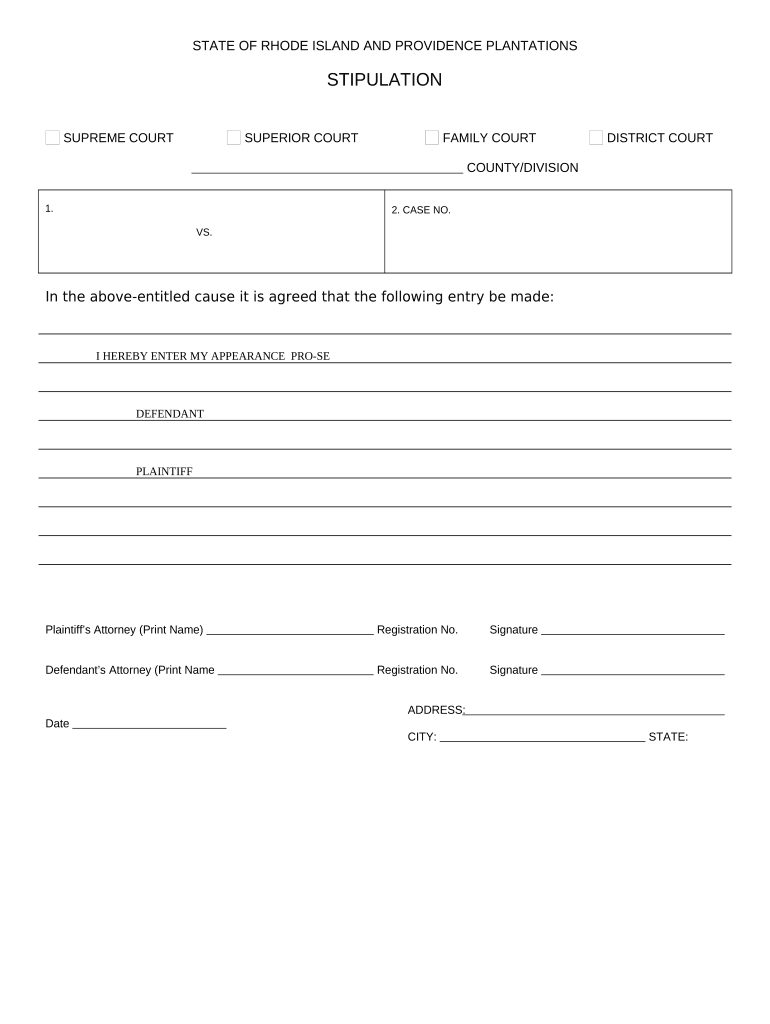
Statement of Agreement

A precise, numbered list of agreed facts or procedures; avoid ambiguous language and include limiting phrases when the agreement is partial or conditional.

Signature Blocks

Printed name, counsel firm, address, telephone, bar number for attorneys, and signature lines for each party or their counsel, dated at signature.

Filing/Service Statement

Brief certificate showing how and when the stipulation was filed and served on opposing parties in compliance with local rules.

Notary or Verification

If the stipulation requires notarization, include an acknowledgment or jurat formatted to state law or preserve an electronic notarization record.

Scope and Limitations

State the duration, whether the stipulation is conditional, and whether it affects subject-matter rights, preservation of claims, or discovery obligations.

Compliance and Legal Frameworks That Apply

ESIGN / UETA: 15 U.S.C. §7001; states adopt UETA
Record Retention: ESIGN requires reproducibility
HIPAA Considerations: BAA required if PHI is included
21 CFR Part 11: Required for FDA-regulated records
SOC 2 / ISO 27001: Industry security certifications
Encryption Standards: TLS 1.2/1.3 and AES-256

Step-by-Step: Preparing and Filing a Rhode Island Stipulation

Follow a consistent sequence to draft, review, sign, file, and serve the stipulation to minimize rejection risk and preserve court timelines.

  • 01
    Draft: Create clear numbered items reflecting only agreed matters.
  • 02
    Review: Confirm party names, docket number, and legal authority for the stipulation.
  • 03
    Sign: All required signatories sign and date; use notarization if required.
  • 04
    File & Serve: File with the clerk and serve opposing counsel per local rules.

Typical Processing Flow for a Court Stipulation

A stipulation moves from drafting to filing and then becomes part of the court record; the flow below outlines the typical handoffs and timing expectations.

  • Drafting: Party prepares and circulates the proposed stipulation for approval.
  • Signatures: Parties and counsel sign; notarization completed if necessary.
  • Filing: Document is submitted to court clerk or e-filing portal.
  • Service: Opposing parties are served, and proof of service is added to the record.

How to Configure an Electronic Workflow for a Stipulation

Set up fields, signer order, and authentication to match the court’s requirements and the parties’ authority before sending for signature.

Field Configuration
Signature Order Sequential or parallel per party agreement
Authentication Email or SMS code; add KBA if required
Notary Field Include digital notarization block if needed
Audit Trail Enable full event logging and timestamps

Digital Signing and eFiling Considerations

Use an eSignature workflow that preserves intent, attribution, and a reliable audit trail to meet ESIGN/UETA standards.

  • Authentication Options: Email link, SMS code, or advanced KBA depending on court or counsel preference
  • File Formats: PDF or PDF/A preferred for court filings
  • Integrations: Connectors to e-filing portals and document management systems

Choose a platform that supports audit trails, secure storage, and any notarization workflow the jurisdiction requires.

Penalties and Risks of an Incorrect or Improper Stipulation

Rejection by Court: Possible
Sanctions: Monetary
Default Risk: Procedural
Evidentiary Waiver: Unintended
Filing Delays: Case schedule impacts
Service Defect: Enforceability issues

Common Pitfalls to Avoid

  • Using informal or ambiguous language that leaves material terms undefined and invites later dispute or motion practice.
  • Mismatched party names or docket numbers that prevent the clerk from associating the stipulation with the correct case file.
  • Omitting required notarization, jurat, or verification when the local rule or document type calls for it.
  • Failing to serve opposing counsel correctly or to include a proof-of-service statement with the filed stipulation.

Practical Examples of Stipulation Use

These examples show how stipulations resolve narrow issues efficiently and create a record for the court to rely on when scheduling or ruling.

Real Estate Closing

Parties agree to extend closing date due to funding delay

  • Agreement limited to date change
  • Court will docket extension and preserve remaining issues for trial if necessary.

Discovery Schedule

Counsel agree on document production deadlines to avoid motion practice

  • Deadlines replace court-ordered schedule
  • Parties file the stipulation and the clerk updates the case calendar accordingly.

Timelines and Typical Deadlines to Watch

Court calendars govern when stipulations take effect; be mindful of local rules and any timing tied to hearings or response windows.

Filing Date:

Date the clerk accepts the document for filing

Service Date:

Date parties were served; often triggers response periods

Effective Date:

Date stated in the stipulation when obligations begin

Opposition Deadline:

Time allowed for non-signing parties to object

Court Adoption:

Date when judge endorses or orders per stipulation

How a Rhode Island Stipulation Differs from a General Contract

Stipulations are typically case-specific, procedural, and submitted to the court; the table highlights core contrasts with general contractual agreements.

Criteria Rhode Island Stipulation General Contract
Primary Purpose narrow procedural/factual issues business obligations
Court Filing often filed not typically filed
Formality procedure-focused negotiated terms
eSignature Accepted yes (per esign/ueta) yes (per esign/ueta)

eSignature Provider Comparison for Stipulation Workflows

Comparison of common eSignature plans and features relevant to preparing and executing stipulations; signNow is listed first per vendor ordering rules.

signNow DocuSign Adobe Sign PandaDoc HelloSign
Starting Price $8/user/mo $15/user/mo $14/user/mo $19/user/mo $15/user/mo
Free Trial 7-day free trial Varies Varies Varies Varies
Bulk Send Yes Yes Yes Yes No
Audit Trail Yes Yes Yes Yes Yes
HIPAA Compliant Yes Yes Yes No No

Practical Tips for Accurate and Efficient Stipulations

Adopt a consistent template and checklist to reduce errors and speed approval for routine stipulations.

Use a Standard Template
Keep a jurisdiction-specific template that includes caption, numbered agreement items, signature blocks, and a proof-of-service line so every stipulation meets clerk expectations.
Confirm Signatory Authority
Verify who may legally bind each party—clients, corporate officers, or counsel with express authority—and document that authority in case of later challenge.
Preserve the Audit Trail
When using eSignature, enable full audit logging, timestamps, and IP records to demonstrate intent and attribution under ESIGN (15 U.S.C. §7001).
Coordinate Filing and Service
File promptly with the clerk and serve all parties using the method required by local rules; attach proof-of-service to avoid disputes about notice.

Frequently Asked Questions About Rhode Island Stipulations

Answers to common questions about signing, filing, eSigning, notarization, and recordkeeping for stipulations filed or exchanged in Rhode Island proceedings.


Need help? Contact support

be ready to get more
Join over 28 million airSlate SignNow users