Establishing secure connection… Loading editor… Preparing document…
Navigation

Fill and Sign the Rpm Inc Form
Fill and Sign the Rpm Inc Form

How it works

Open the document and fill out all its fields.
Apply your legally-binding eSignature.
Save and invite other recipients to sign it.

Rate template

4.5
33 votes
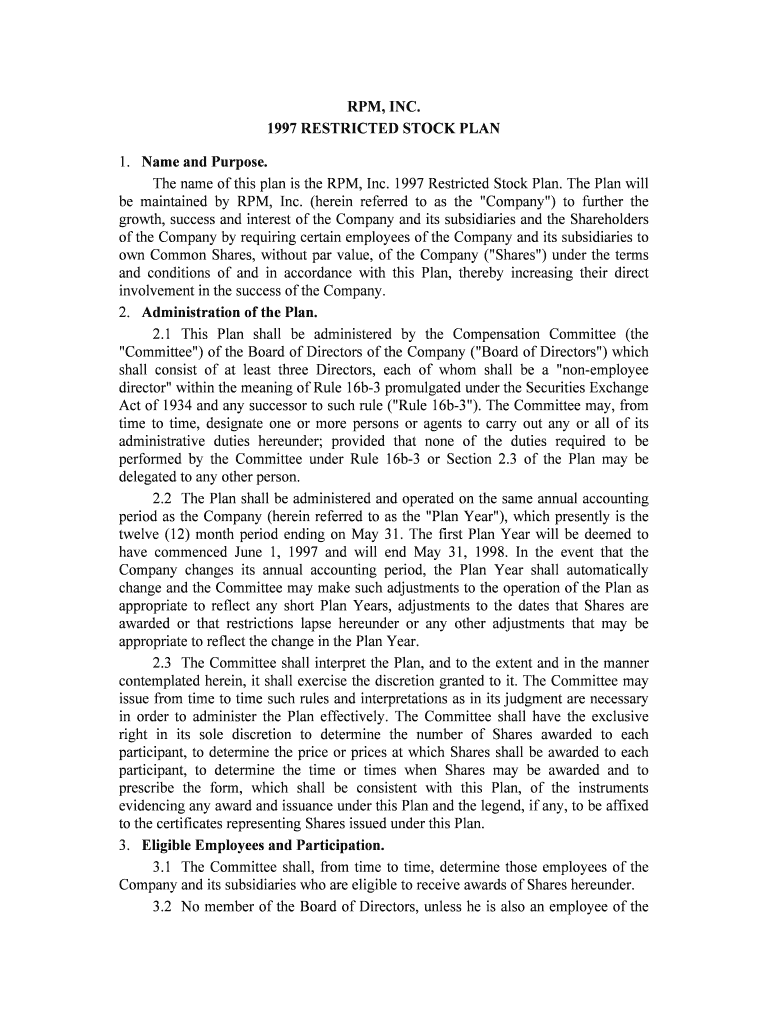
RPM, INC. 1997 RESTRICTED STOCK PLAN 1. Name and Purpose. The name of this plan is the RPM, Inc. 1997 Restricted Stock Plan. The Plan will be maintained by RPM, Inc. (herein referred to as the "Company") to further the growth, success and interest of the Company and its subsidiaries and the Shareholders of the Company by requiring certain employees of the Company and its subsidiaries to own Common Shares, without par value, of the Company ("Shares") under the terms and conditions of and in accordance with this Plan, thereby increasing their direct involvement in the success of the Company. 2. Administration of the Plan. 2.1 This Plan shall be administered by the Compensation Committee (the "Committee") of the Board of Directors of the Company ("Board of Directors") which shall consist of at least three Directors, each of whom shall be a "non-employee director" within the meaning of Rule 16b-3 promulgated under the Securities Exchange Act of 1934 and any successor to such rule ("Rule 16b-3"). The Committee may, from time to time, designate one or more persons or agents to carry out any or all of it s administrative duties hereunder; provided that none of the duties required to be performed by the Committee under Rule 16b-3 or Section 2.3 of the Plan may be delegated to any other person. 2.2 The Plan shall be administered and operated on the same annual accounting period as the Company (herein referred to as the "Plan Year"), which presently is the twelve (12) month period ending on May 31. The first Plan Year will be deemed to have commenced June 1, 1997 and will end May 31, 1998. In the event that the Company changes its annual accounting period, the Plan Year shall automatically change and the Committee may make such adjustments to the operation of the Pl an as appropriate to reflect any short Plan Years, adjustments to the dates that Shares are awarded or that restrictions lapse hereunder or any other adjustments that may be appropriate to reflect the change in the Plan Year. 2.3 The Committee shall interpret the Plan, and to the extent and in the ma nner contemplated herein, it shall exercise the discretion granted to it. The C ommittee may issue from time to time such rules and interpretations as in its judgment are nec essary in order to administer the Plan effectively. The Committee shall have the exc lusive right in its sole discretion to determine the number of Shares awarded to each participant, to determine the price or prices at which Shares shall be awarded to each participant, to determine the time or times when Shares may be awarded and to prescribe the form, which shall be consistent with this Plan, of the instruments evidencing any award and issuance under this Plan and the legend, if any, to be affixed to the certificates representing Shares issued under this Plan. 3. Eligible Employees and Participation. 3.1 The Committee shall, from time to time, determine those employees of the Company and its subsidiaries who are eligible to receive awards of Shares hereunder. 3.2 No member of the Board of Directors, unless he is also an employee of the Company, and no member of the Committee, shall be eligible to participate in the Plan. 4.Awards of Shares. 4.1 The Committee shall, from time to time, determine the number of Shares tha t shall be awarded to an eligible employee hereunder. The Committee shall use the closing price of one (1) Share on the day of the Board of Directors meeting held next preceding each May 31 fiscal year end in determining the number of Shares awarded to an eligible employee for a Plan Year. 4.2 The Shares which may be awarded and issued to employees under this Plan shall be made available from authorized and unissued Shares of the Company. 4.3 Subject to the provisions of the succeeding paragraphs of this Section 4, the aggregate number of Shares which may be issued under this Plan shall not exceed one million two hundred fifty thousand (1,250,000) Shares. 4.4 In the event that the outstanding Shares shall be changed by reason of share splits or combinations, recapitalization or reorganizations, or share dividends, the number of Shares and the class or classes of securities which may thereafter be issued under this Plan may be appropriately adjusted as determined by the Committee so as to reflect such change. 5. Transfer Restrictions. 5.1 The Shares shall not be sold, transferred or otherwise disposed of and shall not be pledged or otherwise hypothecated (and any such sale, transfer or other disposition, pledge or other hypothecation being hereinafter referred to as "to dispose of" or a "disposition") until the earliest of (a) the later of either the employee 's termination of employment with the Company and any of its subsidiaries or the lapse of the right of the Company to a return of such Shares pursuant to Section 5.2 below; (b) a change in control that occurs with respect to the Company; or (c) the terminat ion of the Plan. Notwithstanding the foregoing, the Company may direct that a specified number of Shares may be sold by an employee after the date that any Shares become nonforfeitable under Section 5.2 below to enable such employee to pay any applicable taxes incurred as a result of such Shares becoming nonforfeitable. 5.2 Any Shares awarded hereunder shall be subject to complete forfeiture and return to the Company of such Shares if the employee terminates employment for any reason with the Company and any of its subsidiaries before the earliest to occur of the following: (a) the later of either the attainment of age fifty-five (55) by the em ployee or the fifth (5th) anniversary of the May 31 immediately preceding the date on which suc h Shares are awarded; (b) the retirement of the participant from employment with the Company and any of its subsidiaries on or after attainment of age 65; and (c) a change in control that occurs with respect to the Company. 5.3 In the event that an employee's employment with the Company and any of its subsidiaries shall terminate by reason of death or total disability prior to the e arliest of (a) the lapse of the right of the Company to a return of such Shares pursuant to Section 5.2 above; (b) a change in control that occurs with respect to the Company; or (c) the termination of the Plan, then the restrictions imposed on such Shares by this Section 5 shall lapse and be of no further force and effect. 5.4 The Board of Directors, in its sole discretion, shall decide whether a change in control has occurred. If the Board of Directors shall decide that a change in control has occurred it shall cause to be issued a written notice to the participants of such fact and shall issue all Shares which have become unrestricted to participants as soon a s possible after such notice. In determining whether a change in control has occurred, the Board of Directors shall consider, but shall not be limited to, the occurrence of the following events: (i) the first purchase of Shares pursuant to a tender offer or exchange (other than a tender offer or exchange by the Company) for all or part of the Company's Common Shares or any class or any securities convertible into such Common Shares; (ii) the receipt by the Company of a Schedule 13D or other advice indicating that a person is the "beneficial owner" (as that term is defined in R ule 13d-3 under the Securities Exchange Act of 1934) of twenty percent (20%) or more of the Company's Common Shares calculated as provided in paragraph (d) of said Rule 13d- 3; (iii) the date of approval by Shareholders of the Company of an agreement providing for any consolidation or merger of the Company in which the Company will not be the continuing or surviving corporation or pursuant to which Common Shares of the Company, or any class or any securities convertible into such Common Shares of the Company, would be converted into cash, securities, or other property, other than a merger of the Company in which the holders of shares of all classes of the Company's capital stock immediately prior to the merger would have the same proportion of ownership of capital stock of the surviving corporation immediately after the merger; (iv) the date of the approval by Shareholders of the Company of any sale, lease, exchange, or other transfer (in one transaction or a series of related transactions) of all or substantially all the assets of the Company; or (v) the adoption of any plan or proposal for the liquidation (but not a partial liquidation) or dissolution of the Company. 5.5 The Committee may require any participant to execute and deliver to t he Company a stock power in blank with respect to the Shares issued subject to the restrictions in Section 5.2 above and may require that the Company retain possession of the certificates for Shares with respect to which all of the restrictions have not lapsed. Notwithstanding retention of certificates by the Company or an escrow agent, the participant in whose name certificates are issued shall have all rights (inc luding dividend and voting rights) with respect to the Shares represented by such certificates, subject to the terms, conditions and restrictions specified under this Plan, and the Shares represented by such certificates shall be considered as issued and outstanding and fully paid and non-assessable for all purposes. 6. Other Restrictions. Notwithstanding anything in this Plan to the contrary, in lieu of the restrictions set forth in Article 5 above, the Committee may impose other restrictions as it deems appropriate on any Shares awarded hereunder which lapse at an earlier date than set forth herein or accelerate the lapse of restrictions imposed on a prior award of Shares hereunder. Awards of Shares under the Plan are not required to be made on the same terms and conditions even though the Shares are awarded at the same time. The terms of awards of Shares hereunder may vary from time to time and from employee to employee. 7. Escrow Agreement and Legends. In order to enforce the restrictions imposed upon Shares issued hereunder, the Committee also may require any participant to enter into an Escrow Agreeme nt providing that the certificates representing Shares issued pursuant to this Plan shall remain in the physical custody of an escrow agent until any or all of the restrictions imposed pursuant to this Plan have terminated. The Committee may impose such additional restrictions on any Shares awarded pursuant to the Plan as it may dee m advisable, including, without limitation, restrictions under the Securities Act of 1933, as amended, under the requirements of NASDAQ or any other stock exchange upon which such Shares are then listed and under any state blue sky or securities laws applicable to such Shares. In addition, the Committee may cause a legend or le gends to be placed on any certificates representing Shares issued pursuant to this Plan, which legend or legends shall make appropriate reference to the various restrictions imposed hereunder. 8. Amendments. This Plan may be amended at any time by the Board of Directors, provided, that if this Plan shall have been approved by the Shareholders of the Company no such amendment shall increase the maximum number of Shares that may be issued pursuant to this Plan, except pursuant to Section 4 hereof, without the further approval of such Shareholders; and provided further, that no amendment to this Plan shall modify or impair the rights of participants who have been awarded Shares, or who have been granted the right to an award of Shares hereunder prior to any such amendment. 9. Duration. This Plan became effective upon its adoption by the Board of Directors for the Plan Year ending May 31, 1998 and shall terminate on May 31, 2007 or such earlier date as may be determined by the Board of Directors; provided, however, that the Plan shall terminate and all awards of Shares under the Plan shall be revoked if, within 12 months of the date of its adoption by the Board of Directors, the Plan does not receive the approval of a majority of the outstanding Shares present in person or by proxy and entitled to vote at a meeting of Shareholders of the Company. 10. Beneficiary Designation. Unless a participant has designated a beneficiary in accordance with the provisi ons of the following sentence, any Shares that become unrestricted and payable on account of the death of an employee shall be paid to the person or persons in the first of the following classes in which there are any survivors of such participant: (a) his or her spouse at the time of death; (b) his or her issue per stirpes; (c) his or her parents; and (d) the executor or administrator of his or her estate. Instead of having any Shares that become payable on account of a participant's death paid to a beneficiary as determined above, a participant may sign a document designating a beneficiary or beneficiaries to receive such Shares and filing such designation with the Company. 11. Coordination with Deferred Compensation Plan. In the event that an employee has previously received an award of Shares that are subject to the restrictions set forth in Section 5.2 above, such an employee has not made an election under Section 83(b) of the Internal Revenue Code, and the lapse of such restrictions will result in the receipt of an amount of compensation in excess of the amount that may be deducted under Section 162(m) of the Internal Revenue Code, the Committee shall have the right and authority to cancel such number of Shares as is necessary so that the compensation amount attributable to the remaining Shares tha t will become unrestricted on the next immediate May 31 will be deductible by t he Company after taking into account Section 162(m) of the Internal Revenue Code, and the employee shall automatically receive as a credit to his account under the RPM, Inc. Deferred Compensation Plan an amount equal to (i) multiplied by (ii) where: (i) equals the average closing price of one Share for the five (5) trading day period ending on such May 31; and (ii) equals the number of Shares that the employee has elected to forfeit as set forth above in this Article 11. The Committee may determine to make such a cancellation only during the period commencing May 1 and ending May 21 which immediately precedes the May 31 on which the restrictions for such Shares lapse pursuant to Section 5.2 above. The Employee shall be notified of any such cancellation which shall be in writing and shall be subject to such further requirements as determined by the Committee in its sole discretion. IN WITNESS WHEREOF, RPM, Inc., by its Chairman of the Board duly authorized, has caused this Plan to be executed as of this 16th day of July, 1997. RPM, Inc. By: /s/ THOMAS C. SULLIVAN Thomas C. Sullivan, Chairman RPM, Inc. 8/28/97

Useful suggestions for finalizing your ‘Rpm Inc’ online

Are you fed up with the inconvenience of managing paperwork? Look no further than airSlate SignNow, the premier electronic signature solution for both individuals and businesses. Bid farewell to the monotonous task of printing and scanning documents. With airSlate SignNow, you can seamlessly complete and sign documents online. Utilize the robust features included in this user-friendly and budget-friendly platform to transform your document management process. Whether you need to sign forms or collect electronic signatures, airSlate SignNow manages it all effortlessly, with just a few clicks.

Adhere to this detailed guide:

  1. Sign in to your account or initiate a free trial of our service.
  2. Click +Create to upload a file from your device, cloud storage, or our form library.
  3. Load your ‘Rpm Inc’ in the editor.
  4. Click Me (Fill Out Now) to set up the document on your end.
  5. Add and designate fillable fields for others (if necessary).
  6. Proceed with the Send Invite options to solicit eSignatures from others.
  7. Save, print your copy, or convert it into a reusable template.

No need to worry if you need to collaborate with your colleagues on your Rpm Inc or send it for notarization—our platform offers everything you require to complete such tasks. Register with airSlate SignNow today and elevate your document management to new levels!

Here is a list of the most common customer questions. If you can’t find an answer to your question, please don’t hesitate to reach out to us.

Need help? Contact Support

The best way to complete and sign your rpm inc form

Save time on document management with airSlate SignNow and get your rpm inc form eSigned quickly from anywhere with our fully compliant eSignature tool.

How to Sign a PDF Online How to Sign a PDF Online

How to complete and sign documents online

In the past, dealing with paperwork took pretty much time and effort. But with airSlate SignNow, document management is quick and simple. Our powerful and easy-to-use eSignature solution lets you easily fill out and eSign your rpm inc form online from any internet-connected device.

Follow the step-by-step guidelines to eSign your rpm inc form template online:

  • 1.Sign up for a free trial with airSlate SignNow or log in to your account with password credentials or SSO authorization option.
  • 2.Click Upload or Create and import a form for eSigning from your device, the cloud, or our form collection.
  • 3.Click on the file name to open it in the editor and utilize the left-side toolbar to complete all the blank fields accordingly.
  • 4.Drop the My Signature field where you need to approve your form. Provide your name, draw, or upload a photo of your handwritten signature.
  • 5.Click Save and Close to accomplish modifying your completed document.

After your rpm inc form template is ready, download it to your device, export it to the cloud, or invite other people to eSign it. With airSlate SignNow, the eSigning process only takes a couple of clicks. Use our powerful eSignature tool wherever you are to handle your paperwork productively!


How to Sign a PDF Using Google Chrome How to Sign a PDF Using Google Chrome

How to complete and sign documents in Google Chrome

Completing and signing documents is easy with the airSlate SignNow extension for Google Chrome. Adding it to your browser is a fast and beneficial way to deal with your forms online. Sign your rpm inc form template with a legally-binding electronic signature in just a couple of clicks without switching between tools and tabs.

Follow the step-by-step guide to eSign your rpm inc form in Google Chrome:

  • 1.Navigate to the Chrome Web Store, find the airSlate SignNow extension for Chrome, and add it to your browser.
  • 2.Right-click on the link to a form you need to approve and select Open in airSlate SignNow.
  • 3.Log in to your account with your password or Google/Facebook sign-in option. If you don’t have one, you can start a free trial.
  • 4.Use the Edit & Sign menu on the left to complete your sample, then drag and drop the My Signature option.
  • 5.Upload an image of your handwritten signature, draw it, or simply enter your full name to eSign.
  • 6.Make sure all the details are correct and click Save and Close to finish modifying your form.

Now, you can save your rpm inc form sample to your device or cloud storage, send the copy to other people, or invite them to electronically sign your document with an email request or a secure Signing Link. The airSlate SignNow extension for Google Chrome enhances your document processes with minimum effort and time. Try airSlate SignNow today!


How to Sign a PDF in Gmail How to Sign a PDF in Gmail How to Sign a PDF in Gmail

How to fill out and sign forms in Gmail

When you receive an email containing the rpm inc form for signing, there’s no need to print and scan a document or save and re-upload it to another tool. There’s a better solution if you use Gmail. Try the airSlate SignNow add-on to rapidly eSign any documents right from your inbox.

Follow the step-by-step guidelines to eSign your rpm inc form in Gmail:

  • 1.Visit the Google Workplace Marketplace and find a airSlate SignNow add-on for Gmail.
  • 2.Set up the tool with a corresponding button and grant the tool access to your Google account.
  • 3.Open an email containing an attached file that needs approval and use the S symbol on the right sidebar to launch the add-on.
  • 4.Log in to your airSlate SignNow account. Choose Send to Sign to forward the document to other parties for approval or click Upload to open it in the editor.
  • 5.Place the My Signature option where you need to eSign: type, draw, or upload your signature.

This eSigning process saves efforts and only requires a few clicks. Utilize the airSlate SignNow add-on for Gmail to update your rpm inc form with fillable fields, sign documents legally, and invite other parties to eSign them al without leaving your mailbox. Enhance your signature workflows now!


How to Sign a PDF on a Mobile Device How to Sign a PDF on a Mobile Device How to Sign a PDF on a Mobile Device

How to fill out and sign documents in a mobile browser

Need to quickly submit and sign your rpm inc form on a smartphone while doing your work on the go? airSlate SignNow can help without the need to install additional software programs. Open our airSlate SignNow tool from any browser on your mobile device and create legally-binding eSignatures on the go, 24/7.

Follow the step-by-step guidelines to eSign your rpm inc form in a browser:

  • 1.Open any browser on your device and follow the link www.signnow.com
  • 2.Register for an account with a free trial or log in with your password credentials or SSO option.
  • 3.Click Upload or Create and pick a file that needs to be completed from a cloud, your device, or our form library with ready-to go templates.
  • 4.Open the form and fill out the empty fields with tools from Edit & Sign menu on the left.
  • 5.Place the My Signature field to the form, then enter your name, draw, or upload your signature.

In a few simple clicks, your rpm inc form is completed from wherever you are. Once you're done with editing, you can save the file on your device, create a reusable template for it, email it to other people, or invite them electronically sign it. Make your paperwork on the go quick and effective with airSlate SignNow!


How to Sign a PDF on iPhone How to Sign a PDF on iPhone

How to fill out and sign paperwork on iOS

In today’s business world, tasks must be done quickly even when you’re away from your computer. Using the airSlate SignNow application, you can organize your paperwork and sign your rpm inc form with a legally-binding eSignature right on your iPhone or iPad. Set it up on your device to conclude agreements and manage documents from anywhere 24/7.

Follow the step-by-step guide to eSign your rpm inc form on iOS devices:

  • 1.Go to the App Store, search for the airSlate SignNow app by airSlate, and install it on your device.
  • 2.Open the application, tap Create to upload a form, and select Myself.
  • 3.Choose Signature at the bottom toolbar and simply draw your signature with a finger or stylus to eSign the sample.
  • 4.Tap Done -> Save after signing the sample.
  • 5.Tap Save or take advantage of the Make Template option to re-use this paperwork later on.

This process is so easy your rpm inc form is completed and signed in just a few taps. The airSlate SignNow application works in the cloud so all the forms on your mobile device are kept in your account and are available whenever you need them. Use airSlate SignNow for iOS to boost your document management and eSignature workflows!


How to Sign a PDF on Android How to Sign a PDF on Android

How to complete and sign forms on Android

With airSlate SignNow, it’s simple to sign your rpm inc form on the go. Install its mobile app for Android OS on your device and start boosting eSignature workflows right on your smartphone or tablet.

Follow the step-by-step guide to eSign your rpm inc form on Android:

  • 1.Go to Google Play, find the airSlate SignNow app from airSlate, and install it on your device.
  • 2.Log in to your account or create it with a free trial, then add a file with a ➕ key on the bottom of you screen.
  • 3.Tap on the imported document and select Open in Editor from the dropdown menu.
  • 4.Tap on Tools tab -> Signature, then draw or type your name to electronically sign the form. Complete empty fields with other tools on the bottom if necessary.
  • 5.Use the ✔ button, then tap on the Save option to end up with editing.

With an intuitive interface and full compliance with major eSignature requirements, the airSlate SignNow application is the perfect tool for signing your rpm inc form. It even works offline and updates all record changes when your internet connection is restored and the tool is synced. Complete and eSign documents, send them for approval, and create re-usable templates whenever you need and from anyplace with airSlate SignNow.

Sign up and try Rpm inc form
  • Close deals faster
  • Improve productivity
  • Delight customers
  • Increase revenue
  • Save time & money
  • Reduce payment cycles


