Establishing secure connection… Loading editor… Preparing document…
Navigation

Fill and Sign the Sale Software Form
Fill and Sign the Sale Software Form

How it works

Open the document and fill out all its fields.
Apply your legally-binding eSignature.
Save and invite other recipients to sign it.

Rate template

4.6
63 votes
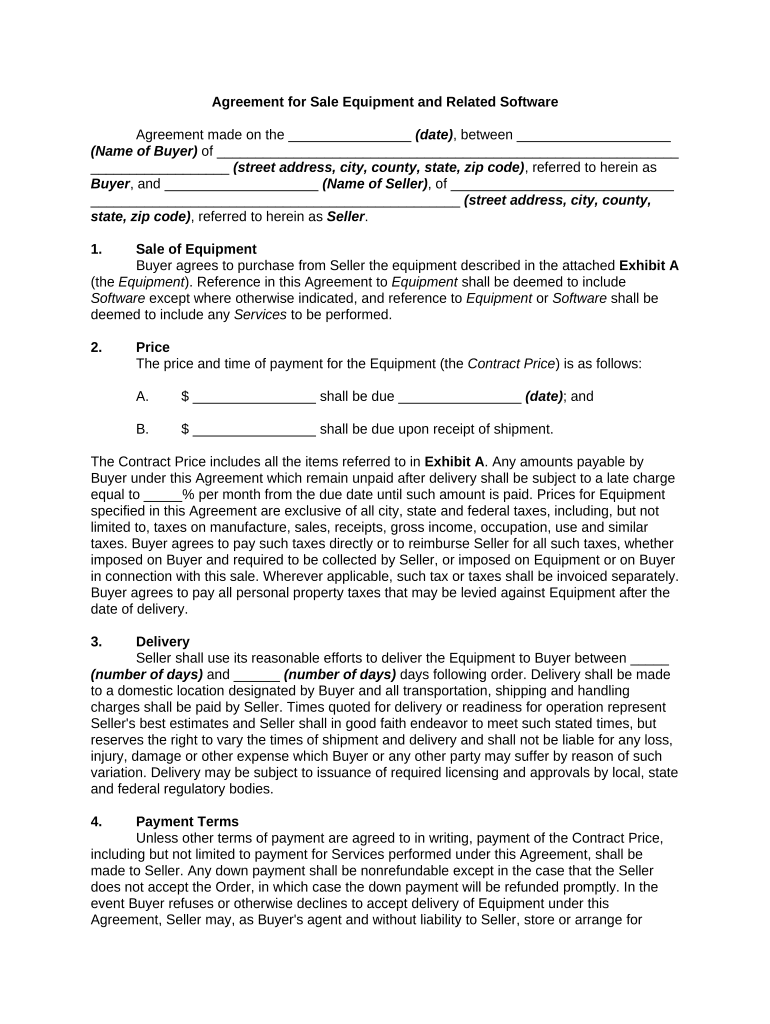
Agreement for Sale Equipment and Related Software Agreement made on the ________________ (date) , between ____________________ (Name of Buyer) of ____________________________________________________________ __________________ (street address, city, county, state, zip code) , referred to herein as Buyer , and ____________________ (Name of Seller) , of _____________________________ ________________________________________________ (street address, city, county, state, zip code) , referred to herein as Seller . 1. Sale of Equipment Buyer agrees to purchase from Seller the equipment described in the attached Exhibit A (the Equipment ). Reference in this Agreement to Equipment shall be deemed to include Software except where otherwise indicated, and reference to Equipment or Software shall be deemed to include any Services to be performed. 2. Price The price and time of payment for the Equipment (the Contract Price ) is as follows: A. $ ________________ shall be due ________________ (date) ; and B. $ ________________ shall be due upon receipt of shipment. The Contract Price includes all the items referred to in Exhibit A . Any amounts payable by Buyer under this Agreement which remain unpaid after delivery shall be subject to a late charge equal to _____% per month from the due date until such amount is paid. Prices for Equipment specified in this Agreement are exclusive of all city, state and federal taxes, including, but not limited to, taxes on manufacture, sales, receipts, gross income, occupation, use and similar taxes. Buyer agrees to pay such taxes directly or to reimburse Seller for all such taxes, whether imposed on Buyer and required to be collected by Seller, or imposed on Equipment or on Buyer in connection with this sale. Wherever applicable, such tax or taxes shall be invoiced separately. Buyer agrees to pay all personal property taxes that may be levied against Equipment after the date of delivery. 3. Delivery Seller shall use its reasonable efforts to deliver the Equipment to Buyer between _____ (number of days) and ______ (number of days) days following order. Delivery shall be made to a domestic location designated by Buyer and all transportation, shipping and handling charges shall be paid by Seller. Times quoted for delivery or readiness for operation represent Seller's best estimates and Seller shall in good faith endeavor to meet such stated times, but reserves the right to vary the times of shipment and delivery and shall not be liable for any loss, injury, damage or other expense which Buyer or any other party may suffer by reason of such variation. Delivery may be subject to issuance of required licensing and approvals by local, state and federal regulatory bodies. 4. Payment Terms Unless other terms of payment are agreed to in writing, payment of the Contract Price, including but not limited to payment for Services performed under this Agreement, shall be made to Seller. Any down payment shall be nonrefundable except in the case that the Seller does not accept the Order, in which case the down payment will be refunded promptly. In the event Buyer refuses or otherwise declines to accept delivery of Equipment under this Agreement, Seller may, as Buyer's agent and without liability to Seller, store or arrange for storage of such declined Equipment at Buyer's expense, and such Equipment shall be deemed to be delivered at the time it is either put into storage or turned over to the carrier for shipment, whichever occurs first. Any amounts which become due from Buyer under this Agreement may not be set off against any other amounts which may be due from Seller to Buyer under this Agreement or otherwise. Unless otherwise stated, all prices are in U.S. dollars. 5. Acceptance The criterion for acceptance of Equipment is the successful operation of the Equipment using Seller's standard test procedures and diagnostic test programs applicable to the Equipment involved. All acceptance tests will be conducted prior to delivery and will be run by Seller’s personnel. If Buyer or its representative fails to witness such tests, performance of the tests will not be delayed. Acceptance will be deemed to have been made upon successful completion of the acceptance tests as evidenced by issuance of a test certificate. 6. Title and License Title and risk of loss to the Equipment shall pass to Buyer at the time the Equipment is delivered to Buyer. All Software is made available in accordance with the terms and conditions of this Agreement and the terms and conditions of Seller's Individual End User Software License Agreement, which is attached to this Agreement as Exhibit B , incorporated and made a part of this Agreement by this reference. 7. Variations and Extras The Equipment and Services provided by Seller shall be those specified in this Agreement as accepted in writing by Seller. Should Seller agree to any variations from or extras beyond the requirements of the accepted order, which involve extra cost to Seller, or should Seller incur extra cost owing to delays caused by Buyer's instructions, incorrect instructions, lack of instructions, or other matters within the responsibility of Buyer, or Buyer's agents or subcontractors, such extra costs may be charged by Seller and shall be paid for by Buyer and the scheduled delivery or completion dates shall be appropriately extended. 8. Specifications and Performance The Equipment supplied will be substantially in accordance with the specifications provided to Buyer, subject to reasonable variations plus or minus. Such reasonable variations shall not be made the basis of any claim against Seller or its suppliers. Seller shall not be responsible for performance figures given in any source other than the specifications. Seller reserves the right to supply Equipment in fulfillment of its obligations under this Agreement, the design or construction of which has been modified, provided that the general performance of the Equipment is not adversely affected. Unless otherwise stated, the Equipment will be packaged in accordance with normal air freight packing standards. 9. Operation of the Equipment Buyer shall be responsible for operation of the Equipment. Buyer shall operate the Equipment in a reasonably competent manner and in compliance with the operations manual for the Equipment. Buyer shall comply with all applicable rules, laws, and regulations in connection with operation of the Equipment. 10. Infringement Indemnity Agreement Seller will defend and indemnify Buyer against a claim that the Equipment infringes a United States copyright or patent, provided that: (a) Buyer notifies Seller in writing within _______ (number of days) days of the claim; (b) Seller has sole control of the defense and all related settlement negotiations; and (c) Buyer provides Seller with the assistance, information and authority necessary to perform Seller's obligations under this Section Ten. Reasonable out- of-pocket expenses incurred by Buyer in providing such assistance will be reimbursed by Seller. Seller shall have no liability for any claim of infringement based on use of Equipment altered by Buyer. In the event the Equipment is held or is believed by Seller to infringe, Seller shall have the option, at its expense, to: (a) modify the Equipment to be non-infringing; (b) obtain for Buyer a license to continue using the Equipment; or (c) refund the fees paid for the Equipment. This Section 10 states Seller's entire liability and Buyer's exclusive remedy for infringement, misappropriation or related claims. 11. Waiver and Disclaimer A. Seller warrants that Equipment will be free from defects in workmanship and materials and will conform to applicable specifications for a period of ______ (number) months from the date of shipment or _____ (number) hours of ____________________ _____________________ (type of equipment) operation, whichever comes first (the Warranty Period , provided Buyer gives written notice to Seller of any defect within the Warranty Period or within _______ (number) days after the end of the Warranty Period. The Warranty on the Equipment is prorated (that is, for example, if Equipment became defective after four months, the Buyer would pay to Seller four-twelfths of the price of a replacement of the Equipment. Credit toward refurbishment or replacement will be given to Buyer, at Seller's option, and will be prorated from the date of original shipment or for the Warranty Period, as specified. This Warranty is valid only if the Equipment is operated with non-defective electronic and control equipment supplied by and in accordance with written instructions by Seller. B. As a first resort, field service engineering (FSE) personnel or subcontractors will provide on-site warranty service, maintenance and parts replacement as to the defective Equipment at Buyer's location. In the event FSE or the subcontractors cannot perform the necessary diagnostics, maintenance or repair at Buyer's facilities, Buyer will be required to return for repair such defective Equipment to Seller's designated repair facility at no cost within ______ (number) days after notice. Seller will be responsible for any transportation, insurance and all other charges to and from Seller's designated repair facility and will promptly reimburse Buyer any shipping and handling charges incurred by Seller or its representatives. So long as Seller is so notified of any such defect in workmanship or materials within the Warranty Period , Seller will correct the defect by making any necessary repairs or, at its option, by providing replacements for such defective Equipment, parts, or components of the same (Parts). It is recommended for efficiency and timeliness that replacement be made by FSE or subcontractors from a stock of Parts separately purchased by Seller. Defective Parts, if replaced, will become the property of Seller. All other charges, including, but not limited to, FSE travel, on-site labor, removal and reinstallation fees, shall be assumed by Seller during the Warranty Period . C. Buyer will pay Seller the cost of all charges, to include but not limited to a reasonable charge for examination and rework, if the returned Equipment proves not to be defective or if at Buyer's request Seller performs work upon returned Equipment exceeding Seller's obligations under this Warranty. D. This Warranty extends only to the original Buyer of the Equipment from Seller. This Warranty does not apply to, and Seller assumes no responsibility for, damage or defects due to any cause other than those specified above, including, but not limited to, damage or defects arising as a result of misuse, improper installation by non-authorized Buyer personnel or non-authorized subcontractors, accident, neglect, modification, repair by Buyer, subjection to adverse conditions, demands exceeding performance levels required by applicable specifications or operating instructions furnished by Seller, failure to carry out recommended servicing, or from the use of components or replacement parts other than those supplied or approved in writing by Seller. E. It shall be incumbent upon the Buyer to show evidence of faulty parts or workmanship when operated or tested in any other manner. The liability of Seller arising from the supply or use of the Equipment, whether it arises under Warranty or otherwise, shall be limited solely to correcting defects or providing replacement parts to the Buyer as set forth above in this Agreement and is limited to the period of the Warranty. IN NO EVENT SHALL TOTAL LIABILITY EXCEED THE TOTAL CONTRACT PRICE. IN NO EVENT SHALL SELLER BE LIABLE FOR SPECIAL, INCIDENTAL OR CONSEQUENTIAL DAMAGES, NOR SHALL IT BE LIABLE FOR ANY OTHER DAMAGES, EXCEPT AS PROVIDED ABOVE IN THIS AGREEMENT. THIS WARRANTY IS IN LIEU OF ALL OTHER WARRANTIES, EXPRESSED OR IMPLIED, INCLUDING THE IMPLIED WARRANTIES OF MERCHANTABILITY AND FITNESS FOR A PARTICULAR PURPOSE. ANY INSTALLATION, MAINTENANCE, REPAIR, SERVICE, RELOCATION OR ALTERATION TO OR OF, OR OTHER TAMPERING WITH, THE PRODUCTS PERFORMED BY ANY PERSON OR ENTITY OTHER THAN SELLER WITHOUT SELLER'S PRIOR WRITTEN APPROVAL, OR ANY USE OF REPLACEMENT PARTS NOT SUPPLIED BY SELLER, SHALL IMMEDIATELY VOID AND CANCEL ALL WARRANTIES WITH RESPECT TO THE AFFECTED PRODUCTS. THIS WARRANTY IS EXCLUSIVE AND IS MADE IN LIEU OF ALL OTHER WARRANTIES. THE GOODS SPECIFICALLY COVERED UNDER THIS WARRANTY ARE OF AN EXPERIMENTAL NATURE. NO WARRANTIES OF MERCHANTABILITY OR FITNESS FOR PARTICULAR PURPOSE ARE EXPRESSED OR IMPLIED. NO MODIFICATION OR ALTERATION OF THE FOREGOING WARRANTY AND LIMITATION OR REMEDIES PROVISIONS SHALL BE VALID OR ENFORCEABLE UNLESS SET FORTH IN A WRITTEN AGREEMENT SIGNED BY SELLER AND BUYER. THE INDEMNITIES IN SECTION TEN AND SECTION SIXTEEN AND THE WARRANTY IN THIS SECTION ELEVEN IS EXCLUSIVE AND IN LIEU OF ALL OTHER INDEMNITIES OR WARRANTIES, WHETHER EXPRESSED OR IMPLIED, INCLUDING THE IMPLIED WARRANTIES OF MERCHANTABILITY AND FITNESS FOR A PARTICULAR PURPOSE. 12. Nondisclosure By virtue of this Agreement, Buyer may have access to information that is confidential to Seller (Confidential Information). Confidential Information shall include, but not be limited to, the terms and pricing under this Agreement, the technical and other specifications for the Equipment and all information clearly identified as confidential or proprietary, including, but not limited to, drawings, designs, specifications, manuals or information relating in any way to the Equipment, howsoever issued, including all oral communications subsequently identified in writing by Seller as proprietary, without the prior written permission of Seller. Confidential Information shall not include information that: (i) is or becomes a part of the public domain through no act or omission of Buyer; (ii) was in Buyer's lawful possession prior to the disclosure and had not been obtained by Buyer either directly or indirectly from the disclosing party; (iii) is lawfully disclosed to Buyer by a third party without restriction on disclosure; or (iv) is independently developed by Buyer. Buyer agrees to hold Confidential Information in confidence during the term of this Agreement and for a period of _____ (number) years after termination of this Agreement. Buyer agrees that unless required by law, it shall not make Confidential Information available in any form to any third party or to use Confidential Information for any purpose other than the implementation of this Agreement. Buyer agrees to take all reasonable steps to ensure that Confidential Information is not disclosed or distributed by its employees, representatives or agents in violation of the terms of this Agreement. Copyright in all materials made available by Seller shall remain with Seller at all times. The provisions of this Section 12 shall survive any termination of this Agreement. 13. Rights in Data Seller retains full ownership of all inventions, designs, copyrights, processes and data already made or evolved by Seller in the preparation of or during the course of any work under or resulting from this Agreement. 14. Limitation of Liability IN NO EVENT SHALL SELLER BE LIABLE FOR ANY INDIRECT, INCIDENTAL, PUNITIVE, SPECIAL OR CONSEQUENTIAL DAMAGES, OR DAMAGES FOR LOSS OF PROFITS, REVENUE, OR USE INCURRED BY BUYER OR ANY THIRD PARTY, WHETHER IN AN ACTION IN CONTRACT, OR TORT, OR OTHERWISE EVEN IF ADVISED OF THE POSSIBILITY OF SUCH DAMAGES. SELLER'S LIABILITY FOR DAMAGES ARISING OUT OF OR IN CONNECTION WITH THIS AGREEMENT SHALL IN NO EVENT EXCEED THE PURCHASE PRICE OF THE DEFECTIVE EQUIPMENT. THE PROVISIONS OF THIS AGREEMENT ALLOCATE THE RISKS BETWEEN SELLER AND BUYER. SELLER'S PRICING REFLECTS THIS ALLOCATION OF RISK AND BUT FOR THIS ALLOCATION AND LIMITATION OF LIABILITY, SELLER WOULD NOT HAVE ENTERED INTO THIS AGREEMENT. 15. Indemnity Buyer shall indemnify and hold harmless Seller from and against any and all liability, damages, costs, losses and expenses arising out of or in connection with any personal injury, including death, or any damage to property or business which may be suffered by use, operation, or failure to operate of the Equipment furnished under this Agreement except for the negligent acts of Seller. 16. Force Majeure If Seller's ability to perform its obligations under this Agreement is limited, delayed or prevented in whole or in part by any reason whatsoever not reasonably within the control of Seller, or its suppliers, including, but not limited to, act of God, war, invasion, act of foreign enemy, hostilities, civil war, rebellion, civil strife, strikes or industrial dispute, or by any law, rule, regulation, order or other action by any public authority, transportation delays or the refusal of any necessary license, then Seller shall be excused, discharged, and released of performance to the extent such performance is so limited, delayed or prevented, without liability of any kind. 17. If this Agreement is terminated or cancelled, then, at Seller's option, and in addition to all other remedies available at law or in equity: (1) Buyer shall accept delivery of and make payment for all Equipment which is either finished or ready for shipping; and (2) Buyer shall reimburse Seller for all costs of all material, all other costs, including but not limited to, general, selling and administrative expenses, and a reasonable profit on the terminated portion of this Agreement. Filing of a petition in bankruptcy, commencement of any insolvency proceeding, or execution of an assignment for the benefit of creditors shall, at the option of Seller, shall be deemed a cancellation by Buyer. 18. To secure payment and performance of all of Buyer's obligations under this Agreement, Seller retains title to the Equipment and a security interest in the Equipment until payment in full and performance by Buyer of all such obligations. When requested by Seller, Buyer shall duly acknowledge this Agreement, and execute, acknowledge and deliver to Buyer, in Seller's usual form, a supplement to this Agreement, security agreement, financing statement and other appropriate instruments to constitute the Equipment as the unencumbered security for the obligations of Buyer under this Agreement, or to enable Seller to comply with all applicable filing or recording laws. 19. Buyer agrees to comply fully with all relevant export laws and regulations of the United States (Export Laws) to assure that the Equipment is not: (1) exported, directly or indirectly, in violation of Export Laws; or (2) intended to be used for any purposes prohibited by Export Laws. Buyer agrees that the Equipment will only be used or operated in the United States and other territories approved in writing by Seller. 20. Seller is an independent contractor; nothing in this Agreement shall be construed to create a partnership, joint venture or agency relationship between the parties. 21. Severability The invalidity of any portion of this Agreement will not and shall not be deemed to affect the validity of any other provision. If any provision of this Agreement is held to be invalid, the parties agree that the remaining provisions shall be deemed to be in full force and effect as if they had been executed by both parties subsequent to the expungement of the invalid provision. 22. No Waiver The failure of either party to this Agreement to insist upon the performance of any of the terms and conditions of this Agreement, or the waiver of any breach of any of the terms and conditions of this Agreement, shall not be construed as subsequently waiving any such terms and conditions, but the same shall continue and remain in full force and effect as if no such forbearance or waiver had occurred. 23. Governing Law This Agreement shall be governed by, construed, and enforced in accordance with the laws of the State of ______________. 24. Notices Any notice provided for or concerning this Agreement shall be in writing and shall be deemed sufficiently given when sent by certified or registered mail if sent to the respective address of each party as set forth at the beginning of this Agreement. 25. Attorney’s Fees In the event that any lawsuit is filed in relation to this Agreement, the unsuccessful party in the action shall pay to the successful party, in addition to all the sums that either party may be called on to pay, a reasonable sum for the successful party's attorney fees. 26. Mandatory Arbitration Any dispute under this Agreement shall be required to be resolved by binding arbitration of the parties hereto. If the parties cannot agree on an arbitrator, each party shall select one arbitrator and both arbitrators shall then select a third. The third arbitrator so selected shall arbitrate said dispute. The arbitration shall be governed by the rules of the American Arbitration Association then in force and effect. 27. Entire Agreement This Agreement shall constitute the entire agreement between the parties and any prior understanding or representation of any kind preceding the date of this Agreement shall not be binding upon either party except to the extent incorporated in this Agreement. 28. Modification of Agreement Any modification of this Agreement or additional obligation assumed by either party in connection with this Agreement shall be binding only if placed in writing and signed by each party or an authorized representative of each party. 29. Assignment of Rights The rights of each party under this Agreement are personal to that party and may not be assigned or transferred to any other person, firm, corporation, or other entity without the prior, express, and written consent of the other party. 30. In this Agreement, any reference to a party includes that party's heirs, executors, administrators, successors and assigns, singular includes plural and masculine includes feminine. WITNESS our signatures as of the day and date first above stated. ________________________ _________________________ (P rinted name) (P rinted name) ________________________ _________________________ (Signature of Seller) (Signature of Buyer)

Helpful suggestions for finishing your ‘Sale Software’ online

Are you fed up with handling documentation? Look no further than airSlate SignNow, the premier digital signature platform for individuals and enterprises. Wave farewell to the monotonous routine of printing and scanning files. With airSlate SignNow, you can effortlessly finalize and sign documents online. Utilize the powerful features packed into this user-friendly and affordable platform and transform your document management process. Whether you need to approve forms or gather signatures, airSlate SignNow manages it all seamlessly, needing only a few clicks.

Follow this comprehensive guide:

  1. Access your account or sign up for a complimentary trial with our service.
  2. Select +Create to upload a document from your device, cloud storage, or our template archive.
  3. Load your ‘Sale Software’ in the editor.
  4. Click Me (Fill Out Now) to finalize the document on your end.
  5. Add and designate fillable fields for others (if necessary).
  6. Continue with the Send Invite settings to solicit eSignatures from others.
  7. Download, print your copy, or convert it into a reusable template.

No need to worry if you must work with your team on your Sale Software or send it for notarization—our platform has everything you require to accomplish those tasks. Register with airSlate SignNow today and elevate your document management to a new level!

Here is a list of the most common customer questions. If you can’t find an answer to your question, please don’t hesitate to reach out to us.

Need help? Contact Support
Sale software free
Sale software for small business
Sale software free download
Best sale software
Point of sale software
Point of sale software free download
HubSpot Sales Hub Professional features
Free offline POS software download for PC
Sale software free
Sale software for small business
Sale software free download
Point of sale software

The best way to complete and sign your sale software form

Save time on document management with airSlate SignNow and get your sale software form eSigned quickly from anywhere with our fully compliant eSignature tool.

How to Sign a PDF Online How to Sign a PDF Online

How to complete and sign forms online

In the past, dealing with paperwork required pretty much time and effort. But with airSlate SignNow, document management is quick and simple. Our powerful and easy-to-use eSignature solution lets you easily fill out and eSign your sale software form online from any internet-connected device.

Follow the step-by-step guide to eSign your sale software form template online:

  • 1.Register for a free trial with airSlate SignNow or log in to your account with password credentials or SSO authorization option.
  • 2.Click Upload or Create and add a file for eSigning from your device, the cloud, or our form collection.
  • 3.Click on the file name to open it in the editor and use the left-side menu to fill out all the empty areas accordingly.
  • 4.Drop the My Signature field where you need to approve your sample. Provide your name, draw, or upload a photo of your handwritten signature.
  • 5.Click Save and Close to finish modifying your completed form.

Once your sale software form template is ready, download it to your device, save it to the cloud, or invite other people to eSign it. With airSlate SignNow, the eSigning process only takes several clicks. Use our robust eSignature solution wherever you are to manage your paperwork successfully!


How to Sign a PDF Using Google Chrome How to Sign a PDF Using Google Chrome

How to complete and sign paperwork in Google Chrome

Completing and signing paperwork is easy with the airSlate SignNow extension for Google Chrome. Installing it to your browser is a fast and productive way to deal with your forms online. Sign your sale software form sample with a legally-binding electronic signature in a few clicks without switching between programs and tabs.

Follow the step-by-step guide to eSign your sale software form in Google Chrome:

  • 1.Navigate to the Chrome Web Store, search for the airSlate SignNow extension for Chrome, and install it to your browser.
  • 2.Right-click on the link to a document you need to sign and select Open in airSlate SignNow.
  • 3.Log in to your account with your credentials or Google/Facebook sign-in option. If you don’t have one, you can start a free trial.
  • 4.Utilize the Edit & Sign toolbar on the left to complete your template, then drag and drop the My Signature option.
  • 5.Add an image of your handwritten signature, draw it, or simply type in your full name to eSign.
  • 6.Verify all the details are correct and click Save and Close to finish editing your paperwork.

Now, you can save your sale software form template to your device or cloud storage, send the copy to other people, or invite them to eSign your form via an email request or a protected Signing Link. The airSlate SignNow extension for Google Chrome improves your document processes with minimum effort and time. Try airSlate SignNow today!


How to Sign a PDF in Gmail How to Sign a PDF in Gmail How to Sign a PDF in Gmail

How to fill out and sign paperwork in Gmail

Every time you receive an email with the sale software form for approval, there’s no need to print and scan a document or save and re-upload it to another program. There’s a much better solution if you use Gmail. Try the airSlate SignNow add-on to promptly eSign any documents right from your inbox.

Follow the step-by-step guide to eSign your sale software form in Gmail:

  • 1.Navigate to the Google Workplace Marketplace and locate a airSlate SignNow add-on for Gmail.
  • 2.Set up the tool with a related button and grant the tool access to your Google account.
  • 3.Open an email with an attached file that needs signing and use the S sign on the right panel to launch the add-on.
  • 4.Log in to your airSlate SignNow account. Select Send to Sign to forward the document to other parties for approval or click Upload to open it in the editor.
  • 5.Put the My Signature field where you need to eSign: type, draw, or import your signature.

This eSigning process saves time and only takes a couple of clicks. Utilize the airSlate SignNow add-on for Gmail to update your sale software form with fillable fields, sign paperwork legally, and invite other parties to eSign them al without leaving your mailbox. Boost your signature workflows now!


How to Sign a PDF on a Mobile Device How to Sign a PDF on a Mobile Device How to Sign a PDF on a Mobile Device

How to complete and sign documents in a mobile browser

Need to quickly submit and sign your sale software form on a mobile phone while doing your work on the go? airSlate SignNow can help without the need to set up extra software apps. Open our airSlate SignNow solution from any browser on your mobile device and add legally-binding eSignatures on the go, 24/7.

Follow the step-by-step guidelines to eSign your sale software form in a browser:

  • 1.Open any browser on your device and follow the link www.signnow.com
  • 2.Sign up for an account with a free trial or log in with your password credentials or SSO authentication.
  • 3.Click Upload or Create and pick a file that needs to be completed from a cloud, your device, or our form catalogue with ready-to go templates.
  • 4.Open the form and fill out the blank fields with tools from Edit & Sign menu on the left.
  • 5.Add the My Signature field to the form, then enter your name, draw, or add your signature.

In a few easy clicks, your sale software form is completed from wherever you are. When you're finished editing, you can save the document on your device, generate a reusable template for it, email it to other people, or invite them electronically sign it. Make your paperwork on the go fast and productive with airSlate SignNow!


How to Sign a PDF on iPhone How to Sign a PDF on iPhone

How to complete and sign paperwork on iOS

In today’s business world, tasks must be completed rapidly even when you’re away from your computer. Using the airSlate SignNow mobile app, you can organize your paperwork and approve your sale software form with a legally-binding eSignature right on your iPhone or iPad. Set it up on your device to conclude contracts and manage forms from just about anywhere 24/7.

Follow the step-by-step guide to eSign your sale software form on iOS devices:

  • 1.Go to the App Store, search for the airSlate SignNow app by airSlate, and set it up on your device.
  • 2.Launch the application, tap Create to add a form, and choose Myself.
  • 3.Opt for Signature at the bottom toolbar and simply draw your signature with a finger or stylus to eSign the form.
  • 4.Tap Done -> Save after signing the sample.
  • 5.Tap Save or use the Make Template option to re-use this paperwork later on.

This method is so simple your sale software form is completed and signed within a few taps. The airSlate SignNow app works in the cloud so all the forms on your mobile device are kept in your account and are available any time you need them. Use airSlate SignNow for iOS to boost your document management and eSignature workflows!


How to Sign a PDF on Android How to Sign a PDF on Android

How to complete and sign documents on Android

With airSlate SignNow, it’s simple to sign your sale software form on the go. Set up its mobile application for Android OS on your device and start improving eSignature workflows right on your smartphone or tablet.

Follow the step-by-step guidelines to eSign your sale software form on Android:

  • 1.Go to Google Play, find the airSlate SignNow application from airSlate, and install it on your device.
  • 2.Sign in to your account or register it with a free trial, then upload a file with a ➕ key on the bottom of you screen.
  • 3.Tap on the uploaded document and choose Open in Editor from the dropdown menu.
  • 4.Tap on Tools tab -> Signature, then draw or type your name to electronically sign the sample. Fill out empty fields with other tools on the bottom if necessary.
  • 5.Utilize the ✔ button, then tap on the Save option to finish editing.

With an intuitive interface and full compliance with main eSignature standards, the airSlate SignNow application is the best tool for signing your sale software form. It even operates without internet and updates all record adjustments once your internet connection is restored and the tool is synced. Fill out and eSign documents, send them for eSigning, and generate re-usable templates whenever you need and from anyplace with airSlate SignNow.

Sign up and try Sale software form
  • Close deals faster
  • Improve productivity
  • Delight customers
  • Increase revenue
  • Save time & money
  • Reduce payment cycles


