Establishing secure connection…Loading editor…Preparing document…

Sample Complaint

This template is fully customizable. Edit the text, fill out the fields, and send it for signature. Give it a try!
Sample Complaint

What a Sample Complaint is and when it’s used

A Sample Complaint is a model civil pleading that sets out the parties, jurisdictional basis, factual allegations, legal causes of action, and the remedies sought from a court. It functions as a template to ensure required elements—caption, statement of claim, demand for relief, and signature block—are included in initial filings. Users adapt a sample complaint to the specifics of a dispute before filing with the appropriate court clerk or e-filing system and serving the defendant according to procedural rules.

Why a clear, complete complaint matters

A well-prepared complaint frames the dispute, preserves claims against statute of limitations risks, and enables efficient court processing. Proper structure reduces the chance of early dismissal, supports service of process, and helps opposing parties and the court understand relief sought.

Why a clear, complete complaint matters

Who typically prepares or files a complaint

Plaintiffs, counsel, and legal support staff use a sample complaint as a starting point to draft a compliant initial pleading.

  • Plaintiffs and claimants preparing their case for court and capturing essential facts and relief requested.
  • Attorneys and law firms who tailor counts, damages, and jurisdictional statements for litigation strategy.
  • Pro se litigants who need a structured template to meet court formatting and content requirements.

Using a sample complaint helps ensure completeness and consistency, whether the filer is represented or self-represented.

Step-by-step: drafting and filing a Sample Complaint

Follow these core steps from draft to filing to ensure the complaint meets procedural and local rules.

  • 01
    Prepare Draft: Draft facts, counts, and exhibits; verify names and jurisdiction.
  • 02
    File with Clerk: E-file or submit paper to the court clerk and pay required fees.
  • 03
    Serve Defendant: Serve process per state or federal service rules and retain proof of service.
  • 04
    File Proof: File proof of service and any required cover sheets with the court.

Anatomy of a professional Sample Complaint

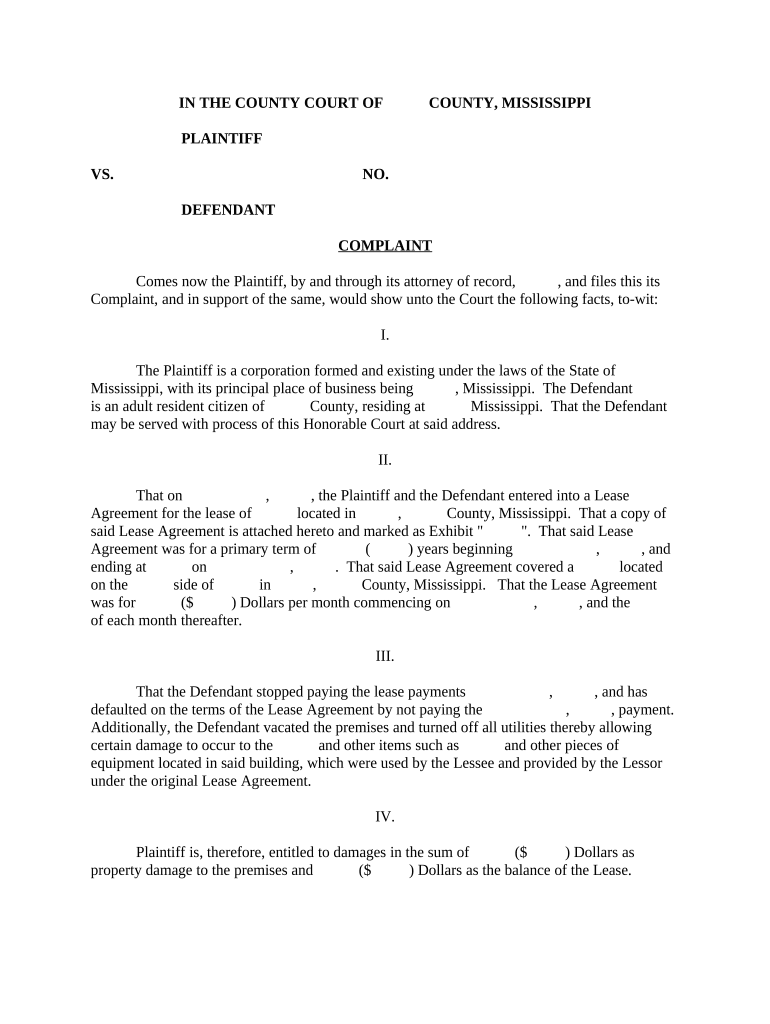
A complaint should be organized, numbered, and set out in discrete sections so the court and opposing parties can quickly identify claims, facts, jurisdiction, and requested remedies.

Caption

Court name, case number, and party captions placed at the top of the document to establish venue and docketing information for the clerk.
Jurisdiction Statement

Clear statement of the legal basis for the court’s authority, including statutory citations or diversity/admiralty references where applicable.

Parties

Identification of the plaintiff(s) and defendant(s) with addresses and entity descriptions to support service and venue determinations.

Statement of Facts

Chronological, concise factual paragraphs that substantiate each element of the claimed causes of action without argumentative language.

Causes of Action

Separate numbered counts stating each legal theory, the elements required, and how the facts satisfy those elements.

Demand for Relief

Precise remedies requested—damages amounts, injunctive language, and any statutory fees or costs sought.

Where to file and how documents move through the court

Filing paths depend on jurisdiction and court level. Courts typically permit electronic filing; some accept paper filings or require additional cover sheets.

  • File with Court Clerk: Submit complaint via the court’s e-filing portal or in person at the clerk’s office.
  • Case Assigned: Clerk assigns a case number and judge, then the docket is opened for entries.
  • Service of Process: Plaintiff arranges service on defendants following jurisdictional rules and methods allowed by the court.
  • Proof of Service: File a proof or affidavit of service to show defendants were properly notified of the action.

Configuring an e-filing workflow for complaints

Set up a repeatable workflow to streamline drafting, signatures, exhibits, and e-filing where available.

Field Configuration
Authentication Email, SMS code, or stronger signer verification where required
Signature Type Standard electronic signature or digitally certified signature as needed
Templates Reusable pleading templates with preplaced fields for names, dates, and amounts
Storage Archive final PDFs in a secure repository with audit trails

Technical needs for drafting, signing, and submitting

Use software that supports PDF and Word draft import, eSignature, and secure storage to maintain an audit trail.

  • Supported Formats: PDF, DOCX, and fillable form exports
  • Integrations: Connectors with case management or storage systems like NetSuite, Google Workspace, or Box
  • Authentication Options: Email link, SMS code, or advanced multi-factor methods

Confirm the court accepts electronically signed filings and that exported PDFs meet local formatting and archival requirements.

How signNow compares on price and core features

Price and feature availability vary by vendor and plan. The table lists common entry points and feature presence across major eSignature providers.

signNow DocuSign Adobe Sign PandaDoc HelloSign
Starting Price $8/user/mo $15/user/mo $14/user/mo $19/user/mo $15/user/mo
Free Trial 7-day free trial Varies by plan Varies by plan Varies by plan Varies by plan
Bulk Send Yes Yes Yes Yes Varies by plan
Audit Trail Yes Yes Yes Yes Yes
HIPAA Compliant Yes Yes Yes No No
Envelope Cap No cap 100 envelopes/user/year No cap No cap No cap

Security and compliance considerations

Encryption In Transit: TLS 1.2/1.3
Encryption At Rest: AES-256
Audit Trails: Comprehensive event logs
Certifications: SOC 2 Type II, ISO 27001
Regulatory Support: ESIGN, UETA, 21 CFR Part 11
Healthcare Compliance: HIPAA (BAA required)

Potential consequences of an incorrect or incomplete complaint

Dismissal: Court may dismiss for failure to state a claim
Default Judgment: Occurs if defendant not served timely
Sanctions: Monetary sanctions under Rule 11
Statute Bar: Claims time-barred if filed late
Service Defect: Improper service can delay case
Fee Forfeiture: Fees may not be refunded on dismissal

Common drafting and filing errors to avoid

  • Using the wrong venue or court—check subject-matter and geographic jurisdiction before filing.
  • Failing to attach or clearly reference supporting exhibits, which can hamper the ability to prove factual allegations.
  • Incorrect or incomplete defendant identification can prevent valid service and delay the case.
  • Omitting a required cover sheet or failing to follow local format may cause rejection by the clerk.

Practical tips for accurate and efficient complaint preparation

Adopt consistent practices to reduce revision cycles and improve acceptance rates when filing with courts.

Confirm Jurisdiction and Venue
Verify the correct court and venue before filing; jurisdictional mistakes often require costly amendments or refiling.
Use Numbered Paragraphs
Number factual allegations and counts; this improves clarity and enables precise reference in motions and discovery.
Attach Key Exhibits
Attach contracts, invoices, or communications cited in the complaint and label exhibits for easy identification.
Keep Proofs of Service
Retain signed proofs and file them promptly to establish the record of notification to defendants.

Real examples of how organizations use sample complaints

These brief examples illustrate practical uses of sample complaints across small businesses and property disputes.

Optica Ventures LLC

Optica adapted a template to capture investor disputes quickly

  • Focused the pleading on contract breaches and damages computations
  • The template reduced drafting time and ensured consistent presentation of financial exhibits across related matters.

Martin Properties

A property manager used a sample complaint for tenant eviction matters

  • Standardized allegations simplified repeated filings
  • The approach enabled faster filings across multiple properties while preserving consistent factual and statutory assertions.

Frequently asked questions about the Sample Complaint

Answers to common procedural and practical questions about preparing, signing, filing, and serving complaints.


Need help? Contact support

be ready to get more
Join over 28 million airSlate SignNow users