Establishing secure connection…Loading editor…Preparing document…

Letter to Credit Reporting Bureau to Prevent Identity Theft

This template is fully customizable. Edit the text, fill out the fields, and send it for signature. Give it a try!
Letter to Credit Reporting Bureau to Prevent Identity Theft

What this letter is and when to use it

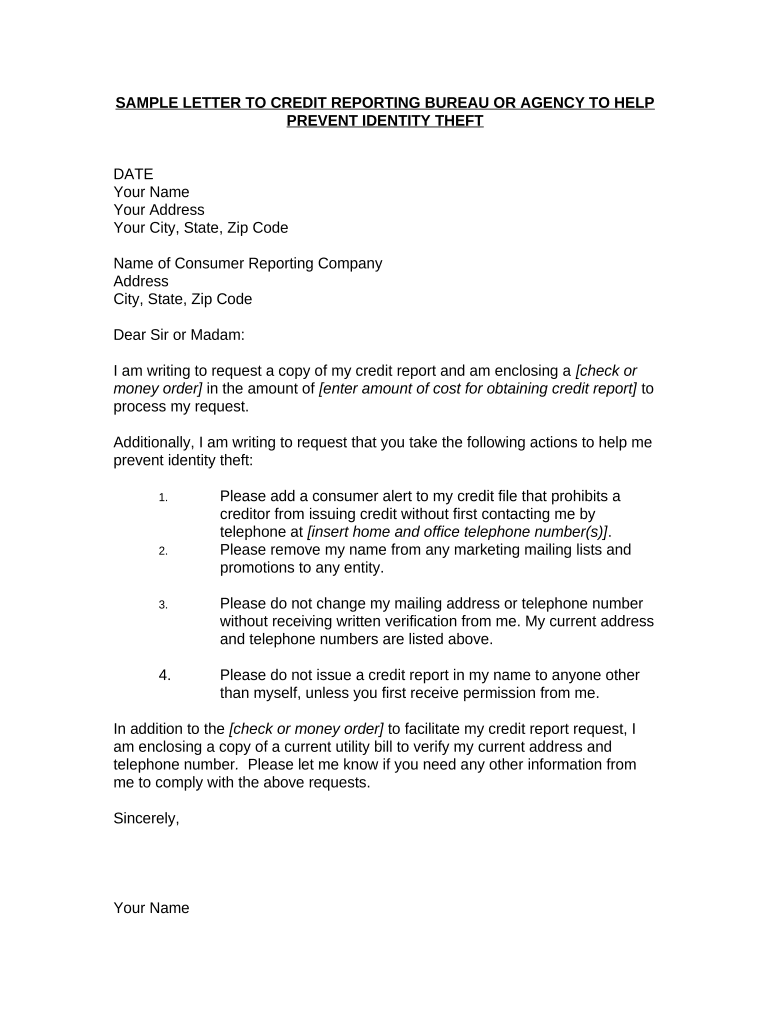
A Letter to Credit Reporting Bureau to Prevent Identity Theft is a formal written notice you send to one or more consumer reporting agencies to report suspected identity theft, request a fraud alert or security freeze, and ask that disputed or fraudulent accounts be investigated and blocked. The letter typically explains the suspected fraud, lists affected accounts, attaches proof of identity and supporting documentation, and requests specific remedial actions. Use this letter when you discover unauthorized accounts, receive collection notices for debts you did not incur, or are planning to file a police report or identity-theft affidavit.

Why sending a clear letter matters

A concise, documented letter creates an auditable record for the credit bureaus, helps trigger statutory dispute procedures under the Fair Credit Reporting Act, and preserves your rights to correction and dispute resolution. Proper documentation speeds investigations and reduces the chance of lingering errors on your credit file.

Why sending a clear letter matters

Who commonly prepares this letter

Individuals, consumer advocates, and legal or financial advisors prepare identity-theft letters to initiate formal disputes and protective steps with credit reporting agencies.

  • Individual consumers who detect unauthorized activity on credit reports or bills.
  • Identity-theft recovery services and credit monitoring companies acting on behalf of clients.
  • Attorneys or financial counselors representing clients in disputes and remediation.

Step-by-step: preparing and sending the letter

Follow a clear sequence to document the issue, attach evidence, send to the right bureaus, and track responses.

  • 01
    Describe the fraud: Summarize unauthorized accounts and dates.
  • 02
    List affected accounts: Include account numbers and creditor names.
  • 03
    Attach proof: Add ID copy, police report, affidavit.
  • 04
    Send & track: Use certified mail or e-submission with receipt.

Essential components to include in the letter

A complete letter combines identifying details, a plain statement of theft, documentary proof, and a clear request to the bureau for action and confirmation.

Your Identity

Full legal name, current address, previous addresses if relevant, date of birth, and Social Security number help match your request to the correct credit report and reduce misidentification.
Statement of Theft

A short, dated statement describing that you are a victim of identity theft, that the listed accounts are fraudulent, and that you request investigation under FCRA.

List of Fraudulent Accounts

Detail each unauthorized account with creditor name, account number (if available), date opened, and why you believe it is fraudulent to help the bureau locate disputed entries.

Requested Action

Specify whether you request a fraud alert, security freeze, reinvestigation under FCRA, deletion of fraudulent items, or a statement of dispute be added to the file.

Supporting Documents

Attach a copy of government-issued ID, proof of address, police report or FTC Identity Theft Affidavit, and any creditor correspondence demonstrating fraud.

Signature & Date

Sign and date the letter. If notarization is required by a bureau or creditor, include a notarized signature or follow RON procedures as applicable.

Security and data practices to consider

Encryption: TLS 1.2/1.3; AES-256 at rest
Access Controls: Role-based access and passwords
Audit Trail: Timestamps, IP, action history
HIPAA BAA: BAA required for PHI handling
Certifications: SOC 2 Type II, ISO 27001
Retention Policy: Defined retention and deletion

Supporting documents commonly included

Attach documents that verify your identity and substantiate the fraudulent activity; include clear copies and avoid low-resolution scans.

Government ID

Clear, legible photocopy or scan of a government-issued photo ID (driver's license or passport) showing name and photo. Many bureaus require a color copy to reduce fraud.

Proof of Address

Recent utility bill, bank statement, or lease showing your name and current address. Avoid P.O. boxes alone unless the bureau accepts them for identity verification.

Police Report

A copy of the police report or complaint number documenting the identity-theft incident. Not all bureaus require a police report, but it strengthens the claim.

FTC Affidavit

A completed FTC Identity Theft Affidavit or similar sworn statement supporting your claim; used by creditors and some bureaus during investigations.

How to configure a digital workflow for letter submission

Set up a reproducible workflow so every letter includes required fields, attachments, and delivery confirmation for audits.

Field Configuration
Document Format PDF/A preferred for preservation
Attach ID Color scan, max 5 MB
Authentication Email + SMS code for signer
Delivery Method Certified mail and e-submit options

Where to send the letter and what happens next

Choose the correct recipient and delivery method; each path generates a different response timeline and evidence trail.

  • Credit Bureaus: Send to Experian, Equifax, TransUnion individually.
  • Creditors/Collectors: Send to the account holder listed on the file.
  • Law Enforcement: File a police report when requested.
  • FTC: Complete Identity Theft Affidavit for federal record.

Digital submission and platform considerations

Use platforms that preserve audit trails, store signed copies, and support secure attachment delivery when submitting letters electronically.

  • Formats Supported: PDF, DOCX, scanned images
  • Integrations: Salesforce, NetSuite, Google Workspace
  • Authentication: Email, SMS, KBA options

Key timelines to expect after you send the letter

Timelines differ by action requested; the bureaus and furnishers have statutory deadlines for investigations and responses that affect your next steps.

Bureau Reinvestigation:

30 days (15 U.S.C. §1681i)

Extended Investigation:

45 days maximum with notice

Security Freeze:

Immediate placement after verification

Fraud Alert Duration:

90 days or extended on request

Record Retention:

Keep records until resolution

Typical investigation milestones

A typical timeline includes drafting and sending, bureau intake, reinvestigation, and confirmation or further escalation.

01

Draft Letter

Compile identity details and documentation.

02

Send to Bureaus

Use certified mail or secure e-submission.

03

Investigation Period

Bureaus verify with furnishers, usually 30 days.

04

Outcome & Follow-up

Bureau issues results; dispute closed or escalated.

Common mistakes that slow down resolution

  • Missing or illegible ID copies cause delays because bureaus cannot verify identity or match your request to the correct file.
  • Vague descriptions of accounts (no account numbers or creditor names) prevent efficient location of disputed items in credit files.
  • Failing to keep delivery receipts and tracking prevents proving you submitted the request within statutory timeframes if disputes escalate.
  • Using incorrect bureau addresses or web portals leads to misrouting; confirm the bureau's accepted submission channels before sending documents.

Risks of incomplete or inaccurate letters

Delayed Processing: Longer investigation times
Rejection: Missing documents can be rejected
TIN Issues: Backup withholding risk
Incomplete Relief: Fraud not fully removed
Legal Exposure: Potential creditor suits
Record Loss: Insufficient evidence retained

How an identity-theft letter compares to related requests

Different requests to credit bureaus achieve different outcomes; choose the right request for your objective.

Request Type Identity-Theft Letter Credit Freeze
Purpose dispute fraudulent items block new accounts
Documentation id + police report id + pin setup
Immediate Effect
Reversibility yes with pin

eSignature vendor pricing and feature snapshot

Comparison of typical starting prices and feature availability for common eSignature vendors. Pricing varies by billing frequency and plan tier.

signNow DocuSign Adobe Sign PandaDoc HelloSign
Starting Price $8/user/mo $15/user/mo $14/user/mo $19/user/mo $15/user/mo
Free Trial 7-day trial Not specified Not specified Not specified Not specified
Bulk Send Yes Yes Yes Yes Not specified
Audit Trail Yes Yes Yes Yes Yes
HIPAA Compliant Yes Yes Yes No No

Frequently asked questions and troubleshooting

Answers to common questions about evidence, delivery, expected responses, and next steps if bureaus do not resolve the dispute.


Need help? Contact support

be ready to get more
Join over 28 million airSlate SignNow users