Establishing secure connection…Loading editor…Preparing document…

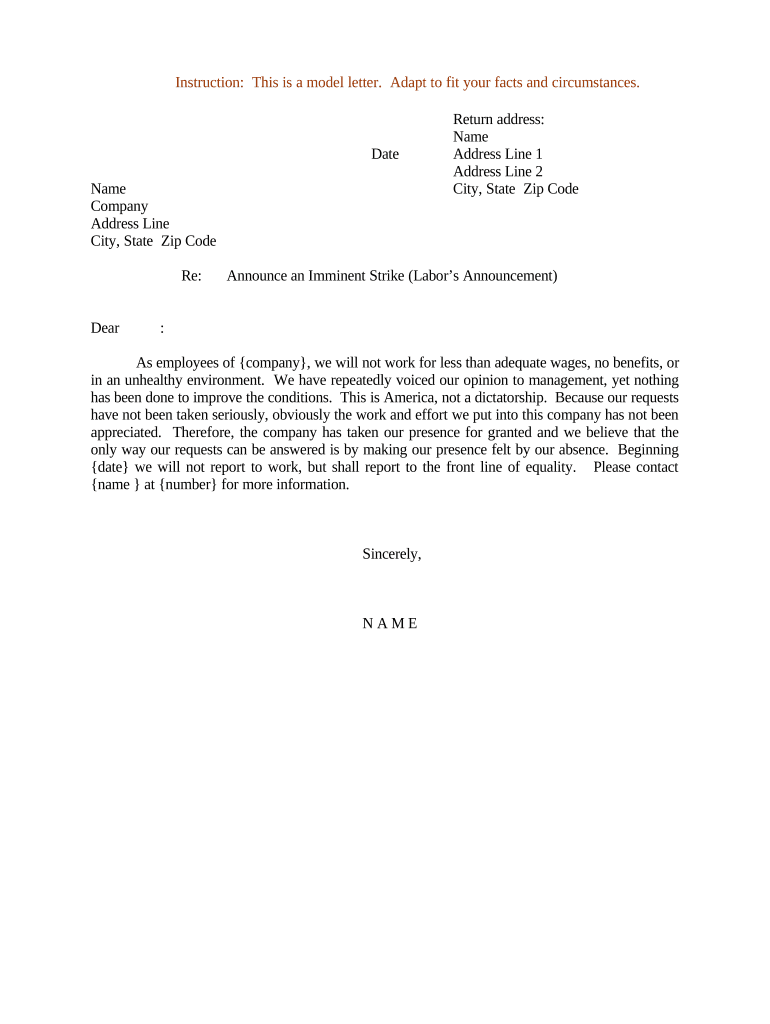
Letter Announcing Imminent Strike

This template is fully customizable. Edit the text, fill out the fields, and send it for signature. Give it a try!
Letter Announcing Imminent Strike

What the Letter Announcing Imminent Strike Is

A Letter Announcing Imminent Strike is a written notice from a labor organization or employer informing affected parties that a strike action is expected to begin on a specified date or within a defined timeframe. The letter typically states the reason for the action, the planned start date and time, affected work units or locations, any contingency plans for essential services, and contact information for follow up. It serves both as formal communication to employees, management, clients, and third parties and as a record of notice for labor relations and possible legal review.

Why a Clear Announcement Matters

A precise, professional announcement reduces confusion, protects bargaining positions, and documents the parties' intentions. It helps recipients prepare operationally and legally while preserving evidence of proper notice and timing under collective bargaining and employment rules.

Why a Clear Announcement Matters

Who Prepares and Receives This Letter

Accurate distribution and retention of the letter protect rights and provide an audit trail for dispute resolution or regulatory review.

  • Union leadership and organizers who must notify members and employers of planned work stoppages and coordinate logistics.
  • Human resources and operations managers notifying employees, clients, vendors, and contingency teams about service disruptions.
  • Legal counsel and compliance officers who need a documented timeline and wording consistent with labor law and contract terms.

Core Elements to Include in a Professional Notice

A well-structured letter combines factual detail, clear timing, legal context, and contact points so recipients can respond or plan accordingly.

Heading

Clear title such as 'Notice of Imminent Strike' followed by issuing party and date to make the document immediately identifiable and searchable.
Statement of Intent

A concise statement that a strike is imminent, including the objective or dispute summary, to document the reason without inflammatory language.

Start Date and Time

Specific MM/DD/YYYY and time of planned action so recipients can schedule staffing, security, and customer notifications accurately.

Scope and Locations

List affected departments, job classifications, shifts, or facilities to limit ambiguity about who and what will be impacted.

Contingency Measures

Information on essential services, picket lines, property protection, or emergency coverage to reduce operational risk and liability.

Contact and Representation

Names, phone numbers, and email addresses for union representatives and employer contacts for questions, corrections, or negotiations.

Required Fields and Minimum Data

Issuing Party: Full legal name
Recipient: Company or entity name
Effective Date: MM/DD/YYYY
Start Time: HH:MM AM/PM
Affected Units: Departments listed
Contact Info: Phone and email

Step-by-Step: Completing the Letter

Follow these sequential steps to draft a clear, compliant announcement suitable for internal circulation and legal recordkeeping.

  • 01
    Prepare facts: Confirm dates, scope, and decision authority before drafting.
  • 02
    Draft text: Use neutral, factual language and include required fields.
  • 03
    Review legal: Have counsel or labor relations review for contract compliance.
  • 04
    Distribute: Send via agreed channels and retain signed records.

Configuring an Online Draft and Approval Workflow

Set a review and approval flow so drafts are checked by the right stakeholders before distribution.

Field Configuration
Draft Owner Union or HR representative
Reviewer Group Legal and operations
Approval Required Yes, single approver or committee
Distribution Method Email, posted notice, and eSignature copy

Digital Signing and Delivery Considerations

Ensure the chosen workflow meets legal requirements for electronic documentation, stores copies securely, and preserves a tamper-evident audit trail for dispute resolution.

  • File formats: PDF or DOCX
  • Audit data: IP, timestamp
  • Authentication: Email or SMS code

Where to Send and How Distribution Typically Works

Follow a predictable distribution path so recipients receive consistent messaging and a verifiable record is produced.

  • Internal Recipients: Send to affected employees and supervisors first.
  • Management: Notify operations, HR, and executive teams.
  • Third Parties: Inform clients, vendors, and subcontractors as needed.
  • Regulators: File notices if required by statute or contract.

Timing and Notice Deadlines to Watch

Timing obligations vary by collective bargaining agreement, employer policy, and sometimes statute; confirm required notice windows before issuing a letter.

Contract Notice Clauses:

Follow the timeline specified in the collective bargaining agreement.

Internal Policy Deadlines:

Comply with employer policies for minimum internal notice periods.

Essential Service Exceptions:

Provide longer notice if public safety or critical services are affected.

Negotiation Windows:

Allow time for mediation or cooling-off where contract requires.

Document Retention Start:

Retention begins on notice date for audit purposes.

Key Milestones from Draft to Distribution

Treat the process as a sequence of milestones with clear owners and deadlines to reduce dispute risk.

01

Draft Finalized

Legal review and factual verification completed.

02

Approval Obtained

Authorized representative signs the document.

03

Distribution Sent

Notices delivered to listed recipients.

04

Records Archived

Signed copies stored with audit trail preserved.

Common Mistakes to Avoid

  • Using imprecise dates or times that create ambiguity about when the action begins and end points for liability.
  • Failing to confirm signatory authority, which can lead to challenges about whether the notice was properly issued.
  • Omitting scope details so recipients cannot determine whether they are covered by the action or need to report for duty.
  • Distributing contradictory messages across channels that cause operational confusion or undermine bargaining positions.

Potential Legal and Operational Risks

Contract Breach: Damages exposure
Unfair Labor Charge: NLRB filing risk
Public Safety Liability: Increased legal scrutiny
Financial Loss: Lost revenue
I-9 Compliance: Recordkeeping gaps
Reputational Harm: Stakeholder distrust

Practical Tips for Accurate and Efficient Completion

Use consistent templates, confirm authority, and secure a verifiable signature and audit trail to minimize disputes and confusion.

Use neutral language
Avoid emotive or accusatory phrasing; stick to facts and dates to reduce escalation risk.
Confirm signatory authority
Verify that the signer is authorized under the collective bargaining agreement or corporate delegation.
Preserve audit trails
Capture timestamps, IP addresses, and delivery receipts when sending notices electronically.
Coordinate channels
Send notices via agreed channels in contracts and follow up with posted or in-person notice when required.

Sample Situations Where This Letter Is Used

These examples show typical contexts and practical considerations for drafting an imminent strike announcement.

Manufacturing Plant Action

Union notifies employer of planned work stoppage

  • Scope limited to one shift at a single plant
  • The notice included contingency staffing and a mediator contact to permit expedited talks and reduce downtime.

School District Labor Notice

Teachers' union announces potential strike date

  • Affected schools and substitute plans listed
  • The district used the letter to activate emergency childcare plans and coordinate state-mandated notice requirements.

How This Letter Differs from Related Notices

Compare common notice types so you choose the correct format and legal posture for your situation.

Criteria Strike Notice Cooling-Off Notice Bargaining Demand Termination Notice
Purpose announce strike request pause begin bargaining end employment
Formality high moderate high high
Typical Recipient employer/all staff parties and mediator employer/union employee/hr
Timing Sensitivity critical dates negotiation window scheduled meetings immediate effect

eSignature Platform Pricing and Feature Snapshot

This table summarizes common pricing and feature criteria for popular eSignature vendors to help weigh platform capabilities for issuing and archiving notices.

signNow DocuSign Adobe Sign PandaDoc HelloSign
Starting Price $8/user/mo $15/user/mo $14/user/mo $19/user/mo $15/user/mo
Free Trial Yes, 7-day free trial Yes, limited trial Yes, limited trial Yes, limited trial Yes, limited trial
Bulk Send Yes Yes Yes Yes No
Audit Trail Yes Yes Yes Yes Yes
HIPAA Compliant Yes Yes Yes No No
Envelope Cap No envelope cap 100 envelopes/user/year Varies by plan Varies by plan Varies by plan

Frequently Asked Questions

Answers to common procedural and legal questions when preparing or issuing a Letter Announcing Imminent Strike.


Need help? Contact support

be ready to get more
Join over 28 million airSlate SignNow users