Reporting Period
Specify the fiscal year or anniversary period the annual report covers, including inclusive dates. Clear period designation avoids ambiguity for franchise tax calculations and compliance audits.
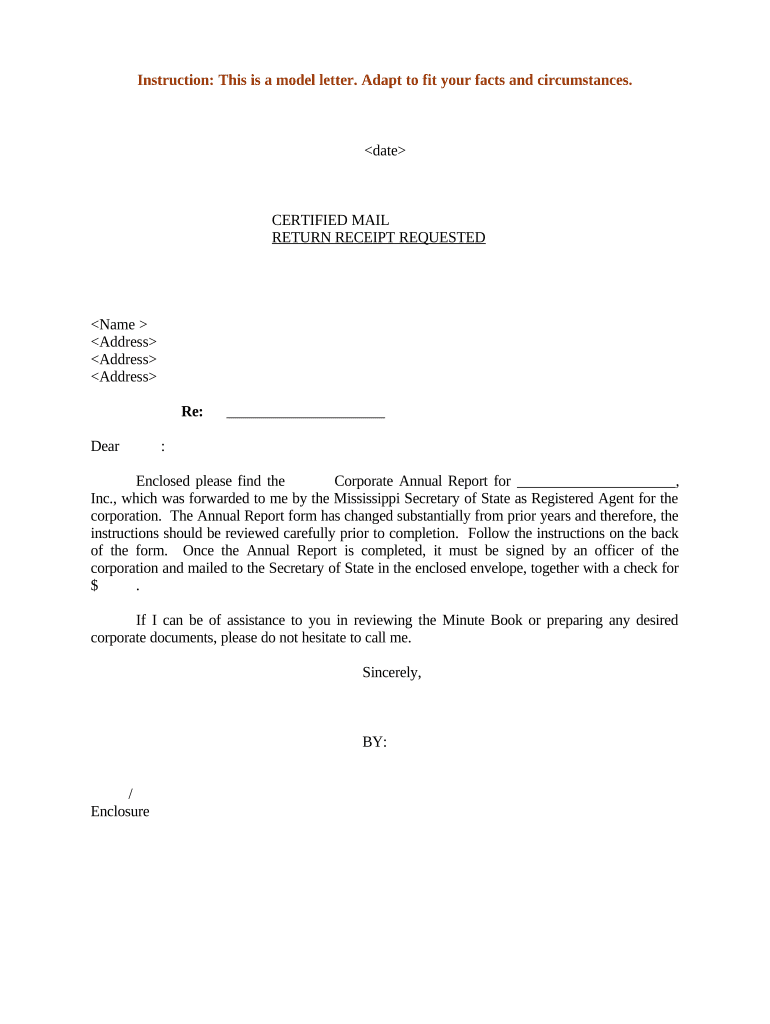
Maintaining an accurate Mississippi Corporate Annual Report Letter helps corporations meet state reporting obligations, reduces risk of administrative dissolution, and creates an auditable record of who authorized the filing. It also supports internal governance and third-party verification.

Corporations, registered agents, and corporate counsel use the Mississippi Corporate Annual Report Letter to confirm reported corporate data and filing responsibility.
Specify the fiscal year or anniversary period the annual report covers, including inclusive dates. Clear period designation avoids ambiguity for franchise tax calculations and compliance audits.
Provide full registered agent name and Mississippi street address. Confirm agent consent and ensure the recorded address matches the Secretary of State database to prevent service issues.
List current officers and directors with titles. Include appointment dates where applicable and verify name spellings to align with official corporate records and past filings.
Include the authorized signer’s printed name, title, signature, and signature date in MM/DD/YYYY format. Note corporate capacity and attach a resolution if required by bylaws.
Attach a copy of the filed annual report, any required franchise tax payment receipt, and corporate resolution authorizing the filing when applicable to the letter.
Provide a primary contact name, telephone number, and email address for follow-up questions. Ensure contact details are monitored through the reporting period for timely responses.
| Field | Configuration |
|---|---|
| Auto-fill Company Data | Map to entity database or CSV import. |
| Signer Order | Set sequential or parallel signing. |
| Authentication | Choose email, SMS code, or ID check. |
| Attachments | Attach annual report PDF with letter. |
| Completion Cert | Enable audit trail and timestamping. |
Ensure your platform supports PDF, DOCX, and secure TLS transport for eSubmission and long-term archiving.
Varies by state and entity anniversary; check SoS instructions.
Payment schedules differ; corporate franchise taxes may be annual.
Penalties can include fees or administrative dissolution risk.
Some states allow payment or filing extensions; verify locally.
Always verify deadlines with Mississippi Secretary of State.
Complete officer, director, and agent data updates.
Legal or corporate counsel reviews letter for accuracy.
Authorized officer signs and dates the letter.
Submit to Secretary of State and retain records.
A family-owned Mississippi corporation used the annual report letter to correct registered agent details and confirm officer changes after its fiscal year-end.
A Mississippi nonprofit included the annual report letter with its filing to update board member information and to document fiscal year changes for grant compliance.
| signNow | DocuSign | Adobe Sign | PandaDoc | HelloSign | |
|---|---|---|---|---|---|
| Starting Price | $8/user/mo | $15/user/mo | $14/user/mo | $19/user/mo | $15/user/mo |
| Free Trial | 7-day free trial | Varies | Varies | Varies | Varies |
| Bulk Send | Yes | Yes | Yes | Yes | No |
| Audit Trail | Yes | Yes | Yes | Yes | Yes |
| HIPAA Compliant | Yes | Yes | Yes | No | No |
| Envelope Cap | No cap | 100 envelopes/user/year | Varies by plan | Varies by plan | Varies by plan |