Establishing secure connection…Loading editor…Preparing document…

Letter Requesting Lease Extension

This template is fully customizable. Edit the text, fill out the fields, and send it for signature. Give it a try!
Letter Requesting Lease Extension

What a Letter Requesting Lease Extension Is

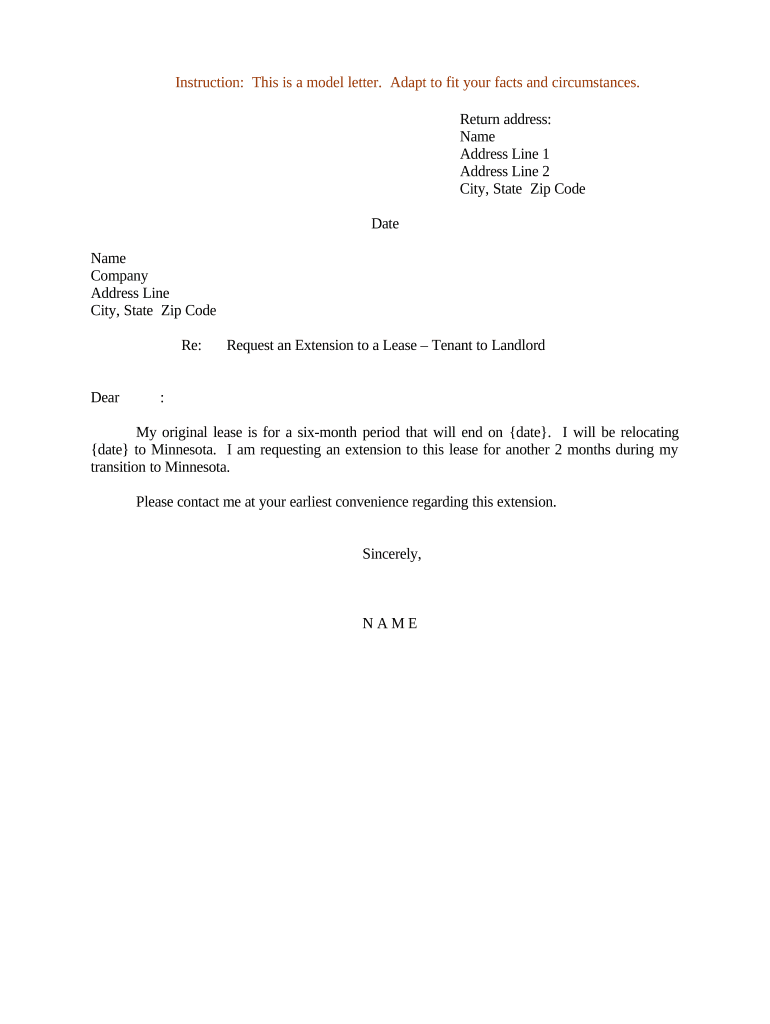
A Letter Requesting Lease Extension is a formal written notice from a tenant to a landlord asking to extend the existing lease term under specified conditions. It identifies the parties, the leased premises and original lease dates, proposes the new term and any rent or other changes, and requests written acceptance or counterproposal. The letter creates a record of the tenant's intent and can be used to preserve occupancy rights while parties negotiate a formal lease amendment or addendum. It may be delivered by paper, certified mail, or electronically where permitted.

Why a Clear Extension Request Helps Both Parties

A concise, documented request reduces misunderstandings, preserves tenancy expectations, and creates a dated record of the tenant's proposal. It makes negotiations efficient, supports lease administration, and helps evidence consent if disputes arise; electronic delivery and signatures are typically valid under U.S. e-signature law when requirements are met.

Why a Clear Extension Request Helps Both Parties

Who Typically Prepares and Receives This Letter

Common users include tenants initiating an extension, property managers coordinating responses, and landlords reviewing proposals.

  • Tenants seeking continuity of occupancy and clarity on terms during renegotiation.
  • Landlords and property managers who must document consent or propose counterterms in writing.
  • Attorneys or representatives who prepare or review amendment language and negotiate details.

Use the letter to start a documented negotiation; follow up promptly and keep a dated copy for records.

Step-by-step: Drafting and Sending Your Lease Extension Letter

Follow a simple sequence to prepare a clear, enforceable extension request and to track landlord response.

  • 01
    Review Lease: Locate the original lease clause and confirm notice requirements and deadlines.
  • 02
    Draft Request: State parties, address, current term, requested new term, rent, and justification.
  • 03
    Choose Delivery: Pick certified mail, personal delivery, or e-delivery per lease notice provisions.
  • 04
    Follow Up: Document landlord reply, save acceptance, and convert agreement into a signed amendment.

How to set up an online completion workflow

Configure fields and authentication to match lease notice rules and signatory expectations before sending electronically.

Field Configuration
Signature Field Required; timestamped and auditable
Date Field Auto-fill MM/DD/YYYY when signer completes
Authentication Email link or SMS code per risk level
Reminders Schedule 3-day and 7-day automatic reminders

Delivery and integration options for electronic submission

Choose delivery and platform settings that satisfy your lease's notice clause and recordkeeping needs.

  • Email Delivery: Standard, preserves timestamps
  • Certified Mail: Provides postal proof
  • Signing Link: Direct signer access via a secure URL

For systems integration or high-volume workflows, select platforms that support audit trails, attachments, and archival export in PDF or DOCX formats and integrate with document storage or property management systems.

Where to send or file the extension request

Select the delivery method that aligns with the lease's notice clause and provides verifiable proof of delivery or acceptance.

  • Email to Agent: Send to the landlord or property manager email listed in the lease
  • Certified Mail: Mail return receipt requested for postal evidence
  • Hand Delivery: Obtain signed receipt from recipient
  • Portal Upload: Upload to landlord or management company tenant portal

Core elements to include in a professional extension letter

A complete letter references the original lease, states the requested change precisely, and creates a clear record for acceptance or negotiation.

Header and Date

Include sender address, landlord address, and the letter date so the notice period is calculable and correspondence is traceable.
Identifying Parties

Name the tenant and landlord exactly as in the lease to avoid ambiguity about who is requesting and who must respond.

Lease Reference

Cite the original lease date and any identifying clause or lease number so the extension request ties directly to the correct agreement.

Extension Terms

Clearly state proposed new start and end dates or the length of the extension and any rent or fee changes tied to the extension.

Consideration

Specify any additional consideration such as rent increases, security deposit adjustments, or concessions tied to the extension.

Acceptance and Signatures

End with a signature block and request written acceptance; indicate acceptable methods of acceptance (email, signed amendment, or portal confirmation).

Essential fields to capture for accuracy

Tenant Name: Full legal name
Landlord Name: Entity or individual
Property Address: Street, unit, city, state, ZIP
Current Lease Date: MM/DD/YYYY
Requested Term: Exact dates or duration
Signature / Date: Signer name and MM/DD/YYYY

Common risks if the letter is incomplete or incorrect

Late Notice: May forfeit extension rights
Name Mismatch: Acceptance may be invalid
Vague Dates: Leads to conflicting interpretations
Unsigned Request: May not bind recipient
Improper Delivery: No proof of notice
Unapproved Terms: Creates unenforceable promises

Frequent preparation mistakes to avoid

  • Leaving the new term ambiguous instead of giving precise start and end dates causes later disputes and complicates enforcement.
  • Failing to reference the specific lease and clause can leave the request disconnected from the governing agreement.
  • Relying solely on casual email without confirming the lease allows electronic notices may result in contested delivery or acceptance.
  • Not documenting landlord acceptance in writing or with a signed amendment risks uncertainty about agreed changes.

Recommended timing and processing expectations

Plan ahead and allow time for review and negotiation; recommended notice windows reduce risk of last-minute refusals or misunderstandings.

Advance Notice:

Send 60–90 days before lease expiration when possible

Landlord Response:

Allow 14–30 days for reply or counterproposal

Execution Window:

Allow 7–14 days for signing after agreement reached

Record Retention:

Keep dated copies until after the term and for retention period

Urgent Requests:

If under 30 days, use certified mail or confirmed e-delivery

eSignature vendor comparison for executing lease extension letters

Common vendor features relevant to lease amendment workflows: starting price, trial availability, bulk send, audit trail, HIPAA compliance, and envelope or session caps.

signNow DocuSign Adobe Sign PandaDoc HelloSign
Starting Price $8/user/mo $15/user/mo $14/user/mo $19/user/mo $15/user/mo
Free Trial 7-day free trial Varies by plan Varies by plan Varies by plan Varies by plan
Bulk Send Yes Yes Yes Yes No
Audit Trail Yes Yes Yes Yes Yes
Envelope Cap No cap 100 envelopes/user/year Varies Varies Varies

Frequently asked questions about lease extension letters

Answers to common questions about validity, delivery, signatures, and next steps when a landlord does not immediately accept an extension request.


Need help? Contact support

be ready to get more
Join over 28 million airSlate SignNow users