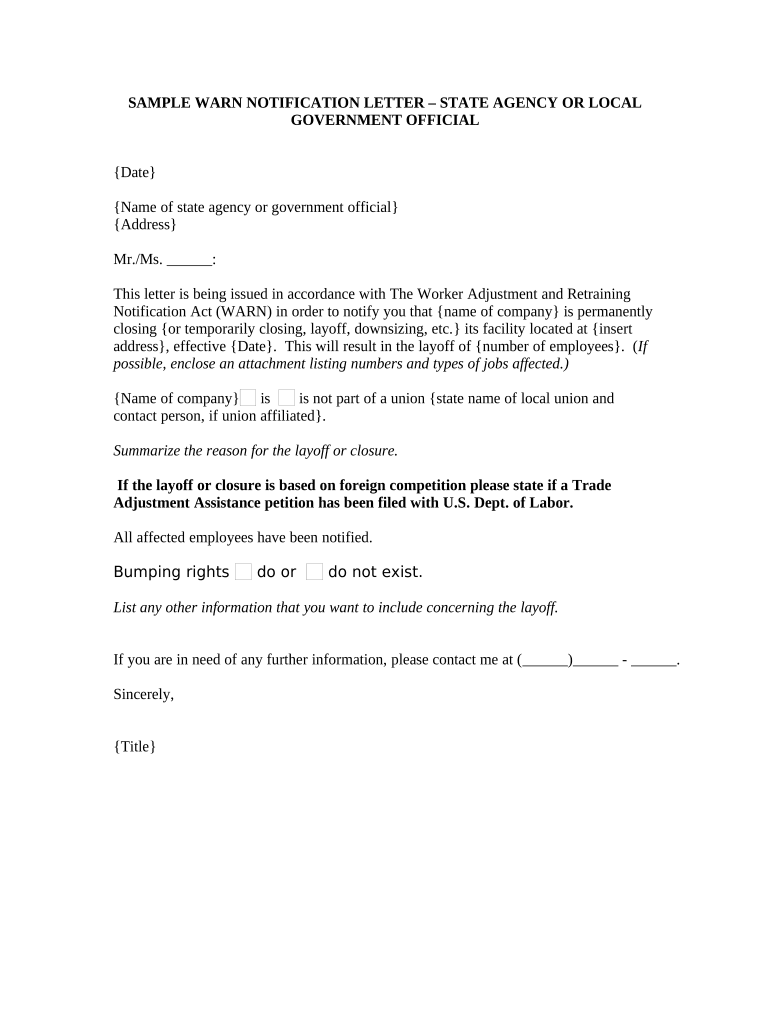
Warn Notification Letter
What a Warn Notification Letter Is
Why a Clear Warn Notification Letter Matters
A properly completed WARN letter helps employers satisfy statutory notice duties, reduces risk of costly back pay or penalties, and provides affected workers with actionable information about benefits and services. Clear notices also streamline coordination with state dislocated worker units and minimize administrative disputes.
Who Prepares and Receives a Warn Notification Letter
Employers, HR teams, legal counsel, and state labor agencies are the primary users and recipients of WARN notices.
- Employers and HR departments prepare the notice and distribute it to employees and appropriate agencies.
- Legal counsel reviews legal compliance, timing, and the company’s defenses or exemptions.
- State dislocated worker units and local workforce agencies receive copies for coordination of employee services.
Use employer counsel and HR to confirm coverage, calculate notice periods, and document distribution to reduce exposure.
Typical Signatories and Authorized Reviewers
HR Director
The HR Director typically prepares and certifies the WARN notice, coordinates employee lists and distribution, and records service dates. They ensure the notice includes accurate employee counts, positions, and affected worksite addresses, and they work with counsel on legal defenses or exceptions.
Company Executive
An authorized company officer (CEO, COO, or CFO) must sign or approve the notice as the employer representative. That signer confirms factual accuracy, authorizes transmission to agencies, and maintains the official record for potential claims alleging failure to provide required notice.
Step-by-Step: Preparing and Sending the Notice
-
01Confirm Coverage: Determine if federal or state WARN applies.
-
02Gather Data: Compile accurate employee counts and site addresses.
-
03Draft Notice: Include statutory content and contact information.
-
04Send and Document: Deliver to employees, union, and agencies; retain proof.
Overview: How WARN Notices Move Through Agencies
-
Internal Review: Legal and HR approve the notice for accuracy.
-
Employee Delivery: Provide written notice to affected employees.
-
Agency Submission: Send copies to state dislocated worker units as required.
-
Record Retention: Store delivery evidence and signed approvals.
Configuring an Electronic Workflow for WARN Notices
| Field | Configuration |
|---|---|
| Signer Order | HR then Executive approval |
| Authentication | Email or SMS code |
| Attachments | Employee list and org chart |
| Delivery Proof | Audit trail and delivery timestamp |
Digital Delivery and Platform Integration Considerations
Use a platform that preserves an audit trail, supports signer authentication, and exports a read-only signed record.
- Audit Trail: Timestamp, IP, action log
- Authentication: Email, SMS, or stronger
- Integrations: HRIS and document storage
Maintain electronic copies with tamper-evident signatures and export options for long-term retention and regulatory review.
Key Timing Rules to Remember
Notice Period:
60 days advance notice (29 U.S.C. §2102)
Agency Filing:
Submit to state dislocated worker unit as required
Union Notification:
Notify union representatives simultaneously
Documentation Deadline:
Keep delivery proof indefinitely for audits
Amended Notices:
Send updated notices promptly when plans change
Milestones From Decision to Recordkeeping
Decision Date
Date the employer finalizes the layoff plan and begins internal approvals.
Notice Drafted
Draft the WARN letter with employee counts and effective dates.
Notice Sent
Deliver notice to employees, unions, and agencies at least 60 days before the event.
Records Retained
Retain delivery evidence, approvals, and correspondence per retention policy.
Primary Penalties and Legal Risks
Common Pitfalls When Preparing a WARN Letter
- Ambiguous employer identity or worksite addresses can invalidate the notice and complicate enforcement defenses.
- Incorrect employee counts or misclassifying full‑time versus part‑time staff increases potential back pay exposure.
- Failure to send copies to the appropriate state agency or union compromises compliance and may trigger additional penalties.
- Relying on informal delivery (oral notices) without documented written delivery often fails to meet statutory notice requirements.
eSignature Provider Pricing Snapshot for WARN Notices
| signNow | DocuSign | Adobe Sign | PandaDoc | HelloSign | |
|---|---|---|---|---|---|
| Starting Price | $8/user/mo | $15/user/mo | $14/user/mo | $19/user/mo | $15/user/mo |
| Free Trial | 7-day free trial | No | No | Yes, limited | Yes, limited |
| Bulk Send | Yes | Yes | Yes | Yes | No |
| Audit Trail | Yes | Yes | Yes | Yes | Yes |
Real-World Examples of Digital Notice Workflows
Tech Data — Executive Operations
The team standardized notices and approvals to reduce legal review time.
- They used templated notices for consistency.
- Consistent templates and an auditable delivery record streamlined coordination with state workforce agencies and reduced internal disputes about timing and recipients.
Fertility Centers of Illinois — Clinic Management
Clinical operations centralized employee notifications through a digital workflow.
- Signed records were preserved for HR.
- Having a tamper‑evident signed notice and centralized employee lists simplified audits and improved transparency with affected staff and legal counsel.
Practical Tips for Accurate and Efficient Notices
Frequently Asked Questions About WARN Notices
-
Is a WARN letter always required?
Not always. Federal WARN covers employers meeting size and layoff thresholds; many states have mini‑WARN laws with different thresholds. Evaluate employee counts, employment duration, and state rules with counsel to determine coverage.
-
What happens if notice is late?
Late notices can trigger civil penalties, employer liability for back pay and benefits for the notice period, and potential state penalties. Preserving written reasons and prompt corrective action may mitigate exposure.
-
Can notices be delivered electronically?
Yes. Electronic delivery is common if it provides a reliable audit trail and the recipient can access the record. Ensure signed copies and delivery evidence are retained for potential administrative review.
-
Who must receive the notice?
Affected employees, their unions (if applicable), and the designated state dislocated worker unit must receive notice. Some states require additional local filings or public postings.
-
How should employer count affected workers?
Count employees affected at each worksite according to federal and state definitions, distinguishing full‑time, part‑time, and temporary staff as specified by the applicable statute and guidance.
-
What records should be kept?
Keep the final notice, proofs of delivery, employee lists, approval records, and any communications about timing or exceptions. Retain per federal and state retention rules to preserve defenses.