Establishing secure connection…Loading editor…Preparing document…

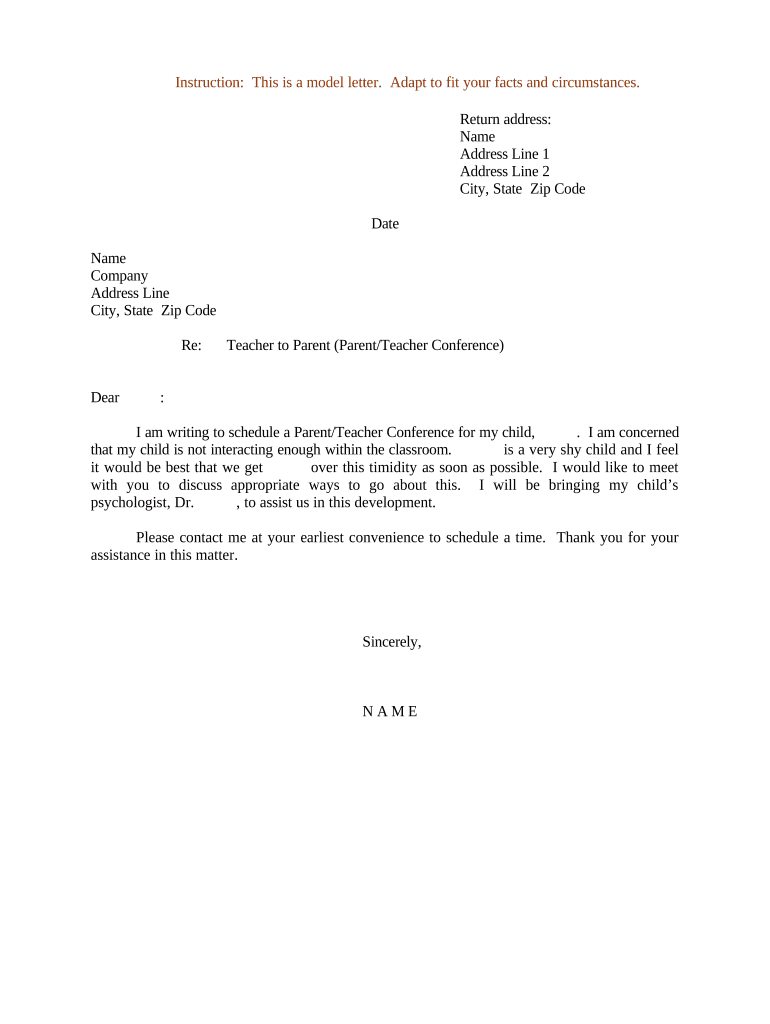
Letter Requesting Parent/Teacher Conference

This template is fully customizable. Edit the text, fill out the fields, and send it for signature. Give it a try!
Letter Requesting Parent/Teacher Conference

What a Letter Requesting Parent/Teacher Conference Is and When to Use It

A Letter Requesting Parent/Teacher Conference is a written request from a parent, guardian, or teacher asking to meet and discuss a student's academic progress, behavior, accommodations, or other school-related matters. The letter typically states the student's name, grade, purpose for the meeting, preferred dates and times, and contact information for scheduling. It can be formal or informal depending on district policy. When sent electronically, an audit trail and retention practices help document consent and receipt; FERPA and, when health information is involved, HIPAA considerations may apply.

Why a Formal Written Request Matters

A clear written request creates a record, clarifies the meeting purpose, and speeds scheduling while helping administrators manage calendars and prepare relevant materials.

Why a Formal Written Request Matters

Who Typically Prepares or Receives This Letter

The letter is used by parents, guardians, teachers, school counselors, and special education staff to request or propose a conference.

  • Parents and guardians requesting a meeting to discuss academic or behavioral concerns.
  • Classroom teachers requesting a conference to review progress or coordinate support.
  • School counselors or special education staff arranging eligibility or IEP-related meetings.

Common Signers and Parties

Parent

A parent or legal guardian who requests the meeting to review grades, behavior, accommodations, or disciplinary matters. They provide contact details and indicate available meeting times so school staff can schedule and prepare.

Teacher

A classroom or specialist teacher who initiates a conference to discuss progress, interventions, or observations. Teachers usually detail the issues to be addressed and may request relevant records or a school counselor to attend.

Essential Parts of a Professional Request Letter

A concise, well-structured letter helps recipients prepare and ensures the meeting addresses the right topics. Include objective facts and clear scheduling options.

Header

Student name, grade, teacher and school name, and the date the letter is sent to create a clear record and file association.
Purpose

One-line summary of why the meeting is requested (academic progress, behavior, IEP review, health concerns) to set expectations for attendees.

Preferred Times

Two to three specific date/time options and a timeframe (morning/afternoon) to reduce back-and-forth and speed scheduling.

Attendees

List who should attend (parent/guardian, teacher, counselor, principal, support staff) so the school can arrange appropriate participants.

Contact Info

Provide a primary phone number and email for scheduling and indicate best times and any accessibility needs or language interpretation requests.

Signature

Printed name and signature of the requester plus date; when sent electronically, include an audit trail or electronic signature to confirm authorship.

Step-by-Step: Writing and Sending the Request

Follow these sequential steps to prepare a clear request that the school can process efficiently and record in the student's education file.

  • 01
    Draft the Letter: State student details, purpose, and preferred meeting times.
  • 02
    Attach Documents: Include recent work samples or reports if relevant.
  • 03
    Choose Delivery: Send by school portal, email, or hand-deliver to the office.
  • 04
    Confirm Receipt: Ask for acknowledgement and follow up if no response within the expected timeframe.

Configuring an Electronic Submission Workflow

If sending electronically, set up fields and authentication that match school policy and privacy requirements.

Field Configuration
Sender Email Parent or teacher email address used for tracking
Authentication Email link or SMS code for signer verification
Signature Type Typed name or drawn signature with timestamp
Audit Trail Enable IP, timestamp, and action logs for recordkeeping

Typical Electronic Submission Flow

This sequence shows how an electronic request moves from the sender to school staff and back with confirmation.

  • Upload: Attach the completed request letter and any supporting files.
  • Assign: Route to the teacher or office mailbox handling conferences.
  • Acknowledge: Recipient confirms receipt and proposes meeting times if needed.
  • Document: Final meeting details recorded in the student record and shared with attendees.

Practical Tips for Clear, Effective Requests

Use plain language and focus on constructive outcomes to keep the meeting productive and focused on the student's needs.

Be concise and specific
Limit the letter to one page, name the primary concern, and request concrete next steps so attendees can prepare targeted materials and responses.
Provide multiple scheduling options
Offer at least two or three date/time windows to reduce delays. Indicate whether virtual attendance is acceptable to broaden availability.
Respect privacy rules
Avoid sharing sensitive medical details unless necessary; if included, note who may discuss health information and confirm HIPAA or FERPA requirements.
Keep a copy for your records
Retain the signed letter and any replies—digital or printed—to document the request and outcomes for future reference or follow-up.

Common Preparation Pitfalls to Avoid

  • Vague purpose statements that do not specify whether the meeting addresses grades, behavior, or disability accommodations.
  • Providing only one narrow scheduling option, which often causes unnecessary delays and rescheduling.
  • Omitting contact details or using an email address with limited access, preventing timely acknowledgement.
  • Including medical or sensitive information without confirming whether the school requires specific consent or redaction.

Timing Expectations When Requesting a Conference

Allow sufficient lead time for staff to coordinate calendars, gather records, and arrange support personnel or interpreters when needed.

Advance Notice Recommended:

Request meetings at least 7–14 days before preferred dates to improve scheduling success.

Teacher Response Time:

Expect teachers or staff to acknowledge within 3–5 school days in typical circumstances.

IEP or 504 Meetings:

Special education meetings may require longer notice and pre-meeting documentation under district procedures.

Short-Notice Concerns:

If immediate intervention is needed, flag the request as urgent and follow up by phone.

Record Retention Trigger:

Date the letter and confirmation so meeting outcomes are preserved in the student record.

Risks and Consequences of Incomplete or Improper Requests

Delays: Missed scheduling and delayed supports
Privacy Exposure: Unauthorized sharing of student data
Record Gaps: No documentary evidence of requested actions
Miscommunication: Wrong attendees or unprepared staff
Noncompliance: Failure to follow district procedures
Escalation: Potential need for formal complaints

Required Data Elements to Include for Proper Processing

Student Name: Full legal name
Grade/Teacher: Grade and homeroom teacher
Meeting Purpose: Clear short description
Preferred Times: Two to three options
Contact Info: Phone and email
Signature: Signed and dated

Realistic Use Cases for the Request Letter

Two common scenarios show how the letter frames concerns and what to include for a productive meeting.

Parent Academic Concern

A parent notices falling grades and requests a meeting to discuss classroom supports

  • The parent lists recent assignments and preferred dates
  • The teacher prepares samples and assessment data and the conference results are summarized and placed in the student file for follow-up.

Teacher Behavior Intervention

A teacher requests a conference after observing repeated disruptions and seeks family collaboration

  • The teacher outlines observed incidents and proposed strategies
  • The school counselor attends, interventions are agreed, and documented next steps and monitoring dates are set.

Technical Options for Sending and Signing the Letter

Choose a delivery channel that meets the school's acceptance policy and ensures privacy during transmission.

  • Formats Supported: PDF, DOCX, or plain text
  • Authentication: Email link or SMS code
  • Integrations: School portal or secure email

Ensure the selected platform preserves an audit trail and meets any applicable privacy requirements for education records.

eSignature Vendor Pricing Snapshot for Letter Requests

Compare core pricing and capability signals for eSignature providers commonly considered for school or district workflows. signNow is listed first per vendor-comparison conventions.

signNow DocuSign Adobe Sign PandaDoc HelloSign
Starting Price $8/user/mo $15/user/mo $14/user/mo $19/user/mo $15/user/mo
Free Trial 7-day free trial Varies by vendor Varies by vendor Varies by vendor Varies by vendor
Bulk Send Yes Varies Varies Varies Varies
Audit Trail Yes Yes Yes Yes Yes
HIPAA Compliant Yes Yes Yes No No
Envelope Cap No cap 100 envelopes/user/year Varies Varies Varies

Frequently Asked Questions About Letter Requests and Electronic Submission

Answers to common practical questions on form content, privacy, e-signing, and next steps when issues arise.


Need help? Contact support

be ready to get more
Join over 28 million airSlate SignNow users