Establishing secure connection…Loading editor…Preparing document…

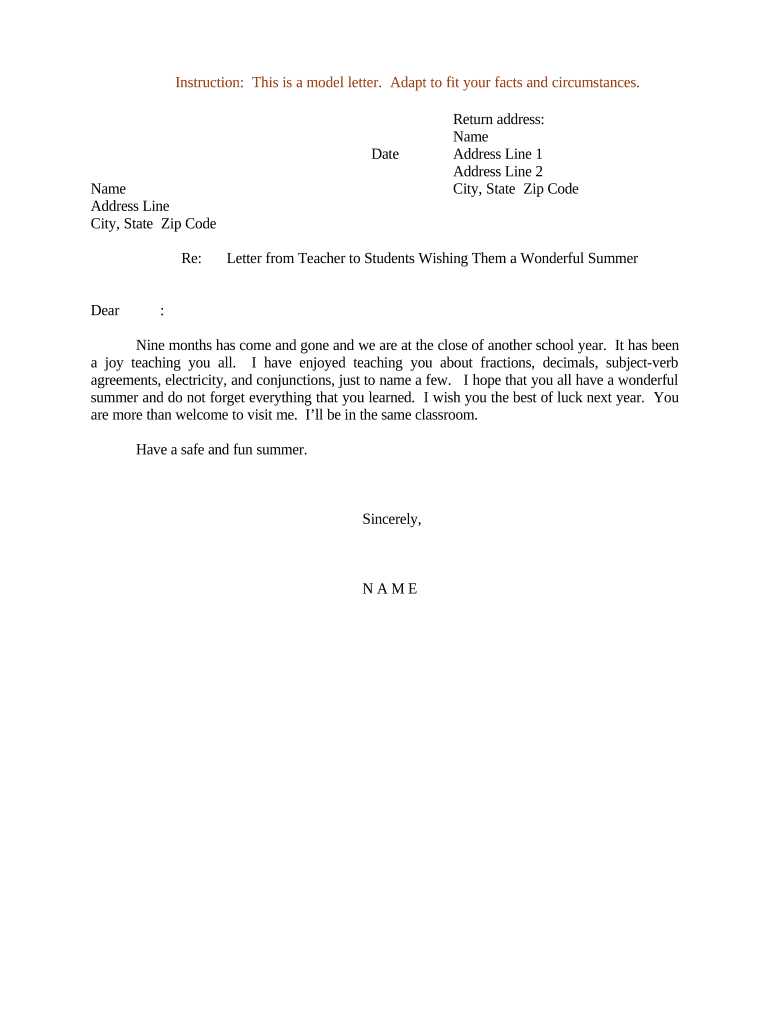
Letter from Teacher to Students Wishing Them a Wonderful Summer

This template is fully customizable. Edit the text, fill out the fields, and send it for signature. Give it a try!
Letter from Teacher to Students Wishing Them a Wonderful Summer

What the Letter Is and When to Use It

A Letter from Teacher to Students Wishing Them a Wonderful Summer is a short, professional communication teachers send at the end of a term to acknowledge student effort, summarize key accomplishments, and offer encouragement for the break. It typically includes a warm opening, brief reflection on classroom highlights, practical reminders (supply lists or reading suggestions), and a polite closing with contact information. The letter can be personalized for individual students or sent as a class-wide message and is suitable for distribution as printed copies, email, school portal posts, or an e-signed PDF.

Why Sending a Thoughtful Summer Letter Matters

A concise summer letter reinforces positive student relationships, provides continuity between terms, and communicates any important dates or materials students should prepare. It also creates a record of teacher-to-family communication and supports a predictable transition into summer.

Why Sending a Thoughtful Summer Letter Matters

Who Typically Sends and Receives This Letter

Common senders include classroom teachers, subject teachers, and grade-level teams sending end-of-year notes to students and families.

  • Classroom teachers sending personalized notes to each student or the whole class.
  • Grade-level or department teams issuing a joint letter summarizing year highlights and next steps.
  • School administrators sharing calendar items or district-wide summer resources with students and families.

Primary Roles That Create or Authorize the Letter

Classroom Teacher

A teacher drafts and personalizes the letter for students, includes course-specific notes and suggestions, and is responsible for distribution while respecting FERPA privacy constraints for student information.

School Administrator

A principal or administrator may review and approve classwide messages, add district updates, and confirm distribution channels align with district communications policy and data-protection requirements.

Essential Elements to Include in Your Summer Letter

A professional summer letter balances warmth with clear logistics; include these six elements to ensure clarity, personalization, and compliance with school communication norms.

Salutation

Address the student by name where feasible and include a brief greeting that sets a positive, inclusive tone and strengthens the teacher–student connection.
Opening Reflection

One or two sentences acknowledging accomplishments or growth to reinforce student effort and provide specific praise that feels authentic rather than generic.

Summer Encouragement

Offer short, actionable suggestions for maintaining skills (reading lists, math practice) framed positively and tailored to the class level or individual needs.

Logistics & Dates

Include essential administrative items such as the first day of the next term, supply lists, or optional summer assignments in clear, concise language.

Contact Info

Provide appropriate contact channels for families (school email or office phone) and note expected response times consistent with district policy.

Closing and Signature

End with a polite closing, the teacher’s printed name, role, and signature line; indicate whether the letter is classwide or personalized.

Step-by-Step: Prepare and Issue the Letter

Follow these four practical steps to produce and distribute a professional end-of-year summer letter with minimal friction.

  • 01
    Draft the Message: Write a short, student-focused note.
  • 02
    Personalize Where Appropriate: Add one specific line per student if feasible.
  • 03
    Choose Distribution: Decide between print, email, LMS, or e-signed PDF.
  • 04
    Document Retention: Store a copy per school record policy.

Delivery Options and How They Work

Select the distribution channel that balances reach, privacy, and recordkeeping; these methods are commonly used in K–12 settings.

  • Printed Copies: Hand to students or send home with them.
  • Email to Families: Send via school or teacher-managed email lists.
  • Learning Management System: Post as an announcement in the class LMS.
  • Secure PDF: Distribute a PDF where access is controlled.

Saving, Exporting, and Supporting Documents

Prepare final copies in common formats and attach supporting items so recipients have clear next steps and you maintain an accessible record.

File Formats

Export the final letter as PDF and DOCX. PDFs preserve layout; DOCX enables later edits and institutional archiving.

Attached Materials

Include supply lists, summer reading lists, or district forms as separate attachments for clarity and easy printing by families.

Access Controls

Restrict distribution lists to school accounts and approved parent contacts to comply with privacy policies.

Backup Copies

Store a signed or timestamped digital copy in your school’s document system for the required retention period.

Practical Tips for Clear, Respectful Communication

These recommendations help ensure your letter is professional, inclusive, and aligned with school policies.

Keep tone positive and inclusive
Use language that celebrates effort and growth, avoid comparisons between students, and ensure content is appropriate for diverse family backgrounds.
Limit personal student information
Avoid including sensitive details in group distributions. When sharing student-specific academic information, follow FERPA restrictions and district guidelines.
Be concise and actionable
Provide only necessary dates, supply items, or optional activities. Clear, short lists are more likely to be read and retained by families.
Coordinate with school communications
Confirm messaging and distribution channels with administrators to avoid duplication and to follow district recordkeeping practices.

Milestones from Draft to Recordkeeping

A straightforward sequence ensures timely distribution and proper archival of the letter for school records.

01

Draft Completion

Finalize text and personalize as needed.

02

Administrative Review

Obtain any required school-level approvals.

03

Distribution

Send to students/families via chosen channel.

04

Archive Copy

Save signed or timestamped copy in records.

Typical Timing Recommendations

Choose the distribution date to maximize impact while fitting school calendars and approval timelines.

One week before term ends:

Ideal for classwide letters and final reminders.

Last day of school:

Works for celebratory messages and immediate distribution.

Early summer follow-up:

Optional check-in or reading encouragement in June.

Before registration deadlines:

Include any enrollment or supply reminders.

Record retention start:

Date the saved copy on distribution for retention tracking.

How to Update or Revise a Sent Letter

If details change after distribution, follow a clear correction and notification process to maintain trust and accurate records.

01

Identify the Change:

Clarify what information needs correction.
02

Draft Correction:

Prepare a brief, factual update statement.
03

Review with Admin:

Obtain necessary approvals before sending.
04

Send Update:

Distribute via same channel as original.
05

Archive Revision:

Save both original and corrected copies.
06

Notify Key Parties:

Confirm receipt with families when appropriate.

Digital Delivery Considerations and Integrations

Digital distribution requires compatible file formats and attention to privacy and access controls when using district systems.

  • File Types: PDF, DOCX supported.
  • Integrations: Google Workspace, Microsoft 365, LMS.
  • Access Controls: School account restrictions.

Configuring an Online Template for Class Letters

Set up a reusable template so you can personalize letters quickly while keeping fields consistent across students and years.

Field Configuration
Teacher Name Auto-fill from staff profile
Student Name Merge field for personalization
Date MM/DD/YYYY auto-populate
Personal Note Optional short text field

Comparing Personalized Letter vs Mass Announcement

Choose the format that best fits your goal: personal connection or efficient mass distribution; tradeoffs are summarized below.

Criteria Personalized Letter Mass Announcement
Personalization high low
Formality more formal less formal
Delivery Effort higher effort lower effort
Recordkeeping individual records single record

Neutral Comparison: eSignature Platforms for School Letters

If you plan to distribute letters as signed PDFs, these platform features and starting prices provide a quick comparison; signNow is listed first per vendor ordering rules.

signNow DocuSign Adobe Sign PandaDoc HelloSign
Starting Price $8/user/mo $15/user/mo $14/user/mo $19/user/mo $15/user/mo
Free Trial 7-day trial Varies by vendor Varies by vendor Varies by vendor Varies by vendor
Bulk Send Yes Yes Yes Yes No
Audit Trail Yes Yes Yes Yes Yes
HIPAA Compliant Yes Yes Yes No No

Common Pitfalls to Avoid

  • Including sensitive student information in group emails that may violate FERPA.
  • Using informal or unclear language that confuses parents about dates or expectations.
  • Failing to obtain required administrative approval before broad distribution.
  • Losing track of sent copies and distribution lists needed for recordkeeping.

Risks and Consequences of Improper Communication

FERPA Violation: Sharing protected student education records publicly can lead to administrative penalties.
Privacy Breach: Including health or sensitive details without consent may trigger HIPAA or district privacy reviews.
Misinformation: Incorrect dates or instructions can cause missed deadlines and administrative follow-up.
Recordkeeping Gaps: Insufficient archival copies impede responses to inquiries or disputes.
Unapproved Messaging: Distribution without approval can conflict with district communications policy.
Data Loss: Not saving a dated copy can complicate later verification of what families received.

Frequently Asked Questions and Troubleshooting

Answers to common questions about drafting, distributing, and storing a summer letter, including legal and privacy considerations.


Need help? Contact support

be ready to get more
Join over 28 million airSlate SignNow users