Establishing secure connection…Loading editor…Preparing document…

Letter Concerning Slip and Fall Accident

This template is fully customizable. Edit the text, fill out the fields, and send it for signature. Give it a try!
Letter Concerning Slip and Fall Accident

What the Letter Concerning Slip and Fall Accident Is

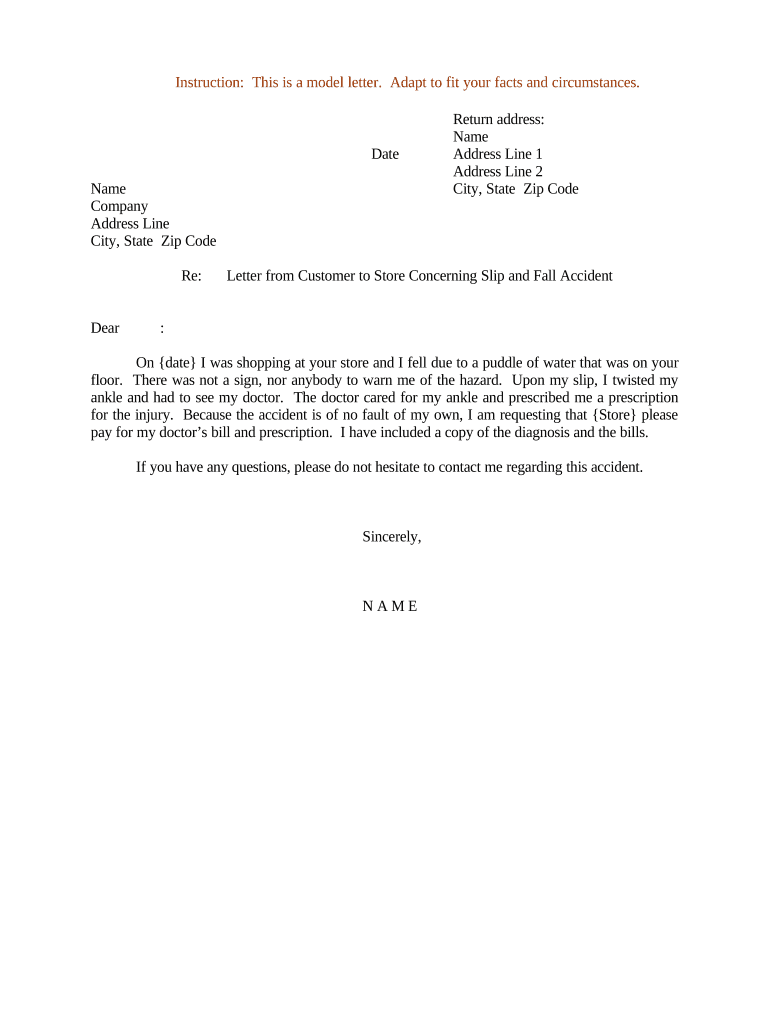
A Letter Concerning Slip and Fall Accident is a written notification from an injured person (or their representative) describing a fall incident on another party's property. It documents the incident date, location, factual details, injuries, and initial treatment, and requests acknowledgement, corrective action, or claim submission. This letter preserves a contemporaneous record, can start a claims process, and helps create a clear timeline of events for insurers, property managers, or legal counsel while remaining neutral and factual in tone.

Why a Formal Letter Matters for a Slip-and-Fall

A formal, dated letter creates a contemporaneous record, clarifies the injured party's account, and notifies responsible parties and insurers. It supports evidence preservation, helps meet notice requirements, and may shorten resolution time when combined with clear documentation.

Why a Formal Letter Matters for a Slip-and-Fall

Who Typically Prepares and Receives This Letter

Typical senders and recipients vary by context: private tenant, visitor, corporate claimant, or counsel notifying property owner and insurer.

  • Injured individual — Documents incident facts, injuries, and requests acknowledgement or corrective action.
  • Property owner or manager — Receives notice, initiates internal investigation and preserves video or maintenance records.
  • Insurer or claims adjuster — Uses the letter to open a claim file and coordinate medical records and liability review.

Use clear, objective language and attach supporting evidence so recipients can promptly investigate and respond.

Step-by-step: Drafting a Clear Slip-and-Fall Letter

Follow these sequential steps to produce a focused, usable letter that supports claim handling and evidence preservation.

  • 01
    Header: Add your contact info, recipient name, address, and date.
  • 02
    Incident Summary: State date, time, and exact location with observable facts.
  • 03
    Injury Details: Describe injuries, immediate first aid, and medical visits.
  • 04
    Request: Ask for acknowledgment, preservation of evidence, and claim instructions.

How to Send the Letter and Track Responses

A reliable delivery and tracking process increases the letter's evidentiary value and helps prove timely notice.

  • Prepare: Assemble letter and supporting attachments in a single PDF.
  • Send: Email with read receipt or certified mail to the correct recipient.
  • Confirm: Record delivery proof and save server logs or postal receipts.
  • Follow-up: Set reminders for insurer or owner responses and next steps.

Digital Workflow Settings for an eSigned Letter

Configure these common settings when sending the letter electronically to ensure security and clear routing.

Field Configuration
Authentication Email link or SMS code for signer verification
Routing Order Send to property owner, then insurer, then counsel
Attachments Allow multiple PDFs and image files
Audit Trail Capture IP, timestamp, and signer actions

Essential Elements to Include in the Letter

A professional letter balances factual description with documented evidence to support any subsequent claim or investigation.

Sender and Recipient

Full legal names, roles (tenant/visitor/owner), complete addresses, and best phone/email contacts for reply and follow-up.
Incident Facts

Clear, neutral narrative of what happened, avoiding legal conclusions; include specific times, locations, and environmental observations.

Witness Information

Names and contact details for any witnesses and a brief summary of their observations to support the account.

Damage and Injury Detail

List visible injuries, symptoms, and immediate medical steps plus dates and provider names to connect care to the incident.

Evidence Attached

Attach photos, video references, maintenance logs, invoices, and medical records as separate, labeled exhibits.

Requested Action

State the desired acknowledgment, preservation of evidence, claim instructions, or a request for the insurer to assign an adjuster.

Security and Privacy Considerations

Encryption: TLS 1.2/1.3; AES-256 at rest
Access Controls: Role-based permissions for document access
Audit Trail: IP, timestamp, and action logging
HIPAA BAA: Execute BAA when medical data is present
Authentication: Email, SMS, or advanced signer verification
Retention: Secure archival with tamper logs

Risks of an Incomplete or Incorrect Letter

Statute of Limitations: May be missed without timely notice
Evidence Loss: Delayed preservation reduces proof value
Claim Denial: Insufficient detail may prompt denial
Privacy Breach: Improper disclosure of medical data
Incorrect Recipient: Sending to wrong party delays response
Signature Issues: Unsigned letters lack formal attribution

Common Preparation Mistakes to Avoid

  • Overstating fault or speculating about cause can escalate disputes; stick to verifiable facts and observable conditions.
  • Failing to attach photos, witness contacts, or medical records reduces the letter's usefulness to insurers and investigators.
  • Using vague location descriptions (e.g., 'near entrance') instead of precise details can prevent retrieval of surveillance footage.
  • Neglecting to record delivery proof or digital audit trails makes it harder to prove timely notice and receipt.

Technical Considerations for eSigning and Secure Delivery

Choose a platform that supports common formats, audit trails, and the authentication level you need before sending the letter.

  • Formats: PDF, DOCX supported
  • Integrations: Connects with Salesforce, Google Workspace, NetSuite
  • Audit Trail: Captures timestamps and signer metadata

For medical or sensitive data, ensure the platform supports HIPAA compliance and execute a BAA; verify encryption, audit logs, and signer authentication options.

Common eSignature Vendor Comparison for Sending Letters

Compare typical pricing and feature availability across popular eSignature providers; signNow appears first for parity and clarity.

signNow DocuSign Adobe Sign PandaDoc HelloSign
Starting Price $8/user/mo $15/user/mo $14/user/mo $19/user/mo $15/user/mo
Free Trial 7-day free trial Varies by plan Varies by plan Varies by plan Varies by plan
Bulk Send Yes (plan-dependent) Yes Yes Yes No
Audit Trail Yes Yes Yes Yes Yes
HIPAA Compliant Yes (BAA available) Yes Yes No No
Envelope Cap No envelope cap 100 envelopes/user/year Varies by plan Varies by plan Varies by plan

FAQs: Practical Answers for Common Questions

Answers to routine questions about validity, delivery, evidence, and next steps when you prepare or receive a slip-and-fall letter.


Need help? Contact support

be ready to get more
Join over 28 million airSlate SignNow users