South Carolina Divorce
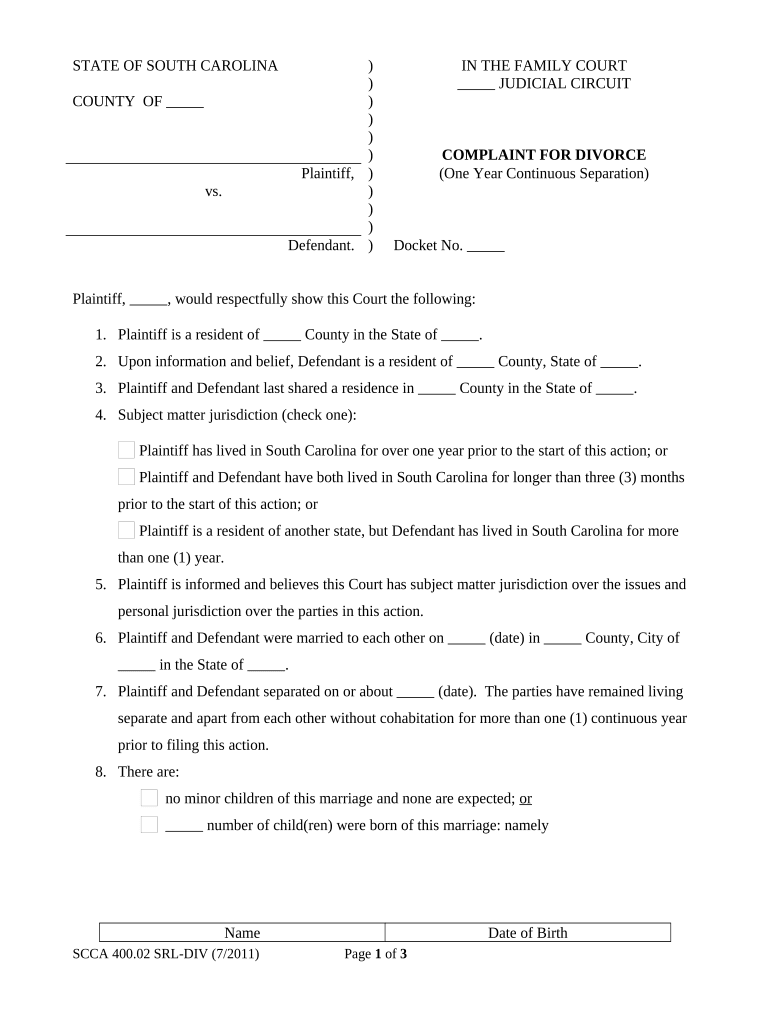
What a South Carolina divorce filing is and why it matters
Why accurate completion matters for outcomes and enforceability
Accurate, complete divorce filings reduce delays, lower the risk of contested procedural challenges, and help the court evaluate custody, support, and property issues promptly. Given family law exclusions under some e-signature frameworks, careful attention to signature method, service of process, and court rules preserves enforceability and avoids rejected filings.

Who typically prepares and handles South Carolina divorce documents
Parties and professionals with different roles complete and manage divorce paperwork in South Carolina.
- Petitioners and respondents — Individuals file petitions, respond to pleadings, and provide sworn statements.
- Family law attorneys — Prepare pleadings, negotiate settlements, and coordinate service and hearing logistics.
- Court clerks and family court judges — Review filings for jurisdictional compliance and enter interim and final orders.
Each party must follow local court rules for filing format, service, and signature authentication to avoid procedural rejection or delays.
Core steps to prepare and file a divorce in South Carolina
-
01Draft petition: Complete the complaint/petition with parties, grounds, and relief requested.
-
02Serve papers: Arrange lawful service of process on the respondent per court rules.
-
03Temporary orders: Request temporary custody, support, or restraining orders if needed.
-
04Final hearing: Resolve contested issues at hearing or enter a signed settlement decree.
Where filings go and how documents are routed in the divorce process
-
Prepare filing: Assemble petition, summons, and supporting affidavits.
-
File with court: Submit at the county family court clerk or via the court's e-filing system if available.
-
Service: Provide legally required service of process to the respondent.
-
Court action: Clerk schedules hearings, and judge issues interim or final orders.
Typical eSignature vendor pricing and feature snapshot for divorce paperwork
| signNow | DocuSign | Adobe Sign | PandaDoc | HelloSign | |
|---|---|---|---|---|---|
| Starting Price | $8/user/mo | $15/user/mo | $14/user/mo | $19/user/mo | $15/user/mo |
| Free Trial | Yes, 7-day trial | Varies | Varies | Varies | Varies |
| Bulk Send | Yes | Yes | Yes | Yes | No |
| Audit Trail | Yes | Yes | Yes | Yes | Yes |
| HIPAA Compliant | Yes | Yes | Yes | No | No |
Consequences and legal risks of incorrect or incomplete divorce filings
Common preparation errors that prolong divorce cases
- Omitting full legal names or aliases, which complicates service and identity verification.
- Using informal signature methods when the court or statute requires notarization or in-person verification.
- Failing to attach required financial affidavits and support documentation at filing.
- Not checking county-specific filing rules and e-filing availability before submission.
Practical tips to complete South Carolina divorce paperwork accurately
Who signs and certifies divorce paperwork
Petitioner — Individual
The petitioner signs the initial complaint and any affidavits under oath. Their signature initiates the court action and must be properly authenticated according to court rules to establish jurisdiction and service.
Attorney — Counsel
An attorney signs on behalf of a client when authorized, adds a bar number and contact details, and may file electronically if the court allows attorney e-filing; attorney signatures carry professional responsibility obligations.
How to amend or update divorce documents after filing
Draft amendment:
File motion:
Serve parties:
Schedule hearing:
Receive order:
Update records:
Digital formats, integrations, and technical considerations for electronic documents
Use industry-standard file types and trusted integrations when preparing supporting documents for court review.
- Supported formats: PDF and DOCX are recommended
- Common integrations: Google Workspace, Microsoft 365, NetSuite
- Security: TLS 1.2/1.3 and AES-256 at rest
Frequently asked questions about South Carolina divorce paperwork
-
Can I e-sign a final divorce decree?
Final divorce decrees and some family law court orders are commonly treated as exceptions to routine e-signature acceptance. Federal ESIGN law (15 U.S.C. ch. 96) and state UETA frameworks preserve electronic signatures generally, but many courts require in-person signatures, notarization, or judicial approval for final family law orders. Check the local family court rules before relying on e-signatures for final decrees.
-
Is notarization required for divorce affidavits?
Some supporting affidavits and sworn financial statements must be notarized or signed under penalty of perjury. Whether a notary or witness is required depends on the document type and local rules; verify with the county family court clerk.
-
What if the respondent cannot be located?
When the respondent cannot be located, the petitioner may request alternative service methods prescribed by the court, such as publication or service by certified mail, subject to judicial approval. Follow local rules carefully and obtain court permission before using nonstandard service.
-
Can I file documents electronically with the court?
Many counties provide e-filing portals for family court pleadings; availability varies. Even where e-filing exists, signature and authentication requirements may differ. Confirm e-filing availability and technical specs with the county clerk's office.
-
How do I correct a filed pleading?
File a formal motion to amend or a corrected pleading per local procedure, serve opposing parties, and request a docket entry; do not simply replace the document without court approval.
-
When should I consult an attorney?
Seek counsel if there are contested custody, support, or complex property matters, or if you face procedural issues such as defective service, potential perjury exposure, or unclear jurisdictional questions.