Establishing secure connection…Loading editor…Preparing document…

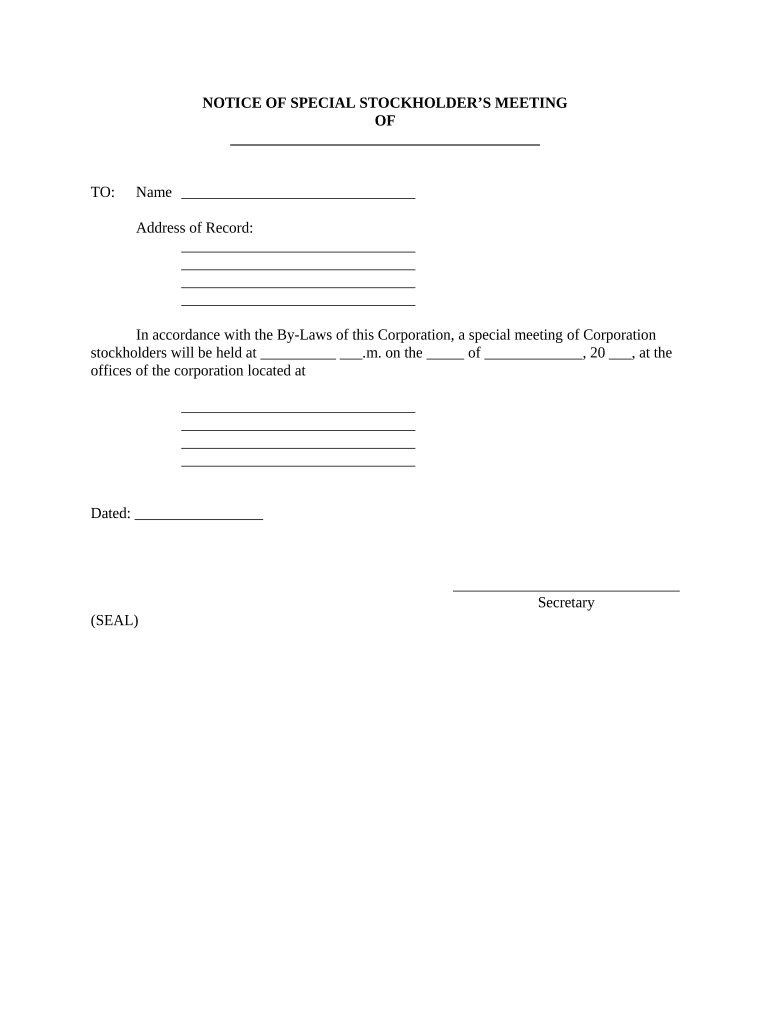
Notice of Special Stockholder’s Meeting

This template is fully customizable. Edit the text, fill out the fields, and send it for signature. Give it a try!
Notice of Special Stockholder’s Meeting

What a Notice of Special Stockholder’s Meeting Is

Notice of Special Stockholder’s Meeting is a formal written announcement used by corporations to inform shareholders that a meeting will occur outside the regular annual schedule to address one or more specific corporate actions. The notice must identify the meeting date, time, physical location or virtual access instructions, the record date for voting eligibility, and the specific proposals or actions shareholders will consider. Preparing the notice requires following corporate bylaws and state corporation law; using electronic delivery and e-signature is governed by federal ESIGN rules and applicable state UETA or ESRA provisions.

Why a Clear and Compliant Notice Matters

A clear Notice of Special Stockholder’s Meeting protects shareholder voting rights, helps satisfy statutory notice requirements under state corporation codes, and supports good corporate governance; compliant electronic delivery can speed distribution while preserving legal effect.

Why a Clear and Compliant Notice Matters

Who Typically Prepares and Sends This Notice

Typical users who prepare or send this notice include corporate secretaries, boards of directors, and legal counsel for the issuing company.

  • Corporate secretary or corporate governance officer responsible for meeting logistics and compliance.
  • Board members initiating a special meeting to approve mergers, charter amendments, or other significant actions.
  • Outside counsel advising on notice sufficiency, proxy rules, and state corporate law compliance.

Step-by-Step: Preparing and Issuing the Notice

Follow this step-by-step process to prepare and issue a Notice of Special Stockholder’s Meeting accurately and on time.

  • 01
    Prepare Agenda: List specific proposals, rationale, and any supporting materials for shareholder review.
  • 02
    Set Record Date: Confirm state law and bylaws to determine voting eligibility date.
  • 03
    Draft Notice: Include date, time, location/virtual access, record date, and proxy instructions.
  • 04
    Deliver Notice: Send by required method within statutory notice period and retain proof.

Configuring an Electronic Distribution Workflow

Configure your digital workflow to meet notice requirements and corporate governance standards before distributing the notice to shareholders.

Field Configuration
Authentication Method Email link, SMS code, or knowledge-based authentication
Delivery Method Email, postal mail, or RON where permitted
Reminder Schedule Custom reminders at predetermined intervals
Proxy Attachment Attach proxy form as PDF to the notice

Platform Capabilities to Confirm Before Sending

Before e-delivering notices, verify your eSignature platform supports secure distribution, signer consent capture, and detailed audit records suitable for corporate governance.

  • File Types: PDF and DOCX supported
  • Integrations: CRM and cloud storage integrations available
  • Access Controls: Role-based permissions and SSO

How Electronic Notice Distribution Typically Works

Typical workflow for issuing, distributing, and collecting signed Notices of Special Stockholder’s Meeting electronically is outlined below.

  • Draft Notice: Assemble agenda, date, record date, and proxy form.
  • Add Recipients: Upload shareholder list and designate delivery preferences.
  • Send Electronically: Use compliant e-delivery methods with consent logged.
  • Archive Records: Store signed notices and audit trail for retention.

Six Essential Elements to Include in the Notice

A professional Notice of Special Stockholder’s Meeting clearly communicates governance information, voting mechanics, and distribution details so shareholders can make informed decisions.

Purpose

Describe the specific corporate action(s) to be considered, such as mergers, charter amendments, or director changes, with sufficient detail so shareholders understand the matter to be voted on and can assess impact.
Agenda

List each proposal as a discrete agenda item and include any explanatory materials or references to attached exhibits so voters see the full scope of matters presented for approval.

Record Date

State the record date used to determine shareholders entitled to notice and voting; indicate the method for confirming share ownership and any transfer agent contact details.

Voting Instructions

Provide clear voting methods—by proxy, in person, or electronically—including deadlines, acceptable submission formats, and how votes will be tabulated and certified.

Proxy Details

Attach or describe the proxy form and any deadlines for proxy submission; include information on appointing proxies and procedures for revocation or amendment of proxies.

Delivery & Access

Specify delivery method (mail, email, RON link), virtual meeting access details if remote, accessibility accommodations, and contact information for questions or technical assistance.

Supporting Documents and Practical Additions

Include supporting materials that shareholders commonly expect with a special meeting notice to reduce follow-up requests and compliance risk.

Exhibits

Attach any proposed amended charter, merger agreement, or financial exhibits so that shareholders receive the operative documents they will be asked to approve.

Contact Info

Provide a named contact, phone number, and email for questions about meeting logistics, proxy procedures, and document access to minimize confusion and facilitate responses.

Accessibility

Note accommodations for shareholders with disabilities, language assistance, and remote-access support to ensure full participation rights are practical.

Recordkeeping

State how signed notices, proxies, and audit trails will be retained and how shareholders may obtain copies of meeting results.

Real-World Examples from Companies That Digitize Notices

Case examples show how organizations moved to digital notices and collected signatures while preserving compliance and security.

Optica Ventures LLC — Brian Fitzgibbons, COO

Optica Ventures shifted routine shareholder communications to an electronic workflow to reduce turnaround time and improve clarity for recipients.

  • "The interface is simple and easy-to-use for our team; more importantly, it is just as easy for our customers."
  • The streamlined digital approach reduced mailing delays and improved response rates while keeping the required audit trail and record copies for governance review.

Martin Properties — Tim Martin, Founder

A real estate operator standardized its special meeting notices and proxy collection using online delivery and archiving.

  • "I can process and execute all of these documents online with 100% compliance and built-in security."
  • The centralized digital process simplified tracking, allowed secure remote voting, and ensured consistent record retention across jurisdictions.

Typical Professionals Involved

Corporate Secretary

The corporate secretary coordinates meeting logistics, prepares the notice, ensures adherence to bylaws and state law, maintains the shareholder ledger, and preserves proof of delivery and signatures for governance and audit purposes.

Outside Counsel

Outside counsel reviews notice language for legal sufficiency, advises on proxy disclosures and regulatory filings for public entities, and helps manage shareholder challenges or procedural disputes that may arise after notice distribution.

Security and Compliance Features to Expect

Encryption in transit: TLS 1.2 / 1.3
Encryption at rest: AES-256
Certifications: ISO 27001, SOC 2 Type II
HIPAA: BAA available for covered use
21 CFR Part 11: Compliant features supported
Legal frameworks: ESIGN and UETA compliance

Key Risks and Potential Consequences

Defective Notice: Meeting or votes may be invalidated
Missed Record Date: Eligible voters may be excluded
Improper Delivery: Claims of lack of notice or due process
Incomplete Proxy: Vote challenges and procedural disputes
Regulatory Filing Error: Fines or supplemental filing obligations
Litigation Risk: Potential shareholder litigation exposure

Common Preparation and Delivery Mistakes to Avoid

  • Using an incorrect record date or outdated shareholder ledger that omits eligible voters and invites post-meeting challenges to validity.
  • Failing to include precise agenda items or attaching incomplete exhibits, which can lead to ambiguity and grounds for vote rescission.
  • Not obtaining or documenting shareholder consent for electronic delivery where required under ESIGN or company bylaws, jeopardizing legal effect.
  • Relying on insufficient authentication for proxy submission, increasing the risk of unauthorized voting or contested vote tallies.

Typical Deadlines and Timing Considerations

Key timelines and statutory expectations related to notice delivery, record date selection, and proxy materials distribution for special stockholder meetings.

Record Date:

Set per bylaws; commonly 10–60 days before meeting

Notice Period:

Check bylaws; common minimums start at 10 days

Proxy Materials:

Distribute proxy form and statement as required for solicitations

SEC Filings (public):

File proxy or solicitation documents with SEC where applicable

Proof of Delivery:

Retain delivery receipts, emails, and audit trails

Milestones From Call to Close for a Special Meeting

Sequential milestones from board approval through meeting conclusion should be tracked and documented.

01

Board Resolution

Board approves calling the special meeting and its agenda.

02

Set Record Date

Determine shareholder eligibility date in accordance with bylaws.

03

Serve Notice

Deliver notice by required methods within statutory period.

04

Hold Meeting

Conduct meeting, collect votes, and document results.

How This Notice Differs from Related Corporate Documents

A quick comparison clarifies when to use a special meeting notice versus annual notices, proxy statements, or written consent procedures.

Document Type Notice of Special Stockholder’s Meeting Annual Meeting Notice Proxy Statement Written Consent
When used ad hoc matters regular annual business solicit proxy votes action without meeting
Delivery requirement per bylaws/state per bylaws/state sec rules for public per bylaws/state
Filing obligation depends (private/public) depends (private/public) sec filing if public depends
Voting method in-person or proxy in-person or proxy proxy voting written consent

eSignature Pricing and Feature Snapshot for Meeting Notices

Comparison of common eSignature plans and key features relevant to distributing and collecting signed notices for corporate meetings.

signNow DocuSign Adobe Sign PandaDoc HelloSign
Starting Price $8/user/mo $15/user/mo $14/user/mo $19/user/mo $15/user/mo
Free Trial 7-day free trial Free trial available Free trial available Free trial available Free trial available
Bulk Send Yes Yes Yes Yes No
Audit Trail Yes Yes Yes Yes Yes
HIPAA Compliant Yes Yes Yes No No
Envelope Cap No cap 100 envelopes/user/year Varies Varies Varies

Frequently Asked Questions About Notices of Special Stockholder’s Meetings

Answers to common questions about preparing, serving, and validating a Notice of Special Stockholder’s Meeting are below.


Need help? Contact support

be ready to get more
Join over 28 million airSlate SignNow users