Establishing secure connection…Loading editor…Preparing document…

Temporary Restraining Order

This template is fully customizable. Edit the text, fill out the fields, and send it for signature. Give it a try!
Temporary Restraining Order

What a Temporary Restraining Order Is

A Temporary Restraining Order (TRO) is a short-term court order issued to prevent threatened or ongoing harm until a full hearing can be held. TROs typically impose immediate limitations or prohibitions on a respondent's behavior, preserve the status quo, and schedule a hearing for longer-term relief.

Why a TRO Matters in Urgent Disputes

A TRO provides immediate legal protection when imminent harm is alleged and a full hearing cannot wait; it can stop harassment, prevent property loss, or preserve assets while the court sets a hearing.

Why a TRO Matters in Urgent Disputes

Who Completes a Temporary Restraining Order and Why

People and organizations use TROs when immediate court-ordered protection is needed and there is insufficient time for a full adversary hearing.

  • Individuals seeking immediate protection from harassment, threats, or abuse.
  • Family law attorneys initiating emergency orders for clients in danger.
  • Civil litigants or businesses preserving property, assets, or evidence pending a hearing.

Who Can Sign or Authorize a TRO

Petitioner — Individual

The petitioner (or an authorized attorney) completes and signs the TRO petition or affidavit describing facts and danger. The petitioner's sworn statement must accurately describe recent acts or credible threats to establish immediate need for protection.

Judge or Clerk

A judge or authorized court official signs and issues the TRO. The court's signature makes the order enforceable; clerks file and provide the official stamped order used for service and law enforcement compliance.

Core Sections Found in a Professional TRO

A well-structured Temporary Restraining Order includes standardized sections so courts can review and enforce emergency relief efficiently across jurisdictions.

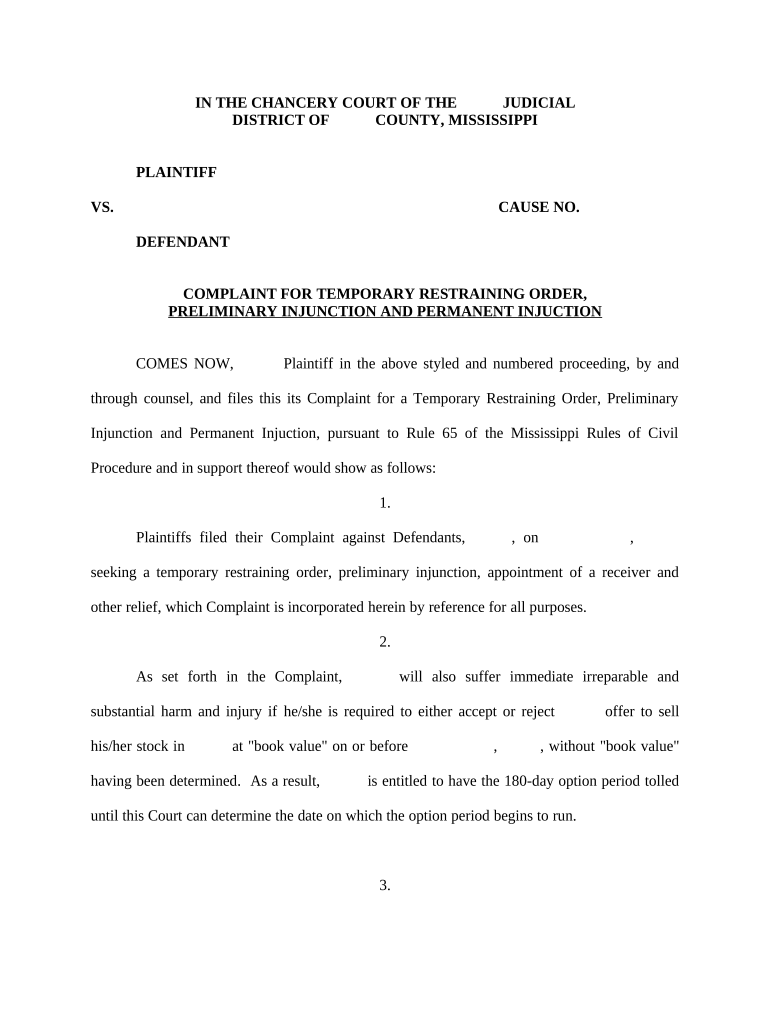
Case Caption

Court name, case number, and party names placed at the top of the document so the order is tied to a specific proceeding and easily located in court files and electronic records.
Parties Identified

Clear identification of petitioner and respondent with full legal names, addresses, and contact details; precise naming avoids misdirected service and ensures enforceability against the correct person.

Statement of Facts

A concise sworn affidavit describing recent acts, threats, dates, times, and witnesses that demonstrate immediate risk—this evidentiary summary supports the court's ex parte decision.

Relief Requested

Specific prohibitions and affirmative requirements (stay-away, no contact, vacate residence, or asset preservation) with detailed geographic or operational limits to avoid ambiguity.

Duration and Hearing

The TRO's effective date, expiration date or condition (e.g., until hearing), and scheduled return hearing details so parties know when the court will review longer-term injunctive relief.

Signature and Verification

Signature lines for petitioner and judicial signature block for the issuing judge plus a certificate of service and, where required, notarization or sworn affirmation language.

Step-by-Step: Filing a Temporary Restraining Order

Follow these sequential steps to prepare, file, and pursue a TRO; local court rules determine exact filing and service mechanics.

  • 01
    Prepare Petition: Complete TRO form and supporting affidavit with clear facts and requested relief.
  • 02
    File with Court: Submit petition to the appropriate court clerk for emergency ex parte review or standard filing.
  • 03
    Serve Respondent: Arrange personal service after issuance; follow local rules for who may serve and acceptable methods.
  • 04
    Attend Hearing: Appear at the scheduled hearing to present evidence and argue for continued relief or dismissal.

How the TRO Order Flows Through the Court System

A TRO becomes effective once signed by the court and properly served; these four steps summarize the typical court processing path toward a full hearing.

  • Court Review: Judge reviews petition and affidavit for immediate risk and legal sufficiency.
  • Order Issued: Court signs the TRO and clerk stamps the official order for distribution.
  • Service to Respondent: Process server or authorized person effects personal service with proof filed in court.
  • Law Enforcement Notice: Served order is used by police for enforcement and to prevent violations.

Configuring an Online TRO Workflow

If you digitize the TRO filing package, standardize fields and authentication to match court evidentiary requirements and produce a court-ready PDF with audit records.

Field Configuration
Authentication Method Email link or SMS code; stronger options include multi-factor or identity verification.
Signature Type Electronic signature with audit trail; notarized signatures require RON or in-person notarization when needed.
Export Package PDF/A with embedded audit trail and signer certificate for court submission.
Retention Policy Store executed package and audit trail for the retention period required by law.

Digital Tools and File Standards for eFiling TROs

Use platforms that produce tamper-evident PDFs, capture a detailed audit trail, and support the authentication method courts require.

  • File Formats: PDF, PDF/A for archival
  • Integrations: Court e-filing systems and case management
  • Authentication: Email, SMS code, or identity verification

Penalties and Risks from Incomplete or Incorrect TROs

Service Failure: Order not enforced
Contempt Risk: Civil or criminal penalties
Perjury Exposure: False statements invite charges
Order Vacatur: Relief may be rescinded
Evidence Loss: Insufficient support weakens case
Delay in Relief: Filing errors postpone hearing

Common Mistakes When Preparing a TRO

  • Naming the wrong respondent or using an alias that prevents valid service and enforcement.
  • Providing vague or speculative facts rather than specific recent incidents with dates and witnesses.
  • Failing to include or file proof of service, which can render the order unenforceable.
  • Not checking or following local court rules for ex parte procedures and required supporting documents.

Practical Tips for Accurate and Efficient TRO Completion

Adopt consistent practices to minimize risk and speed the court's review; organize evidence and follow local filing rules.

Use Clear Facts
Present chronological, concrete incidents with dates and witnesses; avoid speculation and summarize only verifiable events to strengthen urgency claims.
Attach Evidence
Include photos, messages, police reports, or medical records as exhibits to corroborate the affidavit and support immediate relief.
Follow Local Rules
Confirm court-specific ex parte procedures, required forms, and filing hours to prevent administrative rejection or delay.
Confirm Service
Plan for timely personal service and obtain a signed proof of service to file with the court immediately after the respondent is served.

Downloading, Saving, and Supporting Documents

After the order is signed, produce a court-ready package and retain copies in formats acceptable for filing and long-term storage.

Download Options

Export executed TROs as PDF/A for archival and as a standard PDF for sharing with law enforcement and counsel; include the audit trail as a separate attachment.

File Formats

Use PDF/A for court archives, PDF for everyday use, and preserve a machine-readable copy if the e-filing system requires it.

Audit Trail

Keep a tamper-evident audit report showing signer identity, timestamps, IP addresses, and actions for evidentiary support in court.

Supporting Documents

Attach sworn affidavits, exhibits, proof of service, and any protective orders or prior cases that substantiate the emergency request.

Real-World TRO Use Cases

These anonymized scenarios illustrate common circumstances where courts grant temporary restraining orders and how petitioners structure applications.

Family Protection Example

A petitioner documents repeated threats and a recent escalating incident with dates and police reports

  • The court issues an ex parte TRO for immediate no-contact relief
  • At the return hearing the petitioner presents witnesses and records to seek an extended injunction.

Workplace Safety Example

A business submits contemporaneous HR incident reports and security video timestamps showing vandalism threats

  • Court grants a short-term order preventing contact and access to facilities
  • Employer uses the TRO to schedule a contested hearing for a longer order.

Typical Timelines and Deadlines for TRO Proceedings

Timeframes vary by jurisdiction; the following items summarize common scheduling and filing deadlines petitioners should expect.

Ex Parte Order Duration:

Often 7–14 days until the return hearing; exact duration varies by state and court rule.

Return Hearing Schedule:

Hearing typically set within 7–21 days after issuance; timing depends on court calendar and urgency.

Service Deadline:

Serve respondent before the return hearing or as required by local rules to preserve enforceability.

Extension or Renewal:

Petitioner may request longer relief at the hearing; renewal procedures and durations vary by statute.

Permanent Injunction Timeline:

If continued relief is sought, the full injunction hearing may follow the TRO within weeks or months depending on discovery needs.

eSignature Vendor Pricing Snapshot for Court Documents

Comparison of common eSignature options used to collect signatures and produce court-ready PDFs; signNow appears first per platform data.

signNow DocuSign Adobe Sign PandaDoc HelloSign
Starting Price $8/user/mo $15/user/mo $14/user/mo $19/user/mo $15/user/mo
Free Trial 7-day free trial Yes Yes Yes Yes
Bulk Send Yes Yes Yes Yes No
Audit Trail Yes Yes Yes Yes Yes
HIPAA Compliant Yes Yes Yes No No

Security, Compliance, and Evidence Standards

In-Transit Encryption: TLS 1.2/1.3 encrypted
At-Rest Encryption: AES-256 protected
Audit Trails: Comprehensive signer records
HIPAA Support: BAA available when required
21 CFR Part 11: Support for regulated workflows
Certifications: SOC 2 Type II and ISO 27001

Frequently Asked Questions About Temporary Restraining Orders

Answers to common TRO questions covering electronic signing, service, hearings, and practical issues petitioners frequently encounter.


Need help? Contact support

be ready to get more
Join over 28 million airSlate SignNow users