Establishing secure connection… Loading editor… Preparing document…
Navigation

Fill and Sign there Are Different Procedures for a Forcible Entry and Detainer Form
Fill and Sign there Are Different Procedures for a Forcible Entry and Detainer Form

How it works

Open the document and fill out all its fields.
Apply your legally-binding eSignature.
Save and invite other recipients to sign it.

Rate template

4.4
41 votes
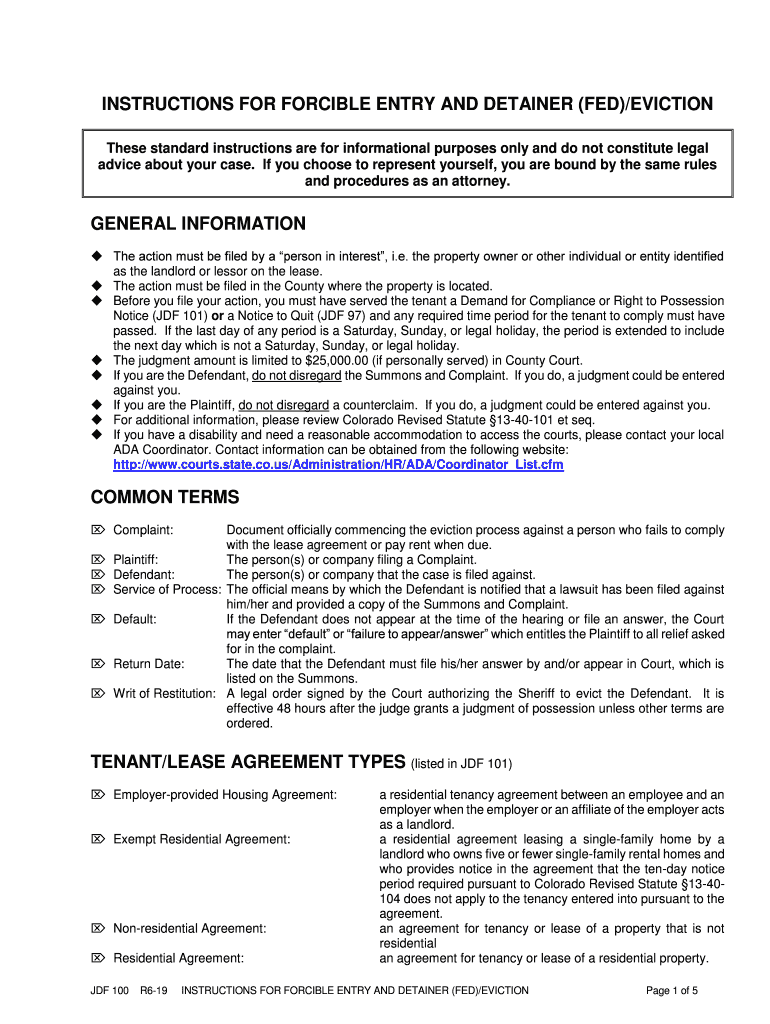
JDF 100 R6-19 INSTRUCTIONS FOR FORCIBLE ENTRY AND DETAINER (FED)/EVICTION Page 1 of 5 INSTRUCTIONS FOR FORCIBLE ENTRY AND DETAINER (FED)/EVICTION These standard instructions are for informational purposes only and do not constitute legal advice about your case. If you choose to represent yourself, you are bound by the same rules and proc edures as an attorney. GENERAL INFORMATION ◆ The action must be filed by a “person in interest”, i.e. the property owner or other individual or entity identified as the landlord or lessor on the lease. ◆ The action must be filed in the County where the property is located. ◆ Before you file your action, y ou must have served the tenant a Demand for Compliance or Right to Possession Notice (JDF 101) or a Notice to Quit (JDF 97) and any required time period for the tenant to comply must have passed. If the last day of any period is a Saturday, Sunday, or legal holiday, the period is extended to include the next day which is not a Saturday, Sunday, or legal holiday. ◆ The judgment amount is limited to $ 25,000.00 (if personally served) in County Court . ◆ If you ar e the Defendant , do not disregard the Summons and Complaint. If you do, a judgment could be entered against you. ◆ If you are the Plaintiff , do not disregard a counterclaim. If you do, a judgment could be entered against you. ◆ For additional information, please review Colorado Revised Statute §13 -40 -101 et seq. ◆ If you have a disability and need a reasonable accommodation to access the courts, please contact your local ADA Coordinator. Contact information can be obtained from the following website: http://www.courts.state.co.us/Administration/HR/ADA/Coordinator_List.cfm COMMON TERMS  Complaint: Document officially commencing the eviction process against a person who fails to comply with the lease agreement or pay rent when due.  Plaintiff: The person(s) or company filing a Complaint.  Defendant: The person(s) or company that the case is filed against.  Service of Process: The official means by which the Defendant is no tified that a lawsuit has been filed against him/her and provided a copy of the Summons and Complaint.  Default: If the Defendant does not appear at the time of the hearing or file an answer, the Court may enter “default” or “failure to appear/answer” whic h entitles the Plaintiff to all relief asked for in the complaint.  Return Date: The date that the Defendant must file his/her answer by and/or appear in Court, which is listed on the Summons.  Writ of Restitution: A legal order signed by the Court authori zing the Sheriff to evict the Defendant. It is effective 48 hours after the judge grants a judgment of possession unless other terms are ordered. TENANT/LEASE AGREEMEN T TYPES (listed in JDF 101)  Employer -provided Housing Agreement: a residential tenancy agreement between an employee and an employer when the employer or an affiliate of the employer acts as a landlord.  Exempt Residential Agreement: a residential agree ment leasing a single -family home by a landlord who owns five or fewer single -family rental homes and who provides notice in the agreement that the ten -day notice period required pursuant to Colorado Revised Statute §13 -40 - 104 does not apply to the tenancy entered into pursuant to the agreement.  Non -residential Agreement: an agreement for tenancy or lease of a property that is not residential  Residential Agreement: an agreement for tenancy or lease of a residential property. JDF 100 R6-19 INSTRUCTIONS FOR FORCIBLE ENTRY AND DETAINER (FED)/EVICTION Page 2 of 5 If you do not understand this information, please contact an attorney . FEES The filing fee is $ 85, if y our claim is for possession only an d or your money claim is for less tha n $1000 . If your claim is in excess of $1000 please refer to the cha rt on page 2 of these instructions. . If you are unable to pay , you must complete the Motion to File without Payment and Supporting Financial Affidavit (JDF 205) and submit it to the Court. Once you submit the completed JDF 205 form and a blank Order (JDF 206), the Court will decide if you nee d to pay the filing fee. Other fees that a party to the case may encounter are as follows: Claim Amount (Plaintiff, Petitioner) Filing Fee Less than $1,000 $85 $1,000 up to $15,000 $105 $15,000 up to $25,000 $135 Third Party Plaint iff Intervenor, Party filing answer With cross claim or counter claim Less than $1,000 $84 $1,000 up to $15,000 $104 $15,000 up to $25,000 $134 Defendant, Respondent, Third Party Defendant Other party NOT filing cross claim or counter claim Less than $1,000 $80 $1,000 up to $15,000 $100 $15,000 up to $25,000 $130 ❑ Jury Demand Fee $ 98 .00 ❑ Copies of Documents (Documents on file) $ .75 per page or $1.50 if double -sided ❑ Copies of Documents (Documents not on file) $ .25 per page or $.50 if double -sided ❑ Service Fees Varies (Not p ayable through or to the Court.) FORMS To access a form online go to www.courts.state.co.us and click on the “ Self Help/ Forms” tab , select “All Court Forms and Instructions” and then select “ Evictions and Forec losures” . The packet/forms are available in PDF or WORD by selecting “County Civil – Eviction (FED)” . You may complete a form online and print or you may print it and type or pri nt legibly in black ink. Read these instructions carefully to determine what forms you may need. ❑ CRCCP Form 1A Summons in Forcible Entry and Unlawful Detainer ❑ CRCCP Form 3 Answer Under Simplified Civil Procedure ❑ JDF 97 Notice to Quit ❑ JDF 98 Affidavit of Service ❑ JDF 99 Complaint in Forcible Entry and Detainer ❑ JDF 1 01 Demand for Compliance or Right to Possession Notice ❑ JDF 102 Stipulation for Forcible Entry & Detainer (FED)/Eviction ❑ JDF 103 Writ of Restitution ❑ JDF 104 Moti on for Entry of Judgment ❑ JDF 106 Order re: Stipulation ❑ JDF 107 Order for Entry of Judgment JDF 100 R6-19 INSTRUCTIONS FOR FORCIBLE ENTRY AND DETAINER (FED)/EVICTION Page 3 of 5 STEPS TO FILING YOUR CASE Step 1: You have already completed and posted the Demand for Compliance or Right to Possession Notice (JDF 101) or Notice to Quit (JDF 97 ) and the time for the tenant to comply has passed. If this has not b een completed , do not proceed to Step 2. Step 2: Complete Initial Forms. The caption area below needs to be completed on all forms filed. Keep a copy of each form for your own re cords and make a copy to provide to the other party. County Court__________ ______________ County, Colorado Court Address: Plaintiff(s): (print your name here) v. Defendant(s): (print name here) COURT USE ONLY Attorney or Party Without Attorn ey (Name and Address): (Print your name and address here if you are represen ting yourself.) Phone Number: E -mail: FAX Number: Atty. Reg. #: Case Number: Division Court room NAME OF FORM ❑ Complaint in Forcible Entry and Detainer (JDF 99). ❑ You are the Plaintiff and the person(s) you are evicting is/are the Defendant(s). ❑ Fill in all the blanks and c omplete all necessary information on the Complaint form. ❑ If you are fil ing against multiple Defendants in the same action, list all of the Defendant s. ❑ Make sure you have the appropriate number of copies of all documents for the Court and the Defendant(s). ❑ You may f ile a copy of the lease or rental agreement with the Court if a written lease or rental agreement was made , check with the court where you are filing for specific filing requirements . Please mark as Exhibit “A” if available. The lease or rental agreement must be served to the Defendant(s) with the Complaint . ❑ File with the Court a copy of the Demand for Compliance or Right to Possession Not ice or Notice to Quit . Please mark as Exhibit “B”. A copy of this notice , which has already been served to the Defendant(s) , must be attached to the Complaint . ❑ Summons in Forc ible Entry and Unlawful Detainer (CRCCP Form 1A) and Answer under Simplified Civil Procedure (CRCCP Form 3). ❑ Complete the upper portion ( caption only) on the Summons and Answer. ❑ The Court will provide you with a case number, division, and courtroom whe n you file your case. When you receive this information , enter it on both fo rms. In addition, enter the case number on the upper portion of the return of service, so that the Court can match this document to the appropriate case when filed back with the Court. ❑ The Clerk will complete the appropriate fields on the Summons (CRCCP 1 A) with Court location, date, and time. ❑ You must provide additional copies to serve the Defendant(s). Step 3: You are ready to file your case with the Court . ❑ Provide the Court with the completed forms and exhibit as described in Steps 1 - 2 above . ❑ Pay the filing fee. Step 4: When the case is filed, the Clerk will set your case for a Court date . This Court date is the date you will return to Court for a trial setting, agree ment , or judgment may be entered . JDF 100 R6-19 INSTRUCTIONS FOR FORCIBLE ENTRY AND DETAINER (FED)/EVICTION Page 4 of 5 ❑ The Clerk will complete the appropriate fi elds on the Summons (CRCCP 1A) with the Court location, date, and time. ❑ The Court date will be set between 7 to 14 days from the date of issuance of the Summons .( §13 -40 -111(1) ) ❑ You must provide the necessary forms and attach the appropriate exhibits to serve the Defendant(s). Step 5: You are ready to have the Defendant(s) served. You are responsible for paying the service fees, if any. Personal service or service by posti ng and mail must be completed at least 7 day s before the day for appearance s pecified in the Summons. Complete the following process based on the type of service selected: If the person doing your service cannot serve the Defendant(s) personally, the pa pers should be posted on the door to the main entrance of the dwelling or oth er conspicuous place upon the premises. The Court will only award you possession and not money damages if you post and mail the Summons and Complaint . A monetary award may be gr anted only if there has been personal service of process on the Defendant(s). Personal Service: Select either the Sheriff’s Department, a private process server, or someone you know who is 18 years or older and not a party to the action and who knows t he rules of service to serve the Defendant. There is a service fee that is pa yable to the Sheriff’s Department or Private Process Server. The fee for service is usually awarded as part of your court costs if the court rules in your favor. ❑ Provide the proc ess server with the Affidavit of Service (JDF 98) for each Defendant and two sets of the Summons, Complaint , and Answer forms. In addition, attach all appropriate exhibits as described in Step 2. ❑ The process server will return the original Summons to you w ith the Affidavit of Service completed. ❑ Each Defendant must be served at lea st 7 days before the day for appearance specified in the Summons. Service by Posting and Mailing: ❑ If personal service cannot be made upon the Defendant(s), the person completing service, i.e. process server or Sheriff’s Department, must post the papers o n the door to the main entrance or other conspicuous place upon the premises. ❑ No later than the day following the day you file the Complaint with the Court, you must mail a copy o f the Summons, Complaint, and Answer to the Defendant(s) by postage prepaid, first class mail. (In addition, attach the appropriate exhibits.) ❑ After you have placed the forms in the mail, complete the certificate of mailing. The certificate of mailing is included on the Summons (CRCCP Form 1A). The purpose of completing the certifi cate of mailing is to provide proof that you did mail the Summons, Complaint and Answer to the Defendant(s) by postage pre - paid, first class mail. Step 6: Service is complete. File the original Summons and Affidavit(s) of Service with the Clerk on or b efore the date you are to appear in Court. FIRST APPEARANCE It is important that you are on time or early for your Return Date and that you have all of your information with y ou. Please turn off your cell phone and respect all parties in the courtroom . You may be asked to speak to the other party on the Return Date to determine if the claim can be settled to avoid going to trial . ❑ If the Plaintiff(s) and Defendant(s) appear on the Return Date , one of the following situations can occur: 1. The Defendant (s) can agree to vacate the premises or the parties can agree to certain conditions that enable the Defendant(s) to remain in the property . An agreement can be made to the amount of money owed and a payment plan can be put in place. The agreement, called a “stipulation,” must be put in writing JDF 100 R6-19 INSTRUCTIONS FOR FORCIBLE ENTRY AND DETAINER (FED)/EVICTION Page 5 of 5 on the court form titled “Stipulation in Forcible Entry and Detainer” (JDF 102). The stipulation must be filed with, and approved by, the court. A Stipulation form (JDF 102) may be purchased from the clerk’s office or you may bring one with you to Court. The Plaintiff(s) does not have to agree to the filing of the Stipulation if they want the Defendant(s) off the property. ❑ If a stipulati on is reached, an Order re: Stipulation (JDF 106) must be filed with the Cour t with the Stipulation . Complete the caption only on the form. The Court will complete the remaining sections on the form and give you a signed copy. 2. With approval of the cou rt, t he Plaintiff(s) can continue the return date, if the Plaintiff(s) feel t hat further discussion with the Defendant(s) is/are required or, if the Defendant(s) is/are given another opportunity to fulfill a pre -arranged agreement. 3. The Defendant(s) file an Answer . A Possession Hearing and/or a Court Trial regarding money issues will be set. ❑ If the Defendant(s) do not appear or do not timely file an Answer and Steps 1 - 6 have been completed properly. The Court may award possession and/or, if personal s ervice was obtained, monetary judgment to the Plaintiff(s). DEFENDANT FILES AN ANSWER OR ANSWER AND COUNTERCLAIM Unless the Court has approved a written stipulation of the parties, the Defendant must file an answer, in writing, with the appropriate filing fee , on or before the Return Date set in the Summons. The purpose of the answer is for the Defendant(s) to respond to the allegations in the Complaint. The Defendant may also file a counterclaim with the answer. If the Defendant requests a jury trial, an additional fee will be required for the jury fee. See the Fees section ab ove for more information. The Court will determine if the issue of possession is to be determined by a jury in the event of a jury demand. The Defendant may apply to the Court fo r a waiver of the filing fees due to indigency by filing a Motion to File wit hout Payment and Supporting Financial Affidavit ( JDF 205 ). If, in the answer, the Defendant asserts a defense to the Plaintiff’s request for possession of the property, the cas e will be set for a possession hearing. The possession hearing may address o nly the issue of possession and reserve other matters including any counterclaim for a later trial or all matters may be tried together JUDGMENT INFORMATION The Court cannot col lect your monetary judgment for you but can give you information regarding th e necessary collection forms. Check with the local clerk’s office to determine whether the following forms are required by the Court where you are filing. Then, c omplete the appr opriate forms based on the judgment awarded. ❑ Possession Judgment: ❑ Complete t he Motion for Entry of Judgment (JDF 104) . ❑ Complete the caption and include the property address (2nd check box) on the Order for Entry of Judgment (JDF 107). ❑ The Court will rev iew the Motion and upon approval will complete the Order (JDF 107) and give y ou a signed copy. ❑ If the Defendant (s) have not vacated the property within 48 hours from the date of judgment, complete the caption only on the Writ of Restitution (JDF 103) and provide to the Court for issuance . ❑ Once the Writ is issued, it is the oblig ation of the Plaintiff(s) to contact the Sheriff’s Office for the execution of the Writ. ❑ Monetary Judgment: ❑ If you obtained personal service on the Defendant(s), the Motion for Entry of Judgment (JDF 104) may request a money judgment. The Motion also as ks for court costs and the process fee for service of the Summons. Interest and attorney fees are not normally awarded on evictions filed without an attorney. ❑ Complete the captio n only on the Order for Entry of Judgment with Issuance of Interrogatories (J DF 107). The Court will complete the remaining sections on the form. JDF 100 R6-19 INSTRUCTIONS FOR FORCIBLE ENTRY AND DETAINER (FED)/EVICTION Page 6 of 5 Additional collection information entitled “Instructions for Collecting a Judgment and Completing a Writ of Garnishment” (JDF 82) is available on the state judicial website, www.courts.state.co.us . Select the “Self Help/ Forms ” tab , then select “All Court Forms and Instructions”, then select “Garnishments and Judg ments ”.

Useful tips on preparing your ‘There Are Different Procedures For A Forcible Entry And Detainer’ online

Are you fed up with the complications of handling paperwork? Look no further than airSlate SignNow, the premier eSignature solution for individuals and small to medium-sized businesses. Bid farewell to the tedious process of printing and scanning documents. With airSlate SignNow, you can effortlessly finalize and validate paperwork online. Take advantage of the robust features embedded in this intuitive and cost-effective platform and transform your method of handling paperwork. Whether you need to validate forms or gather eSignatures, airSlate SignNow manages it all seamlessly, with just a few clicks.

Follow this detailed guide:

  1. Sign in to your account or sign up for a free trial with our service.
  2. Click +Create to upload a document from your device, cloud storage, or our template library.
  3. Access your ‘There Are Different Procedures For A Forcible Entry And Detainer’ in the editor.
  4. Click Me (Fill Out Now) to complete the form on your behalf.
  5. Add and assign editable fields for other individuals (if necessary).
  6. Continue with the Send Invite settings to request eSignatures from others.
  7. Download, print your version, or convert it into a reusable template.

Don’t fret if you need to work with your colleagues on your There Are Different Procedures For A Forcible Entry And Detainer or send it for notarization—our platform has everything you need to complete those tasks. Create an account with airSlate SignNow today and take your document management to new levels!

Here is a list of the most common customer questions. If you can’t find an answer to your question, please don’t hesitate to reach out to us.

Need help? Contact Support

The best way to complete and sign your there are different procedures for a forcible entry and detainer form


Save time on document management with airSlate SignNow and get your there are different procedures for a forcible entry and detainer form eSigned quickly from anywhere with our fully compliant eSignature tool.

How to Sign a PDF Online How to Sign a PDF Online

How to fill out and sign forms online

Previously, coping with paperwork required pretty much time and effort. But with airSlate SignNow, document management is fast and easy. Our powerful and easy-to-use eSignature solution enables you to easily fill out and eSign your there are different procedures for a forcible entry and detainer form online from any internet-connected device.

Follow the step-by-step guide to eSign your there are different procedures for a forcible entry and detainer form template online:

  • 1.Register for a free trial with airSlate SignNow or log in to your account with password credentials or SSO authorization option.
  • 2.Click Upload or Create and import a form for eSigning from your device, the cloud, or our form collection.
  • 3.Click on the document name to open it in the editor and utilize the left-side toolbar to fill out all the empty areas properly.
  • 4.Drop the My Signature field where you need to approve your sample. Provide your name, draw, or upload an image of your regular signature.
  • 5.Click Save and Close to finish modifying your completed form.

As soon as your there are different procedures for a forcible entry and detainer form template is ready, download it to your device, export it to the cloud, or invite other parties to eSign it. With airSlate SignNow, the eSigning process only takes a few clicks. Use our robust eSignature tool wherever you are to handle your paperwork successfully!


How to Sign a PDF Using Google Chrome How to Sign a PDF Using Google Chrome

How to fill out and sign forms in Google Chrome

Completing and signing paperwork is easy with the airSlate SignNow extension for Google Chrome. Adding it to your browser is a fast and beneficial way to manage your forms online. Sign your there are different procedures for a forcible entry and detainer form sample with a legally-binding eSignature in a few clicks without switching between applications and tabs.

Follow the step-by-step guide to eSign your there are different procedures for a forcible entry and detainer form template in Google Chrome:

  • 1.Go to the Chrome Web Store, find the airSlate SignNow extension for Chrome, and add it to your browser.
  • 2.Right-click on the link to a form you need to approve and choose Open in airSlate SignNow.
  • 3.Log in to your account with your credentials or Google/Facebook sign-in option. If you don’t have one, sign up for a free trial.
  • 4.Use the Edit & Sign menu on the left to fill out your sample, then drag and drop the My Signature option.
  • 5.Upload an image of your handwritten signature, draw it, or simply enter your full name to eSign.
  • 6.Verify all information is correct and click Save and Close to finish modifying your paperwork.

Now, you can save your there are different procedures for a forcible entry and detainer form sample to your device or cloud storage, send the copy to other individuals, or invite them to eSign your document via an email request or a secure Signing Link. The airSlate SignNow extension for Google Chrome enhances your document workflows with minimum effort and time. Try airSlate SignNow today!


How to Sign a PDF in Gmail How to Sign a PDF in Gmail How to Sign a PDF in Gmail

How to fill out and sign documents in Gmail

When you get an email with the there are different procedures for a forcible entry and detainer form for approval, there’s no need to print and scan a file or download and re-upload it to a different tool. There’s a much better solution if you use Gmail. Try the airSlate SignNow add-on to promptly eSign any paperwork right from your inbox.

Follow the step-by-step guide to eSign your there are different procedures for a forcible entry and detainer form in Gmail:

  • 1.Navigate to the Google Workplace Marketplace and locate a airSlate SignNow add-on for Gmail.
  • 2.Set up the program with a related button and grant the tool access to your Google account.
  • 3.Open an email with an attached file that needs signing and use the S symbol on the right panel to launch the add-on.
  • 4.Log in to your airSlate SignNow account. Choose Send to Sign to forward the file to other people for approval or click Upload to open it in the editor.
  • 5.Place the My Signature option where you need to eSign: type, draw, or upload your signature.

This eSigning process saves time and only takes a couple of clicks. Take advantage of the airSlate SignNow add-on for Gmail to adjust your there are different procedures for a forcible entry and detainer form with fillable fields, sign paperwork legally, and invite other parties to eSign them al without leaving your mailbox. Enhance your signature workflows now!


How to Sign a PDF on a Mobile Device How to Sign a PDF on a Mobile Device How to Sign a PDF on a Mobile Device

How to complete and sign forms in a mobile browser

Need to quickly complete and sign your there are different procedures for a forcible entry and detainer form on a smartphone while doing your work on the go? airSlate SignNow can help without needing to install extra software applications. Open our airSlate SignNow solution from any browser on your mobile device and create legally-binding eSignatures on the go, 24/7.

Follow the step-by-step guidelines to eSign your there are different procedures for a forcible entry and detainer form in a browser:

  • 1.Open any browser on your device and follow the link www.signnow.com
  • 2.Create an account with a free trial or log in with your password credentials or SSO option.
  • 3.Click Upload or Create and pick a file that needs to be completed from a cloud, your device, or our form library with ready-made templates.
  • 4.Open the form and fill out the blank fields with tools from Edit & Sign menu on the left.
  • 5.Place the My Signature area to the sample, then enter your name, draw, or add your signature.

In a few easy clicks, your there are different procedures for a forcible entry and detainer form is completed from wherever you are. Once you're done with editing, you can save the document on your device, build a reusable template for it, email it to other individuals, or ask them to eSign it. Make your paperwork on the go prompt and efficient with airSlate SignNow!


How to Sign a PDF on iPhone How to Sign a PDF on iPhone

How to fill out and sign documents on iOS

In today’s business world, tasks must be completed quickly even when you’re away from your computer. Using the airSlate SignNow mobile app, you can organize your paperwork and sign your there are different procedures for a forcible entry and detainer form with a legally-binding eSignature right on your iPhone or iPad. Install it on your device to conclude agreements and manage documents from just about anywhere 24/7.

Follow the step-by-step guidelines to eSign your there are different procedures for a forcible entry and detainer form on iOS devices:

  • 1.Go to the App Store, find the airSlate SignNow app by airSlate, and set it up on your device.
  • 2.Launch the application, tap Create to add a form, and select Myself.
  • 3.Choose Signature at the bottom toolbar and simply draw your autograph with a finger or stylus to eSign the form.
  • 4.Tap Done -> Save right after signing the sample.
  • 5.Tap Save or utilize the Make Template option to re-use this paperwork later on.

This process is so simple your there are different procedures for a forcible entry and detainer form is completed and signed in just a couple of taps. The airSlate SignNow app works in the cloud so all the forms on your mobile device remain in your account and are available whenever you need them. Use airSlate SignNow for iOS to enhance your document management and eSignature workflows!


How to Sign a PDF on Android How to Sign a PDF on Android

How to fill out and sign paperwork on Android

With airSlate SignNow, it’s easy to sign your there are different procedures for a forcible entry and detainer form on the go. Set up its mobile application for Android OS on your device and start improving eSignature workflows right on your smartphone or tablet.

Follow the step-by-step guide to eSign your there are different procedures for a forcible entry and detainer form on Android:

  • 1.Open Google Play, search for the airSlate SignNow app from airSlate, and install it on your device.
  • 2.Sign in to your account or create it with a free trial, then import a file with a ➕ option on the bottom of you screen.
  • 3.Tap on the imported document and choose Open in Editor from the dropdown menu.
  • 4.Tap on Tools tab -> Signature, then draw or type your name to eSign the sample. Fill out blank fields with other tools on the bottom if required.
  • 5.Use the ✔ key, then tap on the Save option to end up with editing.

With a user-friendly interface and full compliance with primary eSignature standards, the airSlate SignNow application is the best tool for signing your there are different procedures for a forcible entry and detainer form. It even works without internet and updates all document modifications once your internet connection is restored and the tool is synced. Complete and eSign forms, send them for approval, and make re-usable templates anytime and from anywhere with airSlate SignNow.

Sign up and try There are different procedures for a forcible entry and detainer form
  • Close deals faster
  • Improve productivity
  • Delight customers
  • Increase revenue
  • Save time & money
  • Reduce payment cycles

