Establishing secure connection…Loading editor…Preparing document…

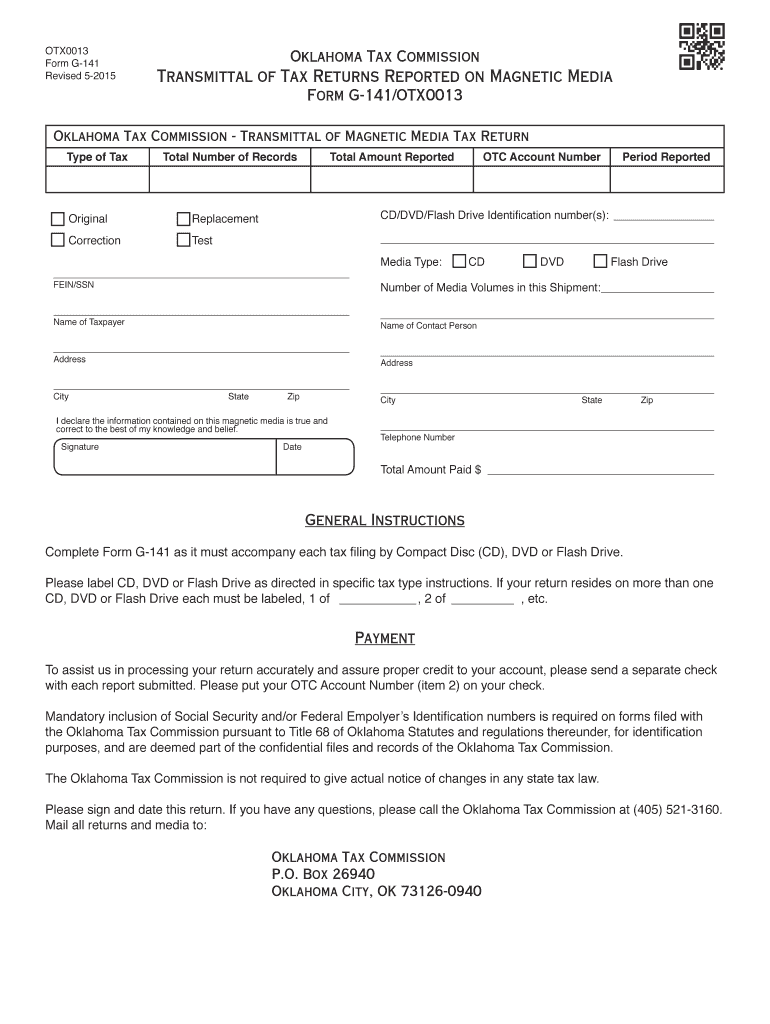
Oklahoma Transmittal of Tax Returns Reported on Magnetic Media

This template is fully customizable. Edit the text, fill out the fields, and send it for signature. Give it a try!
Oklahoma Transmittal of Tax Returns Reported on Magnetic Media

What the Oklahoma Transmittal of Tax Returns Reported on Magnetic Media Covers

The Oklahoma Transmittal of Tax Returns Reported on Magnetic Media is a state-level cover sheet and tracking record used when submitting multiple taxpayer information returns in an electronic/magnetic media format to the Oklahoma Tax Commission. The transmittal identifies the payer, the number and type of returns included, the media format and layout standard, and contact information for technical or filing questions. It ensures the state can match incoming electronic files to the submitting entity, and it documents transmission method, record counts, and the preparer responsible for the submission.

Why a Proper Transmittal Matters for Oklahoma Magnetic Media Filings

A complete transmittal reduces processing delays, helps the Oklahoma Tax Commission reconcile records, and minimizes rejection risk when large batches of returns are delivered on magnetic media or by approved electronic methods. Accurate transmittal data supports timely taxpayer crediting and state matching processes.

Why a Proper Transmittal Matters for Oklahoma Magnetic Media Filings

Who typically prepares and submits the Oklahoma transmittal

Entities that commonly complete the transmittal include payroll processors, accounting firms, large employers, and tax software providers submitting bulk information returns.

  • Payroll service providers preparing year-end 1099/ wage data for many clients.
  • In-house employer payroll departments sending bulk information returns on behalf of the business.
  • Third-party tax preparers and specialist software vendors transmitting formatted magnetic-media files.

Step-by-step: completing the transmittal and preparing files

Follow these steps in order to assemble the transmittal and prepare the magnetic media submission for Oklahoma.

  • 01
    Assemble returns: Compile all information returns according to state record layouts.
  • 02
    Populate transmittal: Complete submitter details, counts, format, and contact fields.
  • 03
    Validate file: Run format and record-count validation before writing media or creating the electronic package.
  • 04
    Transmit and retain proof: Send media via approved method and keep transmission logs and copies.

How to configure an electronic workflow for the transmittal

Standardize your workflow so transmittal fields and file-format checks run automatically before submission.

Field Configuration
Submitter mapping rules Auto-fill legal name and EIN from master account record
Record-count check Fail submission if totals do not match file totals
Format validator Validate fixed-width or CSV layouts against template definition
Retention policy Auto-store copies and audit trail for required retention period

Digital signing and eSubmission considerations

Use a platform that produces tamper-evident audit records and stores transmission receipts; retention and authentication features help demonstrate compliance if questions arise.

  • File formats supported: PDF, CSV, fixed-width
  • Audit trail: Timestamp and signer data
  • Integrations: FTP, SFTP, API

Where and how to submit the transmittal and media

Submission routes depend on the Oklahoma Tax Commission procedures; common paths include secure file transfer, physical media delivery, or accepted API channels.

  • Prepare media: Write validated file to approved media or package for secure transfer
  • Select transmission method: Use state-accepted SFTP, API, or approved courier for physical media
  • Attach transmittal: Include completed transmittal file with the data submission
  • Confirm receipt: Obtain and store the state's transmission acknowledgment

Typical deadlines associated with magnetic media and information returns

Key federal and state deadlines for information returns affect when magnetic media submissions should be delivered and accepted.

1099-NEC recipient and IRS:

Due January 31 to recipients and IRS

1099-MISC recipient:

Recipient copies due January 31

1099-MISC to IRS (paper):

Paper filing due February 28

1099-MISC to IRS (electronic):

Electronic filing due March 31

State variations:

State due dates may mirror federal or require earlier submission

Penalties and compliance risks to be aware of

Late filing penalty: Per-form fines under IRC §6721
Intentional disregard: $660-plus per form, no cap
Incorrect TIN: Triggers backup withholding at 24%
I-9 paperwork: $281–$2,789 per violation
Data breach exposure: HIPAA/CCPA liabilities possible
Rejected media: Re-transmission delays and cost

Essential data elements required on the transmittal

Submitter ID: Legal entity name
Tax Identifier: Federal EIN or SSN
File Format: Declared layout type
Record Counts: Total records and payee records
Contact: Technical contact info
Transmission Date: MM/DD/YYYY

Common mistakes to avoid when preparing the transmittal

  • Mismatched record counts between the transmittal and the media file leading to automatic rejects and reprocessing delays.
  • Incorrect or missing taxpayer identification numbers causing backup withholding or IRS/state correspondence.
  • Using the wrong file layout or failing validation checks before transmission, which can mean manual correction and late filings.
  • Insufficient contact information or missing transmission receipts that delay problem resolution with the Oklahoma Tax Commission.

Example scenarios for magnetic media transmittals

Two representative scenarios show how different organizations approach bulk magnetic media submissions and avoid common pitfalls.

Large Payroll Processor

A regional payroll processor submits thousands of 1099 records for clients on magnetic media to multiple states.

  • They validate layout and totals automatically before media creation.
  • The processor retains transmission logs and standardized transmittal templates to reduce state reconciliation issues and speed error resolution when a state requests clarification.

Multi-Entity Employer

An employer with multiple EINs consolidates returns by payer group for submission.

  • The transmittal lists each EIN and record counts.
  • Centralized contact and pre-submission validation prevented a late-filing penalty after an initial format rejection.

Best practices to improve accuracy and reduce processing time

Adopt repeatable checks and clear ownership to reduce errors and administrative overhead when preparing transmittals.

Standardize templates
Use a validated transmittal template that auto-populates submitter details and enforces format rules to minimize manual entry errors.
Automate validation
Run format, field, and record-count checks as part of your build process; catch problems before media is written or transmitted.
Retain proof
Store transmission acknowledgments, checksum/hash values, and audit trails to support inquiries and potential audits.
Coordinate contacts
Designate a single technical contact for state reconciliation to reduce back-and-forth and speed issue resolution.

eSignature vendor pricing comparison for transmittal workflows

Comparison of common eSignature vendors and basic plan characteristics relevant to document signing and bulk workflows; signNow is listed first per table conventions.

signNow DocuSign Adobe Sign PandaDoc HelloSign
Starting Price $8/user/mo $15/user/mo $14/user/mo $19/user/mo $15/user/mo
Free Trial 7-day free trial Varies Varies Varies Varies
Bulk Send Yes Yes Yes Yes No
Audit Trail Yes Yes Yes Yes Yes
HIPAA Compliant Yes Yes Yes No No

Frequently asked questions about Oklahoma magnetic media transmittals

Answers to common questions about format, deadlines, and error handling when sending information returns to Oklahoma on magnetic media or via approved electronic delivery.


Need help? Contact support

be ready to get more
Join over 28 million airSlate SignNow users