Establishing secure connection…Loading editor…Preparing document…

Trustee Acceptance Form

This template is fully customizable. Edit the text, fill out the fields, and send it for signature. Give it a try!
Trustee Acceptance Form

What a Trustee Acceptance Form Is and When it’s Used

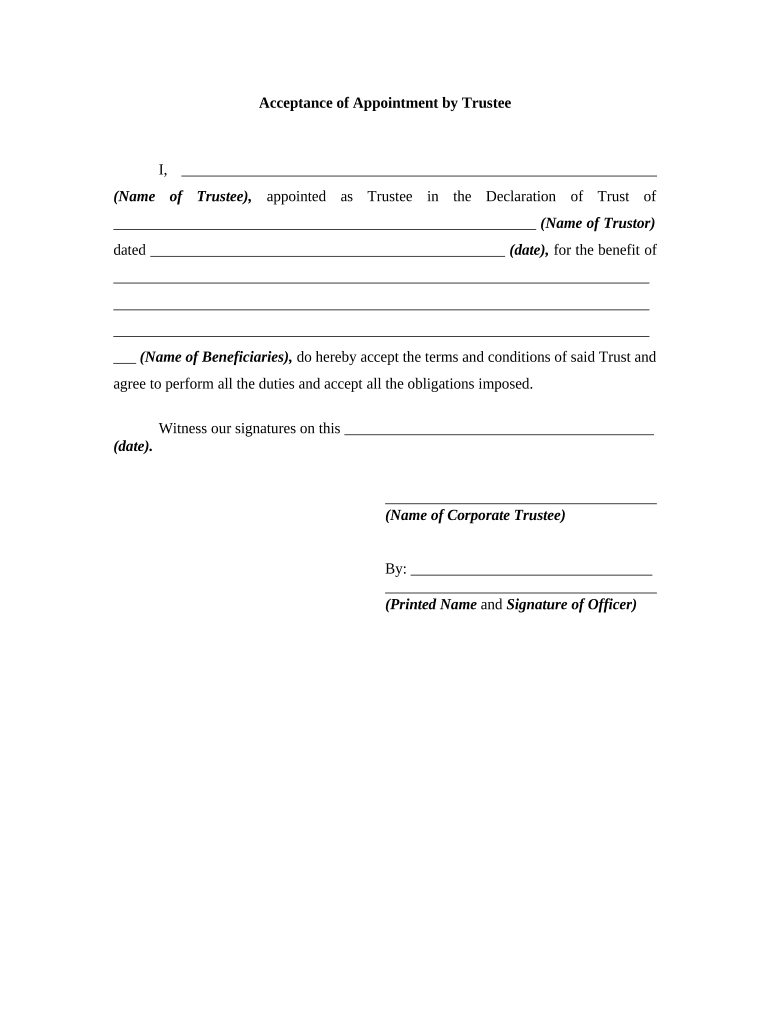
A Trustee Acceptance Form is a written statement by a named trustee acknowledging appointment under a trust and accepting the duties, powers, and fiduciary responsibilities described in the trust instrument. The form typically identifies the trust, the settlor (grantor), the trustee, the effective date of acceptance, any limitations on authority, and the trustee’s signature and date. It may be notarized or witnessed depending on state practice and whether title to real property is involved. The form documents consent and creates a record for trustees, beneficiaries, custodians, and financial institutions.

Why a Clear Acceptance Form Matters

A properly completed Trustee Acceptance Form provides clear evidence that the trustee has assumed fiduciary duties, helps prevent disputes, and supports institutional acceptance of trust assets. It creates an administrative record used by banks, custodians, and courts.

Why a Clear Acceptance Form Matters

Who Typically Completes or Receives This Form

Parties involved in trust administration rely on the Trustee Acceptance Form to verify authority and ensure continuity of asset management.

  • Trustees and co-trustees verifying appointment and duties
  • Trust attorneys and estate administrators preparing trust records
  • Banks, brokerages, and title companies accepting transfers or recording title

Use the form whenever a trustee is appointed or replaces a prior trustee, and provide copies to beneficiaries and financial institutions for their records.

Step-by-Step: Completing and Recording a Trustee Acceptance

Follow these core steps in sequence to finalize acceptance and provide verifiable proof to third parties.

  • 01
    Review Trust: Confirm appointment language and any acceptance conditions.
  • 02
    Complete Form: Fill in trust and trustee details accurately.
  • 03
    Sign and Authenticate: Sign in presence of notary or witnesses as required.
  • 04
    Distribute Copies: Send certified copies to beneficiaries and institutions.

Core Elements a Professional Trustee Acceptance Should Include

A concise, properly formatted acceptance reduces follow-up and supports downstream actions like asset transfers or deed recordings.

Acceptance Statement

Clear language that the named trustee accepts the appointment and agrees to perform fiduciary duties under the trust instrument, citing the trust name and date.
Trust Identification

Full trust title, date of instrument, and any recording reference if the trust owns real property or if the acceptance pertains to a deed.

Trustee Details

Trustee’s full legal name, contact information, and mailing address for notices and recordkeeping.

Powers and Limits

A concise description of powers accepted or expressly declined, drawn from the governing trust provisions to prevent ambiguity.

Execution Details

Signature, printed name, and signature date; space for witness names or notary acknowledgment when required by state or institution.

Delivery Confirmation

A line or checkbox confirming distribution to beneficiaries, successor trustees, or financial institutions, with dates and method of delivery recorded.

Essential Data Points to Record

Trust Name: Exact legal title
Trustee Name: Full legal name
Effective Date: MM/DD/YYYY
Powers: Scope summary
Signature: Signed and dated
Notary: Acknowledgment if required

Typical Processing Flow After Acceptance

After signing, follow a short routing process to complete administrative acceptance and enable asset transfers.

  • Document Execution: Trustee signs and authenticates the document.
  • Verification: Institution reviews identity and authority.
  • Asset Transfer: Accounts or title are reissued to trustee.
  • Recordkeeping: Copies retained by trustee and beneficiaries.

Configuring an Online Acceptance Workflow

Set up fields, notifications, and signer authentication to reduce manual follow-up and ensure a complete record.

Field Configuration
Trust Identification Field Make required; auto-fill from template
Signature Field Require signer authentication and date
Notary Block Include notarization block when needed
Notifications Auto-send copies to beneficiaries

Delivery Formats and Integration Considerations

Choose a platform that supports PDFs, Word DOCX, and audit trails and integrates with your existing systems.

  • File Formats: PDF and DOCX supported
  • Integrations: Salesforce, NetSuite, Google Workspace
  • Authentication: Email, SMS, or advanced methods

Ensure the chosen solution provides retention, export to common formats, and evidence (timestamp, IP, certificate) for institutional acceptance.

Timing Considerations When You Accept Appointment

Timely completion reduces administrative friction and ensures institutions can process transfers without delay.

Sign Promptly:

Execute acceptance as soon as you assume duties

Provide Copies Quickly:

Distribute to beneficiaries and custodians within days

Notary Timing:

Complete notarization at signing if required

Recording Window:

Record deeds promptly when title transfers are involved

Institutional Requirements:

Check each bank or title company for internal deadlines

Key Milestones from Appointment to Asset Transfer

Track these sequential milestones to move from acceptance to operational control and record updates.

01

Appointment Confirmed

Trust instrument triggers appointment and successor trustee designation.

02

Acceptance Executed

Trustee signs acceptance and completes any required notarization or witness steps.

03

Document Delivery

Provide copies to beneficiaries, banks, and title companies for verification.

04

Asset Re-titling

Transfer accounts or record deeds to trustee name as needed.

Common Preparation Mistakes to Avoid

  • Using abbreviated or informal names that do not match the trust instrument or government ID, causing rejection.
  • Failing to notarize or obtain required witness signatures when state law or institutions require them.
  • Omitting a clear effective date, which can complicate the timing of powers and obligations.
  • Not distributing copies to beneficiaries and financial institutions promptly, leading to transfer delays.

Consequences and Legal Risks of an Incorrect Acceptance

Probate Delays: Delayed asset administration
Institutional Refusal: Banks may refuse transfers
Fiduciary Challenge: Increased litigation risk
Tax Reporting: Complications for trust tax filings
Recording Errors: Defective title transfer risk
Compliance Gaps: Missing notarization or witness issues

eSignature Pricing and Feature Snapshot for Trustee Acceptance Workflows

Compare common pricing and capability items across providers. signNow appears first for easy reference; check vendor sites for plan detail and billing frequency.

signNow DocuSign Adobe Sign PandaDoc HelloSign
Starting Price $8/user/mo $15/user/mo $14/user/mo $19/user/mo $15/user/mo
Free Trial 7-day free trial Varies by vendor Varies by vendor Varies by vendor Varies by vendor
Bulk Send Yes Yes Yes Yes No
Audit Trail Yes Yes Yes Yes Yes
HIPAA Compliant Yes Yes Yes No No
Envelope Cap No envelope cap 100 envelopes/user/year Varies by plan Varies by plan Varies by plan

Frequently Asked Questions and Troubleshooting

Answers to common questions about completing, authenticating, and distributing a Trustee Acceptance Form.


Need help? Contact support

be ready to get more
Join over 28 million airSlate SignNow users