Establishing secure connection…Loading editor…Preparing document…

Unemployment Insurance Application for Federal Employees

This template is fully customizable. Edit the text, fill out the fields, and send it for signature. Give it a try!
Unemployment Insurance Application for Federal Employees

What this Unemployment Insurance Application covers

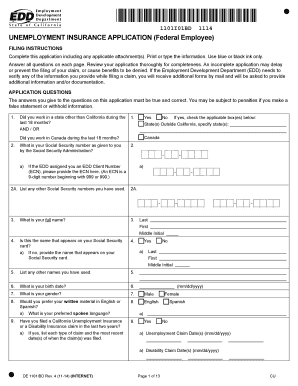
The Unemployment Insurance Application for Federal Employees is the standard form used to request state unemployment benefits after a qualifying separation from federal service. It collects employment history, reason for separation, earnings, and claimant contact information so state agencies can determine eligibility and calculate benefit amounts. Federal employees may have special filing considerations if they receive separation pay, retiree annuities, or federal reemployment rights. This application initiates the state-level claim process and becomes the primary record for benefit eligibility, appeals, and any overpayment reviews.

Why the federal-employee version matters

This version captures data points specific to federal service that affect eligibility and offsets, such as separation pay, federal annuities, and agency employment dates. It helps states apply federal offset rules and coordinate with federal payroll records.

Why the federal-employee version matters

Who completes or relies on this application

Typical users include departing federal employees, HR or personnel offices, and state unemployment claims examiners who process benefits.

  • Departing federal employees filing for state unemployment benefits after involuntary separation or layoff
  • Federal HR or payroll staff supplying separation dates, earnings, and agency verification
  • State unemployment agency examiners who assess eligibility, offsets, and benefit amounts

Accurate completion reduces processing delays and minimizes follow-up requests from the state agency for additional documentation.

Step-by-step: completing the application

Follow these steps in order to gather information and submit a complete application to the state unemployment office.

  • 01
    Gather documents: Collect ID, SF-50s, and earnings statements before you start.
  • 02
    Fill fields: Enter required data exactly as on official records.
  • 03
    Attach evidence: Upload separation notices and federal pay records when prompted.
  • 04
    Submit: Send the form via the state portal or follow agency submission instructions.

Online setup: how to configure an eSubmission workflow

Set up a predictable routing path for digital submissions so state agencies and HR offices receive verified information.

Field Configuration
Authentication Email link, optional SMS code
Attachments Allow PDF, DOCX, JPEG uploads
Notifications Email confirmation to claimant and HR
Audit Trail Capture timestamps, IP, and download log

Where the completed application goes

Completed forms route to the state unemployment agency and may be shared with federal payroll offices for verification.

  • State Portal: Primary submission point for claims processing.
  • HR Office: Provides employment verification upon request.
  • Payroll Records: Used to confirm wages and separation pay.
  • Claims Examiner: Reviews eligibility and calculates benefits.

Digital submission and platform considerations

Electronic submission platforms should support secure uploads, signer authentication, and an auditable event log.

  • File formats: PDF, DOCX, JPEG accepted
  • Authentication: Email link or SMS code
  • Audit trail: Timestamps and IP logging

Confirm the state agency accepts eSubmissions and ensure any platform you use complies with ESIGN and applicable privacy standards.

Key sections to complete on the federal-employee application

A professional submission addresses identity, employment history, separation reason, earnings, benefits offsets, and signature verification.

Identity

Full legal name, SSN, contact details, and mailing address so the agency can verify claimant identity and deliver benefit notices.
Agency information

Name of federal employer, office location, and supervisor contact to assist state examiners with employment verification requests.

Employment history

Start and end dates plus job title and pay grade; these details determine base period wages and weekly benefit calculations.

Separation reason

Clear description of involuntary separation, layoff, or other qualifying event to support eligibility determinations and potential appeals.

Federal offsets

Declare separation pay, annuities, or other federal income that may reduce or defer state benefits to avoid overpayment later.

Certification

Signature block, date, and a statement of truthfulness; attestations confirm intent to file and are required for legal validity.

Supporting materials commonly required

Attach these documents to speed verification and reduce follow-up from the state agency.

SF-50 or separation notice

A copy of the federal separation form or agency letter showing separation date and reason; verifies employment and separation facts.

Recent pay stubs

Provide wage statements covering the base period so the state can calculate weekly benefit rates accurately.

Federal annuity statements

If you receive a federal annuity, include award letters so the agency can apply any required offsets to benefits.

Identification

Driver license or passport copy to confirm identity when the state requires in-person or remote verification.

Essential data elements the form collects

Employee name: Full legal name
Social Security number: Nine-digit TIN
Agency name: Federal employer
Separation date: MM/DD/YYYY
Last wages: Recent pay totals
Signature: Signed and dated

Common mistakes that delay benefit decisions

  • Providing incomplete employment dates or inconsistent job titles that require state examiners to request clarifying documentation and extend processing time.
  • Omitting separation pay or federal annuity information, which can lead to overpayment determinations and later recoupment actions.
  • Uploading illegible attachments or wrong file types, causing agencies to reject documents and request resubmission through approved channels.
  • Using informal signatures or failing to date the signature block, which may invalidate the attestation and require re-signing.

Consequences of incorrect or incomplete applications

Benefit denial: Potential denial
Overpayment: Repayment required
Penalties: Fines or interest
Employment record flag: Agency review
Appeal delays: Longer timelines
Tax reporting: 1099 reporting impact

Timing and key deadlines to monitor

State agencies have varying timelines for initial eligibility decisions, weekly certifications, and appeals — act promptly after separation.

Initial claim filing:

File as soon as practical after separation to avoid lost benefit weeks.

Weekly certifications:

Most states require weekly or biweekly benefit certifications to continue payments.

Appeal filing window:

Deadlines vary by state; file quickly after a denial to preserve rights.

Document requests:

Respond to verification requests within the timeframe specified by the agency.

Tax reporting:

Unemployment benefits are taxable and reported on Form 1099-G by the agency.

Frequently asked questions and common troubleshooting

Answers to common questions about completing, signing, and submitting the Unemployment Insurance Application for Federal Employees.


Need help? Contact support

be ready to get more
Join over 28 million airSlate SignNow users