Establishing secure connection…Loading editor…Preparing document…

Utah Minor's Name Change: Return of Service

This template is fully customizable. Edit the text, fill out the fields, and send it for signature. Give it a try!
Utah Minor's Name Change: Return of Service

What the Utah Minor's Name Change: Return of Service Is

The Utah Minor's Name Change: Return of Service is the sworn affidavit filed with the juvenile or district court that documents how and when a petitioner served required notice of a minor name-change petition on the other parent or interested parties. Returning service establishes constructive or actual delivery of court papers, records service method, server identity, date and time, and attaches proof such as certified mail receipts or an adult process-server declaration. Courts use the returned service to verify jurisdiction and give the case a hearing date; incomplete returns commonly delay or dismiss petitions.

Why a Correct Return of Service Matters

A complete and accurate return of service proves the court provided required notice, preserves due process for the minor and respondents, and enables the court to schedule the name-change hearing without procedural objections.

Why a Correct Return of Service Matters

Who Typically Prepares or Signs the Return of Service

The return of service is completed by the person who physically provided the petition or by a process server; parents, guardians, and attorneys use it when filing a minor's name change.

  • Parent or Guardian files petition and reviews returned service for completeness before filing.
  • Professional Process Server completes affidavit and attaches proof of delivery; must include server details.
  • Attorney prepares documents, ensures compliance with Utah Rules of Civil Procedure, and files the return with the court.

Courts accept properly completed returns as proof of notice; incorrect or missing returns are a frequent cause of continuance or dismissal.

Key Roles and Responsibilities

Petitioner — Parent/Guardian

The petitioner initiates the minor name-change petition, ensures notice requirements are met, reviews the returned service for accuracy, and files the return with the court before the hearing.

Process Server — Affiant

A professional server or adult witness signs the return of service affidavit, records the date, location, recipient identity or method, and may attach postal receipts or an electronic delivery confirmation.

Essential Parts of the Return of Service Package

A professional return of service packet for a Utah minor name change typically includes several discrete documents and attachments so the court can verify notice and proceed to hearing.

Petition

The filed petition for minor name change setting out current and proposed names, grounds for change, and parent or guardian details; forms vary by county but must be signed under penalty of perjury.
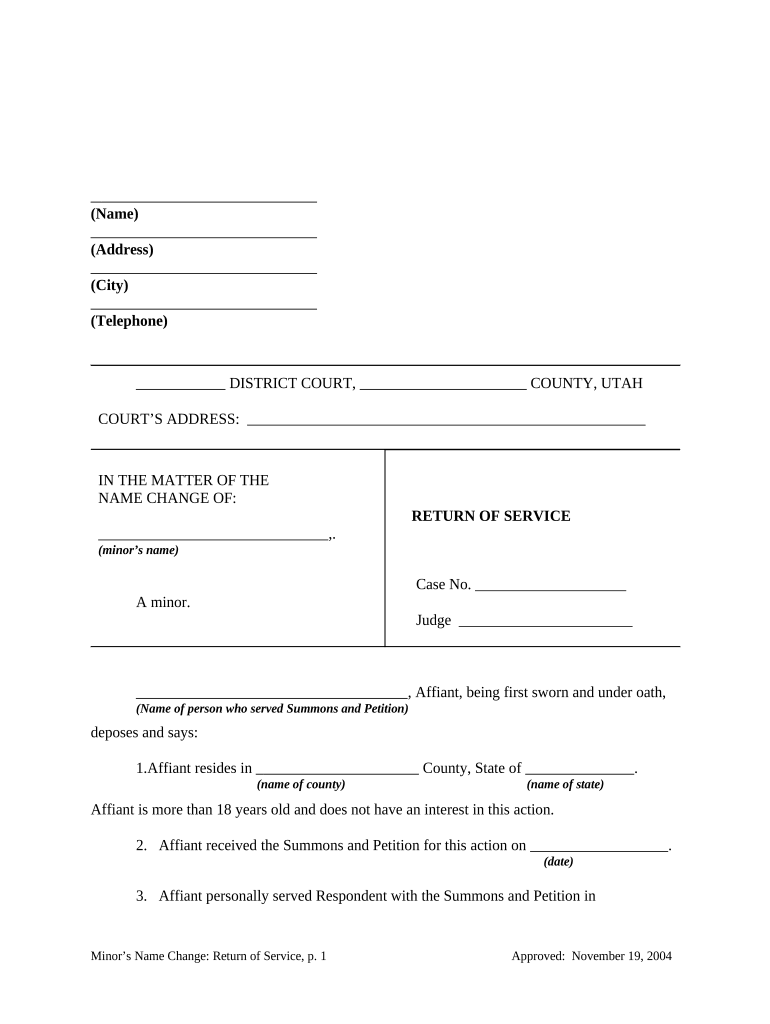
Return of Service

Sworn affidavit describing who served the petition, how it was served, date and time, recipient identity, and any supporting receipts or delivery confirmation attached.

Proof Attachments

Copies of certified mail receipts, tracking information, process server invoice, or electronic delivery logs that corroborate the service method and timing claimed in the affidavit.

Consent Forms

If the noncustodial parent or guardian consents, a signed written consent should be included, which can simplify the court's review and may eliminate contested hearings.

Birth Certificate

A certified copy of the minor's birth certificate is commonly required to confirm identity and to update vital records after court approval.

Proposed Order

A draft order for the judge to sign if the petition is granted; includes the new legal name and instructions for updating governmental records.

Step-by-Step: Completing and Filing the Return of Service

Follow these sequential steps to prepare a compliant return of service for a Utah minor name-change case.

  • 01
    Prepare Petition: Complete name-change petition and required supporting documents.
  • 02
    Serve the Respondent: Arrange personal delivery, certified mail, or authorized substituted service.
  • 03
    Complete Affidavit: Server fills return of service with details and signs under penalty of perjury.
  • 04
    File with Court: Submit petition, return of service, and attachments to the county clerk for processing.

How the Return of Service Moves Through the Court

The administrative flow below shows who receives, reviews, and records the return of service after it's executed.

  • Server to Petitioner: Server returns signed affidavit to the petitioner or petitioner’s attorney.
  • Petitioner to Clerk: Petitioner files the affidavit and attachments with the county court clerk.
  • Clerk Review: Clerk checks for completeness and assigns a hearing date.
  • Judge Consideration: Judge reviews file at hearing and signs order if requirements are met.

Configuring an Online Workflow for Return of Service Documents

If you assemble and submit documents electronically, configure fields and routing to match court requirements.

Field Mapping Map case number, party names, and server details to persistent fields for reuse.
Signature Routing Set signer order so the server signs before the petitioner files with court.
Authentication Require email or SMS codes for server and petitioner to strengthen attribution.
Attachment Rules Enforce required attachments (mail receipts, tracking) as mandatory uploads.
Export Format Save final packet as ISO 32000-compliant PDF for court filing.

Digital Submission: File Formats and Integration Notes

Courts and clerks accept scanned PDFs and many e-filing systems prefer PDF/A; confirm county-specific electronic filing rules before upload.

  • Accepted Formats: PDF, PDF/A, DOCX
  • Integrations: Connectors: Salesforce, Google Workspace, NetSuite
  • Authentication Options: Email, SMS, KBA available

Maintain an audit trail for each signing and preserve originals or certified copies as required by the clerk to support later requests to amend or reissue service.

Timing Expectations and Typical Deadlines

Timing for minor name-change processing and service deadlines varies by county; the items below reflect typical ranges and filing windows.

Service Before Hearing:

Service is generally required a set number of days prior to any scheduled hearing; check local rules.

Hearing Scheduling:

Courts often schedule hearings 4–12 weeks after filing, depending on calendar and backlog.

Filing After Service:

File the return of service immediately after it is executed to avoid continuances.

Publication Requirements:

If allowable, publication may run for 3–4 weeks when personal service is not possible.

Appeal Window:

Post-order appeals or objections follow standard state timelines once the order is entered.

Major Milestones in a Utah Minor Name-Change Case

These numbered stages track the typical lifecycle from petition to final order.

01

1. Petition Filed

Petitioner files with county clerk and pays applicable fees.

02

2. Service Completed

Respondent is served by approved method and server prepares affidavit.

03

3. Return Filed

Return of service and supporting receipts are filed with the court clerk.

04

4. Hearing and Order

Court holds hearing and issues an order changing the minor’s name if requirements are met.

Common Preparation Challenges

  • Incomplete server details or missing witness statements cause the clerk to reject the return and delay the hearing.
  • Using the wrong service method for the respondent’s status (e.g., substituted service when prohibited) can void notice.
  • Failing to attach certified mail receipts or tracking evidence often leads courts to require re-service and a continuance.
  • Unsigned affidavits or missing dates create procedural defects that may result in dismissal or an additional filing fee.

Consequences of an Incorrect or Missing Return of Service

Hearing Continuance: Delays court scheduling
Dismissal Risk: Petition may be dismissed
Perjury Exposure: False statements risk criminal penalties
Costs Increased: Additional filing or service fees
Order Vacatur: Order may be set aside
Record Correction: Extra steps to amend vital records

Security, Compliance, and Legal Validity Considerations

TLS Encryption: TLS 1.2/1.3
Data at Rest: AES-256 encryption
Audit Trail: Timestamp and IP log
ESIGN / UETA: E-sign legality frameworks
HIPAA BAA: Available when required
21 CFR Part 11: Compliant options exist

Practical Examples: How Returns of Service Are Used

Two anonymized scenarios illustrate common outcomes and how proper returns support case progression.

County File Example

A petitioner in Utah County served the respondent by certified mail and attached postal receipts

  • Server recorded delivery and date
  • The clerk accepted the return and scheduled a hearing three weeks later, avoiding re-service delays.

Process Server Example

A professional process server personally served a noncustodial parent at work

  • Server signed affidavit with time and witness details
  • The judge reviewed the sworn return and entered the order without contested testimony.

Practical Tips for Accurate and Efficient Returns of Service

Follow these best practices to reduce rejection risk and keep the case on track.

Confirm Case Details
Verify county, clerk name, and case number before filing; clerks reject misidentified files and re-filing delays the case.
Use Trackable Methods
Choose certified mail or a licensed process server to create verifiable proof of delivery and attach receipts to the affidavit.
Sign Under Penalty
Ensure the server signs under penalty of perjury and includes a printed name, address, and contact information for verification.
Preserve Originals
Keep originals and certified copies for your records and for agency updates to vital records or school files.

eSignature Solution Pricing Comparison for Return of Service Workflows

Compare typical vendor starting prices and key capabilities relevant to preparing, signing, and storing return of service documents; signNow is listed first per comparison protocol.

signNow DocuSign Adobe Sign PandaDoc HelloSign
Starting Price $8/user/mo $15/user/mo $14/user/mo $19/user/mo $15/user/mo
Free Trial 7-day free trial Varies by vendor and plan Varies by vendor and plan Varies by vendor and plan Varies by vendor and plan
Bulk Send Yes (Business Premium) Available on paid tiers Available on paid tiers Available on paid tiers Available on paid tiers
Audit Trail Yes Yes Yes Yes Yes
Envelope Cap No cap 100 envelopes/user/year Varies by plan Varies by plan Varies by plan

Frequently Asked Questions About Returns of Service

Answers to common questions about who can serve, whether e-signatures are acceptable, and what to do if service fails.


Need help? Contact support

be ready to get more
Join over 28 million airSlate SignNow users