Establishing secure connection…Loading editor…Preparing document…

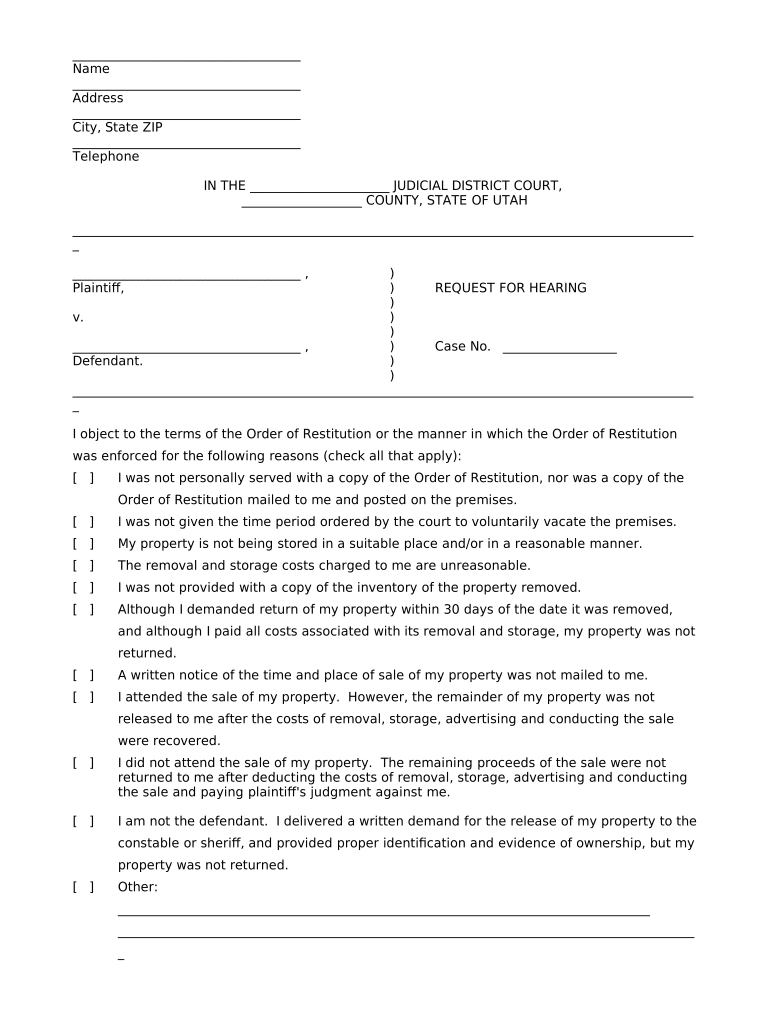
Utah Request for Hearing Regarding Order of Restitution

This template is fully customizable. Edit the text, fill out the fields, and send it for signature. Give it a try!
Utah Request for Hearing Regarding Order of Restitution

What the Utah Request for Hearing Regarding Order of Restitution Is

The Utah Request for Hearing Regarding Order of Restitution is a court filing used to seek review, modification, or clarification of a restitution order entered in a criminal or related proceeding. It informs the court of contested facts, changed ability to pay, calculation errors, or new evidence that could alter the amount or terms of restitution. The form typically identifies the case, the indigence or payment status of the person ordered to pay, legal grounds for relief, and the specific relief requested. Filing procedures and available remedies depend on Utah court rules and the presiding judge’s procedures.

Why a Hearing Request Matters for Restitution Orders

Filing a Request for Hearing lets the affected party present evidence, correct calculation mistakes, and seek modification based on changed financial circumstances. It preserves due process rights and creates an official record for appeal or enforcement review.

Why a Hearing Request Matters for Restitution Orders

Who Typically Prepares and Files This Request

Each filer should confirm local court rules and whether representation or additional paperwork (affidavits, receipts) is required before filing.

  • Defendant or petitioner seeking modification of restitution terms or contesting amount.
  • Defense counsel preparing legal argument, affidavit of financial status, and supporting exhibits.
  • Victim or victim’s representative when clarifying restitution calculations or collection procedures.

Essential Elements to Include on a Professional Request

A complete Utah Request for Hearing Regarding Order of Restitution contains factual, financial, and procedural elements the court needs to schedule and decide a hearing.

Case Identification

List the case name, docket or case number, court division, and judge name so the clerk and judge can immediately locate the underlying record and calendar the matter correctly during scheduling.
Relief Sought

Describe the specific change requested such as reduction, stay, recalculation, or request for a hearing to present ability-to-pay evidence and explain why the current restitution amount is in dispute.

Statement of Facts

Provide a concise factual statement setting out the error, change in financial condition, new evidence, or other reason the restitution order should be reviewed, including dates and supporting circumstances.

Financial Disclosure

Attach a sworn affidavit of income and expenses or similar financial statement so the court can assess ability to pay and determine whether modification or payment plan relief is appropriate.

Supporting Documents

Include invoices, receipts, judgment calculations, pay stubs, tax returns, or correspondence that substantiate the contested amount or the filer’s changed circumstances for the court to review.

Proposed Order

Attach a draft proposed order that clearly states the requested outcome, any proposed payment schedule, and effective dates to expedite clerk review and judicial consideration.

Required Data Elements on the Request

Case Number: Exact docket identifier
Party Names: Full legal names
Date of Order: MM/DD/YYYY
Amount in Dispute: Numeric amount
Contact Information: Phone and mailing address
Signature: Signed and dated

Step-by-Step: Completing and Submitting the Request

Follow these sequential steps to prepare, file, and track a Request for Hearing regarding restitution in Utah.

  • 01
    Gather case documents: Collect the sentencing order, restitution calculation, and supporting receipts.
  • 02
    Prepare affidavit: Complete a sworn financial statement to support modification requests.
  • 03
    Draft request: State relief sought and reference attached exhibits.
  • 04
    File and serve: Submit to the clerk and serve opposing parties per court rules.

How the Hearing Request Moves Through the Court

Understanding the typical routing helps estimate timelines and required actions after filing.

  • Clerk Intake: Clerk reviews for completeness and assigns a calendar date.
  • Opposition Period: Other parties may file responses or objections.
  • Hearing Scheduling: Court sets a hearing date or resolves on briefs.
  • Judicial Decision: Judge issues a written order resolving the relief requested.

Configuring an Electronic Submission Workflow

Set up a clear e-filing and e-signature workflow to reduce processing time and ensure compliance with court requirements.

Field Configuration
Document Format PDF/A preferred for court filings
Signature Method Typed or drawn e-signature allowed where court permits
Authentication Email plus access code or ID verification
File Naming CaseNumber_PetitionerName_DocType

Technical Requirements for eSubmission and eSignature

Check local rules for any additional technical requirements such as file size limits, mandatory certificate fields, or registrar notes before filing electronically.

  • Accepted Formats: Most courts accept PDF; some require PDF/A.
  • Authentication: Courts may require signer identity verification.
  • Retention: Maintain original signed copies for the required retention period.

Timing Considerations and Typical Deadlines

Timeliness can affect your rights; file as soon as possible after the restitution order or discovery of an error and confirm local deadlines.

File Promptly:

Submit the request as soon as grounds for review are identified.

Service Requirements:

Serve opposing parties or the prosecutor per local procedure.

Hearing Scheduling:

Expect scheduling within weeks to a few months.

Court Response:

Opposition or court orders typically issued after hearing or briefing.

Appeal Period:

Post-order appeal windows vary by jurisdiction and case type.

Consequences of Incorrect or Late Requests

Waived Issues: Late filing can forfeit relief opportunities
Enforcement: Unresolved restitution may trigger collections
Contempt Risk: Failure to comply may lead to sanctions
Financial Penalties: Interest or added collection costs possible
Denial of Relief: Incomplete evidence may lead to dismissal
Appeal Limitations: Preservation errors can hamper appellate review

Comparing eSignature Providers for Preparing and Submitting Court Documents

Select an e-signature provider that meets technical, compliance, and budget needs; the table below compares common plan-level features and starting prices.

signNow DocuSign Adobe Sign PandaDoc HelloSign
Starting Price $8/user/mo $15/user/mo $14/user/mo $19/user/mo $15/user/mo
Free Trial Yes, 7-day trial Varies by plan Varies by plan Varies by plan Varies by plan
Bulk Send Yes Yes Yes Yes No
Audit Trail Yes Yes Yes Yes Yes
HIPAA Compliant Yes Yes Yes No No
Envelope Cap No cap 100 envelopes/user/year Varies Varies Varies

Frequently Asked Questions About the Utah Request for Hearing Regarding Order of Restitution

Answers to common procedural and technical questions encountered when preparing or filing a Request for Hearing regarding restitution orders in Utah.


Need help? Contact support

be ready to get more
Join over 28 million airSlate SignNow users