Establishing secure connection…Loading editor…Preparing document…

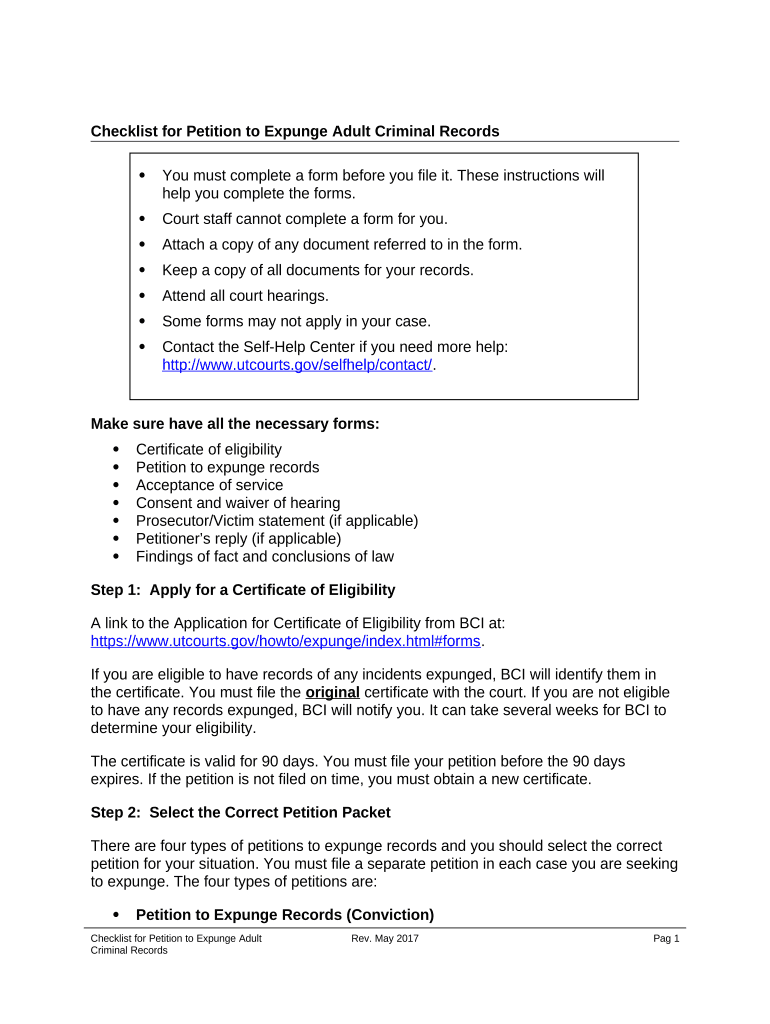
Checklist for Petition to Expunge Adult Criminal Records

This template is fully customizable. Edit the text, fill out the fields, and send it for signature. Give it a try!
Checklist for Petition to Expunge Adult Criminal Records

What the Checklist for Petition to Expunge Adult Criminal Records Is

The Checklist for Petition to Expunge Adult Criminal Records is a structured guide listing the forms, facts, timelines, fees, and supporting exhibits needed to file a petition to expunge or seal adult criminal convictions or arrests. It organizes petitioner information, case identifiers, conviction and sentencing details, statutory eligibility criteria, required attachments (court orders, disposition documents, certificates of completion), service and filing instructions, and signature and notarization items. The checklist is intended to improve completeness, reduce procedural rejections, and clarify state-specific steps while preserving records of submission and any electronic signature events under applicable law.

Why a Complete Checklist Matters for Expungement Petitions

A complete checklist reduces the risk of rejection, shortens court processing time, and documents that all statutory eligibility conditions and supporting records were considered. It helps petitioners and counsel confirm fees, service requirements, and whether notarization or certified copies are needed under state rules.

Why a Complete Checklist Matters for Expungement Petitions

Who Typically Uses This Checklist

The checklist supports multiple users involved in preparing and filing an expungement petition, from self-represented petitioners to court staff.

  • Self-represented petitioners who prepare and submit paperwork without an attorney; useful to track eligibility, exhibits, and service steps.
  • Criminal defense attorneys and public defenders who standardize petition preparation and ensure compliance with local filing rules and statutes.
  • Paralegals, court clerks, and legal aid staff who collect documents, verify court records, and manage filing logistics for multiple clients.

Primary Signers and Their Roles

Petitioner

The individual seeking relief. The petitioner attests to factual statements and signs the petition; accuracy of personal data, conviction dates, and disclosures directly affects eligibility and court acceptance.

Attorney

A licensed attorney of record who may prepare, review, and sign supporting pleadings. The attorney certifies legal accuracy, completes service instructions, and may appear at hearings on the petitioner’s behalf.

Core Components Included in a Professional Checklist

A robust checklist groups items by administrative, evidentiary, and procedural tasks so nothing is overlooked during preparation and filing.

Petition Header

Court name, county, case number, petitioner full name, and respondent/government party details required to identify the proceeding and link attachments.
Eligibility Criteria

Statutory citations and the specific facts that establish eligibility (e.g., waiting periods, conviction classes, completion of sentence or probation).

Supporting Records

Disposition, sentencing documents, proof of completion of conditions, certificates of rehabilitation or treatment, and certified court records when required.

Filing & Service Details

Filing fee amount, method of service, required proof of service form, and whether mailed, hand-delivered, or electronically filed.

Notarization & Authentication

Notary acknowledgements, witness requirements, remote online notarization status where permitted, and any required notarization language.

Signature & Retention

Signature blocks for petitioner and counsel, date fields, and retention info for the petitioner’s copy and court file.

Step-by-Step: Completing the Checklist

Follow these sequential steps to populate the checklist, attach supporting records, and prepare for filing and service.

  • 01
    Gather Records: Obtain certified dispositions and sentencing documents from the clerk.
  • 02
    Confirm Eligibility: Match statutory waiting periods and conviction classes against petition criteria.
  • 03
    Populate Checklist: Complete fields, attach exhibits, and verify names and dates.
  • 04
    File and Serve: Submit to the court per local rules and file proof of service where required.

Digital Workflow Settings for Online Completion

These recommended workflow settings help when the checklist is completed or shared electronically to preserve signatures and evidence of delivery.

Field Configuration
User account type Allow guest signing with email verification to reduce friction
Authentication method Use email plus SMS OTP or knowledge-based checks for stronger signer attribution
Signature capture Enable typed and drawn signatures, with an audit trail for legal proof
Document storage Save final PDF/A with audit trail and timestamp for retention

How Electronic Completion and eSubmission Typically Work

A common online workflow moves the checklist from preparation to signed, notarized, and filed while recording an audit trail at each step.

  • Upload checklist: Upload the checklist and attach required exhibits as PDF or DOCX.
  • Add signer fields: Place signature, date, and initial fields where required by the petition form.
  • Authenticate signer: Authenticate via email, SMS code, or stronger methods if court requires.
  • Finalize and retain: Capture completed PDF with audit trail and distribute copies to parties and counsel.

Technical Requirements for Digital Completion and Submission

Retain a signed copy and the underlying audit trail showing signer email, IP, and timestamp to demonstrate intent and attribution when needed.

  • File format: PDF/A preferred for archival and court compatibility
  • Authentication: Email verification and SMS OTP are common minimum methods
  • Integrations: Platforms often integrate with Google Drive, Box, and court eFiling systems

Common Timelines and Deadlines to Track

Timelines vary by state and statute; use the checklist to record key dates that affect filing eligibility and court scheduling.

Statutory waiting period:

State law often requires a waiting period after sentence completion before filing.

Filing window:

Some statutes permit petitions only within a defined post-conviction timeframe.

Hearing scheduling:

Courts set hearings after filing; times vary widely by docket load.

Proof of service due:

Most jurisdictions require proof of service within a specific number of days after filing.

Appeal or objection period:

Prosecutor or agencies often have a statutory period to object to the petition.

Key Milestones in the Petition Lifecycle

Track these milestone stages in order so each required action is completed before the next step proceeds.

01

Prepare checklist

Collect exhibits and verify eligibility facts prior to filing.

02

File petition

Submit petition with filing fee and attachments to the clerk’s office.

03

Serve parties

Deliver copies and file proof of service per local rules.

04

Attend hearing

Present evidence and argument at the court hearing on the petition.

Common Preparation Mistakes to Avoid

  • Failing to include certified dispositions or sentencing orders causes routine rejections and requests for supplementation.
  • Using inconsistent names or dates across documents creates identity mismatches that delay court review and require corrective filings.
  • Omitting proof of service or filing fee receipts leads to administrative dismissal or the need to refile the petition.
  • Relying on a generic eligibility statement instead of citing the specific statutory provision can result in a denial for insufficient legal basis.

Consequences of an Incorrect or Incomplete Checklist

Dismissal: Court may dismiss the petition
Fee forfeiture: Filing fees may not be refunded
Delayed relief: Processing delays extend final resolution
Statute bar: Missed waiting periods can render petition untimely
Perjury exposure: Incorrect sworn statements may carry legal risk
Incomplete service: Improper service can void proceedings

Security and Compliance Considerations for Digital Checklists

Encryption: TLS 1.2/1.3 in transit; AES-256 at rest
Audit trail: Timestamped logs with IP and action history
Access controls: Role-based permissions and SSO options
HIPAA readiness: Business associate agreement available where required
21 CFR Part 11: Support for FDA-regulated electronic records
Retention: Secure storage with tamper-evident PDFs

Practical Examples of Checklist Use

Two anonymized scenarios illustrate how the checklist organizes preparation and filing tasks in real workflows.

Public Defender Clinic

A clinic compiles a batch of petitions for eligible clients and uses the checklist to standardize documents

  • The clinic attaches certified dispositions for each file
  • Standardization reduced missing exhibits and cut clerk follow-ups, enabling timely hearings and consistent proof-of-service records for all clients.

Self-Represented Petitioner

An individual completes the checklist with court-certified records and service instructions

  • The checklist reminded the petitioner to notarize the verification
  • Having a complete submission eliminated multiple deficiency notices and expedited scheduling of the court hearing.

Frequently Asked Questions About the Checklist and Filing Process

Answers to frequent questions help clarify eSignature validity, notarization needs, typical processing times, and what supporting documents courts commonly require.


Need help? Contact support

eSignature Pricing and Feature Comparison for Checklist Workflows

Basic pricing and feature availability across common eSignature vendors. signNow is listed first in the comparison per platform convention.

signNow DocuSign Adobe Sign PandaDoc HelloSign
Starting Price $8/user/mo $15/user/mo $14/user/mo $19/user/mo $15/user/mo
Free Trial 7-day trial No No Yes, limited Yes, limited
Bulk Send Yes Yes Yes Yes No
Audit Trail Yes Yes Yes Yes Yes
HIPAA Compliant Yes Yes Yes No No
be ready to get more
Join over 28 million airSlate SignNow users