Establishing secure connection…Loading editor…Preparing document…

Utah Expungement Application

This template is fully customizable. Edit the text, fill out the fields, and send it for signature. Give it a try!
Utah Expungement Application

What the Utah Expungement Application Is

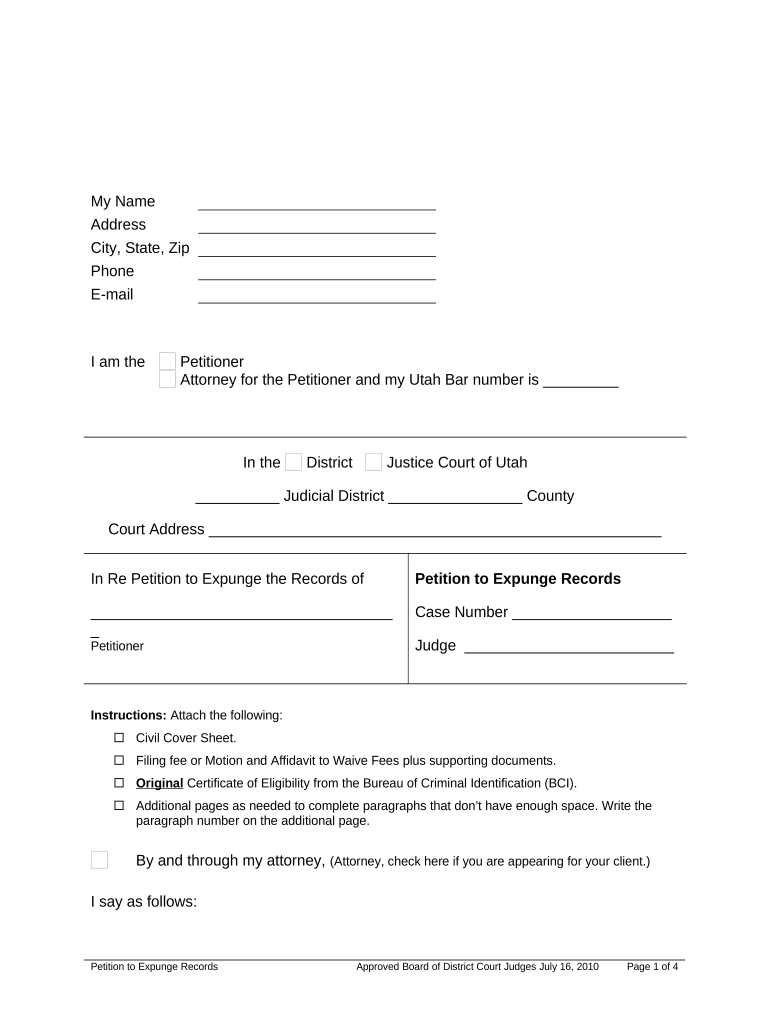
The Utah Expungement Application is the formal petition filed in Utah state courts to request restriction or expungement of criminal records under Utah law. It identifies the petitioner, the docket or case number, the charges to be restricted, and the legal basis for relief, and it directs the court to review eligibility criteria such as conviction type, completion of sentence, and statutory waiting periods. The application triggers judicial review, possible hearings, and coordination with criminal records repositories to update public databases and background-check disclosures when relief is granted.

Why Completing the Application Carefully Matters

An accurate Utah Expungement Application can limit public access to arrest and conviction records, improve employment and housing prospects, and reduce collateral legal burdens. It clarifies eligibility, documents factual and legal grounds, and initiates formal court review.

Why Completing the Application Carefully Matters

Who Typically Prepares or Signs This Application

Common users who complete or assist with the Utah Expungement Application include petitioners, attorneys, and court clerks.

  • Self-represented petitioners seeking restriction or expungement after sentence completion and rehabilitation milestones.
  • Private attorneys preparing legal arguments, motions, and supporting affidavits on a client's behalf.
  • Court clerks and prosecutors who verify filings, calculate deadlines, and certify records for review.

Representative Roles and Responsibilities

Petitioner (Pro Se)

A self-represented petitioner collects certified dispositions, identifies all cases and aliases, drafts the petition, and files with the district court. They must ensure service and maintain records for appeals or further filings.

Attorney (Defense Counsel)

A private attorney evaluates eligibility, prepares legal argument addressing statutory bars, assembles affidavits and certified records, and represents the petitioner at hearings. Counsel also coordinates with prosecutors to resolve disputes before trial.

Essential Data Elements to Include

Full Legal Name: Petitioner’s complete legal name.
Date of Birth: Full birth date in MM/DD/YYYY.
Case Number: Court docket or citation.
Charges: List offense names and statutes.
Disposition: Final outcome and sentence.
Contact Info: Current address, phone, and email.

Step-by-Step: Preparing and Filing Your Petition

Follow these sequential steps to prepare, file, and track a Utah Expungement Application through the court system.

  • 01
    Prepare Documents: Gather certified dispositions and ID; draft petition.
  • 02
    Complete Form: Populate required fields precisely; attach exhibits.
  • 03
    File with Court: Submit to district court clerk and pay fee.
  • 04
    Serve and Wait: Serve prosecutor if required and monitor case status.

Where to File and What Happens Next

The filing path for a Utah Expungement Application involves submission to the appropriate district court and follow-up with criminal record repositories.

  • Local District Court: File the original petition and pay jurisdictional fee.
  • Serve Parties: Provide copies to prosecutor or designated agency.
  • Court Hearing: Judge reviews filings; attend hearing if scheduled.
  • Update Records: If granted, order sent to repositories for restriction.

Configuring an Online Workflow for This Application

Configure online forms and routing to mirror the paper filing process and ensure required evidence is attached.

Field Configuration
Form Template PDF or DOCX with fillable fields
Signer Roles Petitioner, attorney, court clerk roles
Authentication Email link or SMS code
Attachments Upload certified dispositions and ID scans

Platform Capabilities for eSubmission and Sharing

Use platforms that support PDF filling, audit trails, secure delivery, and comply with ESIGN and UETA for digital submissions.

  • Formats Supported: PDF, DOCX, and scanned images
  • Authentication Options: Email links, SMS OTP, or KBA
  • Compliance: ESIGN/UETA, TLS and AES encryption

Potential Risks and Consequences of Errors

Case Denial: Application may be denied for ineligibility.
Processing Delay: Missing documents extend review timelines.
Perjury Risk: False statements risk criminal penalty.
Fee Forfeiture: Nonrefundable filing fees may be lost.
Incomplete Record: Errors can prevent repositories from updating.
Court Sanctions: Possible sanctions for abuse of process.

Common Mistakes That Cause Rejection or Delay

  • Failing to attach certified disposition or sentencing documentation is a leading cause of rejection and forces additional motions and delays in final rulings.
  • Using nicknames, initials, or out-of-date names prevents matching to court files and criminal databases, often requiring notarized affidavits to correct.
  • Neglecting to serve the prosecutor or designated agency per court rule can result in dismissal or reset of hearing dates.
  • Unsigned pages, wrong date formats, or missing initials on attachments prompt clerks to refuse filing or return documents.

Practical Tips to Improve Acceptance and Speed

Adopt these practices to improve acceptance and reduce court follow-up on Utah Expungement Applications and processing time.

Organize certified records and exhibits
Scan and index certified dispositions, sentencing orders, and judgment pages. Create a table of contents for exhibits, attach authenticated PDFs, and verify page numbering to expedite clerk review and reduce requests for clarification.
Confirm identity and matching details
Compare the petitioner’s full legal name, date of birth, and aliases with court records and fingerprint files where applicable. Resolve discrepancies before filing by obtaining certified documents or a sworn affidavit explaining name changes.
Follow service and notice rules
Serve required parties according to local rules, including the county prosecutor or agency, and file proof of service with the court. Missing or incorrect service often delays hearings and can lead to dismissal of the petition.
Prepare clear, concise supporting affidavits
Have witnesses or the petitioner provide signed affidavits that summarize facts, timelines, and rehabilitation steps. Avoid conclusory language; include dates, locations, and factual support to assist judicial factfinding and reduce the need for oral testimony.

Real-World Filing Scenarios

Representative scenarios where the Utah Expungement Application produced different outcomes and operational workflows for petitioners and counsel.

Self-Help Petitioner

A petitioner who completed probation and gathered certified dispositions filed pro se and used a detailed exhibit index to support eligibility.

  • Court granted restriction after brief hearing.
  • Careful assembly of certified records and clear factual affidavits reduced the need for multiple continuances, produced a concise hearing record, and allowed repositories to update public access within weeks of the court order.

Attorney-Assisted Filing

An attorney-led petition included legal argument addressing statutory ineligibility and submitted a motion for hearing to resolve contested records.

  • Judge ordered partial restriction and clarification.
  • Counsel organized chain-of-custody affidavits and negotiated with the prosecutor, which narrowed contested items, shortened litigation, and produced a court order specifying the exact records to be restricted across repositories and external database notifications were sent.

eSignature Vendor Comparison for Submitting the Application

Vendor pricing and feature differences for eSignature solutions commonly used to submit the Utah Expungement Application.

signNow DocuSign Adobe Sign PandaDoc HelloSign
Starting Price $8/user/mo $15/user/mo $14/user/mo $19/user/mo $15/user/mo
Free Trial 7-day free trial, no credit card required Varies Varies Yes, limited Yes, limited
Bulk Send Yes (Business Premium) Yes Yes Yes No
Audit Trail Yes Yes Yes Yes Yes
HIPAA Compliant Yes Yes Yes No No

Frequently Asked Questions

Answers to frequent questions about eligibility, evidence, filing, and follow-up for the Utah Expungement Application.


Need help? Contact support

be ready to get more
Join over 28 million airSlate SignNow users