Establishing secure connection…Loading editor…Preparing document…

Vacate Default Judgment

This template is fully customizable. Edit the text, fill out the fields, and send it for signature. Give it a try!
Vacate Default Judgment

What a Vacate Default Judgment Does and When It Applies

A Vacate Default Judgment is a court filing asking a judge to set aside or undo an existing default judgment entered against a party who did not timely defend the case. Common legal grounds include lack of proper service, excusable neglect, mistake, newly discovered evidence, or fraud on the court. In federal practice, motions to vacate often proceed under Federal Rule of Civil Procedure 60(b); state courts use comparable rules or statutes. The motion asks the court to reopen the matter so the defendant can present a defense or to correct a procedural error leading to the default.

Why You Would File to Vacate a Default Judgment

Vacating a default judgment restores the case to the merits, halts or reverses collections, and provides an opportunity to present defenses or factual corrections before rights are permanently extinguished.

Why You Would File to Vacate a Default Judgment

Who Typically Prepares or Files This Motion

The Vacate Default Judgment form is usually completed by parties facing judgment, their attorneys, or legal aid representatives seeking to reopen a case.

  • Self-represented defendants who missed service deadlines and have timely grounds to reopen the case.
  • Defense attorneys preparing a Rule 60(b) or state-equivalent motion with supporting affidavits.
  • Collections counsel or creditors when defending against competing relief or negotiating stay conditions.

Timely, accurate completion and proper service of the motion are critical; many courts reject motions that fail to meet local formatting, timing, or proof-of-service rules.

Who Signs and Submits the Motion

Defendant

An individual or entity named in the judgment signs declarations or affidavits attesting to the factual basis for vacatur and may sign the motion if unrepresented; attorneys typically sign on behalf of represented parties under applicable court rules.

Attorney

A licensed attorney prepares, signs, and files the motion, certifies service on opposing parties, and handles hearing appearances; counsel also attaches sworn evidence and cites governing rules such as Fed. R. Civ. P. 60 or state equivalents.

Essential Data Elements to Include

Case Caption: Court name, parties
Docket Number: Court-assigned number
Date of Judgment: Entry date
Grounds: Specific legal reason
Supporting Affidavit: Sworn statement
Relief Requested: What court should do

Core Components of a Professional Vacate Default Judgment Motion

A complete motion includes procedural information, a clear factual statement, legal argument, sworn evidence, proposed orders, and proof a copy was served on all parties in accordance with court rules.

Caption

Complete court caption and docket number formatted to local rules so the clerk and judge can quickly identify the file and related entries.
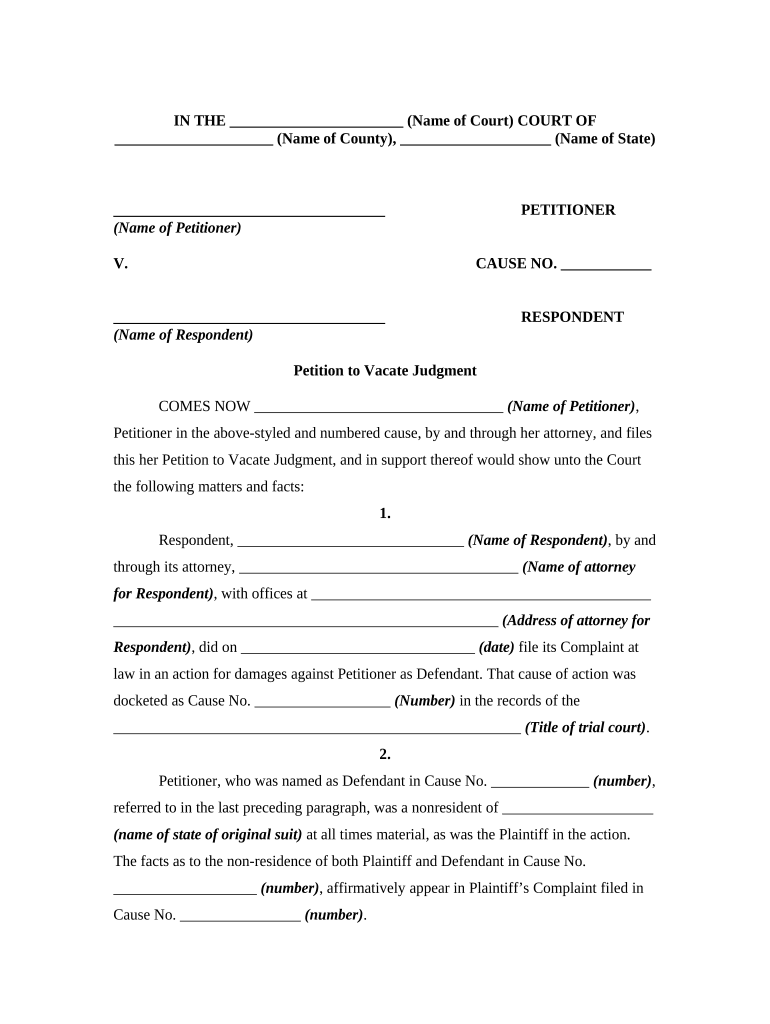
Statement of Facts

Concise, chronological facts explaining why the defendant did not appear and any excusable reason such as lack of service or excusable neglect.

Legal Grounds

Cite the controlling rule or statute, e.g., Fed. R. Civ. P. 60(b) or the applicable state rule, and explain how the facts satisfy the standard for relief.

Affidavits

Attach sworn declarations supporting the motion, including proof of service failures, documentary evidence, or newly discovered materials.

Proposed Order

Provide a ready-to-sign proposed order vacating the judgment and setting subsequent deadlines or hearings for efficient judicial action.

Certificate of Service

A signed certificate showing how and when opposing counsel or parties were served, matching local e-filing and paper service rules.

Step-by-Step: Prepare and File a Motion to Vacate

Complete the motion with supporting evidence, follow local filing rules, serve opposing parties, and be prepared for a hearing or clerk review.

  • 01
    Assess Grounds: Confirm legal basis and any timing limits.
  • 02
    Gather Evidence: Collect affidavits, service records, and documents.
  • 03
    Draft Motion: Write facts, law, and attach exhibits and proposed order.
  • 04
    File and Serve: File with the clerk and serve all parties per court rules.

How the Vacatur Process Moves Through the Court

The court evaluates the motion, may schedule a hearing, and issues an order either vacating the judgment or denying relief; timely and correct service is essential at every stage.

  • Prepare Filing: Assemble motion, affidavits, and proposed order.
  • File With Clerk: E-file or submit paper copies per local rules.
  • Serve Opposing Parties: Provide proof of service consistent with court requirements.
  • Hearing and Ruling: Appear or submit briefing; await judge’s decision.

Setting Up an Online Workflow for the Motion

Configure a digital workflow to collect signatures, attach exhibits, record service, and track filing status for consistency and auditability.

Document Upload Upload the motion and exhibits as PDF files.
Signature Fields Place signature, date, and notary fields for each signer.
Authentication Choose email or SMS code verification for signers.
Routing Order Set signer sequence for affidavits and counsel.
Audit Trail Enable timestamped logs and certificate export.

Technical Considerations for eFiling and eSignatures

Confirm the court’s e-filing and notarization rules before relying on electronic signatures or remote notarization for affidavits.

  • File Formats: PDF/X, PDF/A accepted by many courts
  • Integrations: Connectors like NetSuite or Google Workspace aid document preparation
  • Authentication: Use SMS or email codes; RON requires stronger proofing

Where courts accept electronic filings and e-signatures, maintain audit logs showing intent, attribution, and retention to support legal validity and clerk review.

Timing Rules and Deadlines You Must Know

Timing affects eligibility for relief. Federal Rule 60 and many state rules impose either 'reasonable time' limits or one-year deadlines for some grounds; local rules can add procedural deadlines.

Rule 60(c) Deadline:

Motions under Fed. R. Civ. P. 60(b)(1)-(3) must be filed within one year; other grounds require reasonable promptness.

State Court Variations:

Many states mirror federal timing but check local statutes and rules for exact periods.

Collection Stays:

If enforcement or levy is pending, seek immediate relief to halt collections.

Service Timing:

Proof of timely service is required and affects court acceptance.

Hearing Scheduling:

Allow extra time for notice periods and judge availability.

Key Milestones From Filing to Decision

Track critical stages so deadlines and service requirements are not missed; missing a milestone can forfeit the opportunity to vacate.

01

Preparation

Complete motion, affidavits, and proposed order with exhibits.

02

Filing

E-file or lodge paper copies with the clerk according to rules.

03

Service

Serve opposing parties and file certificate of service promptly.

04

Hearing/Decision

Attend hearing or submit briefs; await judge’s order.

Practical Tips for Accurate and Efficient Completion

Adopt consistent formatting, attach clear supporting evidence, and follow local rules to minimize rejections or delays at the clerk’s office.

Follow Local Rules
Review the court’s motion formatting and page limits; compliance is the leading cause of administrative rejection and delay.
Attach Evidence
Include sworn affidavits, service records, and documentary exhibits to substantiate factual assertions in the motion.
Maintain Audit Trails
Use documented e-signature systems that record timestamps, IP addresses, and signer attribution to prove authenticity if challenged.
Be Concise
State facts and legal arguments succinctly; judges often act more quickly on focused motions supported by clear evidence.

Illustrative Scenarios Where Vacatur Was Appropriate

Two representative, anonymized scenarios show common factual patterns and procedural outcomes for vacating default judgments.

Service Failure Example

A defendant did not receive substituted service due to a wrong address in court records; the court found inadequate service

  • Defendant filed motion within weeks, attached postal tracking and landlord affidavit
  • The court vacated the default, set schedule for a merits hearing, and allowed the defendant to litigate defenses.

Excusable Neglect Example

A small business missed a deadline because mail containing the complaint was misplaced by an agent; counsel demonstrated excusable neglect and prompt action

  • Motion included sworn affidavit and invoices showing business disruption
  • Judge granted vacatur on equitable grounds and permitted an answer with a short discovery schedule.

eSignature Pricing and Feature Comparison for Preparing and Signing Filings

Compare common eSignature plan attributes and compliance capabilities; signNow is placed first for reference. Verify plan details with vendors before purchase.

signNow DocuSign Adobe Sign PandaDoc HelloSign
Starting Price $8/user/mo $15/user/mo $14/user/mo $19/user/mo $15/user/mo
Free Trial 7-day free trial Varies Varies Varies Varies
Bulk Send Yes Yes Yes Yes No
Audit Trail Yes Yes Yes Yes Yes
HIPAA Compliant Yes Yes Yes No No

Common Questions and Troubleshooting Tips

Answers to frequent issues encountered when preparing and filing a motion to vacate default judgment, with practical corrections to avoid common pitfalls.


Need help? Contact support

be ready to get more
Join over 28 million airSlate SignNow users