Establishing secure connection…Loading editor…Preparing document…

Wrongful Death Document

This template is fully customizable. Edit the text, fill out the fields, and send it for signature. Give it a try!
Wrongful Death Document

What the Wrongful Death Document Is and when it's used

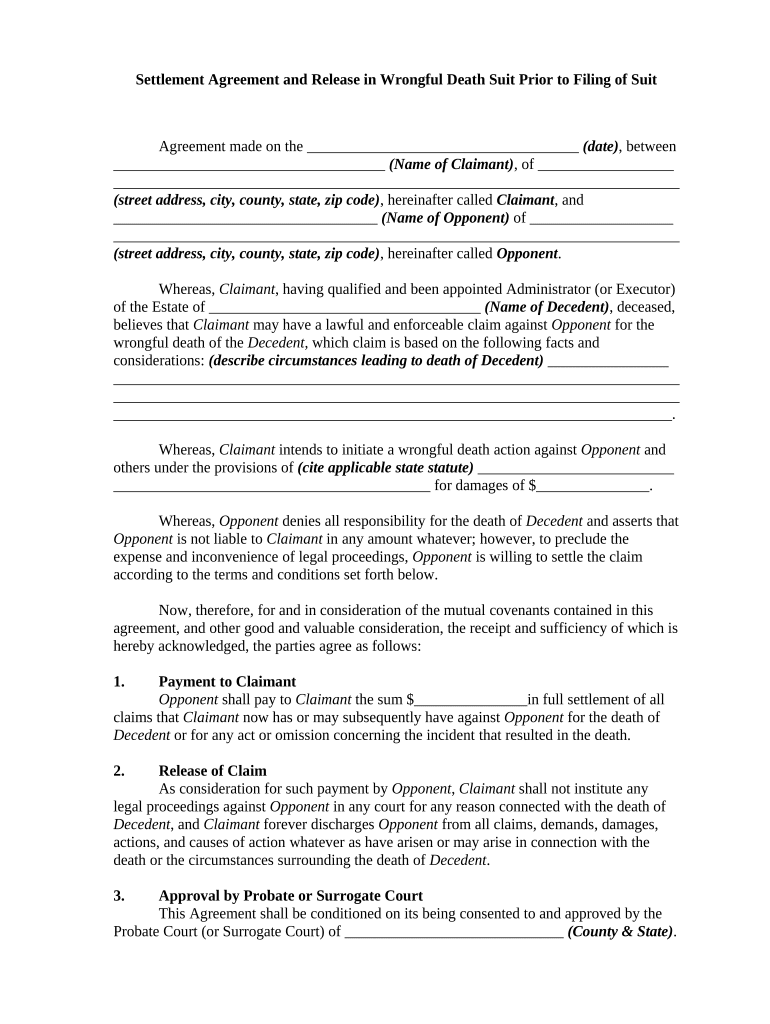
The Wrongful Death Document is a legal claim or demand template used by a decedent's personal representative or surviving family members to assert civil liability when death results from another party's negligence, intentional act, or wrongful conduct. The document frames factual allegations, identifies parties, states statutory bases for recovery, and itemizes damages such as loss of support, medical and funeral expenses, and non-economic losses. It usually initiates settlement negotiations or a civil suit and must align with the applicable state wrongful death statute and probate or estate procedures.

Why a clear Wrongful Death Document matters

A well-prepared Wrongful Death Document preserves legal claims, clarifies liability theories, and quantifies damages for insurers and courts. It organizes supporting evidence and identifies the estate representative and beneficiaries so procedural and timing requirements are met.

Why a clear Wrongful Death Document matters

Who typically prepares and relies on this document

Survivors, personal representatives, and attorney teams commonly prepare a Wrongful Death Document when pursuing compensation through settlement or litigation.

  • Personal representatives filing a civil wrongful death lawsuit on behalf of the estate.
  • Surviving spouse or children seeking compensation for loss of support and consortium.
  • Plaintiff attorneys who draft complaints, settlement demands, and supporting evidence packages.

Core components to include in a professional Wrongful Death Document

A complete document combines identification, factual allegations, statutory references, an itemized damages schedule, supporting evidence, and witness or notarization steps where required by local rules.

Parties

Full legal names and capacities: decedent, personal representative, named defendants, and insurer information to ensure correct service and case captioning.
Factual Allegations

Clear chronological description of the incident, causation facts, and supporting dates, locations, and actor conduct that establish liability under the relevant statute.

Statutory Basis

Reference the applicable wrongful death statute and legal theories (negligence, wrongful act) so the court and opposing counsel can assess entitlement.

Damages

Itemize economic losses, loss of support, funeral and burial costs, and non-economic damages with calculations and supporting documents.

Evidence List

Indexed attachments such as death certificate, medical records, police reports, billing statements, and witness statements to substantiate claims.

Signatures

Signature block for personal representative and counsel; include dates, notary acknowledgment or RON data if state or court requires notarization.

Step-by-step: how to prepare the Wrongful Death Document

Follow this sequence to assemble, verify, and finalize the document before filing or sending to insurers and opposing counsel.

  • 01
    Gather Records: Collect death certificate, medical records, and incident reports.
  • 02
    Identify Parties: List decedent, personal representative, and beneficiaries with contact details.
  • 03
    Detail Damages: Quantify economic and non-economic losses with supporting evidence.
  • 04
    Review & Sign: Confirm facts, obtain signatures, and notarize if required.

How to set up a secure online completion and routing workflow

Define fields, required signers, authentication methods, and conditional sections so each party receives only relevant fields in the correct signing order.

Field Configuration
Signing Order Sequential or parallel routing per case
Required Fields Mark name, date, signature as required
Conditional Logic Show financial sections only when applicable
Authentication Email, SMS, or KBA based on risk

Technical and security requirements for digital completion

Digital completion of a Wrongful Death Document requires secure e-signature capabilities, robust audit trails, and configurable signer authentication.

  • Formats: PDF and DOCX formats supported
  • Integrations: Case management and cloud storage integration
  • Security: TLS 1.2/1.3 transit; AES-256 at rest

Typical routing: from draft to filing or insurer delivery

A standard routing sequence prepares the document, attaches evidence, collects signatures, then files with court or sends a demand to the insurer or opposing counsel.

  • Prepare Document: Draft allegations, parties, and damages clearly.
  • Attach Evidence: Include death certificate, bills, and medical records.
  • Signature & Notarization: Obtain required signatures and notarize if state requires.
  • Filing / Delivery: File court complaint or deliver demand to insurer.

Notarization and witness process: step sequence

Follow these authentication steps when state rules require a notary or witnesses; steps can be completed in person or via compliant remote notarization where permitted.

01

Confirm State Rules

Check whether notarization or witness signatures are required.

02

Determine Witness Count

Identify how many witnesses, if any, the jurisdiction requires.

03

Choose Notary Type

Decide between in-person notary or RON if authorized.

04

Prepare Identification

Gather government ID and any credentialing required for RON.

05

Record Session (RON)

Ensure audio-video recording is retained when RON is used.

06

Sign in Presence

Sign before witnesses or a notary per procedure.

07

Notary Certificate

Notary completes acknowledgment or jurat as required.

08

Attach to Filing

Include notary block when submitting to court or insurer.

Penalties and legal risks from errors or delays

Statute Lapse: Loss of claim
Wrong Party: Defect in service
Missing Evidence: Reduced recoverable damages
Improper Signature: Challenge to validity
HIPAA Violation: Potential penalties
Attorney Fee Risk: Higher litigation costs

Common mistakes to avoid when preparing this document

  • Failing to confirm the personal representative's legal appointment, which can lead to dismissal or a requirement to refile under the correct party.
  • Using inconsistent names or dates between the document and supporting records, which can delay service, probate actions, or insurer review.
  • Omitting or poorly itemizing economic damages and supporting bills, making it harder to substantiate recoverable losses in settlement or trial.
  • Submitting medical records without redaction or required HIPAA authorizations, raising privacy issues and potential compliance exposure.

Practical tips for accurate and efficient completion

Adopt these practices to reduce errors, accelerate review, and preserve admissible evidence.

Use certified records
Obtain certified copies of the death certificate, medical records, and bills where possible. Certified records reduce challenges to authenticity and streamline admission into evidence during litigation or settlement review.
Document calculations
Provide clear, auditable calculations for economic losses and funeral expenses, including dates, rates, and assumptions. Well-documented calculations make settlement valuations transparent and reduce rebuttal points.
Confirm representative authority
Before filing, verify and attach letters of administration or other proof that the signer is the authorized personal representative to avoid procedural dismissal or trustee disputes.
Redact PII carefully
Where medical or third-party records are shared, redact extraneous personal identifiers and include required HIPAA authorizations to minimize privacy risk and comply with data-protection obligations.

Timing considerations and common deadlines

Key deadlines include filing windows set by state statute of limitations, insurer notice periods, and scheduling timelines for probate or estate administration.

Typical Statute of Limitations:

Commonly 2–3 years depending on state

Notice to Insurer:

Provide prompt notice per policy terms

Court Filing Deadline:

File complaint before statutory period expires

Discovery Timing:

Expect discovery windows after filing

Settlement Negotiation Window:

Insurers typically respond within 30–90 days

eSignature vendor comparison for managing and signing Wrongful Death Documents

Comparing basic plan parameters can help teams select a compliant platform for document routing, signing, and record retention; signNow appears first in the vendor list below.

signNow DocuSign Adobe Sign PandaDoc HelloSign
Starting Price $8/user/mo $15/user/mo $14/user/mo $19/user/mo $15/user/mo
Free Trial 7-day free trial Varies Varies Varies Varies
Bulk Send Yes Yes Yes Yes No
Audit Trail Yes Yes Yes Yes Yes
HIPAA Compliant Yes Yes Yes No No

Who has authority to sign the Wrongful Death Document

Personal Representative

Personal Representative (Executor) — The individual appointed by probate court to manage the decedent's estate and pursue claims. Their authority is usually established by letters testamentary or letters of administration issued by the court; attach proof of appointment when filing.

Surviving Beneficiaries

Surviving Spouse or Heirs — Individual beneficiaries can participate in settlement negotiations, but the personal representative typically must sign formal complaints or releases to bind the estate; coordinate execution authority to ensure enforceability.

Practical examples of how the document is used

These two scenarios illustrate common practical uses: one initiated by an estate representative, the other used as a pre-suit demand to an insurer.

Estate Lawsuit Example

A personal representative files a complaint after medical malpractice caused death, alleging negligence and listing economic damages.

  • The claim includes certified medical records and a damages schedule.
  • The complaint frames legal theories, attaches letters of administration, and preserves claims while discovery proceeds toward settlement or trial.

Insurer Demand Example

Surviving family prepares a demand package with itemized bills and proof of dependency to present to the insurer.

  • Demand seeks settlement before litigation.
  • The structured demand clarifies amounts, supports economic loss calculations, and can shorten insurer response time or lead to coverage negotiations.

Frequently asked questions when completing a Wrongful Death Document

Answers to common questions about signatures, e-signing, representative authority, records, and timing to reduce procedural mistakes and compliance risk.


Need help? Contact support

be ready to get more
Join over 28 million airSlate SignNow users