Stamp Digital Sign Time with SignNow

Get rid of paper and automate digital document management for increased efficiency and limitless opportunities. Sign anything from a comfort of your home, fast and accomplished. Discover a greater manner of running your business with airSlate SignNow.

Award-winning eSignature solution

What stamp digital sign time means in practice

stamp digital sign time refers to embedding an authoritative timestamp alongside an electronic signature to record the exact date and time a signer applied their signature. Implementations combine visible or invisible timestamp elements, audit-trail entries, and cryptographic markers to provide a verifiable record. In regulated U.S. contexts, the timestamp supports evidentiary value by showing when a signature action occurred and by linking that action to signer authentication, device metadata, and document state. Platforms such as signNow record these details in the transaction history so administrators and auditors can review the signing chronology and related security events.

Why precise time-stamping matters for legal and operational clarity

Accurate electronic timestamping strengthens evidentiary records by tying signature events to a verifiable time and audit trail, supporting ESIGN and UETA compliance while improving dispute resolution and internal controls.

Why precise time-stamping matters for legal and operational clarity

Common operational challenges with timestamped eSignatures

  • Inconsistent timezone handling across signers can create apparent discrepancies in recorded times.
  • Absent or incomplete audit entries reduce confidence in the signing chronology during reviews.
  • Weak signer authentication can undermine the reliability of the timestamped signature event.
  • Proprietary timestamp formats may complicate long-term archival and third-party verification.

Typical user roles for managing timestamped signing

Signing Manager

A Signing Manager configures signing workflows, applies timestamp fields, and reviews completed transaction logs. They ensure each envelope includes required authentication steps and that timestamps are visible or recorded in the audit trail according to company policy.

IT Administrator

An IT Administrator manages integration credentials, API keys, and time-synchronization settings. They validate platform clocks, maintain secure certificate stores for cryptographic timestamps, and enforce retention policies across cloud storage systems.

Organizations that commonly rely on stamp digital sign time

Financial services, real estate firms, healthcare providers, and HR teams use timestamped signatures to support compliance and recordkeeping.

  • Banks and loan originators for proof of acceptance and timing
  • Healthcare providers for controlled consent and HIPAA-related records
  • Human resources for offer letters, policy acknowledgments, and audit trails

Smaller teams and legal departments also adopt timestamping to reduce risk and establish a clear timeline for critical approvals.

Key tools that support accurate stamp digital sign time

A combination of platform features ensures timestamps are applied correctly and remain verifiable over time.

Visible timestamp

A displayed date/time marker placed near the signature for human-readable evidence and quick review.


Invisible timestamp

A cryptographic timestamp recorded in the audit trail without altering document appearance, supporting backend verification.

Audit trail viewer

An interface for reviewing signer events, timestamps, IP addresses, and authentication steps in chronological order.

Certificate-based signatures

Support for digital certificates that bind a signature to a cryptographic identity for non-repudiation.

Time synchronization

Platform-level clock management and NTP alignment to reduce variance across systems and servers.

Exportable evidence package

A downloadable package that contains the signed document, audit log, and authentication records for external verification.

be ready to get more

Choose a better solution

Integrations and template features that support stamped signing

Common platform capabilities simplify applying and verifying stamped signatures across systems and repetitive workflows.

Google Workspace integration

Embed timestamped signing directly from Google Docs and Drive, preserving document metadata and enabling one-click send while maintaining an audit trail for each signed file.

CRM connectors

Integrate timestamped eSignature actions with CRMs to auto-populate customer records, store signed timestamps in the contact history, and trigger downstream workflows based on signing events.

Cloud storage sync

Automatic saving of timestamped documents to providers like Dropbox or Google Drive ensures consistent archival and simplifies retention management for compliance purposes.

Reusable templates

Templates with predefined timestamp and authentication settings reduce setup time and ensure consistent controls for recurring agreements and approvals.
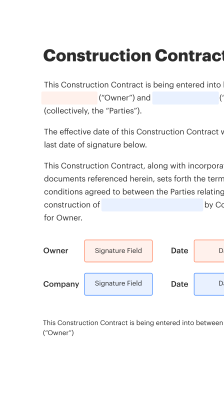
How creating and using a stamp digital sign time typically works

This overview outlines the typical flow from document preparation to timestamped signature validation.

  • Upload: Add document to signing platform
  • Configure fields: Insert signature and timestamp elements
  • Authenticate signer: Apply chosen verification method
  • Record audit: Platform logs time and transaction details
Collect signatures
24x
faster
Reduce costs by
$30
per document
Save up to
40h
per employee / month

Quick step-by-step: apply stamp digital sign time

Follow these core steps when adding a timestamped signature field to a document within an eSignature platform.

  • 01
    Prepare document: Upload and confirm final document version
  • 02
    Place signature: Add signature fields where required
  • 03
    Enable timestamp: Attach a visible or invisible timestamp field
  • 04
    Send for signature: Dispatch with authentication and reminders

How to manage audit trails and timestamp verification

Follow these actions to review and validate timestamped signing events efficiently.

01

Locate transaction:

Open the completed envelope record
02

View audit log:

Access chronological signing events
03

Verify timestamp:

Confirm recorded time and timezone
04

Check authentication:

Review authentication method used
05

Export evidence:

Download the verification package
06

Retain record:

Store in governed archive
be ready to get more

Why choose airSlate SignNow

  • Free 7-day trial. Choose the plan you need and try it risk-free.
  • Honest pricing for full-featured plans. airSlate SignNow offers subscription plans with no overages or hidden fees at renewal.
  • Enterprise-grade security. airSlate SignNow helps you comply with global security standards.
illustrations signature

Recommended workflow settings for timestamped signing

Use these settings when configuring automated signing flows to ensure timestamps are consistently applied and recorded.

Workflow Automation Setting Name Header Default configuration values used across automated signing workflows to maintain consistent timestamp behavior and audit capture.
Reminder Frequency 48 hours
Timestamp Visibility Visible and audit-only options
Signer Authentication Level Two-factor or email
Evidence Package Retention 7 years
Timezone Handling Normalize to UTC

Device and platform considerations for stamping timestamps

Ensure signer devices and hosting systems meet minimum compatibility for consistent timestamp capture and display.

  • Desktop browsers: Chrome, Edge, Safari supported
  • Mobile support: iOS and Android apps available
  • Server requirements: NTP-synced server clock

Confirm platform time synchronization and test signing flows across target devices to avoid timezone-related inconsistencies and to ensure the timestamp is both captured and visible where required.

Core security and authentication elements for stamped signatures

Cryptographic hash: Verifies document integrity
Secure timestamping: Applies authoritative time
Multi-factor authentication: Strengthens signer identity
Audit trail entries: Records signing events
Certificate-based signatures: Enables non-repudiation
Access controls: Limits document actions

Real-world scenarios where stamp digital sign time helps

Two industry examples show how timestamped signatures improve control and compliance across common document processes.

Real Estate Closing

A broker sends closing disclosures with embedded timestamp fields to buyers and sellers

  • timestamping ensures each party’s acceptance time is recorded
  • this provides clear evidence of signing order and timing for lenders

Leading to faster loan funding and reduced post-closing disputes.

Healthcare Consent Forms

A clinic uses timestamped eSignatures for treatment consent and releases

  • each consent includes signer authentication and a cryptographic timestamp
  • timestamps preserve when consent was granted relative to treatment events

Resulting in stronger compliance records and clearer audit outcomes during reviews.

Best practices for secure and reliable stamp digital sign time

Follow these recommended approaches to maximize the reliability and legal utility of timestamped signatures.

Enforce consistent timezone settings
Standardize on UTC or a designated corporate timezone for all timestamp records and document displays so signer times are comparable and audits do not require timezone reconciliation.
Use strong signer authentication
Require multi-factor authentication or certificate-based signatures for high-risk transactions to strengthen the link between the recorded timestamp and the verified signer identity.
Preserve full audit logs
Retain unaltered audit trails that include timestamp entries, IP metadata, and event sequencing to support legal admissibility and internal investigations.
Define retention and archival policies
Implement retention schedules tied to regulatory obligations and ensure archived timestamped documents remain accessible in unchanged form over required retention periods.

FAQs about stamp digital sign time

Common questions and concise answers to help administrators and users understand timestamp behavior and troubleshooting steps.

Feature comparison: stamp digital sign time support

A concise comparison showing basic availability and approaches to timestamped signatures across major eSignature platforms.

Feature or Criteria for Comparison Table signNow (Recommended) DocuSign Adobe Sign
Legal validity under ESIGN/UETA
Visible timestamp option
Certificate-based signatures Optional Optional Optional
Exportable evidence package
be ready to get more

Get legally-binding signatures now!

Retention and archival steps for timestamped documents

Retention workflows should align timestamps with document lifecycle and legal hold procedures.

01

Initial archival

Store signed documents immediately after completion

02

Retention classification

Assign retention based on record type

03

Legal hold process

Preserve records when litigation risk exists

04

Scheduled disposal

Permanently delete per policy

Recommended retention windows for common timestamped records

Typical retention periods below reflect common U.S. practice and regulatory considerations.

Employment records retention:

Three to seven years for most documents

Healthcare consent forms:

Minimum six years depending on state law

Financial transaction records:

Retain for seven years commonly

Real estate closing files:

Keep indefinitely or per lender rules

Tax-related signed forms:

Retain for seven years standard

Risks of inadequate timestamping and control

Disputed timing: Legal uncertainty
Invalid audit entries: Reduced evidentiary weight
Unauthorized access: Data exposure
Noncompliance fines: Regulatory penalties
Data loss: Retention failures
Reputational damage: Customer trust erosion

Feature availability across common eSignature vendors

This table summarizes selected features and common configuration availability across five widely used eSignature providers in the U.S. market.

Feature signNow (Recommended) DocuSign Adobe Sign PandaDoc HelloSign
Free Trial / Entry Offer Trial available Trial available Trial available Trial available Trial available
Mobile apps iOS and Android iOS and Android iOS and Android iOS and Android iOS and Android
Bulk Send capability Included in business plans Add-on or business tier Included in some plans Included in business Included in higher tiers
Advanced authentication options Email, SMS, 2FA, SAML Email, SMS, 2FA, SAML Email, SMS, 2FA, SSO Email, SMS, SSO Email, SMS, OAuth
API access and SDKs Available with API plans Comprehensive API Available with enterprise Available Available with developer keys

Simplify complex workflows

Create, execute, and manage workflows of any complexity, electronically from virtually anywhere. Scalable eSignature capabilities allow you to share documents with the right people in the correct order and define roles for each recipient. Execute document workflows faster and easier than ever before.

Automate document management

Optimize complex signing processes with airSlate SignNow’s powerful features to enhance your business. Control your automated eSignature workflows to ensure they're running at peak performance with instant notifications and reminders.

Optimize in team collaboration

Bring teams together in a secure, shared environment. Manage documents, use form templates and notifications to create more efficient cross-organization collaboration. Free your employees from having to spend time on repetitive activities so that they can focus on valuable, business-critical tasks.

Integrate into your existing systems

Run your projects with industry-leading integration. Collect Salesforce, Microsoft Teams, and SharePoint all in one business flow. Connect your software to a single system for endless possibilities and more productiveness.

Stay compliant with best-in-class data security

Feel confident understanding that your information remains secure by the most recent in encryption security. airSlate SignNow is GDPR and eIDAS certified and offers you transparence into your signing procedure with court-admissible audit trails. Configure user authorization and rights to control who has access to what.


walmart logo
exonMobil logo
apple logo
comcast logo
facebook logo
FedEx logo
be ready to get more

Get legally-binding signatures now!