Cosign Free Project Proposal Electronically Signed with SignNow

Eliminate paperwork and optimize digital document processing for higher productivity and limitless possibilities. eSign any papers from a comfort of your home, fast and feature-rich. Explore a better manner of running your business with airSlate SignNow.

Award-winning eSignature solution

What cosign free project proposal electronically signed means

cosign free project proposal electronically signed describes using an electronic signature solution to obtain legally valid signatures on project proposals without printing or scanning. This approach lets senders prepare proposal documents, apply signing roles and fields, and route the file to signers who confirm identity and execute the document online. For U.S. contexts, platforms like signNow support ESIGN and UETA compliance, provide tamper-evident audit trails, and integrate with cloud storage and common business apps to maintain a consistent, auditable record of proposal acceptance.

Why use electronic cosign for project proposals

Using cosign free project proposal electronically signed reduces turnaround time and centralizes signature records while preserving legal enforceability under ESIGN and UETA.

Why use electronic cosign for project proposals

Common obstacles when cosigning project proposals electronically

  • Document formatting differences can cause fields to misalign across devices, delaying signatures.
  • Insufficient signer identity checks may raise legal or internal compliance concerns for high-risk contracts.
  • Poorly defined signing order or roles can create bottlenecks and incomplete signature flows.
  • Lack of archival policies risks noncompliance with record retention and audit requirements.

Representative users in an electronic cosign process

Procurement Manager

A procurement manager prepares proposals and configures signing roles, ensuring fields for price, scope, and dates are present and routed to legal and vendor signers for approval within the eSignature platform.

Client Signer

A client signer receives the proposal, completes identity verification if required, reviews terms, and applies an electronic signature from any device, with the completed document returned to all parties automatically.

Teams and roles that commonly use cosign workflows

  • Sales teams finalizing client proposals and rate agreements.
  • Procurement teams approving vendor statements of work and contracts.
  • Project managers capturing stakeholder approvals on scope and deliverables.

Across organizations, cosign workflows reduce manual handoffs and centralize signed documents for compliance and reporting.

Advanced capabilities for enterprise proposal cosigning

For organizations handling high volumes or sensitive proposals, advanced eSignature tools provide automation, integrations, and governance features to scale securely.

API Access

Programmatic document creation and signature capture to embed cosign workflows in CRM, procurement, or custom portals while preserving audit metadata and error handling.


Single Sign-On

Integration with corporate identity providers via SAML or OIDC for streamlined access, centralized user provisioning, and enforcement of corporate authentication policies.

Role Management

Granular user roles and permissions to separate template authors, senders, and administrators while ensuring least-privilege access to sensitive proposal documents.

Advanced Authentication

Support for SMS one-time passcodes, knowledge-based verification, or digital certificate checks for higher-assurance signer identity validation on critical proposals.

Document Retention

Configurable retention and archival controls to meet internal policy and regulatory requirements for storing executed proposals and associated evidence.

Integrations

Prebuilt connectors for CRMs, cloud storage, and document editors to minimize manual export/import and maintain a single source of truth for signed proposals.

be ready to get more

Choose a better solution

Core features to look for when cosigning proposals

Select eSignature features that simplify proposal creation, enforce signing rules, and keep a robust compliance audit trail for every executed document.

Templates

Reusable proposal templates reduce repetitive setup, ensure consistent clause placement, and speed generation of standardized project proposals with pre-positioned signature and data fields for common workflows.

Bulk Send

Ability to send the same proposal to multiple recipients or parallel signers, tracking each recipient's status independently while maintaining a centralized record of all signed instances and responses.

Conditional Fields

Dynamic form logic that shows or hides fields based on prior answers, helping tailor proposals to specific project types while minimizing signer confusion and errors during completion.

Audit Reports

Comprehensive event logs that record access, viewing, signing timestamps, IP addresses, and authentication methods to support legal admissibility and internal compliance reviews.
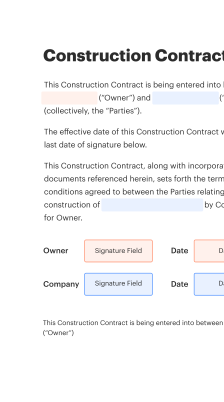
How cosign free project proposal electronically signed works in practice

A clear workflow ensures each signer receives the correct document, verifies identity as needed, and applies an electronic signature that becomes part of the audit record.

  • Upload: Import proposal from cloud or local storage.
  • Configure: Add fields and set signing order and reminders.
  • Authenticate: Require email, SMS, or knowledge-based checks.
  • Complete: Signers apply signatures and receive completed copies.
Collect signatures
24x
faster
Reduce costs by
$30
per document
Save up to
40h
per employee / month

Step-by-step: prepare and cosign a project proposal

Follow these steps to create, route, and complete a cosigned project proposal using an eSignature platform.

  • 01
    Draft Document: Prepare proposal content and finalize attachments.
  • 02
    Add Fields: Place signature, initial, and date fields where required.
  • 03
    Assign Signers: Define roles, order, and authentication methods for each signer.
  • 04
    Send and Track: Deliver via email and monitor completion status.
be ready to get more

Why choose airSlate SignNow

  • Free 7-day trial. Choose the plan you need and try it risk-free.
  • Honest pricing for full-featured plans. airSlate SignNow offers subscription plans with no overages or hidden fees at renewal.
  • Enterprise-grade security. airSlate SignNow helps you comply with global security standards.
illustrations signature

Recommended workflow settings for consistent cosign processes

Configure these workflow settings to standardize proposal circulation, reminders, and evidence capture across your organization.

Setting Name Configuration
Signing Order Sequential
Reminder Frequency 48 hours
Authentication Level Email or SMS
Retention Period 7 years
Audit Logging Enabled

Device and platform requirements for cosigning proposals

  • Desktop Browsers: Chrome, Edge, Safari
  • Mobile Devices: iOS and Android apps
  • Integrations: APIs and cloud connectors

Ensure users have up-to-date browsers or official mobile apps, stable internet access, and any corporate SSO configuration to enable seamless cosign experiences across devices.

Security features that protect electronically signed proposals

Audit Trail: Detailed event logging
Encryption: AES-256 in transit and at rest
Access Controls: Role-based permissions
Authentication: Multi-factor options
Document Integrity: Tamper-evident seals
Data Residency: US-based storage options

Industry use cases for cosign electronically signed proposals

Real-world examples show how electronic cosign accelerates proposal acceptance and preserves auditability across sectors.

Construction Scope Approval

A contractor sends a project proposal for scope and change order approval to an owner

  • fast mobile signing by the owner
  • reduced on-site delays and clearer scope confirmation

Leading to faster project mobilization and fewer disputes.

Software Implementation Proposal

A software vendor delivers a detailed proposal requiring signature from procurement and IT

  • parallel signing by multiple stakeholders
  • clearer acceptance criteria and documented approvals

Resulting in quicker onboarding and a single auditable agreement for implementation.

Best practices for secure, accurate cosigned proposals

Adopt straightforward controls and document hygiene to reduce errors and support legal validity for every electronically cosigned project proposal.

Standardize proposal templates and fields
Create vetted templates for common proposal types that lock required fields and standard clauses. Use version control and review workflows so legal and procurement approve template changes before deployment.
Define signer identity and authentication levels
Classify proposals by risk and require stronger authentication for high-value or regulated agreements. Document chosen methods and retain evidence in the audit trail for dispute resolution.
Maintain clear signing order and reminders
Specify sequential or parallel signing flows and configure automated reminders to reduce delays. Log exceptions and manual overrides for governance and reporting.
Enforce retention and access policies
Apply retention schedules, secure storage, and role-based access to completed proposals. Regularly export or back up records to meet audit and legal hold requirements.

FAQs about cosign free project proposal electronically signed

Answers to common questions about preparing, sending, and validating cosigned project proposals with an eSignature platform.

Feature availability: signNow compared with major vendors

A concise feature comparison for common proposal cosign requirements across leading eSignature providers.

Feature signNow (Recommended) DocuSign Adobe Sign
ESIGN / UETA Compliance
Templates
API / Developer SDKs
Mobile App
be ready to get more

Get legally-binding signatures now!

Compliance risks and penalties to consider

Invalid Signature: Contract unenforceable
HIPAA Violation: Fines and sanctions
FERPA Breach: Student data penalties
Retention Failure: Audit findings
Data Exposure: Reputational damage
Noncompliance: Regulatory fines

Pricing and licensing snapshot for proposal cosign solutions

High-level pricing and plan differences for organizations evaluating eSignature options for proposal cosign workflows.

Plan Type / Availability signNow (Recommended) DocuSign Adobe Sign Dropbox Sign PandaDoc
Entry-level Price (monthly) Tiered subscriptions available Per-user starting tiers Included in Adobe subscriptions Free tier available Paid plans start monthly
Team / Business Plans Business and enterprise tiers Business Pro and advanced Business and enterprise Teams and business Business and enterprise tiers
API Access Available on paid tiers Available on paid tiers Available on paid tiers Available via Dropbox Sign Available on paid tiers
Bulk Send Supported Supported Supported Supported Supported
Compliance Options ESIGN, UETA, HIPAA support options ESIGN, UETA, advanced compliance ESIGN, UETA, FedRAMP options in enterprise ESIGN, UETA ESIGN, UETA

Simplify complex workflows

Create, execute, and manage workflows of any complexity, electronically from virtually anywhere. Scalable eSignature capabilities allow you to share documents with the right people in the correct order and define roles for each recipient. Execute document workflows faster and easier than ever before.

Automate document management

Optimize complex signing processes with airSlate SignNow’s powerful features to enhance your business. Control your automated eSignature workflows to ensure they're running at peak performance with instant notifications and reminders.

Optimize in team collaboration

Bring teams together in a secure, shared environment. Manage documents, use form templates and notifications to create more efficient cross-organization collaboration. Free your employees from having to spend time on repetitive activities so that they can focus on valuable, business-critical tasks.

Integrate into your existing systems

Run your projects with industry-leading integration. Collect Salesforce, Microsoft Teams, and SharePoint all in one business flow. Connect your software to a single system for endless possibilities and more efficiency.

Remain compliant with industry-leading data protection

Feel safe with the knowledge that your data is protected by the most up-to-date in encryption security. airSlate SignNow is GDPR and eIDAS certified and offers you transparence into your eSigning process with court-admissible audit trails. Configure user access permissions and rights to control who has access to what.


walmart logo
exonMobil logo
apple logo
comcast logo
facebook logo
FedEx logo
be ready to get more

Get legally-binding signatures now!