Create a Document Group Templates with SignNow

Easily work with various documents using document group templates. Merge documents, invite more signers and track all changes.

Award-winning eSignature solution

What create a document group templates means for document workflows

The create a document group templates capability lets organizations assemble reusable sets of documents, fields, and signer roles into a single template package for repeated use. In practice this reduces preparation time for multi-document transactions, enforces consistent form layout and field placement, and supports batch distribution or sequential signing flows. Within signNow the feature ties templates to user roles, permissions, and workflows so teams can quickly generate identical document groups for recurring processes while preserving audit trails and compliance metadata required for regulated industries.

Why create a document group templates matters for consistency and speed

Using create a document group templates standardizes document packets, reduces repetitive setup, and lowers the chance of field-placement errors. It accelerates recurring transactions, simplifies training for teams, and supports bulk or parallel signing while retaining a complete audit trail and compliance controls.

Why create a document group templates matters for consistency and speed

Common challenges when assembling document groups

  • Inconsistent field names across documents can break automated data mapping and cause processing errors during signing.
  • Manually recreating multi-document packets for each transaction increases time per agreement and raises operational costs.
  • Poorly defined signer roles and routing sequences create delays and require extra follow-up to obtain missing signatures.
  • Lack of centralized templates increases versioning errors and makes compliance audits more difficult and time consuming.

Typical users and their responsibilities

HR Manager

HR Managers create group templates that combine offer letters, confidentiality agreements, and benefits enrollment forms to ensure every new hire receives the same packet with correctly placed signature and data fields.

Sales Ops

Sales operations specialists build proposal and contract groups that preload pricing tables, signature blocks, and routing rules to accelerate deal closure and reduce manual configuration for account executives.

Teams and roles that commonly use create a document group templates

Legal, HR, sales operations, and procurement teams rely on grouped templates to handle repeatable multi-document transactions efficiently.

  • HR teams assembling offer letters, onboarding forms, and benefits packets for new hires.
  • Sales operations sending multi-document proposals and contracts with consistent field positions and pricing details.
  • Legal and procurement managing standardized master agreements with associated exhibits and signature pages.

Centralizing templates reduces handoffs, enforces consistency, and provides clear ownership for maintenance and version control.

Advanced capabilities that improve template group utility

Beyond basic grouping, advanced features include conditional routing, API-driven provisioning, integrations, and analytics to optimize signed packet handling and oversight.

Conditional routing

Set routing rules that change sequence or recipients based on field values, enabling dynamic signing flows for complex approval scenarios without manual intervention.


Pre-filled field mapping

Map data from CRM or HR systems into template fields to reduce manual entry and prevent transcription errors during mass sends or individualized transactions.

Template sharing controls

Define granular sharing settings so templates are visible only to departments or user groups, preventing misuse and maintaining governance across large teams.

Bulk send and batch processing

Support sending the same template group to many recipients with individualized fields, improving throughput for renewals, onboarding, and mass enrollment processes.

API provisioning

Automate template creation and sending via API to integrate template groups into existing business applications and system-driven workflows reliably.

Reporting and analytics

Track template usage, completion times, and signer behavior to identify bottlenecks and measure operational improvements from template adoption.

be ready to get more

Choose a better solution

Core capabilities to look for in create a document group templates

Effective template grouping includes reusable packet creation, role-based access, conditional fields, and batch distribution. These capabilities reduce prep time and enforce consistent document presentation across transactions.

Reusable packet

Save multi-document sets as a single template with pre-applied fields and signer roles to reuse across departments and preserves field positions for consistent data capture.

Role-based permissions

Restrict template editing and sending to designated team members while allowing view-only access for auditors or external reviewers to maintain security and version control.

Conditional visibility

Use conditional logic to show or hide specific documents and fields within a group depending on data entry or recipient role, streamlining packets for different scenarios.

Bulk distribution

Dispatch a template group to multiple recipients or batches with predefined mapping to recipient fields to support mass enrollment or contract renewals efficiently.
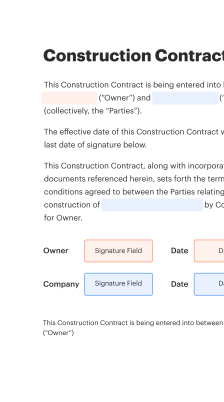
How grouped templates operate in a signing workflow

Grouped templates combine documents, routing, and field rules so a single send action triggers the entire packet's signing lifecycle.

  • Initiate send: Sender selects template group and recipients.
  • Route sequentially: Template enforces signer order if required.
  • Sign and collect: Recipients complete fields and sign digitally.
  • Archive: Signed group stored with audit record.
Collect signatures
24x
faster
Reduce costs by
$30
per document
Save up to
40h
per employee / month

Step-by-step: Build a document group template

Follow these concise steps to assemble and deploy a document group template for recurring multi-document transactions.

  • 01
    Select documents: Choose all files to include in the group.
  • 02
    Define roles: Assign signer and viewer roles for each document.
  • 03
    Add fields: Place signatures, dates, and data fields consistently.
  • 04
    Save and share: Publish template and set team permissions.

Quick operational checklist for template group deployment

Use this checklist to validate each template group before rolling it out to users or integrating it into automated workflows.

01

Confirm document order:

Verify packet sequencing is correct
02

Validate field placements:

Check signature and data fields
03

Assign role permissions:

Set who can send and edit
04

Run a test send:

Complete end-to-end signing test
05

Document version:

Record template version and changes
06

Set retention:

Apply retention and archival rules
be ready to get more

Why choose airSlate SignNow

  • Free 7-day trial. Choose the plan you need and try it risk-free.
  • Honest pricing for full-featured plans. airSlate SignNow offers subscription plans with no overages or hidden fees at renewal.
  • Enterprise-grade security. airSlate SignNow helps you comply with global security standards.
illustrations signature

Recommended workflow settings for template group automation

Configure these settings to align template groups with automated reminders, routing, and archival behavior for consistent execution.

Setting Name Configuration
Reminder Frequency 48 hours
Signature Order Sequential
Auto-Archive Delay 90 days
Default Sender Role Account owner
Completion Notifications Enabled

Device and platform considerations for create a document group templates

Template groups are compatible with modern web browsers and mobile apps but administrators should confirm browser versions and mobile OS support before broad deployment.

  • Desktop browsers: Chrome, Edge, Firefox supported
  • Mobile operating systems: iOS and Android supported
  • Minimum connectivity: Stable internet required

Ensure users run supported browser versions, keep mobile apps updated, and validate integration connectors (CRM, storage) to avoid compatibility issues when sending grouped templates across teams.

Security and protection elements for document group templates

Encryption at rest: AES-256 encryption of stored files
Transport security: TLS 1.2+ for data in transit
Access controls: Role-based permission settings
Audit logging: Immutable event history per document
Document redaction: Selective field masking available
Data residency options: Configurable storage regions

Real-world examples of grouped document templates in action

The following cases illustrate how create a document group templates can be applied across common business processes to reduce manual work and improve control.

Employee Onboarding Packet

A large healthcare employer consolidated offer letters, non-disclosure agreements, and benefits enrollment forms into a single template group to streamline new-hire processing

  • Predefined fields automatically populate from HR data sources
  • This reduced manual data entry and signing friction for candidates

Resulting in faster onboarding and fewer data-entry errors during compliance audits.

Sales Proposal Bundle

A software vendor packaged proposal, subscription agreement, and payment authorization into one reusable group template to ensure consistent presentation

  • Conditional fields expose pricing only for relevant regions
  • This removed variation between reps and made approvals predictable

Resulting in shorter sales cycles and standardized legal terms across deals.

Best practices for secure and accurate grouped templates

Apply consistent naming, version control, and role definitions to keep group templates maintainable and auditable across teams.

Use clear, consistent template naming conventions
Adopt a naming standard that encodes department, purpose, and version so users can quickly find the correct template and avoid using outdated packets.
Limit editing to template owners and administrators
Restrict template changes to a small group to prevent accidental modifications and ensure that any updates follow a review process with documented approvals.
Test templates before production use
Run sample sends through the full signing flow to verify field mapping, role assignments, conditional logic, and document order before distributing templates to end users.
Maintain a version and retention policy
Document template revisions, archive superseded versions, and keep a retention schedule to support audits and legal compliance for signed packets.

FAQs and troubleshooting for create a document group templates

Common issues and answers help administrators and users resolve problems with template creation, sharing, and signing flows quickly.

Feature comparison: create a document group templates across vendors

Compare key capabilities and availability for grouped template features across leading eSignature providers with signNow first as Recommended.

Criteria Compared Across Leading eSignature Vendors signNow (Recommended) DocuSign Adobe Sign
Ability to Create Document Group Templates
Bulk Send Capacity per Batch 1,000 recipients 500 recipients 500 recipients
Native Google Workspace Integration
HIPAA Support Available Configurable Requires Business Pro Requires Business plan
be ready to get more

Get legally-binding signatures now!

Retention and schedule considerations for template groups

Define retention, review cadence, and archival timing to meet internal governance and regulatory requirements for grouped templates and signed packets.

Template review cadence:

Annual review recommended

Document retention period:

Seven years typical for contracts

Automated archival timing:

Archive 90 days after completion

Access review schedule:

Quarterly permission audits

Audit log retention:

Maintain logs for seven years

Risks from improper template management

Compliance fines: Regulatory penalties
Data breaches: Unauthorized access
Contract disputes: Signature validity questions
Operational delays: Slower processing
Reputational harm: Loss of trust
Financial loss: Remediation costs

Pricing snapshot and plan availability for template group features

High-level pricing and plan characteristics that affect template groups, with signNow listed first and labeled as Recommended for clarity.

Vendor Pricing and Plans signNow (Recommended) DocuSign Adobe Sign HelloSign PandaDoc
Example entry-level plan name Business (signNow) Personal (DocuSign) Individual (Adobe) Essentials (HelloSign) Essentials (PandaDoc)
Monthly starting price (USD) $8 per user/mo $10 per user/mo $9.99 per user/mo $15 per user/mo $19 per user/mo
Free trial or free tier Free trial available Free trial available Free trial available Free trial available Free tier exists
API access with plans Available on Business+ Available on Business Pro Available on Business Available on Business Available on Business
Enterprise/HIPAA-capable offerings Enterprise tier with HIPAA Enterprise add-ons Enterprise agreements Business plans enterprise Enterprise available

How to create Document Group Templates

airSlate SignNow offers two types of document grouping — Document Groups and Document Group Templates. The major difference between these two is that you can reuse Document Group Templates which is super convenient if a larger part of your processes and documents are routine in their nature.

User-friendly interface

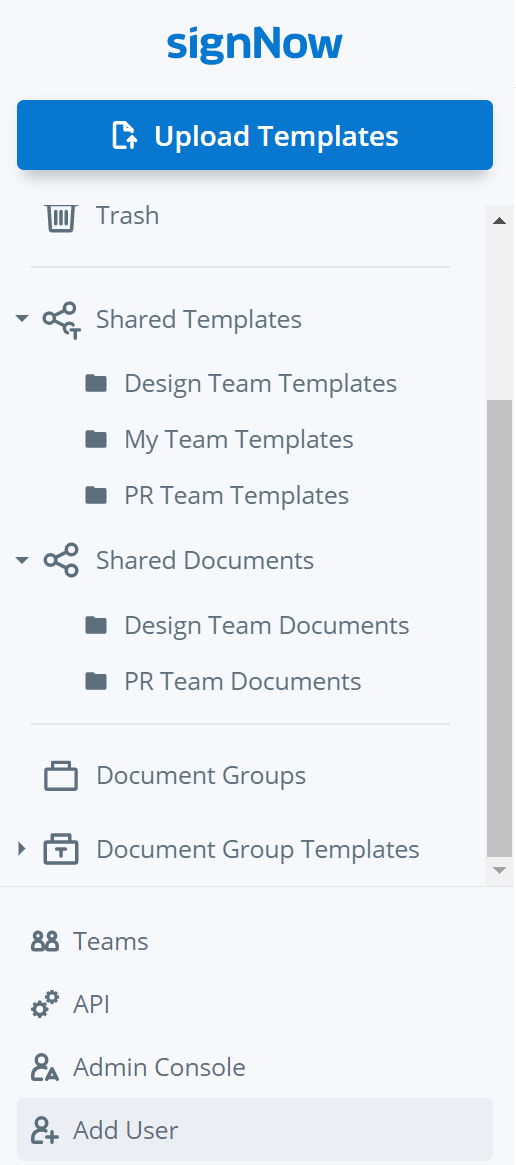
To start using Document Group Templates click on their folder in the left-hand menu of your airSlate SignNow account.
fill-guide-illustration

Ease of preparation

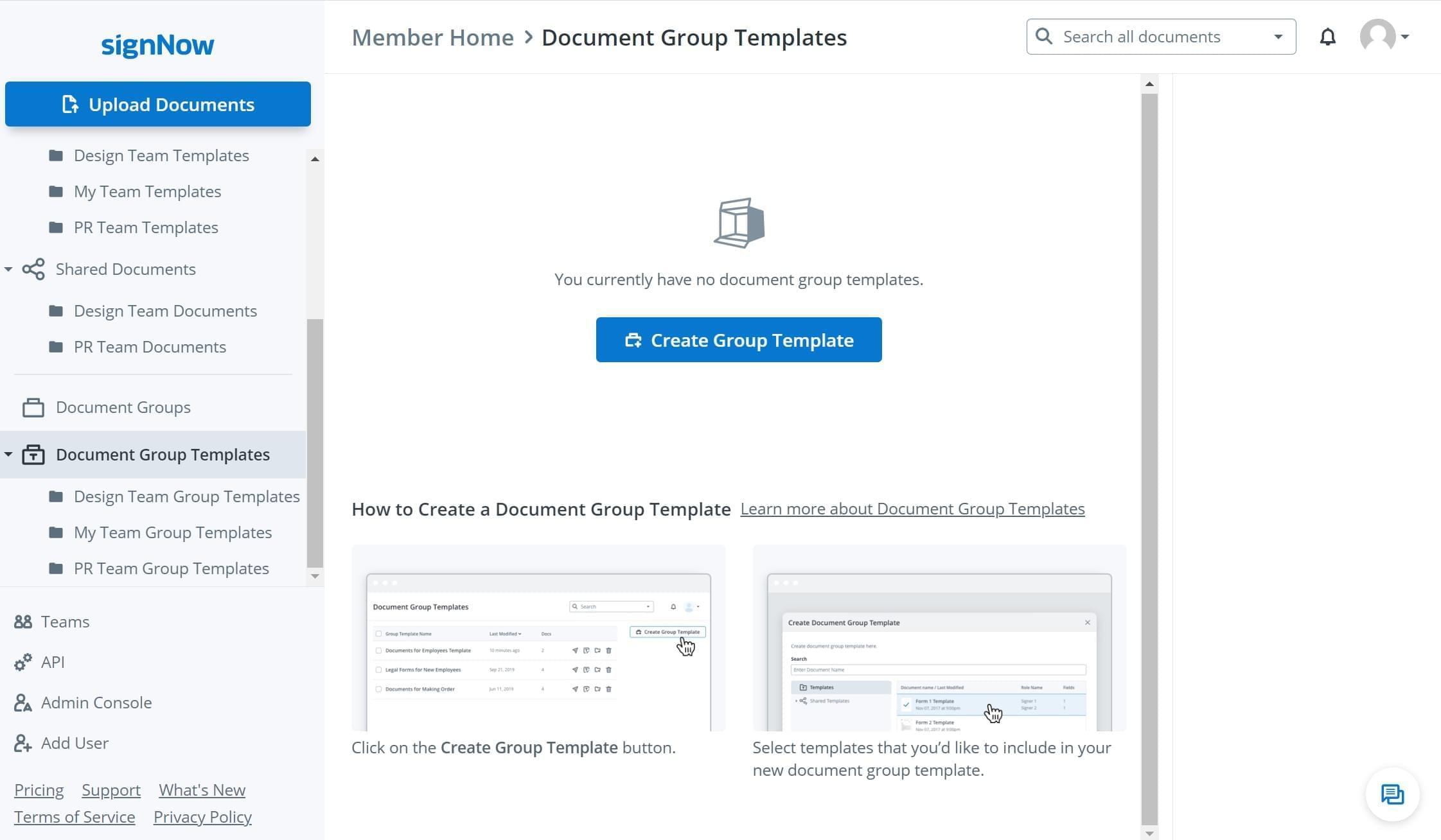
Click Create Group Template to select the document templates that you want to merge and send as one group.
fill-guide-illustration

Intuitive to the max

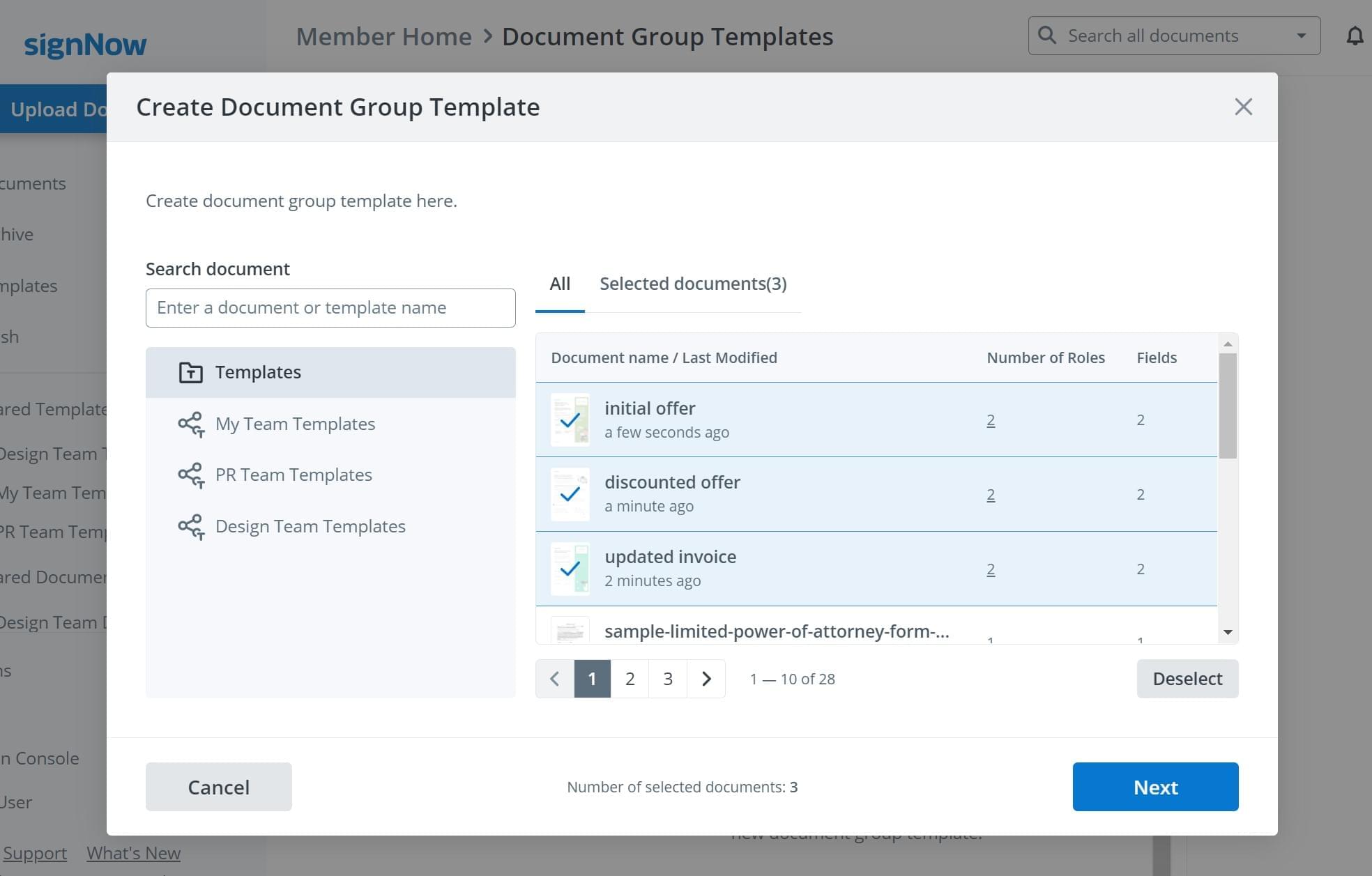
Now select the templates you intend to merge into one group. Note that you can choose your own templates, individual templates, or team templates used by other members of your airSlate SignNow team.
fill-guide-illustration

Convenient for multiparty eSigning

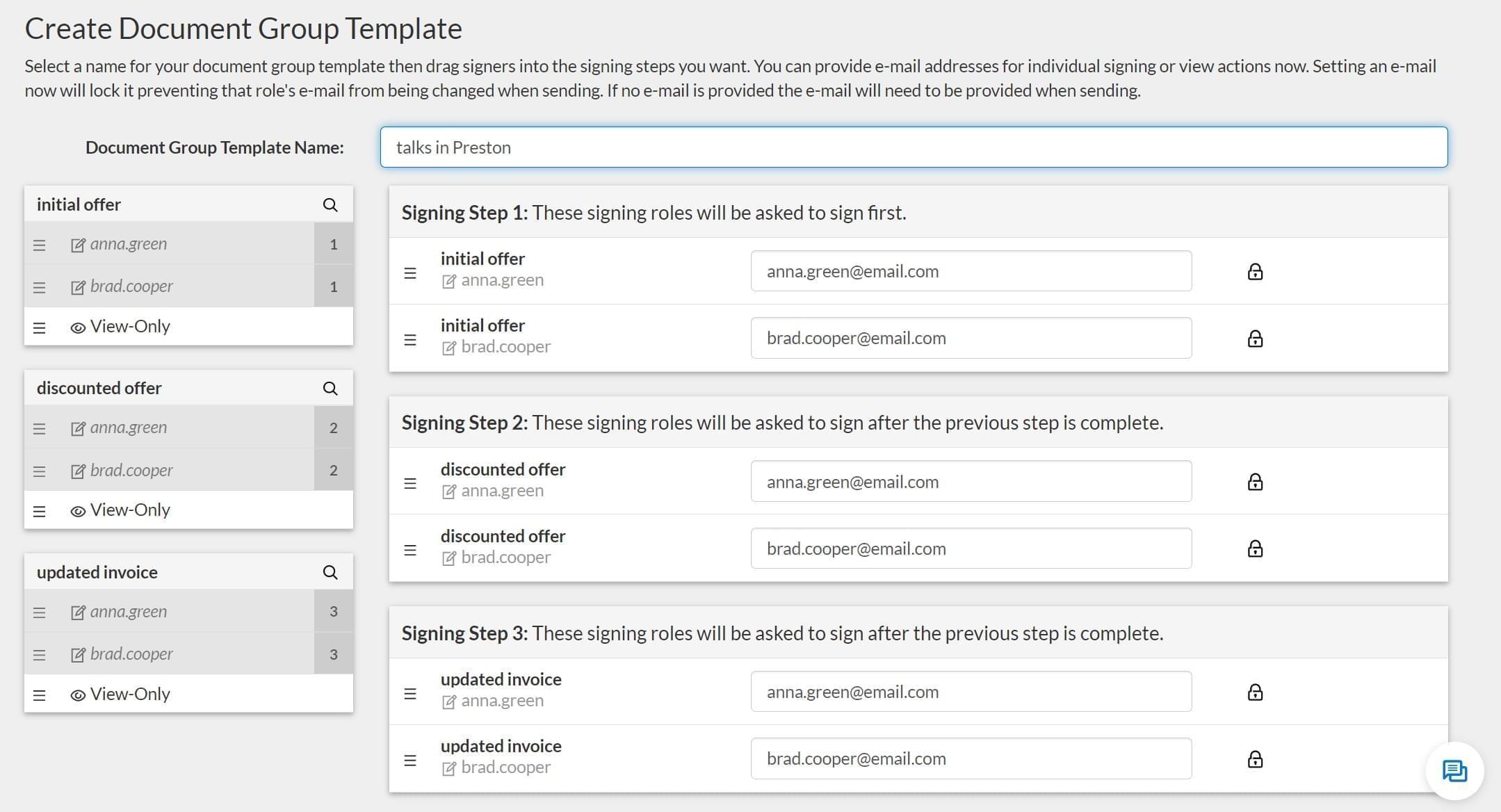
Once a Document Group Template is created, you can name it and set the eSigning order within this group.
fill-guide-illustration

Reminders and other extras

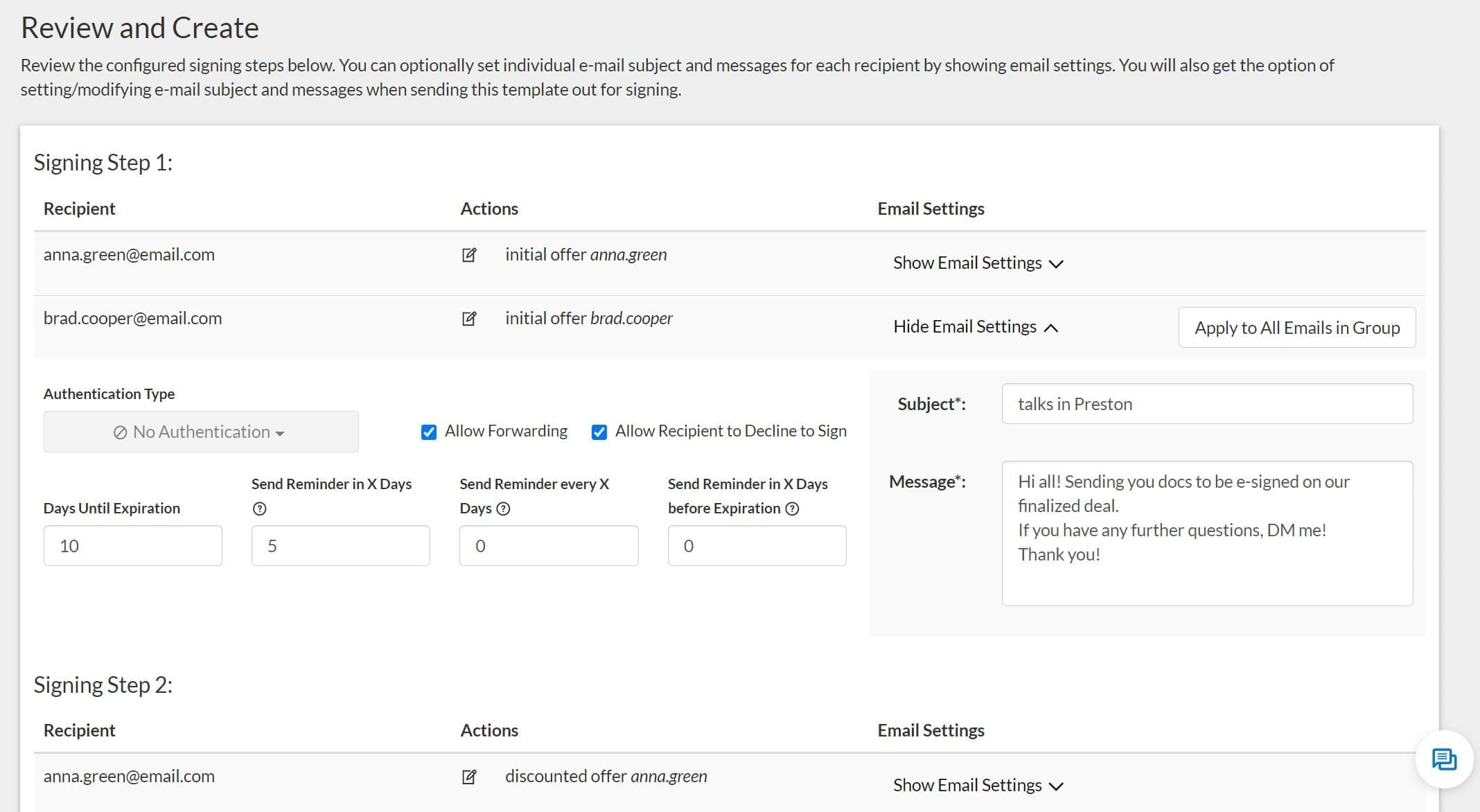
The next step is configuring your Document Group Template. Here you can check the signing steps, recipient emails, set reminders and expiration dates, and also set a password if necessary. You can also customize the subject and the text message to go with your Document Group Template.
fill-guide-illustration

Super easy management

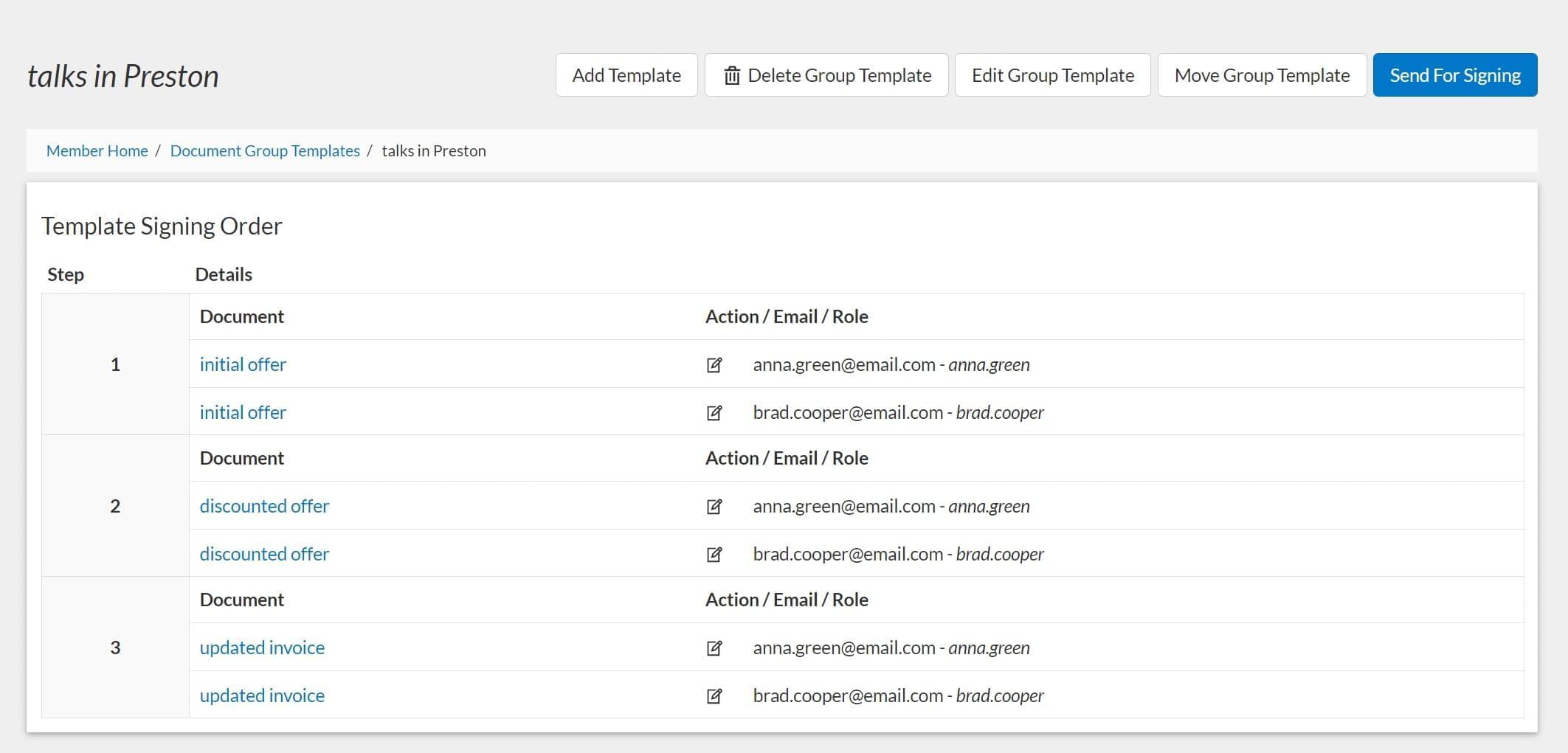
That’s it! Once your Document Group Template is generated, you can click Send For Signing, continue editing, or add another Document Group Template to your digital office.

fill-guide-illustration
walmart logo
exonMobil logo
apple logo
comcast logo
facebook logo
FedEx logo
be ready to get more

Get legally-binding signatures now!