Quotations Software Free for Small Businesses

quotations software free for small businesses

Award-winning eSignature solution

Legal validity and compliance considerations

Electronic quotations and eSignatures are legally recognized in the United States under ESIGN and UETA when intent and consent are captured and records are retained; vendors should document authentication, audit trails, and retention to support enforceability and regulatory needs.

Legal validity and compliance considerations

Typical user roles in small-team quoting

Administrator

Administrators manage account settings, user provisioning, permissions, and integrations. They configure global templates, retention rules, and security controls to align the quoting workflow with company policies and compliance requirements.

Sales Agent

Sales agents create and send quotes, customize line items for clients, track status, and request signatures. They use templates and CRM syncs to accelerate proposals while following approval limits set by administrators.

Core features to look for in quotation software

Key capabilities improve accuracy and speed: template management, pricing and tax calculations, electronic signatures, batch sending, common integrations, and automation for approvals and reminders.

Templates

Customizable quote templates let teams standardize language, pre-fill client details, and lock pricing fields to reduce manual errors and speed quote generation for repeat services.


Line items

Structured line-item support handles quantities, unit prices, discounts, taxes, and subtotals, producing clear totals and exportable itemized breakdowns for clients and accounting.

E‑Signature

Integrated electronic signing captures signer intent, supports standard signature flows, and produces a tamper-evident document with metadata needed for recordkeeping and contract formation.

Bulk Send

Batch or bulk send capabilities deliver identical quotes to multiple recipients, tracking each transaction separately to save time when issuing standard offers or renewals.

Integrations

Connectors to CRM, accounting, and cloud storage keep client data synchronized, reduce duplicate entry, and ensure signed quotes are archived in the right systems automatically.

Automation

Workflow automation triggers reminders, approvals, and expirations; it routes quotes through required reviewers and applies business rules for discounts and authorizations.

be ready to get more

Choose a better solution

Integration and template capabilities that matter

Integrations and flexible templates let small businesses connect quote workflows to existing tools and maintain consistent client-facing documents across channels.

Google Workspace

Two-way integration with Google Docs and Sheets lets users create quotes from a document or spreadsheet, populate templates with sheet data, and save signed documents back to Drive for centralized storage and collaboration.

CRM sync

CRM connectors push client details into quotes and pull signed quote status back to contact records, keeping sales pipelines updated and reducing manual data entry across systems.

Cloud storage

Built-in links for Dropbox and other storage providers archive executed quotes in organized folders, apply retention policies, and simplify retrieval for billing and audits.

Custom Templates

Template libraries support conditional fields, preset pricing logic, and locked clauses so teams maintain brand consistency while accommodating variable services or discounts.
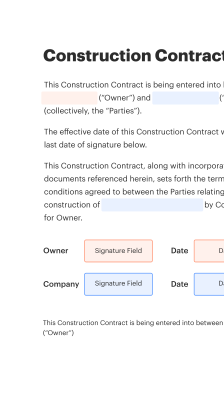
How online quotation workflows operate

Overview of the online quote lifecycle: prepare a template, populate client and line-item data, request signatures, and store the executed document for records.

  • Prepare: Create a quote template with fields and pricing.
  • Populate: Enter client details and customize line items.
  • Request: Send for signature using email or link.
  • Archive: Save completed quote with audit trail attached.
Collect signatures
24x
faster
Reduce costs by
$30
per document
Save up to
40h
per employee / month

Quick setup: start issuing quotes fast

Quick setup steps to start using quotations software free for small businesses, covering account creation, template preparation, signer setup, and initial quote delivery.

  • 01
    Create account: Register with company details and verify email.
  • 02
    Set templates: Build reusable quote templates with pricing fields.
  • 03
    Add recipients: Import clients and assign signer roles.
  • 04
    Send quote: Deliver via email or shareable link for signature.

Managing audit trails for signed quotations

Follow these steps to ensure each quotation transaction is properly logged, preserved, and retrievable for compliance or dispute resolution.

01

Enable logging:

Turn on detailed transaction logs.
02

Capture metadata:

Record IP, timestamps, and user agent.
03

Attach evidence:

Store signed PDFs with metadata.
04

Version control:

Retain prior document versions.
05

Export options:

Enable PDF and CSV exports.
06

Retention rules:

Apply legal retention schedules.
be ready to get more

Why choose airSlate SignNow

  • Free 7-day trial. Choose the plan you need and try it risk-free.
  • Honest pricing for full-featured plans. airSlate SignNow offers subscription plans with no overages or hidden fees at renewal.
  • Enterprise-grade security. airSlate SignNow helps you comply with global security standards.
illustrations signature

Typical workflow and automation settings

Recommended default configurations for a quotations workflow help ensure consistency while enabling automation and auditability for small teams.

Feature Configuration
Reminder Frequency 48 hours
Approval Sequence Sequential approvals
Bulk Send Limit 200 per batch
Template Library Access Team-wide
Auto-Expiration 30 days

Supported devices and platform requirements

Most quotations software free for small businesses runs in a browser and supports current versions of Chrome, Edge, Safari, and Firefox on desktop and mobile.

  • Desktop browsers: Chrome, Edge, Safari, Firefox
  • Mobile platforms: iOS and Android supported
  • Minimum connection: Broadband or stable mobile network

For native apps, ensure device OS versions are recent; allow camera and storage permissions for document capture and offline signing. Check vendor documentation for precise requirements and optional integrations.

Security controls and document protections

Encryption in transit: TLS 1.2+ or equivalent
Encryption at rest: AES‑256 or equivalent
Access controls: Role-based permissions
Multi-factor: Optional two-factor login
Audit logs: Immutable activity records
Compliance attestations: SOC2 and related reports

Practical use cases for small-business quoting

Two representative examples show how quotations software free for small businesses fits common workflows in service and trade industries.

Freelance services

A freelance designer prepares a reusable quote template for hourly and fixed projects, reducing preparation time by using saved pricing fields

  • uses eSignature to confirm client acceptance quickly
  • creates a stored agreement with an audit trail for invoicing

Resulting in faster client onboarding and clearer payment terms for recurring work.

Field contractor

A small contractor creates itemized quotes for materials and labor using predefined line items, ensuring consistent markup and tax calculations

  • shares quotes on mobile for on-site approvals
  • captures client signature immediately after walkthrough

Leading to reduced disputes and faster project starts with documented consent.

Operational best practices for secure, accurate quoting

Practical recommended steps help small businesses keep quotes consistent, secure, and legally sound while minimizing administrative overhead.

Standardize reusable templates and fields
Create and maintain a library of approved quote templates with locked clauses and standardized pricing fields to prevent inconsistent terms and reduce approval cycles across the team.
Maintain clear signer roles and permissions
Assign least-privilege access and explicit signer roles so only authorized personnel can issue quotes, approve discounts, or finalize agreements to reduce errors and internal disputes.
Record and store audit trails for each transaction
Ensure each signed quote includes an immutable audit log with timestamps, IP addresses, and signer details to support compliance, billing, and dispute resolution if needed.
Regularly review retention and backup policies
Define retention schedules aligned with legal requirements, back up executed quotes to secure storage, and document deletion or legal hold procedures for consistent records management.

Common questions and troubleshooting tips

Answers to frequent issues and setup questions help small teams adopt quotation tools with fewer interruptions and clearer expectations.

Feature comparison: digital signing capabilities

A concise comparison of core capabilities across leading eSignature providers relevant to quotations and small-business workflows.

Feature availability and implementation details signNow (Recommended) DocuSign Adobe Acrobat Sign
Legally binding under ESIGN and UETA
Audit trail with tamper-evident records Detailed Detailed Detailed
Bulk Send or batch quoting support Limited
Mobile signing on iOS and Android iOS, Android iOS, Android iOS, Android
be ready to get more

Get legally-binding signatures now!

Retention and backup policies for quote records

Establish clear retention, backup, and deletion rules to meet legal obligations and preserve business history for invoicing and compliance.

Minimum retention period:

7 years

Backup schedule:

Daily incremental backups

Legal hold process:

Immediate freeze on relevant records

Data export frequency:

Monthly exports suggested

Secure deletion policy:

Automated after retention ends

walmart logo
exonMobil logo
apple logo
comcast logo
facebook logo
FedEx logo
be ready to get more

Get legally-binding signatures now!