Establishing secure connection… Loading editor… Preparing document…
Navigation

Fill and Sign the A Corporation Form
Fill and Sign the A Corporation Form

How it works

Open the document and fill out all its fields.
Apply your legally-binding eSignature.
Save and invite other recipients to sign it.

Rate template

4.6
46 votes
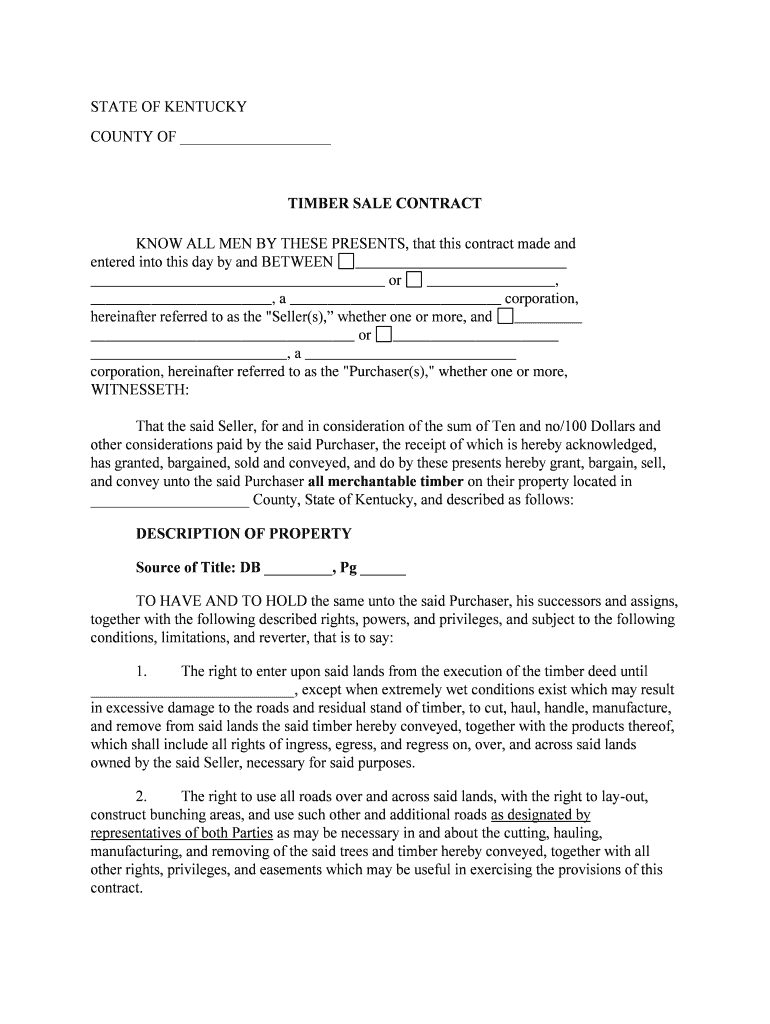
STATE OF KENTUCKY COUNTY OF ____________________ TIMBER SALE CONTRACT KNOW ALL MEN BY THESE PRESENTS, that this contract made and entered into this day by and BETWEEN _______________ _____________ _______________________________________ or _________________, ________________________, a _______ _____________________ corporation, hereinafter referred to as the "Seller(s),” whether one or more, and _________ ___________________________________ or ______________________ __________________________, a ____________________ ________ corporation, hereinafter referred to as the "Purchaser(s)," whether one or more, WITNESSETH: That the said Seller, for and in consideration of the sum of Ten and no/100 Dollars and other considerations paid by the said Purchaser, the receipt of w hich is hereby acknowledged, has granted, bargained, sold and conveyed, and do by these presents hereby grant, bargain, sell, and convey unto the said Purchaser all merchantable timber on their property located in _____________________ County, State of Kentucky, and described as follows: DESCRIPTION OF PROPERTY Source of Title: DB _________, Pg ______ TO HAVE AND TO HOLD the same unto the said Purchaser, his successors and ass igns, together with the following described rights, powers, and privileges, and subject to the following conditions, limitations, and reverter, that is to say: 1. The right to enter upon said lands from the execution of the timber deed until ______________ _____________, except when extremely wet conditions exist which may result in excessive damage to the roads and residual stand of timber, to cut, haul, handle, manufacture, and remove from said lands the said timber hereby conveyed, together with the produ cts thereof, which shall include all rights of ingress, egress, and regress on, over, and across said lands owned by the said Seller, necessary for said purposes. 2. The right to use all roads over and across said lands, with the right to lay -out, construc t bunching areas, and use such other and additional roads as designated by representatives of both Parties as may be necessary in and about the cutting, hauling, manufacturing, and removing of the said trees and timber hereby conveyed, together with all other rights, privileges, and easements which may be useful in exercising the provisions of this contract. 3. The Purchaser, for himself and for his successors and assigns, agrees that in and about the cutting, hauling, handling, manufacturing, and removing of said timber and the products thereof, and in exercising the rights, powers, privileges and immunities granted herein, to do so in accordance with Management Practices as attached (See Exhibit “A”), or in accordance with Management Practices established by the State of Kentucky, and in accordance with good timber cutting practices, by removing the top and limbs from the main tree bole before it is skidded to a bunching area; and not carelessly to injure or damage the remaining timber; and not to damage th e fields, pastures, fences, roads, ditches, bridges, or wildlife food plots; and to remove tops, limbs, debris, and garbage from the property lines, fields, pastures, roads, ditches, and bunching grounds on or over said above -described lands to which the P urchaser has the right of ingress and egress; but, if he, or his successors and assigns, does so, he agrees immediately to repair fences and bridges; remove tops and litter from property lines, fields, pastures, roads, ditches, and bunching grounds; and, u pon completion of the cutting, to repair the roads to as good or better conditions as exists prior to the cutting. Furthermore, it is agreed and understood that those roads crossing other landowners and used for removing timber products included in this co ntract, shall be covered under all of the provisions outlined in this contract. 4. It is understood and agreed and made a part of this contract that all of the rights, powers, and privileges herein given and granted shall terminate and be at the end at mid night on ___________________________ and that all of the trees and timber hereby conveyed, whether standing or fallen, which remain on said lands after said date shall immediately revert to and become the property of the undersigned grantors and their suc cessors in title. 5. The Purchaser agrees to notify the Agent of the Seller, ___________________________. or its representatives, five days prior to entering the property. 6. Upon the execution of this contract, Purchaser has deposited with Seller a Cashie r’s check in the amount of $___________________, which check is made payable to _______________________________. After the expiration of the contract or the release of the rights hereunder and a final inspection of the harvesting made jointly by the Purcha ser and the Seller or his agent, if Purchaser shall have complied with all of its obligations under the terms and provisions of this contract, and shall not have caused any damage to the property of the Seller, Seller or his agents shall return said deposi t to Purchaser. However, if Purchaser has caused any unnecessary damage to any property of Seller or has caused any loss, liability, or expense to Seller by reason of any violation of this contract, Seller or his Agent may make a written statement of the a mount of such damage, loss, expense or liability, give notice of the same to Purchaser and retain from the proceeds of said check the amount of such statement of damage, loss, expense, or liability. If the aggregate amount of such statement of damage shall be less than the amount of said check, then the remaining balance of the check shall be paid to Purchaser by Seller. If the amount of such statement shall exceed the amount of said check, the Seller may retain all of the proceeds of said check and Purchas er shall pay Seller an amount equal to the excess of said statement. It is understood and agreed that the Purchaser pay to the Seller for any sawtimber trees cut that are not sold according to this contract at the rate of $_______________ per M.B.F. (Doyle Scale) for pine sawtimber and $_____________ per M.B.F. (Doyle Scale) for hardwood sawtimber. It is further understood that the Purchaser pay to the Seller for any pulpwood trees cut that are not sold according to this contract at the rate of $__________ per cord for pine or hardwood pulpwood. 7. All of Purchaser’s operations hereunder shall be at Purchaser’s own expense and by means of Purchaser’s own selection, and shall be exclusively at the risk and responsibility of Purchaser; and Seller shall have no liability either directly or indirectly on account of Purchaser’s operations. Purchaser shall indemnify and hold harmless the Seller against any loss, liability, or expense of any kind incurred on account of personal injury, death, or property damage whic h may arise (or may be alleged to have arisen) from any operations hereunder by Purchaser or Purchaser’s contractors, employees, agents, or representatives attributable to negligence or other fault on the part of the Purchaser or Purchaser’s officers, agen ts, employees, or subcontractors. Purchaser acknowledges that the provisions of this sentence were specifically bargained for between Purchaser and Seller. Purchaser shall pay all severance taxes and all other taxes, licenses, and excises required by law t o be paid on account of the timber felling and logging operations hereunder. And for the same consideration as expressed hereinabove, the said Sellers do hereby covenant with the said Purchaser, his successors and assigns, that they are seized of an indefe asible title in fee simple to the timber and rights and privileges herein granted; that they have a good and lawful right to sell and convey the same; and, that they will warrant and forever defend the title thereto, subject to the conditions and limitatio ns expressed herein. 8. Endangered Species Clause - BUYER and SELLER take cognizance of the Federal Endangered Species Act. 16 U.S.C. Section 1531 et seq., and the regulations appearing at 50 C.F.R. Section 17, which list endangered and threatened fish, w ildlife, and plants, including but not limited to the gopher tortoise, (Goperus Polyphemus). Red -Cockaded Woodpecker (Picoides), the Louisiana Black Bear, and such other species of wildlife, fish, and plants which may from time to time be listed as threate ned or endangered. SELLER and SELLER’s AGENT represents that there are no threatened or endangered species of first, wildlife, or plants, or habitat therefore on any of the land subject to this agreement to the best of SELLER’s knowledge. SELLER and BUYER agree that should the presence of any threatened or endangered species or evidence of habitation thereof be found on any of the acreage and the thereon (as is determined by BUYER in consultation with applicable authorities of agencies) and BUYER shall be c ompensated or excused from payment as the case may be for the prorated portion of the purchase price which relates to the affected acreage. Given under our hands and seals this the ___ ___ day of __________________________, 20________. _________ _________________________ ______________________________ Witness Purchaser (if individual) __________________________________ __________________________________ __________________________________ Witness __________________________________ __________________________________ __________________________________ ______________________________ Witness Purchaser (if individual) __________________________________ __________________________________ __________________________________ Witness _____ _____________________________ __________________________________ __________________________________ ______________________________ Witness Purchaser (if corporation) __________________________________ BY:__________________________ _______________________ ___________ Its___________________________ __________________________________ Witness __________________________________ __________________________________ __________________________________ ______________________________ Witness Seller (if individual) __________________________________ __________________________________ __________________________________ Witness __________________________________ __________________________________ __________________________________ ______________________________ Witn ess Seller (if individual) __________________________________ __________________________________ __________________________________ Witness __________________________________ __________________________________ __________________________________ ______________________________ Witness Seller (if corporation) __________________________________ BY:__________________________ __________________________________ Its___________________________ __________________________________ Witness __________________ ________________ __________________________________ Acknowledgment for Individual – Purchaser(s) STATE OF ______________________ COUNTY OF ____________________ The foregoing instrument was acknowledged before me this _________________ (date), by __________________________________(name of person(s) acknowledged), Purchaser(s)). ________________________________ Notary Public, State of Printed Name:___________ _________ My Commission Expires: ____________________ Serial Number, if any: ____________________ Acknowledgment for Corporation - Purchaser STATE OF _______________________ COUNTY OF _____________________ The foregoing instrument was acknowledged before me this _____________________________ (date), by __________________________________ (name and title of officer or agent) of ____________________________(name of corporation) , Purchaser, a __________________ __ (state or place of incorporation) corporation, on behalf of the corporation. ________________________________ Notary Public, State of Printed Name:____________________ My Commission Expires: _____________________ Serial Number, if any _________________ Acknowledgment for Individual – Seller(s) STATE OF ______________________ COUNTY OF ____________________ The foregoing instrument was acknowledged before me this _________________ (date), by __________________________________(name of person(s) acknowledged), Seller(s)). ________________________________ Notary Public, State of Printed Name:____________________ My Commission Expires: ____________________ Serial Number, if any _________________ Acknowledgment for Corporation - Seller STATE OF _______________________ COUNTY OF _____________________ The foregoing instrument was acknowledged before me this _____________________________ (date), by __________________________________ (name and title of officer or agent) of ____________________________(name of corporation) , Seller, a ____________________ (state or place of incorporation) corporation, on behalf of the corporation. ________________________________ Notary Public, State of Printed Name:___________________ My Commission Expires: _____________________ Serial Number, if any _________________ EXHIBIT “A” Management Practices STREAMSIDE MANAGEMENT ZONES Forest lands within the are a immediately adjacent to waters of the State should be managed with specific attention given to measures that can be taken to protect both instream and downstream water quality values. The most important consideration within this zone is that of protectin g the integrity of the streambed and streambanks. It does, however, require careful removal of overstory vegetation to insure protection of understory vegetation. The width of Streamside Management Zones should be varied, depending on the following condit ions: slope of land, soil erodibility, precipitation, knowledge of particular area, sensitivity of stream, etc. Generally, the steeper the slope the wider the SMZ, and the more gentle the slope the narrower the SMZ. The same holds true for erodible soils: the more erodible the soil the wider the SMZ, and the less erodible the soil the narrower the SMZ. PERMANENT ROADS 1. Roads should be carefully planned. 2. Avoid locations in narrow canyons, marshes, wet meadows and Streamside Management Zones if there is another practical route. 3. Minimize the number of stream crossings. 4. Roads designed for stability with adequate drainage. 5. Except at crossings, locate roads as far as practical from streams. 6. Standing water on a road increases operating costs and i s a source of sediment which could be delivered to a stream. 7. As slope increases, diversion structures become more important for reducing the damages caused by soil erosion. Construction of Permanent Roads 1. Use the minimum design standard consistent with the anticipated traffic and reasonable safety. 2. Stumps, logs, and slash should not be covered with fill material and incorporated into road beds. 3. Minimizing the amount of soil exposed will minimize soil erosion. 4. Road slopes should be determined by topography and soil type. 5. Ditches, adequate culverts, drainage dips, water bars, cross drains, etc., should be installed concurrent with construction. 6. Diversion or wing ditches should be used to carry road drainage water. They should empty onto the undisturbed forest floor. 7. Except at crossings, sidecast of fill material should not be placed below the ordinary high water mark of a stream. 8. The exposed soil on the side banks of roads is a source of erosion and ro ad deterioration. Stabilizing the side banks as they are constructed will minimize the problem. Maintenance of Permanent Roads 1. Regular periodic inspection. 2. Drainage devices should be kept open. 3. Back slopes and/or roadbeds may be seeded. 4. Special soil stabilizing materials are available for particularly vulnerable areas. 5. Roads which have a high potential for erosion may be closed to non -essential traffic during wet weather. WATER CROSSINGS 1. Use fords only if stream beds are solid and if the i nstallation of bridges and culverts will accelerate soil movement. 2. Bridges and overflow culverts should be constructed to minimize changes in natural stream beds during high water. 3. Culverts on perennial streams should be installed low enough to allow passage of aquatic life during low water. 4. Dirt fills for bridge approaches should be protected from erosion. 5. Slash and/or construction debris should be removed from streams. 6. Open top culverts, water bars, or broad based dips placed in the road o n either side of the stream crossing will minimize water movement down the road and into the stream. TRAILS 1. The basic principals set forth under Permanent Roads should be applied to Permanent Trails: however, techniques should be altered as appropriate. HARVESTING Temporary Access Roads and Landings 1. The location of temporary access roads (logging roads) shoul d be planned before operations begin. 2. Road construction should be kept to a minimum. 3. Landings should be located to minimize the adverse impact of skidding on the natural drainage pattern. 4. Logging roads and landings should be located on firm ground , outside of Streamside Management Zones and above the ordinary high water mark of streams. 5. Landings should be kept as small in area as possible. 6. When operations are completed, provisions should be made to divert water run -off from the landings and r oads. Felling 1. Careful felling can minimize the impact of subsequent phases of logging operations. 2. Trees should not be felled into streams, except where no safe alternative exists. In the latter case, such trees should be removed promptly. Skidding 1. Timber cut in Streamside Management Zones should be removed by the method which causes the least damage. 2. Skidding should be done so as to avoid disrupting natural drainage and to prevent excessive soil displacement. 3. Stream channels should not be used as skid trails. 4. Crossings of streams should be minimized. Where crossing is necessary, logs should be moved at right angles to the channel. 5. Temporary crossings utilizing culverts, logs or portable bridges may be req uired. These should be removed promptly upon completion of use. 6. Skid trails on steep slopes should have occasional breaks, should be water barred. 7. If harvesting must be done during wet weather it is better to log on well -drained sites. Soils are more easily compacted when wet. 8. Litter from the maintenance and repair of equipment should be kept out of streams and preferably should be buried or hauled to legal dumping sites. 9. Servicing of equipment involving fuel, lubricants, or coolants should be p erformed in places where these materials cannot enter streams. 10. Upon completion of logging, erosion -prone areas can be mulched or seeded. MECHANICAL SITE PREPARATION 1. Avoid excessive soil compaction. 2. Minimize erosion and the movement of sediment in to waters. 3. Prevent accumulation of debris in ponds, streams or rivers. 4. Minimize disturbance in Streamside Management Zones. 5. Windrows, disking, bedding and planting with “furrow” type mechanical planters should follow contours. 6. Soil disturbance during shearing and raking operations should be kept to a practical minimum. 7. Shearing and Chopping blades should be kept sharp. 8. Avoid complete disking of steep slopes with extremely erodible soil. 9. If breaks in bedding occur on slopes, they should be stabilized. 10. Wherever possible, discharge water from furrows and disked areas onto vegetated surfaces. 11. Plant trees on contour. FOREST CHEMICALS 1. BMPs are to use these products in accordance with the manufacturer’s instructions and state and fed eral regulations. No containers or equipment should be washed in any stream. 2. Lines located at right angles to the contour should be avoided. Grades, ditches and water bars should be planned and installed when the line is being constructed. 3. Plowing de ep lines with a fire -line plow should be avoided unless necessary. 4. Plowed or dozed lines should never be led directly into a stream or swamp. PRESCRIBED FIRE 1. Most soil erosion problems arising from prescribed b urning come from fire lines being improperly installed. 2. Lines located at right angles to the contour should be avoided. Grades, ditches and water bars should be planned and installed when the line is being constructed. 3. Plowing deep lines with a fire -line plow should be avoided unless necessary. 4. Plowed or dozed lines should never be led directly into a stream or swamp.

Practical advice for finishing your ‘ A Corporation’ online

Are you fed up with the complexities of managing paper documents? Look no further than airSlate SignNow, the premier digital signature solution for individuals and organizations. Bid farewell to the tedious routine of printing and scanning documents. With airSlate SignNow, you can seamlessly finalize and authorize documents online. Take advantage of the extensive functionalities available in this intuitive and cost-effective platform and transform your document management methods. Whether you need to approve forms or collect signatures, airSlate SignNow takes care of everything effortlessly, needing only a few clicks.

Follow this detailed guide:

  1. Log into your account or register for a free trial with our service.
  2. Click +Create to upload a document from your device, cloud storage, or our template repository.
  3. Open your ‘ A Corporation’ in the editor.
  4. Click Me (Fill Out Now) to prepare the document on your end.
  5. Add and designate fillable fields for others (if required).
  6. Continue with the Send Invite settings to solicit eSignatures from others.
  7. Download, print your copy, or convert it into a multi-use template.

No concerns if you need to collaborate with your colleagues on your A Corporation or send it for notarization—our platform supplies everything required to complete such tasks. Register with airSlate SignNow today and enhance your document management to new heights!

Here is a list of the most common customer questions. If you can’t find an answer to your question, please don’t hesitate to reach out to us.

Need help? Contact Support

The best way to complete and sign your a corporation form

Save time on document management with airSlate SignNow and get your a corporation form eSigned quickly from anywhere with our fully compliant eSignature tool.

How to Sign a PDF Online How to Sign a PDF Online

How to fill out and sign documents online

Previously, dealing with paperwork took pretty much time and effort. But with airSlate SignNow, document management is quick and simple. Our robust and user-friendly eSignature solution allows you to easily fill out and electronically sign your a corporation form online from any internet-connected device.

Follow the step-by-step guide to eSign your a corporation form template online:

  • 1.Sign up for a free trial with airSlate SignNow or log in to your account with password credentials or SSO authorization option.
  • 2.Click Upload or Create and import a form for eSigning from your device, the cloud, or our form collection.
  • 3.Click on the file name to open it in the editor and use the left-side toolbar to fill out all the blank areas appropriately.
  • 4.Drop the My Signature field where you need to approve your form. Provide your name, draw, or import a photo of your handwritten signature.
  • 5.Click Save and Close to accomplish modifying your completed document.

After your a corporation form template is ready, download it to your device, export it to the cloud, or invite other people to electronically sign it. With airSlate SignNow, the eSigning process only requires a few clicks. Use our powerful eSignature tool wherever you are to manage your paperwork effectively!


How to Sign a PDF Using Google Chrome How to Sign a PDF Using Google Chrome

How to fill out and sign paperwork in Google Chrome

Completing and signing documents is easy with the airSlate SignNow extension for Google Chrome. Adding it to your browser is a fast and productive way to deal with your forms online. Sign your a corporation form sample with a legally-binding electronic signature in just a couple of clicks without switching between applications and tabs.

Follow the step-by-step guidelines to eSign your a corporation form in Google Chrome:

  • 1.Navigate to the Chrome Web Store, find the airSlate SignNow extension for Chrome, and install it to your browser.
  • 2.Right-click on the link to a form you need to eSign and select Open in airSlate SignNow.
  • 3.Log in to your account using your credentials or Google/Facebook sign-in option. If you don’t have one, sign up for a free trial.
  • 4.Use the Edit & Sign toolbar on the left to complete your sample, then drag and drop the My Signature option.
  • 5.Add an image of your handwritten signature, draw it, or simply enter your full name to eSign.
  • 6.Verify all the details are correct and click Save and Close to finish editing your form.

Now, you can save your a corporation form template to your device or cloud storage, email the copy to other people, or invite them to electronically sign your form with an email request or a secure Signing Link. The airSlate SignNow extension for Google Chrome improves your document processes with minimum effort and time. Try airSlate SignNow today!


How to Sign a PDF in Gmail How to Sign a PDF in Gmail How to Sign a PDF in Gmail

How to complete and sign documents in Gmail

When you receive an email containing the a corporation form for approval, there’s no need to print and scan a document or save and re-upload it to a different program. There’s a better solution if you use Gmail. Try the airSlate SignNow add-on to promptly eSign any documents right from your inbox.

Follow the step-by-step guide to eSign your a corporation form in Gmail:

  • 1.Visit the Google Workplace Marketplace and find a airSlate SignNow add-on for Gmail.
  • 2.Set up the program with a corresponding button and grant the tool access to your Google account.
  • 3.Open an email containing an attachment that needs approval and utilize the S symbol on the right panel to launch the add-on.
  • 4.Log in to your airSlate SignNow account. Choose Send to Sign to forward the document to other parties for approval or click Upload to open it in the editor.
  • 5.Drop the My Signature field where you need to eSign: type, draw, or upload your signature.

This eSigning process saves time and only takes a few clicks. Utilize the airSlate SignNow add-on for Gmail to adjust your a corporation form with fillable fields, sign documents legally, and invite other parties to eSign them al without leaving your inbox. Improve your signature workflows now!


How to Sign a PDF on a Mobile Device How to Sign a PDF on a Mobile Device How to Sign a PDF on a Mobile Device

How to fill out and sign documents in a mobile browser

Need to rapidly fill out and sign your a corporation form on a smartphone while doing your work on the go? airSlate SignNow can help without needing to install additional software programs. Open our airSlate SignNow solution from any browser on your mobile device and add legally-binding electronic signatures on the go, 24/7.

Follow the step-by-step guide to eSign your a corporation form in a browser:

  • 1.Open any browser on your device and go to the www.signnow.com
  • 2.Create an account with a free trial or log in with your password credentials or SSO authentication.
  • 3.Click Upload or Create and add a file that needs to be completed from a cloud, your device, or our form collection with ready-to go templates.
  • 4.Open the form and fill out the blank fields with tools from Edit & Sign menu on the left.
  • 5.Put the My Signature field to the form, then enter your name, draw, or add your signature.

In a few simple clicks, your a corporation form is completed from wherever you are. When you're finished editing, you can save the document on your device, build a reusable template for it, email it to other people, or ask them to electronically sign it. Make your paperwork on the go prompt and effective with airSlate SignNow!


How to Sign a PDF on iPhone How to Sign a PDF on iPhone

How to fill out and sign paperwork on iOS

In today’s business world, tasks must be completed quickly even when you’re away from your computer. Using the airSlate SignNow app, you can organize your paperwork and approve your a corporation form with a legally-binding eSignature right on your iPhone or iPad. Set it up on your device to conclude contracts and manage forms from anywhere 24/7.

Follow the step-by-step guide to eSign your a corporation form on iOS devices:

  • 1.Open the App Store, search for the airSlate SignNow app by airSlate, and install it on your device.
  • 2.Open the application, tap Create to add a template, and choose Myself.
  • 3.Select Signature at the bottom toolbar and simply draw your signature with a finger or stylus to eSign the form.
  • 4.Tap Done -> Save right after signing the sample.
  • 5.Tap Save or use the Make Template option to re-use this document in the future.

This method is so straightforward your a corporation form is completed and signed in a few taps. The airSlate SignNow app works in the cloud so all the forms on your mobile device are kept in your account and are available any time you need them. Use airSlate SignNow for iOS to improve your document management and eSignature workflows!


How to Sign a PDF on Android How to Sign a PDF on Android

How to fill out and sign forms on Android

With airSlate SignNow, it’s easy to sign your a corporation form on the go. Install its mobile app for Android OS on your device and start boosting eSignature workflows right on your smartphone or tablet.

Follow the step-by-step guide to eSign your a corporation form on Android:

  • 1.Open Google Play, find the airSlate SignNow app from airSlate, and install it on your device.
  • 2.Log in to your account or create it with a free trial, then add a file with a ➕ key on the bottom of you screen.
  • 3.Tap on the uploaded file and select Open in Editor from the dropdown menu.
  • 4.Tap on Tools tab -> Signature, then draw or type your name to eSign the form. Complete empty fields with other tools on the bottom if needed.
  • 5.Use the ✔ key, then tap on the Save option to end up with editing.

With an easy-to-use interface and total compliance with major eSignature standards, the airSlate SignNow application is the best tool for signing your a corporation form. It even works without internet and updates all form changes once your internet connection is restored and the tool is synced. Complete and eSign documents, send them for approval, and make re-usable templates whenever you need and from anyplace with airSlate SignNow.

Sign up and try A corporation form
  • Close deals faster
  • Improve productivity
  • Delight customers
  • Increase revenue
  • Save time & money
  • Reduce payment cycles


