Establishing secure connection…Loading editor…Preparing document…

Michigan Acceptance of Appointment

This template is fully customizable. Edit the text, fill out the fields, and send it for signature. Give it a try!
Michigan Acceptance of Appointment

What the Michigan Acceptance of Appointment Is and When It’s Used

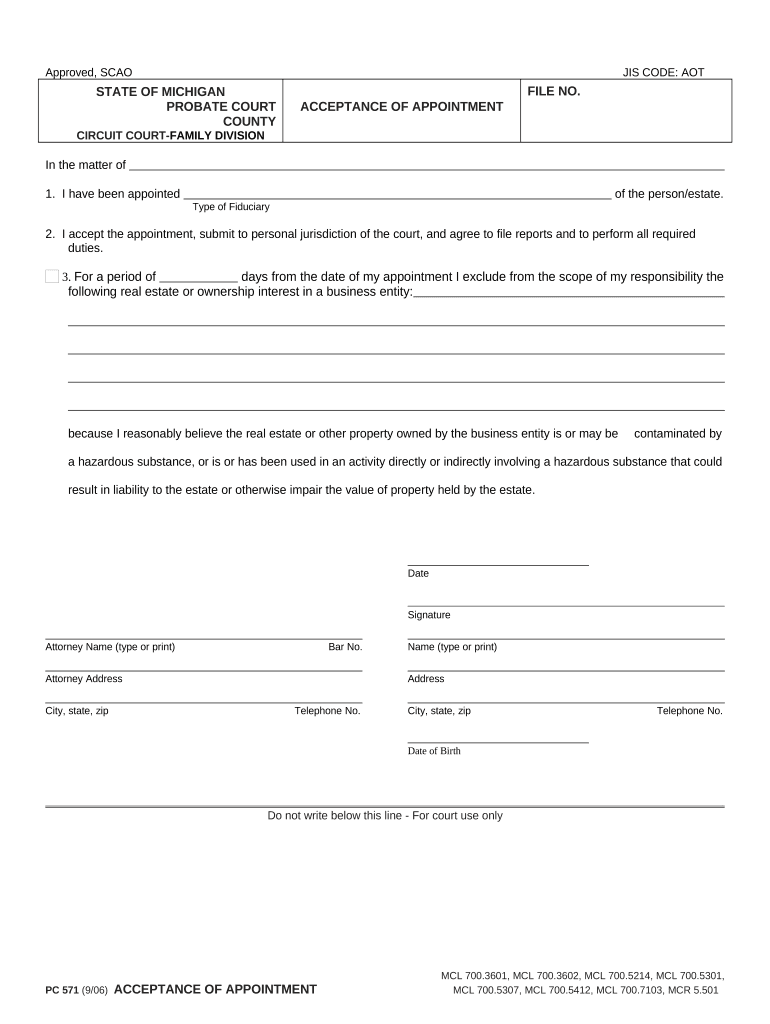
The Michigan Acceptance of Appointment is a signed statement by an individual or entity formally accepting a court or agency appointment to serve in a fiduciary capacity, such as personal representative, guardian, conservator, or agent. The form records the appointee’s name, capacity, effective date, and contact details for court and administrative records. Filing an acceptance may be required to trigger court jurisdiction, allow access to estate or ward assets, or satisfy agency onboarding; local probate and administrative rules determine exact filing format and procedures.

Why a Proper Acceptance of Appointment Matters

A compliant Michigan Acceptance of Appointment documents consent and authority, enabling banks, courts, and agencies to recognize the appointee’s legal role. Clear, accurate filings reduce administrative hold-ups, speed access to assets or records, and provide an audit trail that supports later accounting and compliance obligations.

Why a Proper Acceptance of Appointment Matters

Who Typically Completes This Form

Typical users include individuals appointed by a court, their attorneys, and administrative staff preparing filings.

  • Personal representatives accepting probate appointments to administer a decedent’s estate and handle asset transfers.
  • Guardians or conservators appointed by family court to manage care or financial affairs for a ward.
  • Attorneys and court clerks filing acceptance forms for clients, estates, or agency appointments in county records.

Representative Signers and Typical Roles

Personal Representative

An individual appointed by the court to administer a decedent’s estate; signs the Acceptance of Appointment to establish authority, access bank accounts, and complete probate tasks. Often coordinates with attorneys and financial institutions to settle debts and distribute assets.

Probate Attorney

A licensed attorney representing the estate or appointee; prepares, reviews, and files the Acceptance of Appointment with the probate court, advises on fiduciary duties, and ensures compliance with state rules and timelines to avoid delays or challenges during estate administration.

Essential Information to Include

Appointee Name: Full legal name exactly as on ID
Appointment Date: Use MM/DD/YYYY effective date
Court Information: Court name and case number
Address: Street, city, state, ZIP
Capacity / Role: Executor, guardian, conservator, agent
Signature & Date: Handwritten or e-signature with timestamp

Step-by-Step: Complete and File the Acceptance

Follow these steps to complete and file a Michigan Acceptance of Appointment accurately and in compliance with local requirements.

  • 01
    Prepare Document: Confirm case number, court name, and parties listed correctly.
  • 02
    Provide Details: Enter full legal name, capacity, contact information, and effective date.
  • 03
    Sign & Date: Appointee signs and dates; include printed name and capacity.
  • 04
    File & Serve: Submit to the court clerk and deliver copies to interested parties.

Where to File and Who Receives Copies

This summary explains typical filing destinations and routing options once the form is signed.

  • County Probate: File the original acceptance with the probate court handling the appointment case.
  • Court Clerk: Clerk’s office processes the filing and updates the official docket and records.
  • Third Parties: Provide certified or filed copies to banks, title companies, and agencies as proof of authority.
  • Electronic Filing: If available, use the court’s e-filing system to submit documents and reduce processing time.

Technical Requirements for eSigning and eSubmission

To submit electronically, ensure your eSignature platform supports court-required authentication, audit trails, and accepted file formats.

  • Integrations: Salesforce, NetSuite, Google Workspace supported
  • File Formats: PDF, DOCX, HTML, Excel supported
  • Security Standards: TLS in transit, AES-256 at rest

Configure an Online Signing Workflow

Set up a straightforward digital workflow so each signer completes only the fields they must sign, and the court receives a clean record.

Field Configuration
Authentication Level Email link or SMS code; use stronger ID where required
Required Fields Make name, date, role, and case number mandatory
Audit Trail Capture IP, timestamp, and signer attribution
Delivery Send signed copy to court, banker, and counsel automatically

Typical Timelines and Processing Expectations

Processing times and required deadlines differ by county and court; use local clerk guidance for precise timelines.

File Upon Acceptance:

File the signed acceptance with the court as soon as practicable after appointment.

Notify Interested Parties:

Provide copies to beneficiaries, banks, and counsel promptly to avoid service delays.

Court Processing Time:

Local clerk processing varies; expect days to several weeks depending on backlog.

Record Access:

Third parties often require a certified copy or stamped court filing for verification.

Follow Local Rules:

Some courts require additional forms or intake steps; check county clerk instructions.

Comparing eSignature Options for Completing This Form

Basic feature and pricing differences among major eSignature vendors to consider for secure signing and recordkeeping; signNow appears first as a pricing reference.

signNow DocuSign Adobe Sign PandaDoc HelloSign
Starting Price $8/user/mo $15/user/mo $14/user/mo $19/user/mo $15/user/mo
Free Trial 7-day free trial Varies Varies Varies Varies
Bulk Send Yes Yes Yes Yes No
Audit Trail Yes Yes Yes Yes Yes
Envelope Cap No cap 100 envelopes/user/year Varies Varies Varies

Practical Tips for Accurate, Efficient Completion

Follow these best practices to reduce rejection risk and speed downstream processing.

Double-Check Identifiers
Verify the case number, court name, and party names match the probate notice exactly to prevent clerical rejections and misfiling.
Use Correct Date Format
Enter all dates as MM/DD/YYYY and ensure the effective date aligns with the court order or appointment date to avoid disputes over authority timing.
Maintain an Audit Trail
When using eSignature, retain the platform’s certificate of completion that captures signer attribution, IP address, and timestamps for evidentiary support.
Provide Certified Copies
After filing, obtain a court-stamped copy or certificate of filing to distribute to banks, title companies, and other third parties that require proof.

Common Mistakes to Avoid

  • Using an informal or abbreviated name that does not match government ID, causing verification and access delays.
  • Omitting the case number or filing court, which can lead to the clerk rejecting or misdocketing the submission.
  • Failing to record the signature method or audit trail when eSigning, leaving the document vulnerable to challenge.
  • Not providing certified filed copies to banks or title companies, prolonging asset access and transactional processes.

Consequences of Incorrect or Late Filings

Delay in Access: Court or banks may restrict access
Invalid Acceptance: Incorrect signature invalidates filing
Filing Rejection: Missing information triggers rejection
Fiduciary Liability: Personal liability for misconduct
Penalties: Statutory fines or court sanctions
Tax Consequences: Delayed filings affect tax obligations

Frequently Asked Questions — Michigan Acceptance of Appointment

Answers to common questions about completing, signing, and filing an Acceptance of Appointment in Michigan and related administrative steps.


Need help? Contact support

be ready to get more
Join over 28 million airSlate SignNow users