Establishing secure connection… Loading editor… Preparing document…
Navigation

Fill and Sign the Agreement to Incorporate Whereas Company and Form
Fill and Sign the Agreement to Incorporate Whereas Company and Form

How it works

Open the document and fill out all its fields.
Apply your legally-binding eSignature.
Save and invite other recipients to sign it.

Rate template

4.8
46 votes
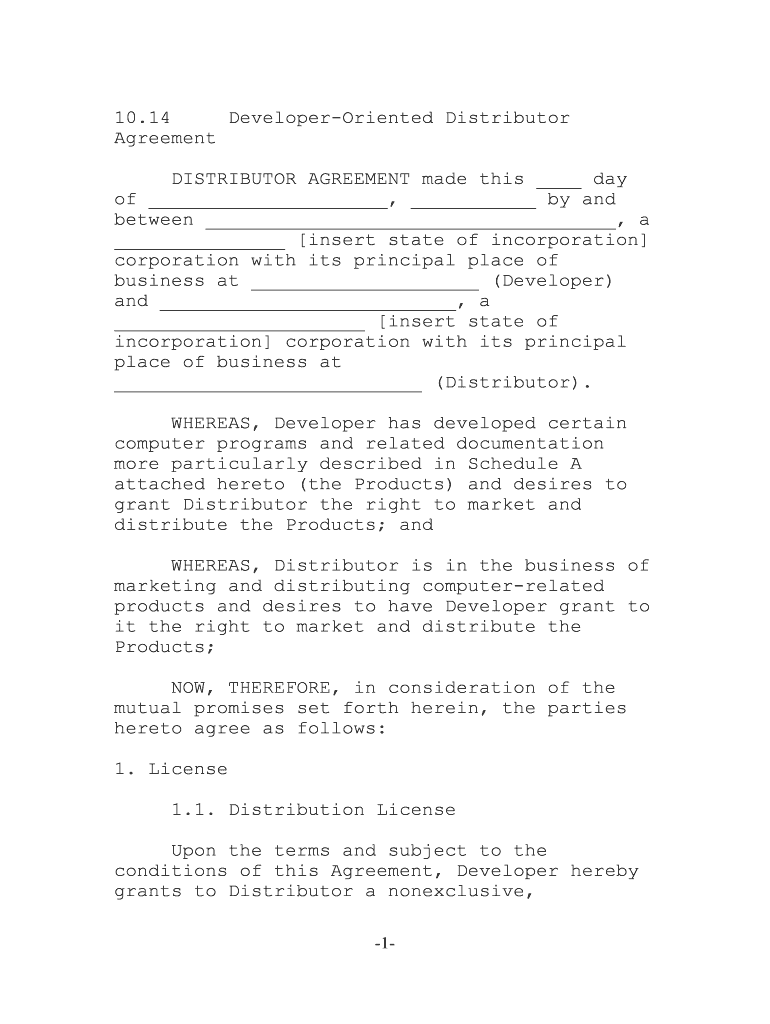
-1- 10.14 Developer-Oriented Distributor AgreementDISTRIBUTOR AGREEMENT made this ____ day of _____________________, ___________ by and between ____________________________________, a _______________ [insert state of incorporation] corporation with its principal place of business at ____________________ (Developer) and __________________________, a ______________________ [insert state of incorporation] corporation with its principal place of business at ___________________________ (Distributor). WHEREAS, Developer has developed certain computer programs and related documentation more particularly described in Schedule A attached hereto (the Products) and desires to grant Distributor the right to market and distribute the Products; and WHEREAS, Distributor is in the business of marketing and distributing computer-related products and desires to have Developer grant to it the right to market and distribute the Products; NOW, THEREFORE, in consideration of the mutual promises set forth herein, the parties hereto agree as follows: 1. License 1.1. Distribution License Upon the terms and subject to the conditions of this Agreement, Developer hereby grants to Distributor a nonexclusive, -2- nontransferable right and license to market and distribute the Products. Distributor shall only distribute the Products to end users (End Users) who enter into an End-User License Agreement (as hereinafter defined). Except for certain modules of the Maintenance Version (as hereinafter defined) provided by Developer solely to Distributor hereunder, the software Products shall be in executable object code form only and Distributor shall have no other right to the source code of such Products. The software Products distributed to End Users shall be in executable object code form only. Distributor shall not modify, translate, decompile, or create or attempt to create, by reverse engineering or otherwise, the source code from the object code of the Products supplied hereunder, or adapt the Products in any way or for use to create a derivative work. Distributor may not, and may not permit End Users to, use, reproduce, sublicense, distribute or dispose of the Products, in whole or in part, except as expressly permitted under this Agreement.1.2. The Territory Distributor may market and distribute the Products solely within the geographical limits set forth in Schedule B attached hereto (the Territory). Nothing contained in this Agreement shall prohibit Developer from licensing or distributing the Products or from appointing any third party (parties) to do same within the Territory or elsewhere. Developer retains the right, in its sole discretion, to change the Territory assigned to Distributor upon sixty (60) days prior written notice to Distributor. -3- 1.3. License of the Products to End Users In connection with Distributor's license and distribution of the Products to End Users, Distributor will have End Users execute an End- User license agreement in the form attached hereto as Schedule C (End-User License Agreement). Distributor may not negotiate the terms of the End-User License Agreement with any prospective End User or agree to any conflicting, different or additional terms from those set forth in the End-User License Agreement without Developer's prior written consent. Developer shall have no liability to Distributor in the event any prospective End User refuses to agree to enter into an End-User License Agreement. 1.4. Product Changes Developer retains the right, in its sole discretion, to upgrade or modify the Products from time to time. In addition, upon thirty (30) days prior written notice to Distributor, Developer may add or delete Products from Schedule A. Upon receipt of any such notice of an upgrade or modification, or upon the expiration of the notice period set forth above for additions or deletions to Schedule A, Distributor shall cease to market and distribute earlier versions of the Products and/or Products deleted from Schedule A. 1.5. License to Use Trademark and Trade Name Any and all trademarks and trade names that Developer uses in connection with the license granted hereunder are and remain the -4- exclusive property of Developer. Nothing contained in this Agreement shall be deemed to give Distributor any right, title or interest in any trademark or trade name of Developer relating to the Products. Subject to notice from Developer in writing that modifies or cancels such authorization, during the term of this Agreement, Distributor may use the trademarks and trade names specified by Developer in writing for normal advertising and promotion of Products. 2. Price, Payment and Shipment2.1. Price Developer shall, in its sole discretion, establish the prices for the Products (Prices) and the current Prices are set forth in Schedule D. Developer may increase or decrease the Prices upon written notice to Distributor. 2.2. Orders, Payment and Shipment Upon Developer's receipt of a written order from Distributor (each an Order) together with a copy of an executed End-User License Agreement, Developer will ship to Distributor the designated quantities of the Products. At Distributor's expense, the Products shall be shipped by Developer to Distributor F.O.B. origin, freight prepaid, with risk of loss to pass to Distributor upon delivery of the Products by Developer to a common carrier. The terms and conditions of this Agreement shall apply to all Orders submitted to Developer by Distributor and supercede any different or additional terms on any Distributor Order form. Orders issued by Distributor to Developer are -5- solely for the purpose of requesting delivery dates and quantities. All Orders shall be subject to acceptance by Developer. Developer shall use reasonable efforts to deliver accepted Orders but shall not be liable for any damages to Distributor or to any third party caused by Developer's delay or error in filling, or failure to fill, any Orders for any reason. Developer shall have no obligation to accept any Order. Full payment of the Price for all Orders of the Product and associated shipping costs are due and payable by Distributor to Developer thirty (30) days after delivery. All other fees and expenses payable hereunder for which Developer issues an invoice to Distributor shall be due and payable thirty (30) days from the date of the invoice. A late payment charge of the lesser of one and one- half percent (1.5%) per month or the highest interest rate allowed by applicable law shall be charged upon all unpaid amounts due hereunder for more than thirty (30) days. Distributor shall reimburse Developer for any out-of-pocket expenses incurred at Distributor's request, including, without limitation, telephone, shipping, insurance and travel-related expenses.2.3. Inspection and Acceptance Distributor shall inspect all Products immediately upon delivery and shall, within seven (7) calendar days, give written notice to the common carrier and Developer of any claim for damages or shortages. Distributor shall give written notice to Developer within thirty (30) calendar days of delivery in the event that any Product does not conform with the terms of this Agreement. If Distributor fails -6- to give any such notice the Products shall be deemed accepted for all purposes of this Agreement.2.4. Taxes In addition to the Price and other fees payable hereunder, Distributor shall pay any federal, state, local or other duties and excise taxes, now or hereafter applied on the sale, transportation, import, export, licensing or use of the Products, including sales tax, value added tax or similar tax. Any taxes imposed by federal, state or any local government or any amount in lieu thereof, including interest and penalties thereon, paid or payable at any time by Developer in connection with Developer's license to Distributor, exclusive of taxes based on Developer's net income, shall be borne by Distributor. 3. Maintenance and Support 3.1. Developer Support For the maintenance and support fee set forth in Section 3.3, Developer will provide Distributor with the maintenance services described in Schedule E attached hereto (Developer Support). Developer reserves the right to designate any modified or updated versions of the Product as new Products, which are not required to be provided under Developer Support. Such new Products will only be provided to Distributor for distribution to End Users under maintenance subject to the payment of additional license and support fees as designated by Developer. Developer will use -7- reasonable efforts to respond to Distributor's inquiries regarding support in a timely manner; however, Developer does not guarantee the timeliness of its responses or that it will be able to answer all of Distributor's inquiries.3.2. Distributor Support Except for the explicit support obligations of Developer set forth in Section 3.1, Distributor shall remain solely responsible for all installation, maintenance and support services to the End Users with regard to the Products. Developer agrees to deliver to Distributor together with the first Order delivered to Distributor a maintenance version of such Products which shall include certain modules of the software Products in source code form (Maintenance Version). The Maintenance Version shall be used solely by Distributor's personnel providing maintenance services to End Users and shall only be used at Distributor's site. Distributor's failure to use or maintain the confidentiality of the Maintenance Version pursuant to the terms of this Agreement shall be deemed a material breach of this Agreement. 3.3. Maintenance and Support Fee For the Developer Support, Distributor shall pay to Developer annually, in advance, a maintenance and support fee equal to ten percent (10%) of the Prices for the Products licensed to all current End Users, or such amount as may otherwise be agreed to in writing by Developer (Developer Support Fee). With each annual payment of the Developer Support Fee, Distributor shall include a list of all current -8- End Users and a report showing the additions and deletions of End Users from the previous list, and the date of such addition or deletion.3.4. Audit Rights Distributor shall maintain accurate books and records of all licenses granted for the Products, End Users receiving maintenance and the Developer Support Fees payable. Upon reasonable notice to Distributor, and no more frequently than twice a year, Distributor shall make such books and records available to Developer, at Distributor's place of business during normal business hours, to audit the payments being made by Distributor hereunder. 3.5. Distributor Training For a period of ninety (90) days after the date of this Agreement, Distributor may request Developer to provide one (1) day of on-site training and assistance to five (5) of Distributor's personnel who attend such training. After the ninety (90) day period and for any additional on-site training and assistance requested by Distributor, Distributor agrees to pay Developer's then- current standard rates. Distributor shall reimburse Developer for any out-of-pocket expenses, including travel-related expenses incurred by Developer to attend the training sessions. 3.6. End User Training and Developer Consulting Services -9- Distributor shall be solely responsible for the training of End Users. Developer shall be available at its then-current standard rates to provide training, special enhancements, customization and other special work or services which are not covered by this Agreement. 4. Confidentiality and Proprietary Rights 4.1. Confidentiality Distributor acknowledges that in the course of dealings between the parties, Distributor may acquire information about Developer, its business activities and operations, its technical information and trade secrets, including but not limited to the Products, all of which are highly confidential and proprietary to Developer (Confidential Information). Confidential Information shall not include information generally available to or known by the public, or information independently developed outside the scope of this Agreement. Distributor shall hold all such Confidential Information in strict confidence and shall not reveal the same except pursuant to a court order or upon request of Developer. The Confidential Information shall be safeguarded with at least as great a degree of care as Distributor uses to safeguard its own most confidential materials or data relating to its own business, but in no event less than a reasonable degree of care. 4.2. Proprietary Rights Distributor acknowledges and agrees that the Products, and all copies thereof, -10- constitute valuable trade secrets of Developer and/or Confidential Information of Developer and title thereto remains in Developer. Ownership of all applicable copyrights, trade secrets, patents and other intellectual property rights in the Products are and shall remain vested in Developer. All other aspects of the Products, including without limitation, programs, methods of processing, design and structure of individual programs and their interaction and programming techniques employed therein shall remain the sole and exclusive property of Developer and shall not be sold, revealed, disclosed or otherwise communicated, directly or indirectly, by Distributor to any person, company or institution whatsoever other than as expressly set forth herein. The copyright notice and restricted rights legends contained in the Products shall appear on all tapes, diskettes and other tangible media distributed by Distributor.4.3. Specific Remedies If Distributor commits a breach of any of the provisions of Sections 4.1 and 4.2 above, Developer shall have, in addition to all other rights in law and equity, (a) the right to have such provision specifically enforced by any court having equity jurisdiction, it being acknowledged and agreed that any such breach will cause irreparable injury to Developer and that money damages will not provide an adequate remedy, and (b) the right to require Distributor to account for and pay to Developer all compensation, profits, monies or other tangible benefits (collectively, Benefits) derived from or received as the result of any transactions constituting a breach of any of -11- the provisions of this Article 4, and Distributor hereby agrees to account for and pay such Benefits. 5. Limited Warranty5.1. The Warranty For ninety (90) days after delivery of a Product to Distributor, Developer warrants that media upon which the Products are delivered shall be of good quality and workmanship. Upon written notice from Distributor of defective media for a Product, Developer shall use reasonable efforts promptly to provide replacement media. 5.2. Disclaimer of Warranties EXCEPT FOR THE LIMITED WARRANTY SET FORTH IN SECTION 5.1., THE PRODUCTS ARE PROVIDED "AS IS." DEVELOPER SPECIFICALLY DISCLAIMS ALL WARRANTIES EXPRESSED OR IMPLIED, INCLUDING BUT NOT LIMITED TO, IMPLIED WARRANTIES OF MERCHANTABILITY AND FITNESS FOR A PARTICULAR PURPOSE WITH RESPECT TO THE PRODUCTS OR DEFECTS IN THE TAPE, DISKETTE OR OTHER TANGIBLE MEDIA AND DOCUMENTATION, OPERATION OF THE PRODUCTS, AND ANY PARTICULAR APPLICATION OR USE OF THE PRODUCTS. 6. Limitation of Liability IN NO EVENT SHALL DEVELOPER BE LIABLE FOR ANY LOSS OF PROFIT OR ANY OTHER COMMERCIAL DAMAGE, INCLUDING BUT NOT LIMITED TO SPECIAL, INCIDENTAL, CONSEQUENTIAL OR OTHER INDIRECT DAMAGES UNDER ANY CAUSE OF ACTION ARISING OUT OF OR RELATING TO THIS AGREEMENT, INCLUDING, -12- WITHOUT LIMITATION, CLAIMS ARISING FROM MALFUNCTION OR DEFECTS IN THE PRODUCTS. DEVELOPER'S MAXIMUM LIABILITY HEREUNDER FOR ALL CLAIMS ARISING IN ANY SIX MONTH PERIOD DURING WHICH DEVELOPER PROVIDED SERVICE HEREUNDER IS EXPRESSLY LIMITED TO THE AGGREGATE OF ANY AMOUNTS PAID UNDER THIS AGREEMENT BY DISTRIBUTOR TO DEVELOPER WITHIN SAID SIX (6) MONTH PERIOD. DEVELOPER'S TOTAL LIABILITY UNDER THIS AGREEMENT SHALL UNDER NO CIRCUMSTANCES EXCEED AN AMOUNT EQUAL TO _______ THOUSAND DOLLARS ($___,000). 7. Distributor Obligations7.1. Marketing Efforts Distributor agrees to use its best efforts to promote the sale of the Products in the Territory. Distributor agrees to permit Developer to review all of Distributor's promotion and advertising material for the Products prior to use. Distributor shall not use and shall withdraw and retract any promotion or advertising that Developer finds unsuitable, or is in breach of the terms of this Agreement. For the then-current license fee, Developer agrees to deliver to Distributor a single-user version of the software Product (Single-User Version). In the event Developer delivers the Single-User Version to Distributor, use of the Single-User Version shall be subject to the terms and conditions of this Agreement. 7.2. Prohibited Practices Distributor may not make any contracts or commitments on behalf of Developer nor make any -13- warranties or other representations regarding the Products other than those authorized herein or by Developer in a separate writing. 8. Term and Termination8.1. Term This Agreement shall have an initial term of _____ (__) years from the Effective Date (Initial Term), and shall thereafter automatically renew for successive one (1) year periods (each a Renewal Term), unless earlier terminated in accordance with the terms of this Agreement. Either party may cancel this Agreement effective on the last day of the Initial Term, or any Renewal Term, by serving written notice of such termination on the other party at least ninety (90) days prior to the effective date thereof. 8.2. Developer Termination This Agreement may be terminated immediately by Developer under any of the following conditions: (a) if one of the parties shall be declared insolvent or bankrupt; (b) if a petition is filed in any court to declare one of the parties bankrupt or for a reorganization under the Bankruptcy Law or any similar statute and such petition is not dismissed within ninety (90) days or if a Trustee in Bankruptcy or a Receiver or similar entity is appointed for one of the parties; -14- (c) if Distributor does not pay Developer within sixty (60) days from the date that any payments are due hereunder; (d) if Distributor breaches the provisions of Sections 4.1 or 4.2 of this Agreement; or (e) if Distributor otherwise materially breaches the terms of this Agreement, and such breach is not cured within thirty (30) days after written notice of such breach is given by Developer. 8.3. Duties Upon Termination Provided termination is not a result of a material breach of Sections 4.1 or 4.2, the parties agree to continue their cooperation in order to effect an orderly termination of their relationship. Distributor may continue running the Maintenance Version solely for the purpose of providing maintenance to End Users granted licenses pursuant to an End-User License Agreement prior to termination. Upon termination, Distributor shall have no right to order or receive any additional copies of the Products and all of Distributor's rights and licenses granted hereunder shall immediately cease. Within thirty (30) days of termination, Distributor shall return all copies of any promotional materials, marketing literature, written information and reports pertaining to the Products that have been supplied by Developer. -15- 9. Indemnification9.1. Copyright Indemnification Developer shall indemnify, defend and hold Distributor harmless from any claims, demands, liabilities or expenses, including reasonable attorneys' fees, directly resulting from any infringement or violation of any copyright with respect to the Products, as so awarded against Distributor by a court of competent jurisdiction, and provided Distributor is not in breach of this Agreement. Following a decision by a court of competent jurisdiction that the Products infringe any third party's copyright, Developer shall, in its sole discretion: (a) procure for Distributor the right to continue to use, distribute and sell the Products at no additional expense to Distributor; (b) provide Distributor with a noninfringing version of the Products with substantially similar functionality; or (c) notify Distributor that the Products are being withdrawn from the market and immediately terminate this Agreement. 9.2. Cooperation by Distributor Notwithstanding Section 9.1 of this Agreement, Developer is under no obligation to indemnify and hold Distributor harmless unless: (a) Developer shall have been notified promptly of the suit or claim by -16- Distributor and furnished by Distributor with a copy of each communication, notice or other action relating to said claim;(b) Developer shall have the right to assume sole authority to conduct the trial or settlement of such claim or any negotiations related thereto at Developer's expense; and (c) Distributor shall provide reasonable information and assistance requested by Developer in connection with such claim or suit. 9.3. Distributor Indemnification Distributor shall indemnify, defend and hold Developer harmless from any claims, demands, liabilities or expenses, including reasonable attorneys' fees, incurred by Developer as a result of any claim or proceeding against Developer arising out of or based upon (i) the combination, operation or use of the Products with any hardware, products, programs or data not supplied or approved in writing by Developer, if such infringement would have been avoided but for such combination, operation or use or (ii) the modification of the Products by Distributor or End Users. 10. General 10.1. Force Majeure Neither party shall be liable or deemed to be in default for any delay or failure in performance under this Agreement or interruption of service resulting directly or -17- indirectly from acts of God, or any causes beyond the reasonable control of such party.10.2. Jurisdiction and Venue This Agreement shall be governed by and construed in accordance with the laws of the State of _________________. Jurisdiction for litigation of any dispute, controversy or claim arising out of or in connection with this Agreement, or the breach thereof, shall be only in the federal or the state court with competent jurisdiction located in _________________. 10.3. Entire Agreement This Agreement, including the Schedules attached hereto, constitutes the entire agreement between the parties with respect to the subject matter hereof and supercedes all previous proposals, both oral and written, negotiations, representations, commitments, writings and all other communications between the parties. This Agreement may not be modified except by a writing signed by a duly authorized representative of each of the parties. 10.4. Independent Contractors It is expressly agreed that Developer and Distributor are acting hereunder as independent contractors and under no circumstances shall any of the employees of one party be deemed the employees of the other for any purpose. This Agreement shall not be construed as authority for either party to act for the other party in any agency or other capacity, or to make commitments of any kind for the account of or -18- on behalf of the other except to the extent and for the purposes provided for herein.10.5. Assignment This Agreement is not assignable by either party hereto without the consent of the other, except that this Agreement shall be assignable by Developer to an affiliate entity or upon the sale of the right to license and sublicense the Products to the purchaser of said right. This Agreement shall be binding upon and inure to the benefit of the parties and their respective successors. 10.6. Severability and Waiver If any provision of this Agreement is determined by a court of competent jurisdiction to be invalid or unenforceable, such determination shall not affect the validity or enforceability of any other part or provision of this Agreement. Any waiver by any party of any breach of any provisions hereof shall not be effective unless made in a writing signed by the party to be bound. IN WITNESS WHEREOF, the parties hereto have executed this Agreement by a duly authorized representative as of the date set forth above. DISTRIBUTOR By:___________________________ Name: ________________________Title_________________________ DEVELOPER By:___________________________ Name: ________________________Title:_________________________ -19- SCHEDULE A List of Computer Program and Documentation Products SCHEDULE B Geographical Limits for Distribution of the Products SCHEDULE C End-User License Agreement SCHEDULE D Product Price List SCHEDULE E Developer-Provided Maintenance Services EXHIBIT 2 Software

Valuable advice on preparing your ‘Agreement To Incorporate Whereas Company And ’ online

Are you fed up with the inconvenience of handling paperwork? Search no further than airSlate SignNow, the premier electronic signature solution for individuals and businesses. Bid farewell to the monotonous chore of printing and scanning documents. With airSlate SignNow, you can easily finalize and sign documents online. Take advantage of the powerful features included in this intuitive and cost-effective platform and transform your method of document management. Whether you need to authorize forms or collect eSignatures, airSlate SignNow manages everything seamlessly, requiring only a few clicks.

Follow this comprehensive guide:

  1. Sign in to your account or register for a free trial with our service.
  2. Click +Create to upload a file from your device, cloud storage, or our template repository.
  3. Open your ‘Agreement To Incorporate Whereas Company And ’ in the editor.
  4. Click Me (Fill Out Now) to finalize the form on your end.
  5. Add and designate fillable fields for others (if necessary).
  6. Proceed with the Send Invite settings to request eSignatures from others.
  7. Save, print your version, or convert it into a multi-use template.

No need to worry if you need to collaborate with your colleagues on your Agreement To Incorporate Whereas Company And or send it for notarization—our platform has everything you need to accomplish these tasks. Sign up with airSlate SignNow today and elevate your document management to greater heights!

Here is a list of the most common customer questions. If you can’t find an answer to your question, please don’t hesitate to reach out to us.

Need help? Contact Support

The best way to complete and sign your agreement to incorporate whereas company and form

Save time on document management with airSlate SignNow and get your agreement to incorporate whereas company and form eSigned quickly from anywhere with our fully compliant eSignature tool.

How to Sign a PDF Online How to Sign a PDF Online

How to fill out and sign documents online

Previously, working with paperwork required pretty much time and effort. But with airSlate SignNow, document management is easy and fast. Our powerful and user-friendly eSignature solution allows you to easily complete and eSign your agreement to incorporate whereas company and form online from any internet-connected device.

Follow the step-by-step guide to eSign your agreement to incorporate whereas company and form template online:

  • 1.Sign up for a free trial with airSlate SignNow or log in to your account with password credentials or SSO authorization option.
  • 2.Click Upload or Create and import a form for eSigning from your device, the cloud, or our form collection.
  • 3.Click on the file name to open it in the editor and use the left-side menu to complete all the blank areas appropriately.
  • 4.Place the My Signature field where you need to approve your form. Type your name, draw, or upload a picture of your regular signature.
  • 5.Click Save and Close to accomplish editing your completed document.

As soon as your agreement to incorporate whereas company and form template is ready, download it to your device, save it to the cloud, or invite other individuals to eSign it. With airSlate SignNow, the eSigning process only takes a few clicks. Use our powerful eSignature tool wherever you are to handle your paperwork efficiently!


How to Sign a PDF Using Google Chrome How to Sign a PDF Using Google Chrome

How to fill out and sign paperwork in Google Chrome

Completing and signing documents is simple with the airSlate SignNow extension for Google Chrome. Adding it to your browser is a quick and effective way to deal with your forms online. Sign your agreement to incorporate whereas company and form sample with a legally-binding eSignature in a couple of clicks without switching between tools and tabs.

Follow the step-by-step guide to eSign your agreement to incorporate whereas company and form template in Google Chrome:

  • 1.Navigate to the Chrome Web Store, find the airSlate SignNow extension for Chrome, and add it to your browser.
  • 2.Right-click on the link to a form you need to eSign and choose Open in airSlate SignNow.
  • 3.Log in to your account using your password or Google/Facebook sign-in buttons. If you don’t have one, sign up for a free trial.
  • 4.Use the Edit & Sign toolbar on the left to complete your template, then drag and drop the My Signature option.
  • 5.Add an image of your handwritten signature, draw it, or simply type in your full name to eSign.
  • 6.Make sure all data is correct and click Save and Close to finish editing your form.

Now, you can save your agreement to incorporate whereas company and form template to your device or cloud storage, send the copy to other individuals, or invite them to eSign your form with an email request or a secure Signing Link. The airSlate SignNow extension for Google Chrome enhances your document workflows with minimum effort and time. Start using airSlate SignNow today!


How to Sign a PDF in Gmail How to Sign a PDF in Gmail How to Sign a PDF in Gmail

How to fill out and sign documents in Gmail

When you receive an email with the agreement to incorporate whereas company and form for approval, there’s no need to print and scan a file or download and re-upload it to another tool. There’s a better solution if you use Gmail. Try the airSlate SignNow add-on to rapidly eSign any documents right from your inbox.

Follow the step-by-step guide to eSign your agreement to incorporate whereas company and form in Gmail:

  • 1.Visit the Google Workplace Marketplace and find a airSlate SignNow add-on for Gmail.
  • 2.Set up the program with a corresponding button and grant the tool access to your Google account.
  • 3.Open an email with an attached file that needs approval and use the S sign on the right sidebar to launch the add-on.
  • 4.Log in to your airSlate SignNow account. Select Send to Sign to forward the document to other people for approval or click Upload to open it in the editor.
  • 5.Drop the My Signature option where you need to eSign: type, draw, or upload your signature.

This eSigning process saves time and only takes a couple of clicks. Use the airSlate SignNow add-on for Gmail to adjust your agreement to incorporate whereas company and form with fillable fields, sign forms legally, and invite other parties to eSign them al without leaving your mailbox. Boost your signature workflows now!


How to Sign a PDF on a Mobile Device How to Sign a PDF on a Mobile Device How to Sign a PDF on a Mobile Device

How to fill out and sign forms in a mobile browser

Need to quickly complete and sign your agreement to incorporate whereas company and form on a smartphone while doing your work on the go? airSlate SignNow can help without the need to set up extra software programs. Open our airSlate SignNow tool from any browser on your mobile device and create legally-binding eSignatures on the go, 24/7.

Follow the step-by-step guide to eSign your agreement to incorporate whereas company and form in a browser:

  • 1.Open any browser on your device and go to the www.signnow.com
  • 2.Sign up for an account with a free trial or log in with your password credentials or SSO option.
  • 3.Click Upload or Create and add a file that needs to be completed from a cloud, your device, or our form collection with ready-to go templates.
  • 4.Open the form and complete the empty fields with tools from Edit & Sign menu on the left.
  • 5.Put the My Signature area to the sample, then enter your name, draw, or add your signature.

In a few easy clicks, your agreement to incorporate whereas company and form is completed from wherever you are. As soon as you're finished editing, you can save the file on your device, generate a reusable template for it, email it to other people, or invite them electronically sign it. Make your paperwork on the go speedy and efficient with airSlate SignNow!


How to Sign a PDF on iPhone How to Sign a PDF on iPhone

How to fill out and sign forms on iOS

In today’s corporate environment, tasks must be accomplished quickly even when you’re away from your computer. Using the airSlate SignNow app, you can organize your paperwork and sign your agreement to incorporate whereas company and form with a legally-binding eSignature right on your iPhone or iPad. Set it up on your device to conclude contracts and manage documents from anyplace 24/7.

Follow the step-by-step guidelines to eSign your agreement to incorporate whereas company and form on iOS devices:

  • 1.Open the App Store, search for the airSlate SignNow app by airSlate, and install it on your device.
  • 2.Open the application, tap Create to import a template, and select Myself.
  • 3.Select Signature at the bottom toolbar and simply draw your autograph with a finger or stylus to eSign the form.
  • 4.Tap Done -> Save after signing the sample.
  • 5.Tap Save or take advantage of the Make Template option to re-use this document in the future.

This process is so straightforward your agreement to incorporate whereas company and form is completed and signed in just a few taps. The airSlate SignNow application works in the cloud so all the forms on your mobile device are kept in your account and are available whenever you need them. Use airSlate SignNow for iOS to boost your document management and eSignature workflows!


How to Sign a PDF on Android How to Sign a PDF on Android

How to complete and sign paperwork on Android

With airSlate SignNow, it’s easy to sign your agreement to incorporate whereas company and form on the go. Set up its mobile app for Android OS on your device and start boosting eSignature workflows right on your smartphone or tablet.

Follow the step-by-step guide to eSign your agreement to incorporate whereas company and form on Android:

  • 1.Open Google Play, find the airSlate SignNow application from airSlate, and install it on your device.
  • 2.Log in to your account or create it with a free trial, then import a file with a ➕ key on the bottom of you screen.
  • 3.Tap on the uploaded document and choose Open in Editor from the dropdown menu.
  • 4.Tap on Tools tab -> Signature, then draw or type your name to eSign the sample. Complete blank fields with other tools on the bottom if necessary.
  • 5.Utilize the ✔ key, then tap on the Save option to finish editing.

With an intuitive interface and total compliance with main eSignature requirements, the airSlate SignNow application is the best tool for signing your agreement to incorporate whereas company and form. It even works offline and updates all form adjustments once your internet connection is restored and the tool is synced. Complete and eSign documents, send them for approval, and make re-usable templates anytime and from anywhere with airSlate SignNow.

Sign up and try Agreement to incorporate whereas company and form
  • Close deals faster
  • Improve productivity
  • Delight customers
  • Increase revenue
  • Save time & money
  • Reduce payment cycles

