Establishing secure connection… Loading editor… Preparing document…
Navigation

Fill and Sign the Alabama Deposition Form
Fill and Sign the Alabama Deposition Form

How it works

Open the document and fill out all its fields.
Apply your legally-binding eSignature.
Save and invite other recipients to sign it.

Rate template

4.5
34 votes
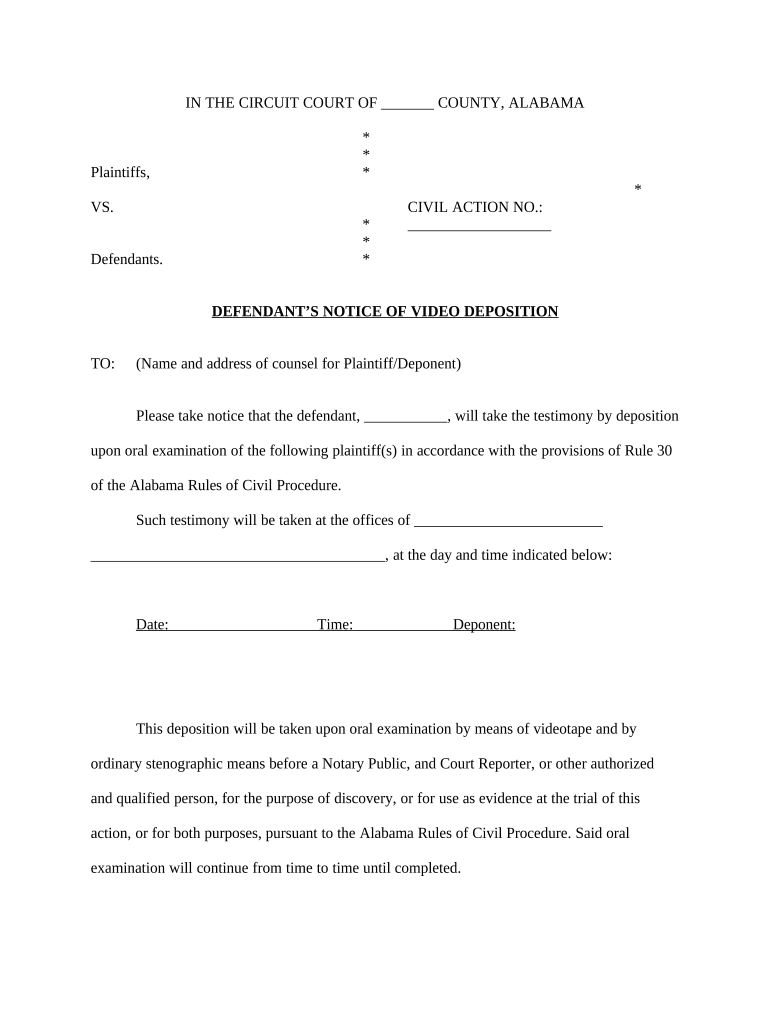
IN THE CIRCUIT COURT OF _______ COUNTY, ALABAMA * * Plaintiffs, * * VS. CIVIL ACTION NO.: * ___________________ * Defendants. * DEFENDANT’S NOTICE OF VIDEO DEPOSITION TO: (Name and address of counsel for Plaintiff/Deponent) Please take notice that the defendant, ___________, will take the testimony by deposition upon oral examination of the following plaintiff(s) in accordance with the provisions of Rule 30 of the Alabama Rules of Civil Procedure. Such testimony will be taken at the offices of _________________________ _______________________________________, at the day and time indicated below: Date: Time: Deponent: This deposition will be taken upon oral examination by means of videotape and by ordinary stenographic means before a Notary Public, and Court Reporter, or other authorized and qualified person, for the purpose of discovery, or for use as evidence at the trial of this action, or for both purposes, pursuant to the Alabama Rules of Civil Procedure. Said oral examination will continue from time to time until completed. Pursuant to Rule 30(b)(5) of the Alabama Rules of Civil Procedure, defendant requests that deponent, at the time and place of the taking of deposition, produce and permit the inspection and copying of documents described in Exhibit A, attached hereto. _________________________________________ OF COUNSEL: ________________________ CERTIFICATE OF SERVICE I certify that I have on this _____ day of __________, ________, served a copy of the foregoing by mailing same by U. S. Mail, first class postage prepaid and properly addressed, to the following: (List counsel for all parties) _________________________________________ EXHIBIT 'A" INSTRUCTIONS a. If you encounter any ambiguity in construing this Request for Production or accompanying definitions or instructions, set forth the matter deemed ambiguous and answer the request by indicating the construction chosen and used in responding. b. If any request is objected to on the grounds of vagueness or over breadth, specifically state the manner in which it is overly broad and respond to the request as focused or narrowed to conform with your objection. c. All documents produced should either be labeled and identified as to which of the various requests the document is responsive to or should be produced as maintained in the ordinary course of business. d. If you object to furnishing any document on the basis of attorney/client privilege or any other basis, please identify the document by the date it bears, or if none, under the date it was written; by the name and address of each person who wrote it, or participated in the writing of it; by the name and address of each person to whom it was addressed and each person to whom a copy was identified as being directed; by the name anti address of each person that received a copy of the document; by description of the document, as for instance, a letter; by its present location or custodian; and by the present location and custodian of each; or if unknown, its last known location or custodian. e. If any requested documents or things cannot be produced in full, produce it to the extent, possible, specifying each reason for your inability to produce the remainder and stating whatever information, knowledge or belief you do have concerning the portion not produced. f. If any document requested was in your possession or control, but is no longer in your possession or subject to your control, please identify said document and state what disposition was made of it, the reason for such disposition and the date thereof. g. In producing documents and things pursuant to this request, furnish all documents and things known or available to you regardless of whether such documents or things are possessed directly by you or your agents, employees, representatives or investigators or by your attorneys, their agents, employees, representatives or investigators. h. If any documents or things requested were at one time in existence but are no longer in existence or made unavailable in any manner, then identify said document and the nature of the information contained therein and state: (a) the date upon which it ceased to exist; (b) the circumstances under which it ceased to exist; (c) the identity of all persons having knowledge of the circumstances under which it ceased to exist; and (d) the identity of all persons having knowledge or who had knowledge of the contents thereof. i. You are requested to produce the file or files in which the documents are contained or compiled. You are further requested to produce all copies of any particular documents that vary in any way from the original, i.e. , all documents with written notations or markings thereon or attached thereto. j. You are requested to produce all original documents, and all other copies known absolutely identical to the originals. In addition, you are requested to produce all drafts and notes (whether typed, handwritten or otherwise) made or prepared in connection with such documents, whether used or not. k. This Request for Production of Documents shall be continuing to the extent required by the Alabama Rules of Civil Procedure. If, after producing documents and things, you obtain or become aware of any further documents, things or information responsive to this Request for Production of Documents, you are required, up to and including the time of trial, to produce to these defendants such additional documents and things and/or provide these defendants with such additional information. DEFINITIONS a. "_________________" as used herein means ________________________ and shall include any agent of __________________________________. b. "Documents(s)'' is used in its broadest possible sense, and shall mean all writings of any kind, including the originals and all nonidentical copies, whether different from the originals by reason of any notation made on such copies, or otherwise, and whether printed, recorded, created or reproduced by any mechanical means or process, or written or produced by hand, including, but not limited to: agreements; contracts; drafts of agreements or contracts; written material referencing oral agreements or contracts; confirmatory memoranda; letters of intent; orders; purchase orders; communications; messages; correspondence; personal calendars (whether written, electronic, or computerized); letters; postcards; packages; telegrams; teletypes; telefax; mailgrams; tape recordings; memoranda; diaries (whether written, electronic, or computerized); summaries; notes or other recordings of telephone conversations, personal conversations, meetings, actions or statements; corporate charters, by-laws, minutes, amendments, proposals, directives, prospectuses, or documents of any description evidencing action taken by a corporate entity, business entity or association; deeds, leases, mortgages, security agreements; legal documents of any kind and description; agenda of meetings; notices; records; files; intraoffice and interoffice memoranda and communications; personal memoranda; photographs; negatives; photographic slides; pictures; motion picture films; photographic film; microfilm; microfiche; newspapers, magazines; charts; graphs; diagrams; drawings; bookkeeping entries; account summaries or statements; financial statements; balance sheets; financial records; bills; invoices; orders; receipts; bank records of all types; returns; canceled checks; vouchers; ledger sheets; accounting information; computer print-outs; computer memories; word processing memories; software; reports; official papers; papers prepared in the ordinary course of business; instruments; chronicles; vouchers; diplomas; stationary; licenses; bills of exchange; bills of sale; logs; theses; circulars; publications; studies; notes of interviews; statements of witnesses; findings of investigations; audits; files; records of negotiation; reports of experts, whether to be called to trial or not; materials furnished to experts, whether to be called to trial or not; reports of consultants, whether to be called to trial or not; any record of any consultation with an expert or potential expert you have elected not to use; all materials furnished to, or notes of conversations with any witness or person interviewed in connection with this case; personal notes; papers; books; notebooks; note cards, indices; physical objects; summaries; statistics; regression analysis; demographic analysis; market studies; stenographic materials; tapes; cassettes; phono graphic records; micro cassettes; discs; compact discs; digital audio tapes; digital optical recording; videotapes (VHS, Beta, or other); maps; posters; transparencies; pamphlets; bulletins; posters; fliers; plans; blueprints drawings; sketches; printed matter; reports; and any and every other written, graphic, mechanical or tangible means by which human intelligence is in any way transmitted, reported, recorded or preserved, as well as worksheets, drafts, alterations, modifications, editing, changes, and amendments to any of the foregoing. c. The terms "you," "your," and "plaintiff(s),” are used to refer to plaintiff(s) ________________________________________ and anyone acting at his/her/their request or on his/her/their behalf. d. As used herein, the term "person'' includes natural persons, corporations, partnerships, associations, ventures, and all other forms of organization or association. e. As used herein, the term "date" shall mean the exact day, month, and year, if ascertainable, or if not, the best approximation thereof, including relationship to other events. f. The term "possession" shall mean having or taking anything into control; something controlled or owned. DOCUMENTS REQUESTED 1. All documents which have ever been transmitted or delivered to Plaintiff(s) or received by Plaintiff(s), from: (i) ________________________________; (ii) All persons alleged by, or understood by Plaintiff(s) to be an agent/employee of ______________________; (iii) All other persons, firms, or entities containing information about ________________________ and/or about any person or entity alleged by Plaintiff(s), or understood to be, an agent of _________________________. 2. All documents which have ever been transmitted by or on behalf of Plaintiff(s), to: (i) ________________________________; (ii) All persons alleged by, or understood by Plaintiff(s) to be an agent/employee of ______________________; (iii) All other persons, firms, or entities containing information about ________________________ and/or about any person or entity alleged by Plaintiff(s), or understood to be, an agent of _________________________. 3. All documents received by Plaintiff(s), from any source, and/or prepared by or on behalf of Plaintiff(s), which contain information related, in whole or in part, to the purchase of the insurance that is at Issue in this case. 4. All documents received by Plaintiff(s), from any source, and/or prepared by or on behalf of Plaintiff(s), which contain information related, in whole or in part, to any ________________________ policy. 5. All documents authored or prepared by Plaintiff(s), including, but not limited to personal notes or memoranda, whenever prepared, which refer to, relate to, or address, in whole or in part, the facts and circumstances surrounding plaintiff(s)’ claims in this lawsuit. 6. All documents received by Plaintiff(s), from any source, and all documents which are otherwise available to Plaintiff(s), which identify and/or describe, in whole or in part, the circumstances under which the Plaintiff(s) allegedly discovered the fraud alleged. 7. All documents in the possession of or available to Plaintiff(s) which refer or relate, in whole or in part, to claims of injury or damage allegedly suffered by the Plaintiff(s) as a result of the acts of _________________. 8. All documents, including, but not limited to written or recorded statements, correspondence, notes, policies, etc., supporting the claims made in the Complaint in this action. 9. Any and all materials received by Plaintiff(s) in connection with the solicitation and/or application for any insurance policy from __________ to date, including, but not limited to, policies of defendant _____________________ or any other company. 10. Copies of all insurance policies and annuities Plaintiff(s) has/have in effect. This request includes, but is not limited to, life insurance, disability insurance, burial insurance, health insurance, cancer insurance, automobile insurance, homeowner's insurance and rental insurance. 11. Plaintiff(s)’ state and federal income tax returns including, but not limited to, schedules and attachments thereto, from the years _______ through present. 12. Any and all documents reflecting or pertaining to any investigation of any of the facts claims alleged in Plaintiff(s)' Complaint done by any person on behalf of Plaintiff(s). 13. All documents or other evidence of any kind which Plaintiff(s) may introduce at the trial of this case. 14. Any and all documents received from any third party that pertain in any way to the allegations in the Complaint and/or the policies at issue in this action. 15. Any and all documents received from or relied upon by any expert hired or retained) by you or on your behalf in connection with this lawsuit. 16. Each and every document identified or referred to in your answers to defendant, ____________________________’s Interrogatories to Plaintiff(s). 17. Each and every document upon which you intend to rely in proving any element of damage claimed in the Complaint. 18. All documents that mention, evidence, relate or pertain in any way to any insurance coverage you have ever had with any defendant. 19. All documents in your possession or in the possession of any of your attorneys that mention, relate or pertain to ____________________________ or any of its present or former agents or employees. 20. All documents that mention, relate or pertain to any of the other defendants to this action. 21. Any statement of any kind by any defendant in this case or by any agent or employee of any defendant. 22. All documents that mention, relate or pertain in any way to any person who has or may have knowledge of any fact relevant to any of the claims you make on this case. 23. All recordings or transcripts of recordings of any conversation of any kind involving a present or former employee or agent of any of the defendants to this action. 24. All documents that evidence or describe any statements, utterances or communication of any kind by any present or former employee or agent of any of the defendants to this action. 25. All documents that mention, relate or pertain in any way to the payment of premiums on the insurance at issue in this case. 26. All documents that relate or pertain to your decision to purchase or apply for the insurance at issue in this case. 27. All document evidencing the payment of any money to ________________________. 28. All bank account statements evidencing any payments to ________________________. 29. All canceled checks evidencing any payments to ________________. 30. All documents relating to the ___________________________________ policy or policies referenced in Plaintiff(s)’ Complaint.

Practical advice on creating your ‘Alabama Deposition’ online

Are you fed up with the complications of handling documentation? Look no further than airSlate SignNow, the premier electronic signature solution for individuals and small to medium-sized businesses. Bid farewell to the laborious ritual of printing and scanning documents. With airSlate SignNow, you can effortlessly complete and sign documents online. Take advantage of the extensive tools embedded in this user-friendly and affordable platform to transform your method of document management. Whether you need to sign forms or gather signatures, airSlate SignNow manages it all efficiently, needing just a few clicks.

Adhere to these comprehensive instructions:

  1. Access your account or initiate a free trial with our service.
  2. Select +Create to upload a document from your device, cloud storage, or our form repository.
  3. Open your ‘Alabama Deposition’ in the editor.
  4. Click Me (Fill Out Now) to finalize the document on your end.
  5. Add and designate fillable fields for other participants (if necessary).
  6. Proceed with the Send Invite settings to solicit eSignatures from others.
  7. Save, print your version, or convert it into a reusable template.

No need to worry if you need to work with others on your Alabama Deposition or send it for notarization—our platform provides all the tools needed to accomplish such tasks. Register with airSlate SignNow today and take your document management to greater levels!

Here is a list of the most common customer questions. If you can’t find an answer to your question, please don’t hesitate to reach out to us.

Need help? Contact Support

The best way to complete and sign your alabama deposition form

Save time on document management with airSlate SignNow and get your alabama deposition form eSigned quickly from anywhere with our fully compliant eSignature tool.

How to Sign a PDF Online How to Sign a PDF Online

How to fill out and sign forms online

In the past, coping with paperwork took pretty much time and effort. But with airSlate SignNow, document management is fast and easy. Our powerful and user-friendly eSignature solution enables you to easily complete and electronically sign your alabama deposition form online from any internet-connected device.

Follow the step-by-step guidelines to eSign your alabama deposition form template online:

  • 1.Sign up for a free trial with airSlate SignNow or log in to your account with password credentials or SSO authorization option.
  • 2.Click Upload or Create and add a form for eSigning from your device, the cloud, or our form collection.
  • 3.Click on the file name to open it in the editor and use the left-side toolbar to complete all the empty fields properly.
  • 4.Place the My Signature field where you need to approve your form. Provide your name, draw, or upload a picture of your handwritten signature.
  • 5.Click Save and Close to finish modifying your completed form.

After your alabama deposition form template is ready, download it to your device, save it to the cloud, or invite other people to electronically sign it. With airSlate SignNow, the eSigning process only requires a couple of clicks. Use our powerful eSignature tool wherever you are to deal with your paperwork effectively!

How to Sign a PDF Using Google Chrome How to Sign a PDF Using Google Chrome

How to complete and sign documents in Google Chrome

Completing and signing documents is simple with the airSlate SignNow extension for Google Chrome. Installing it to your browser is a quick and beneficial way to manage your forms online. Sign your alabama deposition form sample with a legally-binding eSignature in a couple of clicks without switching between applications and tabs.

Follow the step-by-step guidelines to eSign your alabama deposition form in Google Chrome:

  • 1.Go to the Chrome Web Store, search for the airSlate SignNow extension for Chrome, and add it to your browser.
  • 2.Right-click on the link to a form you need to approve and select Open in airSlate SignNow.
  • 3.Log in to your account with your credentials or Google/Facebook sign-in option. If you don’t have one, you can start a free trial.
  • 4.Utilize the Edit & Sign menu on the left to complete your template, then drag and drop the My Signature field.
  • 5.Add an image of your handwritten signature, draw it, or simply enter your full name to eSign.
  • 6.Verify all the details are correct and click Save and Close to finish modifying your paperwork.

Now, you can save your alabama deposition form template to your device or cloud storage, send the copy to other individuals, or invite them to eSign your form via an email request or a secure Signing Link. The airSlate SignNow extension for Google Chrome improves your document workflows with minimum time and effort. Try airSlate SignNow today!

How to Sign a PDF in Gmail How to Sign a PDF in Gmail How to Sign a PDF in Gmail

How to fill out and sign paperwork in Gmail

Every time you get an email containing the alabama deposition form for approval, there’s no need to print and scan a document or save and re-upload it to a different tool. There’s a better solution if you use Gmail. Try the airSlate SignNow add-on to promptly eSign any documents right from your inbox.

Follow the step-by-step guide to eSign your alabama deposition form in Gmail:

  • 1.Navigate to the Google Workplace Marketplace and find a airSlate SignNow add-on for Gmail.
  • 2.Set up the tool with a related button and grant the tool access to your Google account.
  • 3.Open an email containing an attached file that needs signing and use the S sign on the right panel to launch the add-on.
  • 4.Log in to your airSlate SignNow account. Select Send to Sign to forward the file to other people for approval or click Upload to open it in the editor.
  • 5.Put the My Signature field where you need to eSign: type, draw, or upload your signature.

This eSigning process saves time and only requires a few clicks. Use the airSlate SignNow add-on for Gmail to adjust your alabama deposition form with fillable fields, sign forms legally, and invite other people to eSign them al without leaving your inbox. Boost your signature workflows now!

How to Sign a PDF on a Mobile Device How to Sign a PDF on a Mobile Device How to Sign a PDF on a Mobile Device

How to complete and sign paperwork in a mobile browser

Need to rapidly fill out and sign your alabama deposition form on a smartphone while doing your work on the go? airSlate SignNow can help without the need to set up additional software programs. Open our airSlate SignNow tool from any browser on your mobile device and create legally-binding electronic signatures on the go, 24/7.

Follow the step-by-step guidelines to eSign your alabama deposition form in a browser:

  • 1.Open any browser on your device and follow the link www.signnow.com
  • 2.Register for an account with a free trial or log in with your password credentials or SSO authentication.
  • 3.Click Upload or Create and import a file that needs to be completed from a cloud, your device, or our form catalogue with ready-made templates.
  • 4.Open the form and fill out the blank fields with tools from Edit & Sign menu on the left.
  • 5.Put the My Signature field to the sample, then type in your name, draw, or upload your signature.

In a few simple clicks, your alabama deposition form is completed from wherever you are. When you're done with editing, you can save the file on your device, create a reusable template for it, email it to other people, or ask them to electronically sign it. Make your paperwork on the go speedy and productive with airSlate SignNow!


How to Sign a PDF on iPhone How to Sign a PDF on iPhone

How to complete and sign documents on iOS

In today’s business world, tasks must be completed quickly even when you’re away from your computer. Using the airSlate SignNow application, you can organize your paperwork and sign your alabama deposition form with a legally-binding eSignature right on your iPhone or iPad. Install it on your device to conclude agreements and manage documents from anywhere 24/7.

Follow the step-by-step guide to eSign your alabama deposition form on iOS devices:

  • 1.Open the App Store, find the airSlate SignNow app by airSlate, and set it up on your device.
  • 2.Open the application, tap Create to upload a form, and choose Myself.
  • 3.Select Signature at the bottom toolbar and simply draw your autograph with a finger or stylus to eSign the sample.
  • 4.Tap Done -> Save right after signing the sample.
  • 5.Tap Save or utilize the Make Template option to re-use this document in the future.

This method is so easy your alabama deposition form is completed and signed in just a couple of taps. The airSlate SignNow application works in the cloud so all the forms on your mobile device remain in your account and are available any time you need them. Use airSlate SignNow for iOS to enhance your document management and eSignature workflows!


How to Sign a PDF on Android How to Sign a PDF on Android

How to complete and sign forms on Android

With airSlate SignNow, it’s easy to sign your alabama deposition form on the go. Install its mobile application for Android OS on your device and start improving eSignature workflows right on your smartphone or tablet.

Follow the step-by-step guidelines to eSign your alabama deposition form on Android:

  • 1.Navigate to Google Play, search for the airSlate SignNow application from airSlate, and install it on your device.
  • 2.Sign in to your account or create it with a free trial, then import a file with a ➕ button on the bottom of you screen.
  • 3.Tap on the imported document and select Open in Editor from the dropdown menu.
  • 4.Tap on Tools tab -> Signature, then draw or type your name to eSign the sample. Fill out blank fields with other tools on the bottom if required.
  • 5.Use the ✔ button, then tap on the Save option to end up with editing.

With an easy-to-use interface and total compliance with major eSignature standards, the airSlate SignNow application is the perfect tool for signing your alabama deposition form. It even works without internet and updates all form modifications when your internet connection is restored and the tool is synced. Fill out and eSign forms, send them for approval, and make multi-usable templates whenever you need and from anyplace with airSlate SignNow.

Sign up and try Alabama deposition form
  • Close deals faster
  • Improve productivity
  • Delight customers
  • Increase revenue
  • Save time & money
  • Reduce payment cycles







