Establishing secure connection…Loading editor…Preparing document…

Appearance Bond

This template is fully customizable. Edit the text, fill out the fields, and send it for signature. Give it a try!
Appearance Bond

What an Appearance Bond Is and when it applies

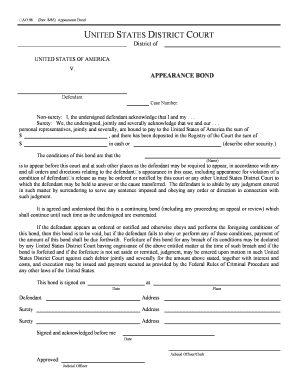
An Appearance Bond is a written undertaking, usually issued by a defendant or a surety company, that the defendant will appear for scheduled court proceedings. It documents the bond amount, the court and case identifier, the parties (defendant, surety, obligee), and the conditions of release. Appearance Bonds can be secured by cash, property, or a surety company and remain active until the court case is resolved or the bond is exonerated. Courts enforce the conditions and may forfeit the bond if the defendant fails to appear.

Why an Appearance Bond is important for defendants and sureties

An Appearance Bond protects the court’s interest in defendant appearance while allowing pretrial release. It clarifies obligations, secures financial responsibility through a set amount or collateral, and creates a formal remedy if a defendant absconds or violates release conditions.

Why an Appearance Bond is important for defendants and sureties

Who prepares and relies on an Appearance Bond

These roles interact throughout the case lifecycle—from bond issuance through disposition or exoneration.

  • Defendants and family members who post cash or property to secure release.
  • Surety companies that underwrite the bond and accept responsibility for the defendant.
  • Clerks of court and prosecutors who monitor compliance and initiate forfeiture actions.

Primary signer roles and their responsibilities

Surety Agent

A licensed surety agent completes bond paperwork, provides underwriting details, and accepts liability for the bond amount; the agent coordinates with the court and the defendant until the bond is exonerated or forfeited.

Criminal Attorney

A defense attorney may sign where authorized, verify defendant identity and conditions, and advise on implications of bond terms including appearance dates, travel restrictions, and potential forfeiture consequences.

Core elements you’ll find on a professional Appearance Bond

A well-prepared Appearance Bond contains a standard set of items that identify the case, define obligations, and document security. Clear, accurate entries reduce dispute risk and speed processing by the court and surety.

Parties

Names and contact details for the defendant, surety or bonding company, and the obligee (court). Accurate legal names are essential for enforcement.
Court & Case

Court name, jurisdiction, and case or docket number to ensure the bond applies to the correct matter and can be matched to court records.

Bond Amount

The monetary amount secured by the bond and any premium paid; specifies whether the bond is cash-secured, property-secured, or surety-backed.

Conditions

Explicit conditions of release, including required court appearances, travel limits, and any special conditions ordered by the judge.

Security / Collateral

Description of collateral, if any (cash, property description, deed), and whether lien or assignment documents are attached.

Signatures

Signature blocks for defendant, surety, and witness/notary as required — dated and clearly indicating signer authority and capacity.

Step-by-step: completing and filing an Appearance Bond

Follow these sequential actions to prepare a valid bond and submit it to the court or clerk’s office.

  • 01
    Prepare Form: Gather case number, defendant ID, and bond terms before starting.
  • 02
    Fill Fields: Enter all required information with exact names and MM/DD/YYYY dates.
  • 03
    Obtain Signatures: Signers and surety must sign; notarize if the jurisdiction requires.
  • 04
    Submit to Court: Deliver the original bond to the clerk and obtain a stamped receipt.

Configuring an online workflow for Appearance Bonds

Online completion speeds processing and creates an audit trail. Configure fields and signer roles to match court requirements.

Document Upload Upload the signed PDF or Word file as the canonical record.
Field Detection Enable automatic field detection to mark names, dates, and signature areas.
Signer Roles Assign defendant, surety, and court clerk roles with signing order.
Authentication Require email or SMS verification; add stronger methods when needed.
Audit Trail Activate complete logging of timestamps, IP addresses, and actions.

Technical considerations for digital completion and submission

Ensure the chosen system retains an unalterable certificate of completion and meets applicable jurisdictional signature rules.

  • Supported Formats: PDF | DOCX | Signed certificate
  • Integrations: Court RMS and case management
  • Authentication: Email, SMS, or KBA

Typical lifecycle of an Appearance Bond

The bond follows a predictable sequence from issuance through case resolution. Each stage creates obligations and documentation.

  • Issue Bond: Bond is prepared, signed, and dated by parties.
  • Deliver to Court: Original delivered and clerk stamps received copy.
  • Monitor Compliance: Court schedules and appearances are tracked.
  • Exoneration or Forfeiture: Bond is exonerated on disposition or forfeited for default.

Common preparation errors to avoid

  • Using nicknames or initials instead of the defendant’s legal name, which can impede enforcement or acceptance by the court.
  • Omitting the case or docket number, causing clerical rejection or misfiling by court staff and delaying processing.
  • Failing to notarize or obtain required witness signatures when the jurisdiction’s rules make those elements mandatory.
  • Submitting an unsigned or undated bond which courts commonly treat as invalid and will refuse to file.

Consequences of an incorrect or breached Appearance Bond

Bond Forfeiture: Court may order forfeiture of the bond amount.
Arrest Warrant: A bench warrant can be issued for failure to appear.
Civil Liability: Surety may pursue recovery against indemnitors.
License Risk: Unlicensed surety activity can trigger regulatory penalties.
Financial Loss: Collateral may be seized to satisfy the bond.
Case Delays: Clerical errors can cause postponements and added costs.

Time-sensitive events tied to an Appearance Bond

Appearance Bonds create timing obligations; many actions have short windows for compliance or challenge.

Initial Appearance:

Typically scheduled within 48–72 hours after arrest, depending on local court rules.

Posting Bond:

Courts often require immediate or same-day posting to effect release.

Motion to Vacate Forfeiture:

Deadlines vary by state; parties should move promptly after forfeiture entry.

Bond Exoneration:

Occurs after final disposition; clerk issues exoneration or order of discharge.

Appeal Periods:

Standard appeal or motion windows follow local rules and affect bond status.

Key milestones from arrest to bond resolution

Track these numbered milestones to manage obligations, documentation and potential remedies if the defendant misses court.

01

Arrest and Booking

Defendant taken into custody and processed by law enforcement.

02

Initial Hearing

Judge sets bail conditions and appearance dates.

03

Bond Posted

Cash, property, or surety posts the bond for release.

04

Case Disposition

Final judgment, plea, or dismissal triggers exoneration process.

Representative real-world examples of document use

These short examples show how organizations use secure signing and bond workflows in practice.

Martin Properties

The interface is simple and easy-to-use for our team; more importantly, it is just as easy for our customers.

  • Used for remote execution of property-related bonds.
  • Tim Martin describes online processing that maintained compliance and security while enabling remote completion across devices.

BIS

We felt most comfortable with airSlate SignNow given their SOC 2 certification and strict focus on ESIGN and UETA act compliance.

  • Adopted secure eSigning for legal documents and bonds.
  • Dan Rotelli notes enterprise compliance needs and the importance of traceable audit trails and certifications.

Practical tips for accurate, efficient Appearance Bond filing

Adopt consistent templates, verify jurisdictional requirements, and keep complete audit logs to minimize rejections and enforcement disputes.

Use exact legal names
Confirm the defendant’s name with government ID and court records; mismatches lead to misfiling and potential invalidation.
Include full case identifiers
Always populate court name, division, and docket number to ensure the bond is matched correctly to the case file.
Verify signer authority
Ensure surety agents are licensed and authorized to bind the company; maintain license numbers and contact data on the bond.
Preserve the audit trail
Keep timestamps, IP logs, and notarization records in one secure file to support exoneration or challenge proceedings.

Security and compliance features relevant to electronic bonds

Encryption in Transit: TLS 1.2/1.3
Encryption at Rest: AES-256
Audit Trail: Detailed timestamp logs
Regulatory Standards: ESIGN | UETA
Industry Compliance: HIPAA (BAA available)
Certifications: SOC 2 Type II

Comparing eSignature vendors for Appearance Bond workflows

Key pricing and capability differences among popular eSignature providers. signNow appears first for direct comparison; confirm features with each vendor before purchase.

signNow DocuSign Adobe Sign PandaDoc HelloSign
Starting Price $8/user/mo $15/user/mo $14/user/mo $19/user/mo $15/user/mo
Free Trial 7-day free trial Varies Varies Varies Varies
Bulk Send Yes (Premium tier) Yes Yes Yes Varies
Audit Trail Yes Yes Yes Yes Yes
Envelope Cap No cap 100 envelopes/user/yr Varies Varies Varies

Frequently asked questions about Appearance Bonds

These answers address common user questions about validity, signing, and handling of Appearance Bonds.


Need help? Contact support

be ready to get more
Join over 28 million airSlate SignNow users