Establishing secure connection… Loading editor… Preparing document…
Navigation

Fill and Sign the Below is between Having an Address at Form
Fill and Sign the Below is between Having an Address at Form

How it works

Open the document and fill out all its fields.
Apply your legally-binding eSignature.
Save and invite other recipients to sign it.

Rate template

4.8
40 votes
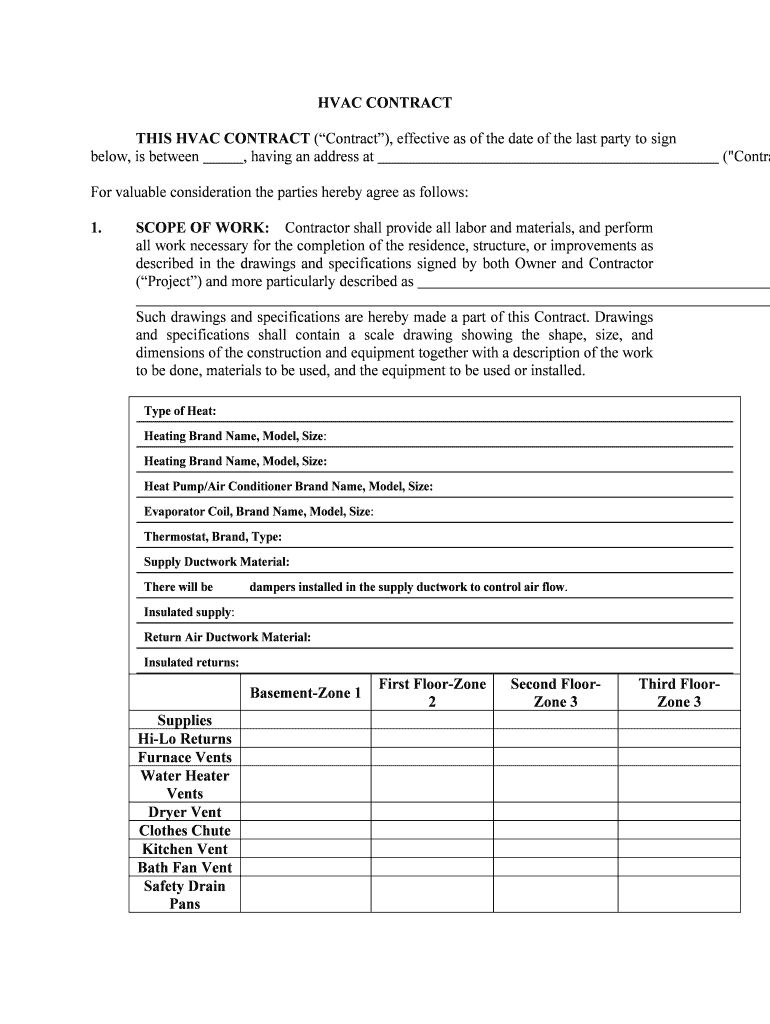
HVAC CONTRACT THIS HVAC CONTRACT (“Contract”), effective as of the date of the last party to sign below, is between , having an address at  ("Contractor") and , having an address at  ("Owner").For valuable consideration the parties hereby agree as follows:1. SCOPE OF WORK: Contractor shall provide all labor and materials, and perform all work necessary for the completion of the residence, structure, or improvements as described in the drawings and specifications signed by both Owner and Contractor (“Project”) and more particularly described as  Such drawings and specifications are hereby made a part of this Contract. Drawings and specifications shall contain a scale drawing showing the shape, size, and dimensions of the construction and equipment together with a description of the work to be done, materials to be used, and the equipment to be used or installed. Typ e o f H ea t:   H ea tin g B ra n d N am e, M od el, S iz e :     H ea tin g B ra n d N am e, M od el, S iz e:    H ea t P um p/A ir C on dit io n er B ra n d N am e, M od el, S iz e:    E va p ora to r C oil , B ra n d N am e, M od el, S iz e :    T herm osta t, B ra n d, T yp e:    S up ply D uctw ork M ate ria l:    T here w ill b e 0 0 0 00 d am pers i n sta lle d i n t h e s u pply d uctw ork t o c o n tr o l a ir f lo w .    In su la te d s u pply :    R etu rn A ir D uctw ork M ate ria l:    In su la te d r etu rn s:   Basement-Zone 1First Floor-Zone 2Second Floor- Zone 3Third Floor- Zone 3Supplies Hi-Lo ReturnsFurnace VentsWater Heater VentsDryer VentClothes ChuteKitchen VentBath Fan VentSafety Drain Pans L/F Valley Flashing  Chimney Flashing  A/C-Heat Pump  Furnace ThermostatAir Cleaner Brand Name, & Model: Humidifier Brand Name, & Model: A/C Pad: Wiring: Registers Brand Name, Style, & Number: Grilles Brand Name, Style, & Number: Fireplace Firebox Manu./Size: Flue Material/Size: Hearth Material/Size: Glass Doors: Mantel: Baseboard Heat Brand Name, Model & Numbers: Gas Line: 2.WORK SITE: The Project shall be constructed on the property of Owner located at  and more particularly described as  (hereafter "the Work Site"). Owner hereby authorizes Contractor to commence and complete the usual and customary excavation and grading on the Work Site as may be required in the judgment of the Contractor to complete the Project. Unless called for in the drawings or specifications, no landscaping, finish grading, filling or excavation is to be performed at the Work Site by the Contractor.3.TIME OF COMPLETION: Contractor shall commence the work to be performed under this Contract on or before  and shall substantially complete the work on or before  . Contractor shall not be liable for any delay due to circumstances beyond its control including strikes, casualty, acts of God, illness, injury, or general unavailability of materials.4.PERMITS: Contractor shall apply for and obtain such permits and regulatory approvals as may be required by the local municipal/county government, the cost thereof shall be included as part of the Project price.5.INSURANCE: Contractor shall maintain general liability, workers compensation and builder's risk insurance.6. SURVEY AND TITLE: If the Project is near the Owner’s property boundary, Owner will point out property lines to the Contractor. If the Owner or Contractor has any doubt about the location of the property lines, Owner shall provide Contractor with boundary stakes through a licensed surveyor. In addition, Owner shall provide Contractor documentation that Owner has title to the Work Site and shall provide Contractor copies of any covenants, conditions, or restrictions that affect the Work Site.7.CHANGES TO SCOPE OF WORK: Owner may make changes to the scope of the work, including changes to the drawings and specifications, from time to time during the construction of the Project. However, any such change or modification shall only be made by written "Change Order" signed by both parties. Such Change Orders shall become part of this Contract. Owner agrees to pay any increase in the cost of the Project as a result of a Change Order. In the event the cost of a Change Order is not known at the time a Change Order is executed, the Contractor shall estimate the cost thereof and Owner shall pay the actual cost whether or not it is in excess of the estimated cost.8.CONTRACT PRICE:{COST PLUS}Owner agrees to pay Contractor the actual cost to Contractor of materials plus the sum of $ for performing the services set forth in the scope of the work. Contractor shall be paid as follows:  .OR{FIXED FEE}Owner agrees to pay Contractor the sum of $ for performing the services set forth in the scope of the work. Contractor shall be paid as follows:  .Contractor shall furnish Owner appropriate releases or waivers of lien for all work performed or materials provided at the time the next periodic payment shall be due.9.LATE PAYMENT/DEFAULT: A failure to make payment for a period in excess of ten (10) days from the due date shall be deemed a material breach of this Contract. If payment is not made when due, Contractor may suspend work on the job until such time as all payments due have been made without breach of the Contract pending payment or resolution of any dispute. Owner agrees to pay a late charge of 1% of all payments that are more than ten (10) days late plus interest at the rate of 1% per month.SPECIAL NOTICE: THE LAW REQUIRES THAT THE CONTRACTOR SHALL SUBMIT A SWORN STATEMENT OF PERSONS FURNISHING MATERIALS AND LABOR BEFORE ANY PAYMENTS ARE REQUIRED TO BE MADE TO THE CONTRACTOR.10. DESTRUCTION AND DAMAGE: If the Project is destroyed or damaged for any reason, except where such destruction or damage was caused by the sole negligence of the Contractor or its subcontractors, Owner shall pay Contractor for any additional work done by Contractor in rebuilding or restoring the Project to its condition prior to such destruction or damage. If the estimated cost of replacing work already accomplished by Contractor exceeds 20 percent of the Contract price, either the Contractor or Owner may terminate this Contract. Upon termination by either party, Contractor shall be excused from further performance under this Contract and Owner shall pay Contractor a percentage of the Contract price in proportion to the amount of work accomplished prior to the destruction or damage.11. ASSIGNMENT: Neither party may assign this Contract, or payments due under the Contract, without the other party’s written consent. Any such assignment shall be void and of no effect.12. INTERPRETATION:(a)Interpretation of Documents. The Contract, drawings, and specifications are intended to supplement one another. In the event of a conflict, the specifications shall control the drawings, and the Contract shall control both. If work is displayed on the drawings but not called for in the specifications, or if the work is called for in the specifications but not displayed on the drawings, Contractor shall be required to perform the work as though it were called for and displayed in both documents.(b)Entire Agreement. This Contract constitutes the entire agreement of the parties. No other agreements, oral or written, pertaining to the work to be performed under this Contract exists between the parties. This Contract may only be modified only by a written agreement signed by both parties.(c) Governing Law. This Contract shall be interpreted and governed in accordance with the laws of the State of Illinois.13. ATTORNEYS’ FEES AND COSTS: If any party to this Contract brings a cause of action against the other party arising from or relating to this Contract, the prevailing party in such proceeding shall be entitled to recover reasonable attorney fees and court costs.14. PERFORMANCE:(a)Contractor may, at its discretion, engage licensed subcontractors to perform work pursuant this Contract provided Contractor shall remain fully responsible for the proper completion of the Project. (b) All work shall be completed in a workman-like manner and in compliance with all building codes and applicable laws. To the extent required by law, all work shall be performed by individuals duly licensed and authorized by law to perform said work.(c)Contractor agrees to remove all debris and leave the premises in broom clean condition. 15.WARRANTY: Contractor warrants the heating and cooling design performance: at  degrees outside temperature, the heating system will maintain  degrees Fahrenheit in the center of each heated room at a height of 5 feet 6 inches above the floor, and  degrees outside temperature the cooling system will maintain  degrees Fahrenheit in the center of each cooled room at a height of 5 feet 6 inches above the floor. Contractor agrees to repair or replace any defective or improperly operating equipment, fixtures, materials, valves, leaking or clogged refrigerant lines, leaking gutters and downspouts for a period of  year(s); and repair or replace defective equipment (whose warranty period extends beyond ) during the full term of the manufacturer's warranty, according the manufacturer’s terms. Contractor agrees to repair or replace leaking valley or flu flashing, separated or detached duct work, and to eliminate unusual booming sound, not including typical mildly noisy ductwork, caused by stiffening or flexing of the ductwork for a period of  year(s). Owner agrees to inspect all fixtures and equipment within  days after installation. If such inspection finds chipped, cracked or otherwise defective and malfunctioning fixtures, equipment, ductwork, lines or other installed items, then Contractor shall repair or replace same. Contractor shall not be responsible after this period. Contractor shall not be responsible for Owners’/Builders' negligence. Contractor hereby assigns to Owner all warranties on materials as provided by the manufacturer of such materials. AGREED:CONTRACTOR:SignaturePrint Name & TitleDateLicense NumberName and Address of License HolderOWNER:SignaturePrint NameDate * Optional for repairs to be paid for from insurance policy proceeds: NOTICE OF CANCELLATION If you are notified by your insurer that all or any part of the claim or contract is not a covered loss under the insurance policy, you may cancel the contract by mailing or delivering a signed and dated copy of this cancellation notice or any other written notice to _____________________________ (name of contractor) at _____________________________ (address of contractor's place of business) at any time prior to midnight on the earlier of the fifth business day after you have received such notice from your insurer or the thirtieth business day after your insurer has received properly executed proof(s) of loss from you. Notice of cancellation shall include a copy of the written notice from the insurer to the effect that all or part of the claim is not a covered loss under the insurance policy. If you cancel, any payments made by you under the contract, other than payments for goods or services related to a catastrophe which you agreed in writing to be necessary to prevent damage to your property, will be returned to you within 10 business days following receipt by the contractor of your cancellation notice.I HEREBY CANCEL THIS TRANSACTION ________________________________ ____________________________ (insured's signature) (date)Within 10 days after a contract referred to in subsection (e) has been cancelled, the contractor offering home repair or remodeling services shall tender to the insured any payments, partial payments, or deposits made by the insured and any note or other evidence of indebtedness. If, however, the contractor has provided any goods or services related to a catastrophe, acknowledged and agreed to by the insured in writing to be necessary to prevent damage to the premises, the contractor is entitled to the reasonable value of such goods and services. Any provision in a contract referred to in subsection (e) that requires the payment of any fee for anything except goods or services related to a catastrophe shall not be enforceable against any insured who has cancelled a contract pursuant to the above. * Optional notice for home solicitation sales:YOU, THE CONSUMER, MAY CANCEL THIS TRANSACTION AT ANY TIME PRIOR TO MIDNIGHT OF THE THIRD BUSINESS DAY AFTER THE DATE OF THIS TRANSACTION. SEE THE ATTACHED NOTICE OF CANCELLATION FORM FOR AN EXPLANATION OF THIS RIGHT. NOTICE OF CANCELLATION _____________________________ (enter date of transaction) _____________________________ (Date) YOU MAY CANCEL THIS TRANSACTION, WITHOUT ANY PENALTY OR OBLIGATION, WITHIN 3 BUSINESS DAYS FROM THE ABOVE DATE. IF YOU CANCEL, ANY PROPERTY TRADED IN, ANY PAYMENTS MADE BY YOU, AND ANY NEGOTIABLE INSTRUMENT EXECUTED BY YOU UNDER THE CONTRACT OR TRANSACTION WILL BE RETURNED WITHIN 10 BUSINESS DAYS FOLLOWING RECEIPT BY THE SELLER OF YOUR CANCELLATION NOTICE, AND ANY SECURITY INTEREST ARISING OUT OF THE TRANSACTION WILL BE CANCELLED. IF YOU CANCEL, YOU MUST MAKE AVAILABLE TO THE SELLER AT YOUR RESIDENCE IN SUBSTANTIALLY AS GOOD A CONDITION AS WHEN RECEIVED, ANY GOODS DELIVERED TO YOU UNDER THIS CONTRACT OR TRANSACTION, OR YOU MAY IF YOU WISH, COMPLY WITH THE INSTRUCTIONS OF THE SELLER REGARDING THE RETURN SHIPMENT OF THE GOODS AT THE SELLER’S EXPENSE AND RISK. IF YOU MAKE THE GOODS AVAILABLE TO THE SELLER AND THE SELLER DOES NOT PICK THEM UP WITHIN 20 DAYS OF THE DATE OF YOUR NOTICE OF CANCELLATION, YOU MAY RETAIN OR DISPOSE OF THE GOODS WITHOUT ANY FURTHER OBLIGATION. IF YOU FAIL TO MAKE THE GOODS AVAILABLE TO THE SELLER, OR IF YOU AGREE TO RETURN THE GOODS TO THE SELLER AND FAIL TO DO SO, THEN YOU REMAIN LIABLE FOR PERFORMANCE OF ALL OBLIGATIONS UNDER THE CONTRACT. TO CANCEL THIS TRANSACTION, MAIL OR DELIVER A SIGNED AND DATED COPY OF THIS CANCELLATION NOTICE OR ANY OTHER WRITTEN NOTICE, OR SEND A TELEGRAM, TO _____________________________ (name of seller), AT _____________________________ (address of seller’s place of business) NOT LATER THAN MIDNIGHT OF (date). I HEREBY CANCEL THIS TRANSACTION. _________________ (Date) _____________________________ (Buyer’s signature)

Useful suggestions for preparing your ‘Below Is Between Having An Address At’ online

Are you weary of the inconvenience of managing paperwork? Look no further than airSlate SignNow, the top eSignature solution for individuals and small to medium-sized businesses. Bid farewell to the monotonous task of printing and scanning documents. With airSlate SignNow, you can smoothly finalize and sign documents online. Utilize the robust features offered by this user-friendly and cost-efficient platform and transform your method of document management. Whether you need to approve documents or collect electronic signatures, airSlate SignNow manages everything effortlessly, with just a few clicks.

Adhere to this comprehensive guide:

  1. Access your account or sign up for a free trial with our service.
  2. Click +Create to upload a document from your device, cloud storage, or our template collection.
  3. Edit your ‘Below Is Between Having An Address At’ in the editor.
  4. Click Me (Fill Out Now) to complete the form on your end.
  5. Add and assign fillable fields for others (if needed).
  6. Continue with the Send Invite options to ask for eSignatures from others.
  7. Save, print your copy, or convert it into a reusable template.

Don't fret if you need to collaborate with your colleagues on your Below Is Between Having An Address At or send it for notarization—our platform provides you with everything required to accomplish such tasks. Register with airSlate SignNow today and take your document management to the next level!

Here is a list of the most common customer questions. If you can’t find an answer to your question, please don’t hesitate to reach out to us.

Need help? Contact Support

The best way to complete and sign your below is between having an address at form

Save time on document management with airSlate SignNow and get your below is between having an address at form eSigned quickly from anywhere with our fully compliant eSignature tool.

How to Sign a PDF Online How to Sign a PDF Online

How to fill out and sign paperwork online

In the past, coping with paperwork took pretty much time and effort. But with airSlate SignNow, document management is fast and easy. Our robust and user-friendly eSignature solution enables you to effortlessly fill out and electronically sign your below is between having an address at form online from any internet-connected device.

Follow the step-by-step guide to eSign your below is between having an address at form template online:

  • 1.Register for a free trial with airSlate SignNow or log in to your account with password credentials or SSO authentication.
  • 2.Click Upload or Create and import a form for eSigning from your device, the cloud, or our form library.
  • 3.Click on the document name to open it in the editor and utilize the left-side menu to fill out all the blank areas accordingly.
  • 4.Place the My Signature field where you need to approve your sample. Provide your name, draw, or import an image of your regular signature.
  • 5.Click Save and Close to accomplish modifying your completed form.

As soon as your below is between having an address at form template is ready, download it to your device, save it to the cloud, or invite other people to electronically sign it. With airSlate SignNow, the eSigning process only requires a couple of clicks. Use our robust eSignature tool wherever you are to deal with your paperwork productively!


How to Sign a PDF Using Google Chrome How to Sign a PDF Using Google Chrome

How to fill out and sign documents in Google Chrome

Completing and signing documents is easy with the airSlate SignNow extension for Google Chrome. Adding it to your browser is a fast and beneficial way to manage your forms online. Sign your below is between having an address at form template with a legally-binding eSignature in a few clicks without switching between programs and tabs.

Follow the step-by-step guide to eSign your below is between having an address at form template in Google Chrome:

  • 1.Go to the Chrome Web Store, find the airSlate SignNow extension for Chrome, and install it to your browser.
  • 2.Right-click on the link to a document you need to approve and select Open in airSlate SignNow.
  • 3.Log in to your account with your password or Google/Facebook sign-in option. If you don’t have one, you can start a free trial.
  • 4.Utilize the Edit & Sign toolbar on the left to fill out your sample, then drag and drop the My Signature option.
  • 5.Insert an image of your handwritten signature, draw it, or simply enter your full name to eSign.
  • 6.Verify all data is correct and click Save and Close to finish editing your form.

Now, you can save your below is between having an address at form sample to your device or cloud storage, send the copy to other individuals, or invite them to eSign your form with an email request or a secure Signing Link. The airSlate SignNow extension for Google Chrome improves your document processes with minimum time and effort. Start using airSlate SignNow today!


How to Sign a PDF in Gmail How to Sign a PDF in Gmail How to Sign a PDF in Gmail

How to fill out and sign forms in Gmail

Every time you receive an email containing the below is between having an address at form for signing, there’s no need to print and scan a document or download and re-upload it to a different program. There’s a better solution if you use Gmail. Try the airSlate SignNow add-on to rapidly eSign any documents right from your inbox.

Follow the step-by-step guidelines to eSign your below is between having an address at form in Gmail:

  • 1.Visit the Google Workplace Marketplace and find a airSlate SignNow add-on for Gmail.
  • 2.Set up the program with a related button and grant the tool access to your Google account.
  • 3.Open an email with an attachment that needs signing and utilize the S symbol on the right sidebar to launch the add-on.
  • 4.Log in to your airSlate SignNow account. Select Send to Sign to forward the document to other people for approval or click Upload to open it in the editor.
  • 5.Drop the My Signature option where you need to eSign: type, draw, or upload your signature.

This eSigning process saves efforts and only takes a few clicks. Use the airSlate SignNow add-on for Gmail to update your below is between having an address at form with fillable fields, sign forms legally, and invite other parties to eSign them al without leaving your mailbox. Boost your signature workflows now!


How to Sign a PDF on a Mobile Device How to Sign a PDF on a Mobile Device How to Sign a PDF on a Mobile Device

How to complete and sign paperwork in a mobile browser

Need to quickly fill out and sign your below is between having an address at form on a mobile phone while working on the go? airSlate SignNow can help without needing to set up extra software programs. Open our airSlate SignNow tool from any browser on your mobile device and create legally-binding eSignatures on the go, 24/7.

Follow the step-by-step guidelines to eSign your below is between having an address at form in a browser:

  • 1.Open any browser on your device and follow the link www.signnow.com
  • 2.Create an account with a free trial or log in with your password credentials or SSO option.
  • 3.Click Upload or Create and import a file that needs to be completed from a cloud, your device, or our form collection with ready-made templates.
  • 4.Open the form and complete the empty fields with tools from Edit & Sign menu on the left.
  • 5.Add the My Signature area to the sample, then type in your name, draw, or add your signature.

In a few simple clicks, your below is between having an address at form is completed from wherever you are. As soon as you're finished editing, you can save the document on your device, generate a reusable template for it, email it to other individuals, or invite them eSign it. Make your paperwork on the go quick and effective with airSlate SignNow!


How to Sign a PDF on iPhone How to Sign a PDF on iPhone

How to fill out and sign forms on iOS

In today’s business world, tasks must be accomplished rapidly even when you’re away from your computer. With the airSlate SignNow application, you can organize your paperwork and approve your below is between having an address at form with a legally-binding eSignature right on your iPhone or iPad. Set it up on your device to close deals and manage forms from just about anywhere 24/7.

Follow the step-by-step guidelines to eSign your below is between having an address at form on iOS devices:

  • 1.Go to the App Store, search for the airSlate SignNow app by airSlate, and set it up on your device.
  • 2.Open the application, tap Create to upload a template, and choose Myself.
  • 3.Opt for Signature at the bottom toolbar and simply draw your signature with a finger or stylus to eSign the sample.
  • 4.Tap Done -> Save right after signing the sample.
  • 5.Tap Save or use the Make Template option to re-use this paperwork later on.

This method is so simple your below is between having an address at form is completed and signed in just a few taps. The airSlate SignNow application works in the cloud so all the forms on your mobile device are kept in your account and are available any time you need them. Use airSlate SignNow for iOS to improve your document management and eSignature workflows!


How to Sign a PDF on Android How to Sign a PDF on Android

How to complete and sign forms on Android

With airSlate SignNow, it’s simple to sign your below is between having an address at form on the go. Set up its mobile app for Android OS on your device and start enhancing eSignature workflows right on your smartphone or tablet.

Follow the step-by-step guide to eSign your below is between having an address at form on Android:

  • 1.Open Google Play, find the airSlate SignNow application from airSlate, and install it on your device.
  • 2.Sign in to your account or create it with a free trial, then import a file with a ➕ option on the bottom of you screen.
  • 3.Tap on the uploaded document and select Open in Editor from the dropdown menu.
  • 4.Tap on Tools tab -> Signature, then draw or type your name to eSign the form. Fill out empty fields with other tools on the bottom if needed.
  • 5.Use the ✔ key, then tap on the Save option to finish editing.

With an easy-to-use interface and total compliance with major eSignature standards, the airSlate SignNow app is the best tool for signing your below is between having an address at form. It even operates without internet and updates all form modifications once your internet connection is restored and the tool is synced. Fill out and eSign documents, send them for approval, and create re-usable templates anytime and from anywhere with airSlate SignNow.

Sign up and try Below is between having an address at form
  • Close deals faster
  • Improve productivity
  • Delight customers
  • Increase revenue
  • Save time & money
  • Reduce payment cycles

