Establishing secure connection…Loading editor…Preparing document…

Business Letter Offering

This template is fully customizable. Edit the text, fill out the fields, and send it for signature. Give it a try!
Business Letter Offering

What a Business Letter Offering Is and When It Applies

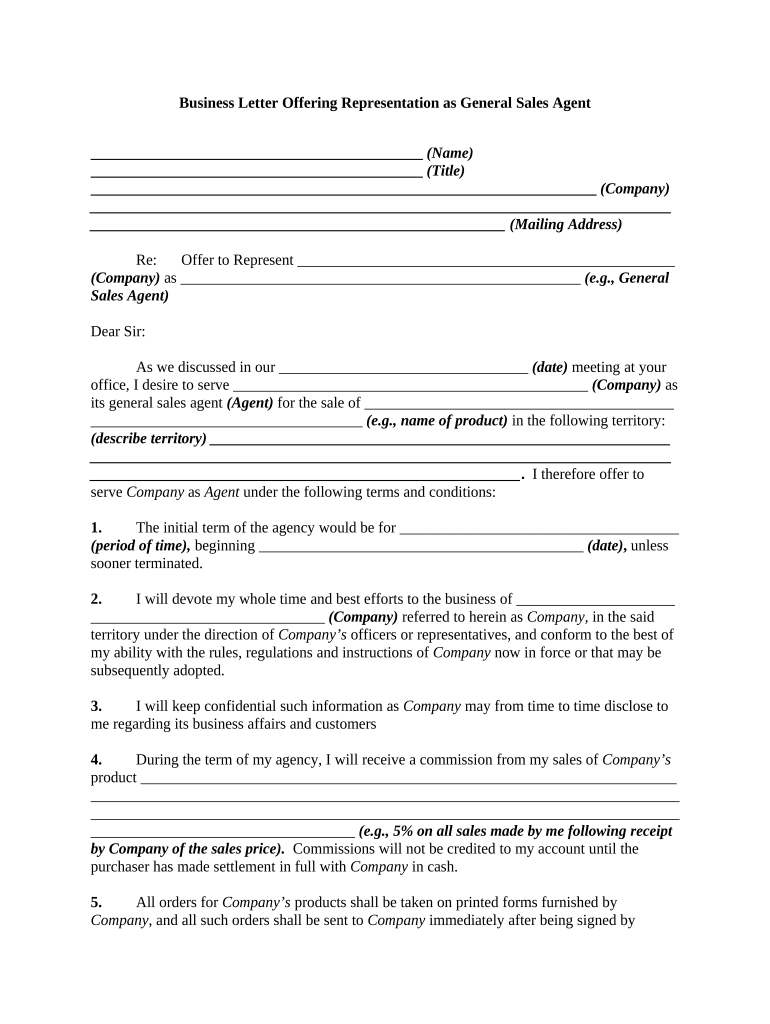
The Business Letter Offering is a formal written proposal a company uses to present specific terms for a commercial transaction, partnership, acquisition, or investment. It states the offer amount, key conditions, payment or delivery terms, deadlines for acceptance, and any contingencies. The document serves as a record of intent that can be negotiated into a binding agreement when accepted or signed. In many contexts it replaces initial face-to-face negotiations, and it is commonly delivered by email, postal mail, courier, or as an electronically signed PDF.

Why a Clear Business Letter Offering Matters

A Business Letter Offering clarifies commercial intent, sets clear terms for acceptance, and creates an auditable record. It reduces misunderstandings, supports negotiation, and can speed contracting when combined with compliant electronic signatures under applicable federal and state law.

Why a Clear Business Letter Offering Matters

Who Prepares and Receives Business Letter Offerings

Typical users include buyers, sellers, corporate development teams, procurement officers, and outside counsel preparing a formal offer.

  • Small and mid-size businesses sending proposals to partners or vendors.
  • Private equity firms, acquirers, and investors documenting term offers formally.
  • Legal and procurement teams creating paperless, auditable offer workflows and processes.

Core Elements to Include in the Offer

Essential parts of a Business Letter Offering explain the offer, define conditions, set deadlines, identify parties, and state signature and acceptance mechanics.

Offer Summary

Summarize the proposed transaction, including itemized price or consideration, scope of goods or services, key deliverables, and any limits on the offer such as expiration or exclusivity periods.
Terms & Conditions

List payment terms, milestones, warranties, indemnities, confidentiality obligations, and any conditions precedent. Use clear plain-language clauses to avoid ambiguity and enable straightforward acceptance or negotiation.

Contingencies

Identify contingencies such as due diligence reviews, regulatory approvals, financing, or third-party consents. Specify deadlines for satisfying contingencies and the consequences of unmet conditions explicitly.

Acceptance

State how acceptance must be communicated, whether by signature, written confirmation, or electronic assent, and include the time window for acceptance and any effective date following acceptance.

Signatures

Include signature blocks for all parties with printed name, title, date, and authority statement. Note whether signatures may be electronic and specify acceptable eSignature methods.

Attachments

Reference any exhibits, schedules, or supporting documents such as price lists, specifications, or proof of authority. Attach or annex copies to ensure the offer is complete and self-contained.

Required Information and Short Field Checklist

Offer Date: Enter date as MM/DD/YYYY.
Offeror Name: Legal entity or individual name.
Offeree Name: Full legal name and role.
Consideration Amount: Exact dollar figure or description.
Effective Date: When obligations begin (MM/DD/YYYY).
Signature Block: Signer name, title, date required.

Step-by-Step: Preparing and Executing the Offer

[INTRO] Prepare the document draft, verify parties, define terms, set deadlines, choose signature method, and send for execution with an audit trail.

  • 01
    Draft Offer: Describe transaction, price, and key conditions clearly.
  • 02
    Review: Have legal and finance review key clauses and risks.
  • 03
    Approve: Obtain internal approvals per company policy before sending.
  • 04
    Execute: Collect signatures electronically or on paper and record.

Setting Up an Electronic Workflow for the Offer

Configure an electronic workflow to route the Business Letter Offering, assign fields, authentication, and automated reminders.

Field name and configuration details Field Name | Configuration Setting and Notes
Signer authentication and verification method Email link | SMS code or knowledge-based verification
Mandatory fields for offer execution Signature & date | Full legal name and title required
Conditional visibility fields and logic Price breakdown | Only visible if payment selected
Automated notifications and reminder settings Signer reminders | Three reminders over two-week period
Audit trail retention and export options Audit PDF | Retain 7 years; export CSV available

How Digital Signing Works for an Offer

The typical e-sign workflow routes the Business Letter Offering from sender to signer, authenticates identity, captures signature, and archives an audit trail.

  • Upload: Add the offer document and attach exhibits.
  • Prepare Fields: Place signature, date, and conditional fields.
  • Send: Choose signing order and authentication method.
  • Complete: Signer executes, system records audit trail.

Platform Capabilities to Confirm

Ensure your chosen platform supports PDF and Word import, audit trails, signer authentication, and compliant retention for Business Letter Offering workflows.

  • File Types: PDF, DOCX, and common formats supported
  • Integrations: CRM and cloud storage integrations
  • Authentication: Email, SMS, SSO options

Key Deadlines and Date Rules to Include

Key timing: set clear offer expiration, response deadlines, contingency periods, and dates for performance. Use explicit MM/DD/YYYY dates to avoid disputes.

Offer expiration and acceptance window:

Specify exact end date and time.

Deadline for contingency satisfaction and notice:

List date by which contingencies must be met.

Method and timeframe for response by offeree:

State required response form and deadline.

Performance start and delivery dates:

Give kickoff and delivery schedule once accepted.

Record retention and effective dates:

Specify effective date and retention timeframe.

Common Preparation Mistakes to Avoid

  • Using vague language about price or scope leads to disputes and may render acceptance ambiguous, increasing litigation risk and negotiation time.
  • Failing to include an expiration date leaves offers open-ended; responders may treat the offer as revocable, complicating enforcement and planning.
  • Not specifying acceptable signature methods or authentication can weaken attribution and create challenges proving who agreed to the terms.
  • Overlooking attachments or failing to label exhibits properly causes ambiguity about included terms and may be grounds for rescission.

Risks and Potential Consequences of Errors

Lost Opportunity: Delay may forfeit negotiation position
Contract Liability: Creates binding obligations if accepted
Tax Exposure: Incorrect terms trigger reporting penalties
Authentication Failure: Weak proof undermines enforceability
Notary Defect: Missing notarization may void certain instruments
Confidentiality Breach: Improper disclosure harms reputation

eSignature Pricing and Feature Comparison

Compare baseline pricing and core capabilities for eSignature providers commonly used to execute Business Letter Offerings.

signNow DocuSign Adobe Sign PandaDoc HelloSign
Starting Price $8/user/mo $15/user/mo $14/user/mo $19/user/mo $15/user/mo
Free Trial 7-day free trial Varies by plan Varies by plan Varies by plan Varies by plan
Bulk Send Yes Available Available Available Available
Audit Trail Yes Yes Yes Yes Yes
HIPAA Compliant Yes (BAA required) Available Available Varies Varies
Envelope Cap No cap 100 envelopes/user/year Varies Varies Varies

Frequently Asked Questions About Business Letter Offerings

Common questions address enforceability, signing authority, notarization, revocation, revision, and secure storage for Business Letter Offerings.


Need help? Contact support

be ready to get more
Join over 28 million airSlate SignNow users