Establishing secure connection…Loading editor…Preparing document…

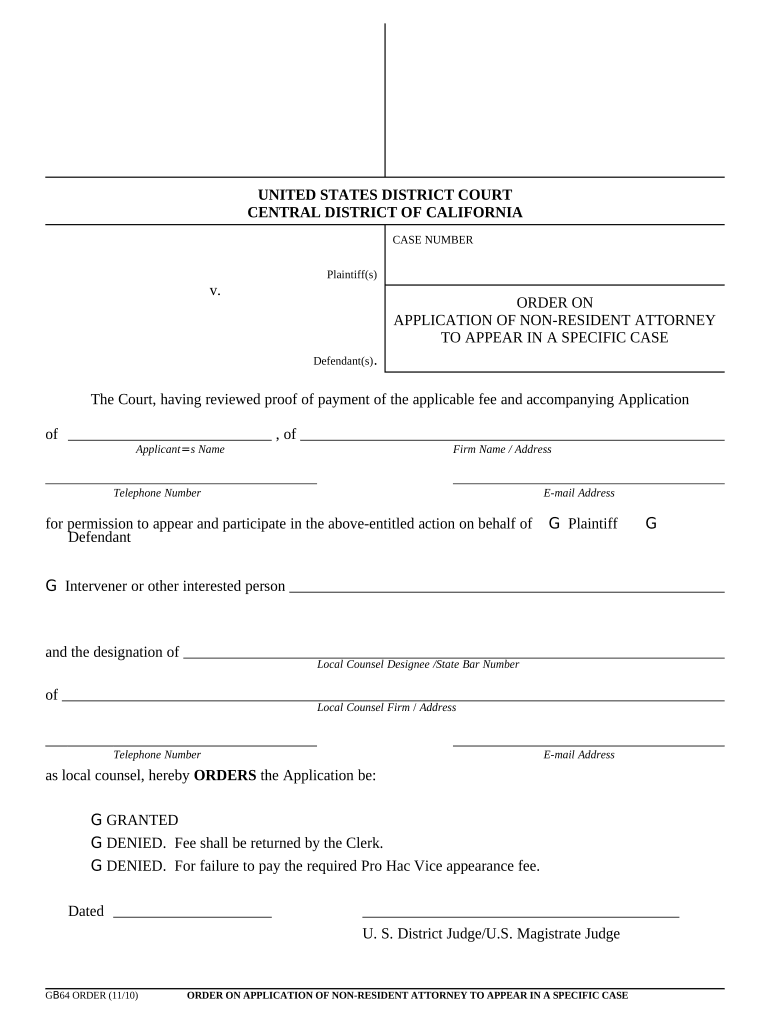
Order on Application of Non-Resident Attorney to Appear in a Specific Case

This template is fully customizable. Edit the text, fill out the fields, and send it for signature. Give it a try!
Order on Application of Non-Resident Attorney to Appear in a Specific Case

What this Order Is and when it’s used

The Order on Application of Non-Resident Attorney to Appear in a Specific Case is a court-issued authorization allowing an out-of-state lawyer to participate in a particular pending matter without full admission to the jurisdiction. The document typically follows a motion or application (often called a pro hac vice motion), attaches an affidavit or certificate of good standing from the attorney’s home jurisdiction, and names any required local counsel. Courts issue such orders to preserve procedural fairness while controlling practice before the bar.

Why a clear, compliant order matters

A properly completed order clarifies who may appear, the scope of permission, and required local counsel, reducing risk of sanctions, appearance challenges, or case delays. Accurate orders help the court maintain a clear record of admitted counsel for service and notice.

Why a clear, compliant order matters

Who prepares and relies on this order

Parties, out-of-state attorneys, local counsel, and court clerks all engage with the order during filing and service.

  • Out-of-state counsel requesting admission in a single case; submits affidavit and related documents.
  • Local counsel of record in the forum; accepts responsibility for notices and local rules.
  • Court clerk and judge; review, sign, and docket the order per court practice.

Step-by-step: preparing and filing the application

Follow these sequential steps to prepare and submit an application for a non-resident attorney to appear in a single case.

  • 01
    Gather documents: Obtain certificate of good standing and any required affidavits.
  • 02
    Complete motion: Draft pro hac vice motion or application with required case caption.
  • 03
    Local counsel consent: Have local counsel sign acceptance of responsibilities and contact details.
  • 04
    File and serve: File with the court clerk and serve opposing counsel per rules.

How to set up the order for online filing

Configure document fields and attachments to match court e-filing system requirements and local rules before upload.

Field Configuration
Court Caption Place as read-only header matching docket format
Attorney Information Make name, bar ID, and jurisdiction required fields
Attachments Attach certificate of good standing as required file
Local Counsel Block Include contact fields and checkbox for acceptance

Typical eSubmission and docketing flow

This sequence outlines how the application moves from preparation to the court-issued order.

  • Prepare package: Assemble motion, affidavit, and attachments
  • File electronically: Upload to court e-filing portal or submit paper copy
  • Clerk review: Clerk checks completeness and local counsel acceptance
  • Judge signs order: Signed order is docketed and served to parties

Digital signing and e-filing considerations

Courts and e-filing systems have specific technical and authentication rules; confirm supported file types and signature methods.

  • File formats: PDF/A and flattened PDFs preferred
  • eSignature type: Audit-trail e-signatures accepted in many courts
  • Authentication: Use platform authentication compatible with e-filer profile

Consequences of filing an incorrect or incomplete order

Rejection or Delay: Court may reject application without prejudice
Sanctions Risk: Possible court sanctions for unauthorized practice
Service Issues: Improper service contact can delay proceedings
Disciplinary Action: Bar discipline risk for misrepresentation
Costs Increased: Additional filing and attorney fees may result
Evidence Gaps: Missing attachments can affect appellate record

Common mistakes to avoid when preparing the application

  • Using an incorrect case caption or case number that does not match the docket causes administrative rejection or misfiling.
  • Failing to attach a current certificate of good standing from the non-resident attorney’s admitting jurisdiction.
  • Not including local counsel’s written acceptance of duties or providing an incorrect service address for local counsel.
  • Omitting required jurisdiction-specific statements, such as disciplinary history disclosures or language mandated by local rule.

Security and compliance features for digital copies

Transport Encryption: TLS 1.2/1.3 in transit
Data at Rest: AES-256 encrypted storage
Audit Trails: Detailed timestamp and IP logs
HIPAA: Compliant with BAA as required
21 CFR Part 11: Supported for regulated records
ESIGN / UETA: Frameworks supported for legal validity

Who signs and endorses the order

Out-of-state Counsel

The non-resident attorney signs the application and provides a declaration or affidavit of good standing; they must also disclose any disciplinary history and accept the jurisdiction’s rules while appearing in the matter.

Local Counsel

Local counsel signs a consent or notice-of-appearance block accepting service and local duties; this party remains on record for notices and typically supervises procedural compliance for the non-resident attorney.

What a professional order includes

A concise, properly formatted order contains specific technical and legal elements so the court and parties have an unambiguous record of admission and responsibilities.

Case Caption

Full court and case identification at the top of the order, matching the initiating pleadings and docket to ensure proper linkage and clerk processing.
Permission Statement

A clear paragraph granting the non-resident attorney permission to appear in the specified case and noting any scope limitations or conditions imposed by the court.

Attorney Credentials

Explicit listing of the non-resident attorney’s jurisdiction of admission, bar membership number, and representation that they are in good standing in their home jurisdiction.

Local Counsel Acceptance

A separate clause or signature block where local counsel accepts responsibility for service, communications, and compliance with local practice rules.

Supporting Attachments

Reference to attached affidavit, certificate of good standing, and any required fee receipt or completed local rule checklist.

Judicial Signature

Signature line and date for the presiding judge or authorized judicial officer, and a clerk stamp or docket entry area to show official issuance.

Timing and filing deadlines to track

Observe court scheduling and local rule deadlines to ensure timely admission and avoid hearing delays.

File Before Hearing:

Submit the application ahead of the scheduled hearing per local rule

Service Timing:

Serve opposing counsel within the period required by court rule

Fee Payment:

Pay any required filing fee at time of submission

Local Registration:

Complete any required pro hac vice registration promptly

Renewal or Substitution:

Note limits on term of permission and process for substitution

Typical eSignature vendor comparison for document workflows

A practical comparison of common eSignature vendors for preparing, signing, and delivering court orders; signNow is shown first for reference to documented pricing and capabilities.

signNow DocuSign Adobe Sign PandaDoc HelloSign
Starting Price $8/user/mo $15/user/mo $14/user/mo $19/user/mo $15/user/mo
Free Trial 7-day free trial Varies Varies Varies Varies
Bulk Send Yes (Premium) Varies Varies Varies Varies
Audit Trail Yes Yes Yes Yes Yes
HIPAA Compliant Yes Yes Yes No No

How teams use the order in practice

Two concise scenarios illustrate routine uses of the order and practical outcomes when executed correctly.

Civil Litigation Example

A national defense firm files a pro hac vice motion with local counsel attached

  • Court grants appearance limited to discovery
  • The matter proceeds without delay and the non-resident attorney receives docketed permission and service notices.

Transactional Dispute Example

Out-of-state counsel seeks temporary admission for a contract dispute hearing

  • Local counsel accepts service and files supporting affidavit
  • Judge signs the order; counsel appears at hearing and files post-hearing briefs under the court’s supervision.

Frequently asked questions and quick answers

Answers to common questions about preparing, filing, and using the Order on Application of Non-Resident Attorney to Appear in a Specific Case.


Need help? Contact support

be ready to get more
Join over 28 million airSlate SignNow users