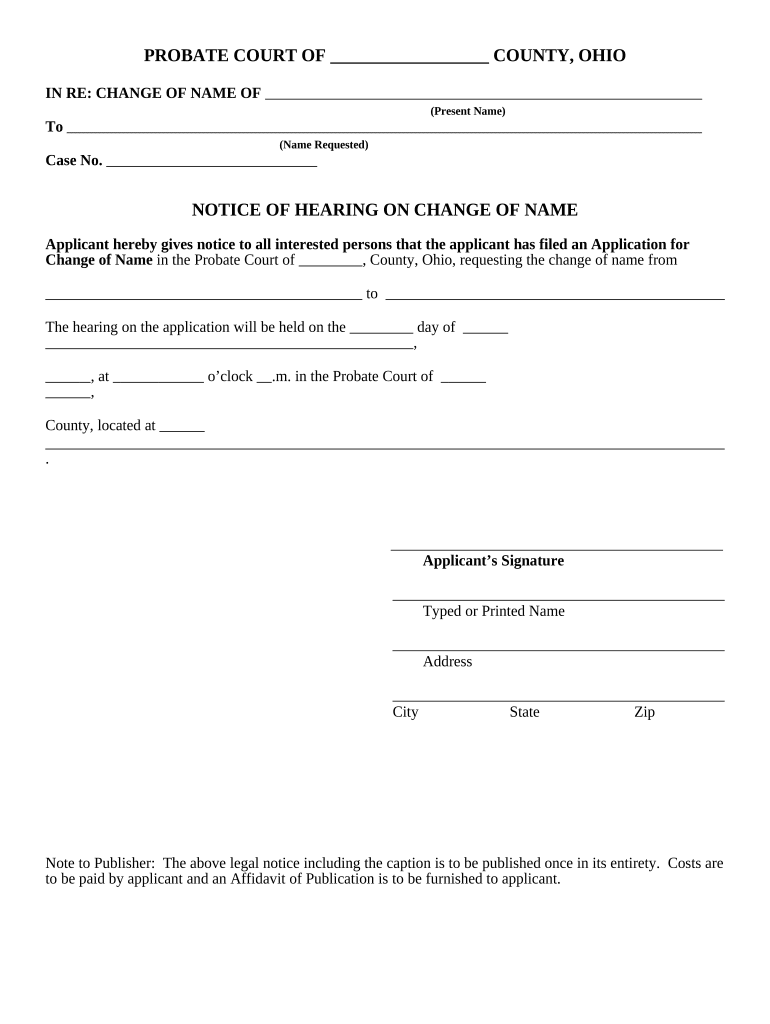
Ohio Notice of Hearing on Change of Name
What the Ohio Notice of Hearing on Change of Name Is
Why the Notice Matters for a Successful Name Change
The Notice ensures constitutional due process by informing the public and relevant parties of the hearing, enabling objections and required publications, creating a public record, and helping the court verify identity and protect third-party interests before granting a name change.
Who typically prepares or receives this Notice
The Notice is used by petitioners, court staff, and legal representatives connected to a name change proceeding.
- Individuals petitioning the court to change their legal name — files and serves the Notice per local court rules.
- Attorneys acting for petitioners — prepare, review, and arrange proper service and publication when required.
- County probate clerks and judges — issue hearing dates, ensure Notice compliance, and record objections if any.
Responsibility for preparing, filing, publishing, and serving the Notice varies by county; confirm local probate court procedures before filing.
Step-by-step: completing and filing the Notice
-
01Prepare Petition: Draft petition and supporting identification.
-
02File Notice: File Notice with county probate clerk.
-
03Publish If Required: Publish in local paper per court instructions.
-
04Attend Hearing: Appear at scheduled hearing with ID.
Online workflow settings for a digital Notice
| Field | Configuration | Enable required fields | Required |
|---|---|
| Signature Type | Electronic signature allowed | Audit trail required |
| Authentication | Email or SMS code for signer verification |
| Document Format | PDF/A recommended for archival submission |
| Retention Rule | Retain signed copy per local rules |
How the Notice travels through the court process
-
File: Submit petition and Notice to probate court.
-
Serve: Provide Notice to required parties or publish as directed.
-
Publish: Run publication if ordered by the court.
-
Hearing: Appear and respond to any objections.
Digital file and delivery requirements for the Notice
Courts and publication vendors accept specific formats and delivery methods; match these before submission.
- Accepted Formats: PDF, DOCX
- Authentication: Email or SMS code
- Integrations: Court e-file portals supported
Confirm the county probate court's e-filing format and any publication vendor specifications to avoid rejections.
Typical timing checkpoints and deadlines
Filing Window:
File petition and Notice as early as practical before the hearing.
Hearing Scheduling:
Hearing often set 4–8 weeks after filing, depending on court calendar.
Publication Timing:
If ordered, publication typically runs in the weeks leading up to the hearing.
Service Deadline:
Serve required parties per local rule, often at least 7 days before hearing.
Record Retention:
Keep filed and signed Notice for minimum retention period per state law.
Key milestones from filing to final order
File Petition
Court accepts petition and assigns a case number.
Notice Issued
Court or filer prepares Notice of Hearing for service.
Publish/Serve
Filer publishes Notice or serves parties as ordered.
Final Hearing
Judge hears the petition and issues an order.
Common pitfalls to avoid
- Using an incorrect or inconsistent legal name on the petition or Notice causes identification and processing delays with the court.
- Failing to publish or serve the Notice as required by the court can result in continuances or dismissal of the petition.
- Missing or incorrect hearing date/time in the Notice leads to improper service and may require re-filing or a reset of the hearing.
- Uploading the wrong file format or unsigned documents to e-file portals can trigger immediate rejection by the court clerk.
Consequences of errors or noncompliance
How the Notice compares with similar court documents
| Criteria | Notice of Hearing | Publication Notice | Petition |
|---|---|---|---|
| Primary Purpose | schedule hearing | publicize intent | request relief |
| Filed With | probate court | newspaper | probate court |
| Requires Service | n/a | ||
| Creates Record | partial |
eSignature vendor pricing comparison relevant to filing and serving Notices
| signNow | DocuSign | Adobe Sign | PandaDoc | HelloSign | |
|---|---|---|---|---|---|
| Starting Price | $8/user/mo | $15/user/mo | $14/user/mo | $19/user/mo | $15/user/mo |
| Free Trial | 7-day free trial | Varies by region | Varies | Varies | Varies |
| Bulk Send | Yes | Yes | Yes | Yes | No |
| Audit Trail | Yes | Yes | Yes | Yes | Yes |
| HIPAA Compliant | Yes | Yes | Yes | No | No |
Representative scenarios using the Notice
Scenario: Routine Adult Name Change
A petitioner files a standard name-change petition and submits a Notice for a probate hearing.
- The court orders publication in the county paper for two weeks.
- After proper service and two weeks of publication, the judge holds the hearing, finds no objections, and issues a decree changing the legal name, which the petitioner uses to update IDs and records.
Scenario: Name Change Following Marriage Dissolution
A petitioner requests restoration of a former surname in probate court using a Notice of Hearing.
- The petitioner provides prior marriage and divorce records to the court.
- The court schedules a hearing, the Notice is served or published per local rule, and the judge issues the order restoring the prior surname after verifying documentation.
Roles involved in preparing and processing the Notice
County Probate Clerk
The clerk receives filings, assigns case numbers, schedules hearings, and records court orders. Clerks enforce local procedural requirements and guide petitioners to applicable forms and fee schedules.
Petitioner / Individual
The petitioner prepares the name change petition and Notice, arranges publication or service as ordered, attends the hearing, and obtains certified copies of the final order to update records.
Frequently asked questions about the Notice and common fixes
-
Can the Notice be e-signed and e-filed?
Many probate courts accept electronically signed Notices when the filing meets the court's e-file format and local rules. Verify the county probate court's e-filing policy and whether a scanned notarized signature or a secure eSignature with audit trail is required.
-
Is publication always required?
Publication is required in some cases or where the court orders it to notify unknown interested parties. Local rules vary; the clerk will state whether publication in a qualifying newspaper is necessary for your hearing.
-
What if the Notice has the wrong date or time?
An incorrect hearing date or time can invalidate service and may require re-filing or a continuance. Contact the probate clerk immediately to correct the record and reissue proper service if needed.
-
How should interested parties be served?
Service methods depend on local rules and may include personal service, certified mail, or publication. Follow the court's instructions exactly and file proof of service before the hearing.
-
Can a minor change their name?
Yes, minors can have names changed, but a parent or guardian must petition on their behalf and the court may require additional documentation or consent depending on the circumstances.
-
How do I fix a clerical error after filing?
If a clerical error appears on the filed Notice, file a corrected Notice or a motion to correct with the probate court as soon as possible and notify affected parties per the court's instructions.