Establishing secure connection…Loading editor…Preparing document…

Louisiana Statement of Claim and Privilege

This template is fully customizable. Edit the text, fill out the fields, and send it for signature. Give it a try!
Louisiana Statement of Claim and Privilege

What the Louisiana Statement of Claim and Privilege Is

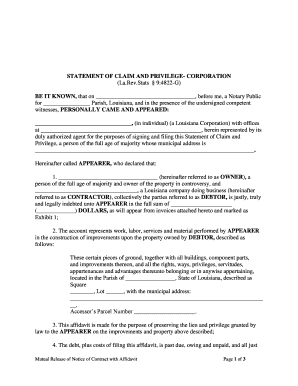
The Louisiana Statement of Claim and Privilege is a formal written filing used to assert a monetary claim and a statutory or contractual privilege (a form of lien) against property, funds, or proceeds under Louisiana law. It identifies the claimant, the respondent, the amount claimed, the legal basis for the privilege, and a description of the asset or transaction subject to the privilege. This document is often prepared by creditors, service providers, contractors, or their attorneys and is filed or recorded with the appropriate parish office or other public registry to create public notice of the claimed privilege.

Why this document matters for preserving rights

Filing a clear Statement of Claim and Privilege preserves legal rights by creating public notice and enabling enforcement remedies under Louisiana’s civil-law framework; it documents the basis, amount, and scope of a claim and starts any statutory processes tied to privileges or liens.

Why this document matters for preserving rights

Who typically prepares and receives this form

Common users range from private creditors to institutional claimants; attorneys frequently prepare or review filings before submission.

  • Creditors and suppliers pursuing unpaid balances and asserting a privilege to secure payment on property or proceeds.
  • Contractors and construction firms documenting mechanic’s- or contractor-style privileges against project funds or property.
  • Healthcare providers and hospitals asserting hospital or medical privileges for unpaid medical charges as permitted by statute.

Parties served may include the property owner, involved lenders, and any party with an interest in the affected asset; proper service is required for enforceability.

Core parts of a professional Statement of Claim and Privilege

A complete filing combines clear identification, a concise statement of the basis for the privilege, an accurate amount, and precise asset identification so a clerk or recorder and any affected party can locate and evaluate the claim quickly.

Caption

Case or filing caption showing court or registry, claimant, and respondent for identification and tracking.
Claimant Details

Full legal name, business entity type, contact information, and, if applicable, counsel details for notices and service.

Amount Claimed

A specific dollar amount or a clearly stated calculation method for fees, costs, or unpaid balances.

Legal Basis

Statute, contract clause, or equitable basis cited with enough specificity to justify the privilege allegation.

Asset Description

Precise description of the property, funds, or proceeds (address, account details, or contract identifiers) subject to the privilege.

Signature & Notary

Signed by the claimant or authorized representative and notarized where state or local rules require acknowledgment.

Step-by-step: filling out the form

Follow these steps in order to complete, review, and file the Statement of Claim and Privilege correctly.

  • 01
    1. Identify Parties: Enter claimant and respondent names exactly as legal entities.
  • 02
    2. State Claim: Describe the amount and legal basis succinctly.
  • 03
    3. Describe Asset: Provide precise property or account identifiers.
  • 04
    4. Sign & Notarize: Sign, date in MM/DD/YYYY, and obtain notary if required.

Where to file and how the filing proceeds

Filing and service steps vary by parish and by the type of privilege; use the local registry or clerk of court guidelines for exact routing.

  • Parish Clerk: File or record the form at the parish clerk or recorder's office per local rules.
  • Service: Serve the respondent and other interested parties according to civil procedure or statutory service requirements.
  • Recording: Record the claim where required to create public notice and preserve priority.
  • Retain Originals: Keep signed original and proof of service for enforcement or litigation.

Configuring an online workflow for this filing

Set up validation, signer authentication, and routing rules before sending the document to reduce processing delays and ensure admissibility.

Field Online Setting
Signature eSignature field with date stamp
Authentication SMS code or email verification
Document Format PDF/A export for archival
Routing Order Sequential signer and notarization step

Digital submission and format considerations

Use secure PDF/A files and an eSignature provider that preserves an audit trail and supports notarization workflows where required.

  • Supported Formats: PDF, DOCX, TIFF accepted by many registries
  • Integrations: Connectors for Google Workspace and Microsoft 365
  • Authentication: Email, SMS, or advanced ID verification

Common timing and processing expectations

Timelines depend on local filing practices and whether the document triggers additional statutory deadlines; plan filings accordingly.

Immediate Filing Recommended:

File promptly to preserve priority over later claimants.

Service Period:

Serve respondent per civil procedure to enable enforcement.

Parish Processing:

Allow clerks time for recording and indexing.

Response Window:

Respondent may have statutorily defined contest periods.

Recording Date:

Recorded date often determines lien priority.

Key risks and consequences of errors

Missed Deadline: Claim barred
Incomplete Form: Filing rejected
Improper Service: Enforcement delayed
Wrong Venue: Invalid filing
Unsigned Document: Unenforceable
Incorrect Amount: Priority disputed

Common mistakes to avoid when preparing the claim

  • Using trade names or abbreviations that do not match legal entity records, causing service or indexing errors with the clerk’s office.
  • Describing assets vaguely instead of including precise identifiers such as address, contract number, account number, or VIN for clear notice.
  • Failing to attach supporting invoices, contracts, or certifications that substantiate the claimed amount and legal basis for the privilege.
  • Assuming electronic submission is accepted without confirming parish or court e-filing rules and, when required, obtaining a notarized paper original.

Essential information fields required on the form

Claimant: Full legal name
Respondent: Full legal name
Amount: Exact dollar amount
Basis: Statute or contract cited
Asset: Precise property ID
Filing Parish: Clerk or recorder identified

Real-world examples showing typical use

These examples illustrate how different organizations used a privilege filing to document a claim and preserve rights.

Martin Properties — Real Estate

Martin Properties needed a fast way to document unpaid closing fees and preserve priority.

  • The filing listed the contract and property identifiers.
  • As a result, the claimant established public notice and streamlined negotiations with lenders while preserving enforcement options if settlement failed.

Fertility Centers of Illinois — Healthcare

A healthcare provider documented unpaid balances tied to patient services and related account proceeds.

  • The statement described the debt and corresponding account.
  • Keeping accurate records and including required privacy notices helped maintain compliance and supported later collection actions consistent with applicable healthcare privacy rules.

eSignature vendor comparison for completing and filing the form

Platform selection affects authentication, notarization support, and cost; below is a high-level vendor comparison with signNow listed first.

signNow DocuSign Adobe Sign PandaDoc HelloSign
Starting Price $8/user/mo $15/user/mo $14/user/mo $19/user/mo $15/user/mo
Free Trial 7-day free trial Varies Varies Varies Varies
Bulk Send Yes Varies by plan Varies by plan Varies by plan Varies by plan
Audit Trail Yes Yes Yes Yes Yes
HIPAA Compliant Yes Yes Yes No No
Envelope Cap No cap 100 envelopes/user/year Varies by plan Varies by plan Varies by plan

Frequently asked questions about preparing and filing the form

Answers to common procedural and technical questions about the Louisiana Statement of Claim and Privilege, including e-signature and notarization considerations.


Need help? Contact support

be ready to get more
Join over 28 million airSlate SignNow users