Establishing secure connection… Loading editor… Preparing document…
Navigation

Fill and Sign the Compensation Employees Form
Fill and Sign the Compensation Employees Form

How it works

Open the document and fill out all its fields.
Apply your legally-binding eSignature.
Save and invite other recipients to sign it.

Rate template

4.4
65 votes
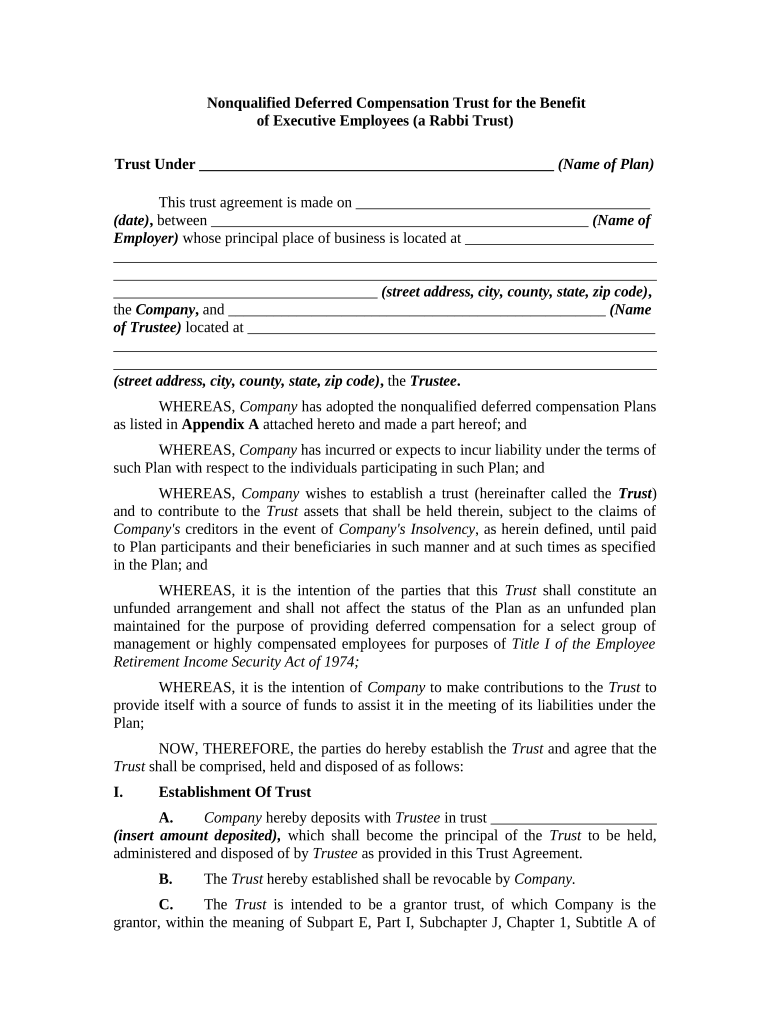
Nonqualified Deferred Compensation Trust for the Benefit of Executive Employees (a Rabbi Trust) Trust Under _______________________________________________ (Name of Plan) This trust agreement is made on _______________________________________ (date) , between __________________________________________________ (Name of Employer) whose principal place of business is located at _________________________ ________________________________________________________________________ ________________________________________________________________________ ___________________________________ (street address, city, county, state, zip code) , the Company , and __________________________________________________ (Name of Trustee) located at ______________________________________________________ ________________________________________________________________________ ________________________________________________________________________ (street address, city, county, state, zip code) , the Trustee . WHEREAS, Company has adopted the nonqualified deferred compensation Plans as listed in Appendix A attached hereto and made a part hereof; and WHEREAS, Company has incurred or expects to incur liability under the terms of such Plan with respect to the individuals participating in such Plan; and WHEREAS, Company wishes to establish a trust (hereinafter called the Trust ) and to contribute to the Trust assets that shall be held therein, subject to the claims of Company's creditors in the event of Company's Insolvency , as herein defined, until paid to Plan participants and their beneficiaries in such manner and at such times as specified in the Plan; and WHEREAS, it is the intention of the parties that this Trust shall constitute an unfunded arrangement and shall not affect the status of the Plan as an unfunded plan maintained for the purpose of providing deferred compensation for a select group of management or highly compensated employees for purposes of Title I of the Employee Retirement Income Security Act of 1974; WHEREAS, it is the intention of Company to make contributions to the Trust to provide itself with a source of funds to assist it in the meeting of its liabilities under the Plan; NOW, THEREFORE, the parties do hereby establish the Trust and agree that the Trust shall be comprised, held and disposed of as follows: I. Establishment Of Trust A. Company hereby deposits with Trustee in trust ______________________ (insert amount deposited) , which shall become the principal of the Trust to be held, administered and disposed of by Trustee as provided in this Trust Agreement. B. The Trust hereby established shall be revocable by Company. C. The Trust is intended to be a grantor trust, of which Company is the grantor, within the meaning of Subpart E, Part I, Subchapter J, Chapter 1, Subtitle A of the Internal Revenue Code of 1986, as amended, and shall be construed accordingly. D. The principal of the Trust and any earnings thereon shall be held separate and apart from other funds of Company and shall be used exclusively for the uses and purposes of Plan participants and general creditors as herein set forth. Plan participants and their beneficiaries shall have no preferred claim on, or any beneficial ownership interest in, any assets of the Trust. Any rights created under the Plan and this Trust Agreement shall be mere unsecured contractual rights of Plan participants and their beneficiaries against Company. Any assets held by the Trust will be subject to the claims of Company's general creditors under federal and state law in the event of Insolvency, as defined in Section III-A herein. E. Company, in its sole discretion, may at any time, or from time to time, make additional deposits of cash or other property in trust with Trustee to augment the principal to be held, administered and disposed of by Trustee as provided in this Trust Agreement. Neither Trustee nor any Plan participant or beneficiary shall have any right to compel such additional deposits. II. Payments to Plan Participants and Their Beneficiaries. A. Company shall deliver to Trustee a schedule (the Payment Schedule ) that indicates the amounts payable in respect of each Plan participant (and his or her beneficiaries), that provides a formula or other instructions acceptable to Trustee for determining the amounts so payable, the form in which such amount is to be paid (as provided for or available under the Plan and the time of commencement for payment of such amounts. Except as otherwise provided herein, Trustee shall make payments to the Plan participants and their beneficiaries in accordance with such Payment Schedule. The Trustee shall make provision for the reporting and withholding of any federal, state or local taxes that may be required to be withheld with respect to the payment of benefits pursuant to the terms of the Plan and shall pay amounts withheld to the appropriate taxing authorities or determine that such amounts have been reported, withheld and paid by Company. B. The entitlement of a Plan participant or his or her beneficiaries to benefits under the Plan shall be determined by Company or such party as it shall designate under the Plan, and any claim for such benefits shall be considered and reviewed under the procedures set out in the Plan. C. Company may make payment of benefits directly to Plan participants or their beneficiaries as they become due under the terms of the Plan. Company shall notify Trustee of its decision to make payment of benefits directly prior to the time amounts are payable to participants or their beneficiaries. In addition, if the principal of the Trust and any earnings thereon, are not sufficient to make payments of benefits in accordance with the terms of the Plan, Company shall make the balance of each such payment as it falls due. Trustee shall notify Company where principal and earnings are not sufficient. III. Trustee Responsibility Regarding Payments to Trust Beneficiary When Company Is Insolvent. Trustee shall cease payment of benefits to Plan participants and their beneficiaries if the Company is Insolvent. Company shall be considered Insolvent for purposes of this Trust Agreement if: A. Company is unable to pay its debts as they become due, or B. Company is subject to a pending proceeding as a debtor under the United States Bankruptcy Code. IV. Payments to Company. Except as provided in Section III hereof, Company shall have no right or power to direct Trustee to return to Company or to divert to others any of the Trust assets before all payment of benefits have been made to Plan participants and their beneficiaries pursuant to the terms of the Plan. V. Investment Authority. The Trustee shall have power to invest and reinvest the Trust property in bonds, stocks, notes, or other property, real or personal, suitable for the investment of trust funds; to register property in the name of a nominee without restriction; to vote in person or by general or limited proxy, or refrain from voting, any corporate securities for any purpose, except that any security as to which the Trustee's possession of voting discretion would subject the issuing company or the Trustee to any law, rule, or regulation adversely affecting either the company or the Trustee's ability to retain or vote company securities, shall be voted as directed by the Company; to lease (for any period of time though commencing in the future or extending beyond the term of the Trust ), sell, exchange, mortgage, or pledge any or all of the trust property as the Trustee deems proper; to borrow from any lender, including a Trustee individually; to employ agents, attorneys and proxies; to compromise, contest, prosecute or abandon claims; to divide or distribute in cash or in kind, or partly in each, or in undivided interests or in different assets or disproportionate interests in assets, to value the Trust property for such purposes, and to sell any property in order to make division or distribution. All rights associated with assets of the Trust shall be exercised by Trustee or the person designated by Trustee, and shall in no event be exercisable by or rest with Plan participants. The Trustee is authorized to establish out of income and credit to principal reasonable reserves for depreciation, obsolescence and depletion. VI. Disposition of Income. During the term of this Trust, all income received by the Trust, net of expenses and taxes, shall be accumulated and reinvested. VII. Accounting by Trustee. Trustee shall keep accurate and detailed records of all investments, receipts, disbursements, and all other transactions required to be made, including such specific records as shall be agreed upon in writing between Company and Trustee. Within ______ (insert number) days following the close of each calendar year and within _______ (insert number) days after the removal or resignation of Trustee, Trustee shall deliver to Company a written account of its administration of the Trust during such year or during the period from the close of the last preceding year to the date of such removal or resignation, setting forth all investments, receipts, disbursements and other transactions effected by it, including a description of all securities and investments purchased and sold with the cost or net proceeds of such purchases or sales (accrued interest paid or receivable being shown separately), and showing all cash, securities and other property held in the Trust at the end of such year or as of the date of such removal or resignation, as the case may be. VIII. Responsibility of Trustee. A. Trustee shall act with the care, skill, prudence and diligence under the circumstances then prevailing that a prudent person acting in like capacity and familiar with such matters would use in the conduct of an enterprise of a like character and with like aims, provided, however, that Trustee shall incur no liability to any person for any action taken pursuant to a direction, request or approval given by Company which is contemplated by, and in conformity with, the terms of the Plan or this Trust and is given in writing by Company. In the event of a dispute between Company and a party, Trustee may apply to a court of competent jurisdiction to resolve the dispute. B. If Trustee undertakes or defends any litigation arising in connection with this Trust, Company agrees to indemnify Trustee against Trustee's costs, expenses and liabilities (including, without limitation, attorneys' fees and expenses) relating thereto and to be primarily liable for such payments. If Company does not pay such costs, expenses and liabilities in a reasonably timely manner, Trustee may obtain payment from the Trust. C. Trustee may consult with legal counsel (who may also be counsel for Company generally) with respect to any of its duties or obligations hereunder. D. Trustee may hire agents, accountants, actuaries, investment advisors, financial consultants or other professionals to assist it in performing any of its duties or obligations hereunder. E. Trustee shall have, without exclusion, all powers conferred on Trustees by applicable law, unless expressly provided otherwise herein, provided, however, that if an insurance policy is held as an asset of the Trust, Trustee shall have no power to name a beneficiary of the policy other than the Trust, to assign the policy (as distinct from conversion of the policy to a different form) other than to a successor Trustee, or to loan to any person the proceeds of any borrowing against such policy. F. Notwithstanding any powers granted to Trustee pursuant to this Trust Agreement or to applicable law, Trustee shall not have any power that could give this Trust the objective of carrying on a business and dividing the gains therefrom, within the meaning of Section 301.7701-2 of the Procedure and Administrative Regulations promulgated pursuant to the Internal Revenue Code. IX. Compensation and Expenses of Trustee. Company shall pay all administrative and Trustee's fees and expenses. If not so paid, the fees and expenses shall be paid from the Trust. X. Resignation and Removal of Trustee. A. Trustee may resign at any time by written notice to Company, which shall be effective __________ (insert number) days after receipt of such notice unless Company and Trustee agree otherwise. B. Trustee may be removed by Company on ____________ (insert number) days notice or upon shorter notice accepted by Trustee. C . Upon resignation or removal of Trustee and appointment of a successor Trustee, all assets shall subsequently be transferred to the successor Trustee. The transfer shall be completed within _____________ (insert number) days after receipt of notice of resignation, removal or transfer, unless Company extends the time limit. D. If Trustee resigns or is removed, a successor shall be appointed, in accordance with Section XI hereof, by the effective date of resignation or removal under Paragraphs A and B of this Section. If no such appointment has been made, Trustee may apply to a court of competent jurisdiction for appointment of a successor or for instructions. All expenses of Trustee in connection with the proceeding shall be allowed as administrative expenses of the Trust. XI Appointment of Successor. A. If Trustee resigns or is removed in accordance with Section 10-A and B hereof, Company may appoint any third party, such as a bank trust department or other party that may be granted corporate trustee powers under state law, as a successor to replace Trustee upon resignation or removal. The appointment shall be effective when accepted in writing by the new Trustee, who shall have all of the rights and powers of the former Trustee, including ownership rights in the Trust assets. The former Trustee shall execute any instrument necessary or reasonably requested by Company or the successor Trustee to evidence the transfer. B. The successor Trustee need not examine the records and acts of any prior Trustee and may retain or dispose of existing Trust assets, subject to Sections VII and VIII hereof. The successor Trustee shall not be responsible for and Company shall indemnify and defend the successor Trustee from any claim or liability resulting from any action or inaction of any prior Trustee or from any other past event, or any condition existing at the time it becomes successor Trustee. XII. Amendment or Termination. A. This Trust Agreement may be amended by a written instrument executed by Trustee and Company. Notwithstanding the foregoing, no such amendment shall conflict with the terms of the Plan or shall make the Trust revocable. B. The Trust shall not terminate until the date on which Plan participants and their beneficiaries are no longer entitled to benefits pursuant to the terms of the Plan. Upon termination of the Trust any assets remaining in the Trust shall be returned to Company. XIII. Miscellaneous. A. Any provision of this Trust Agreement prohibited by law shall be ineffective to the extent of any such prohibition, without invalidating the remaining provisions hereof. B. Benefits payable to Plan participants and their beneficiaries under this Trust Agreement may not be anticipated, assigned (either at law or in equity), alienated, pledged, encumbered or subjected to attachment, garnishment, levy, execution or other legal or equitable process. C. This Trust Agreement shall be governed by and construed in accordance with the laws of the state of __________________________________________. XIV. Effective Date. The effective date of this Trust Agreement shall be ________________________ _______________ (date). WITNESS our signatures as of the day and date first above stated. __________________________________ ____________________________________ (Name of Trustee) (Name of Employer) By: ________________________________ By_________________________________ ___________________________________ ____________________________________ (Name and Office in Corporation) (Name and Office in Corporation) STATE OF ___________________________________ COUNTY OF ___________________________ Personally appeared before me, the undersigned authority in and for said County and State, on this ___________________________________________ (Date), within my jurisdiction, the within named ____________________________________________ (Name of Officer) , who acknowledged that he is the _____________________________ (Name of Office) , a _________________________________________ (name of state) corporation, and that he/she executed the above and foregoing instrument for and on behalf of said corporation, after being duly authorized so to do. ____________________________________ NOTARY PUBLIC My Commission Expires: _______________________ STATE OF ______________________________________ COUNTY OF _____________________________ Personally appeared before me, the undersigned authority in and for said County and State, on this _______________________________________ (Date), within my jurisdiction, the within named _____________________________________________ (Name of Officer) , who acknowledged that he is the _____________________________ (Name of Office) , a _________________________________________ (name of state) corporation, and that he/she executed the above and foregoing instrument for and on behalf of said corporation, after being duly authorized so to do. ____________________________________ NOTARY PUBLIC My Commission Expires: __________________________ (Form of acknowledgement will vary from state to state)

Handy suggestions for preparing your ‘Compensation Employees’ online

Are you fed up with the inconvenience of managing paperwork? Look no further than airSlate SignNow, the leading eSignature solution for individuals and organizations. Bid farewell to the lengthy routine of printing and scanning documents. With airSlate SignNow, you can seamlessly fill out and sign documents online. Utilize the robust features embedded in this user-friendly and affordable platform and transform your approach to document management. Whether you need to authorize forms or gather electronic signatures, airSlate SignNow makes it all effortless, with just a few clicks.

Adhere to this comprehensive guideline:

  1. Access your account or initiate a free trial with our service.
  2. Click +Create to upload a file from your device, the cloud, or our template library.
  3. Open your ‘Compensation Employees’ in the editor.
  4. Click Me (Fill Out Now) to prepare the document on your end.
  5. Include and designate fillable fields for others (if needed).
  6. Continue with the Send Invite settings to solicit eSignatures from others.
  7. Save, print your copy, or convert it into a reusable template.

Don’t fret if you need to collaborate with your teammates on your Compensation Employees or send it for notarization—our platform provides you with all the tools necessary to complete such tasks. Create an account with airSlate SignNow today and elevate your document management to a new level!

Here is a list of the most common customer questions. If you can’t find an answer to your question, please don’t hesitate to reach out to us.

Need help? Contact Support

The best way to complete and sign your compensation employees form

Save time on document management with airSlate SignNow and get your compensation employees form eSigned quickly from anywhere with our fully compliant eSignature tool.

How to Sign a PDF Online How to Sign a PDF Online

How to fill out and sign paperwork online

In the past, working with paperwork required pretty much time and effort. But with airSlate SignNow, document management is quick and simple. Our powerful and easy-to-use eSignature solution enables you to effortlessly complete and eSign your compensation employees form online from any internet-connected device.

Follow the step-by-step guide to eSign your compensation employees form template online:

  • 1.Sign up for a free trial with airSlate SignNow or log in to your account with password credentials or SSO authentication.
  • 2.Click Upload or Create and add a form for eSigning from your device, the cloud, or our form catalogue.
  • 3.Click on the document name to open it in the editor and use the left-side menu to fill out all the blank areas accordingly.
  • 4.Place the My Signature field where you need to eSign your sample. Provide your name, draw, or upload a picture of your handwritten signature.
  • 5.Click Save and Close to accomplish modifying your completed document.

After your compensation employees form template is ready, download it to your device, save it to the cloud, or invite other individuals to eSign it. With airSlate SignNow, the eSigning process only takes several clicks. Use our robust eSignature tool wherever you are to manage your paperwork successfully!

How to Sign a PDF Using Google Chrome How to Sign a PDF Using Google Chrome

How to complete and sign documents in Google Chrome

Completing and signing documents is easy with the airSlate SignNow extension for Google Chrome. Adding it to your browser is a quick and beneficial way to deal with your forms online. Sign your compensation employees form sample with a legally-binding eSignature in a couple of clicks without switching between tools and tabs.

Follow the step-by-step guidelines to eSign your compensation employees form in Google Chrome:

  • 1.Navigate to the Chrome Web Store, find the airSlate SignNow extension for Chrome, and install it to your browser.
  • 2.Right-click on the link to a form you need to approve and choose Open in airSlate SignNow.
  • 3.Log in to your account using your password or Google/Facebook sign-in buttons. If you don’t have one, sign up for a free trial.
  • 4.Utilize the Edit & Sign menu on the left to fill out your sample, then drag and drop the My Signature option.
  • 5.Add an image of your handwritten signature, draw it, or simply type in your full name to eSign.
  • 6.Make sure all data is correct and click Save and Close to finish editing your paperwork.

Now, you can save your compensation employees form template to your device or cloud storage, email the copy to other people, or invite them to eSign your document via an email request or a protected Signing Link. The airSlate SignNow extension for Google Chrome improves your document processes with minimum time and effort. Try airSlate SignNow today!

How to Sign a PDF in Gmail How to Sign a PDF in Gmail How to Sign a PDF in Gmail

How to complete and sign paperwork in Gmail

When you get an email with the compensation employees form for approval, there’s no need to print and scan a file or download and re-upload it to a different tool. There’s a much better solution if you use Gmail. Try the airSlate SignNow add-on to quickly eSign any paperwork right from your inbox.

Follow the step-by-step guide to eSign your compensation employees form in Gmail:

  • 1.Visit the Google Workplace Marketplace and find a airSlate SignNow add-on for Gmail.
  • 2.Install the tool with a related button and grant the tool access to your Google account.
  • 3.Open an email with an attachment that needs signing and utilize the S key on the right sidebar to launch the add-on.
  • 4.Log in to your airSlate SignNow account. Select Send to Sign to forward the document to other people for approval or click Upload to open it in the editor.
  • 5.Place the My Signature option where you need to eSign: type, draw, or upload your signature.

This eSigning process saves time and only requires a couple of clicks. Utilize the airSlate SignNow add-on for Gmail to update your compensation employees form with fillable fields, sign paperwork legally, and invite other individuals to eSign them al without leaving your inbox. Boost your signature workflows now!

How to Sign a PDF on a Mobile Device How to Sign a PDF on a Mobile Device How to Sign a PDF on a Mobile Device

How to complete and sign documents in a mobile browser

Need to quickly submit and sign your compensation employees form on a smartphone while working on the go? airSlate SignNow can help without needing to install extra software applications. Open our airSlate SignNow tool from any browser on your mobile device and create legally-binding eSignatures on the go, 24/7.

Follow the step-by-step guide to eSign your compensation employees form in a browser:

  • 1.Open any browser on your device and follow the link www.signnow.com
  • 2.Sign up for an account with a free trial or log in with your password credentials or SSO authentication.
  • 3.Click Upload or Create and add a file that needs to be completed from a cloud, your device, or our form catalogue with ready-made templates.
  • 4.Open the form and fill out the empty fields with tools from Edit & Sign menu on the left.
  • 5.Place the My Signature field to the sample, then enter your name, draw, or upload your signature.

In a few easy clicks, your compensation employees form is completed from wherever you are. Once you're finished editing, you can save the file on your device, create a reusable template for it, email it to other people, or ask them to eSign it. Make your documents on the go speedy and efficient with airSlate SignNow!


How to Sign a PDF on iPhone How to Sign a PDF on iPhone

How to complete and sign paperwork on iOS

In today’s corporate environment, tasks must be done rapidly even when you’re away from your computer. Using the airSlate SignNow mobile app, you can organize your paperwork and approve your compensation employees form with a legally-binding eSignature right on your iPhone or iPad. Set it up on your device to conclude agreements and manage documents from just about anywhere 24/7.

Follow the step-by-step guide to eSign your compensation employees form on iOS devices:

  • 1.Go to the App Store, find the airSlate SignNow app by airSlate, and set it up on your device.
  • 2.Launch the application, tap Create to import a template, and choose Myself.
  • 3.Choose Signature at the bottom toolbar and simply draw your autograph with a finger or stylus to eSign the sample.
  • 4.Tap Done -> Save after signing the sample.
  • 5.Tap Save or utilize the Make Template option to re-use this paperwork in the future.

This method is so straightforward your compensation employees form is completed and signed within a couple of taps. The airSlate SignNow application works in the cloud so all the forms on your mobile device remain in your account and are available whenever you need them. Use airSlate SignNow for iOS to improve your document management and eSignature workflows!


How to Sign a PDF on Android How to Sign a PDF on Android

How to fill out and sign documents on Android

With airSlate SignNow, it’s easy to sign your compensation employees form on the go. Install its mobile application for Android OS on your device and start improving eSignature workflows right on your smartphone or tablet.

Follow the step-by-step guidelines to eSign your compensation employees form on Android:

  • 1.Navigate to Google Play, search for the airSlate SignNow application from airSlate, and install it on your device.
  • 2.Log in to your account or register it with a free trial, then add a file with a ➕ button on the bottom of you screen.
  • 3.Tap on the imported file and choose Open in Editor from the dropdown menu.
  • 4.Tap on Tools tab -> Signature, then draw or type your name to eSign the form. Fill out empty fields with other tools on the bottom if required.
  • 5.Use the ✔ button, then tap on the Save option to end up with editing.

With an easy-to-use interface and total compliance with major eSignature laws and regulations, the airSlate SignNow app is the perfect tool for signing your compensation employees form. It even works without internet and updates all document modifications once your internet connection is restored and the tool is synced. Complete and eSign forms, send them for eSigning, and generate re-usable templates anytime and from anywhere with airSlate SignNow.

Sign up and try Compensation employees form
  • Close deals faster
  • Improve productivity
  • Delight customers
  • Increase revenue
  • Save time & money
  • Reduce payment cycles







