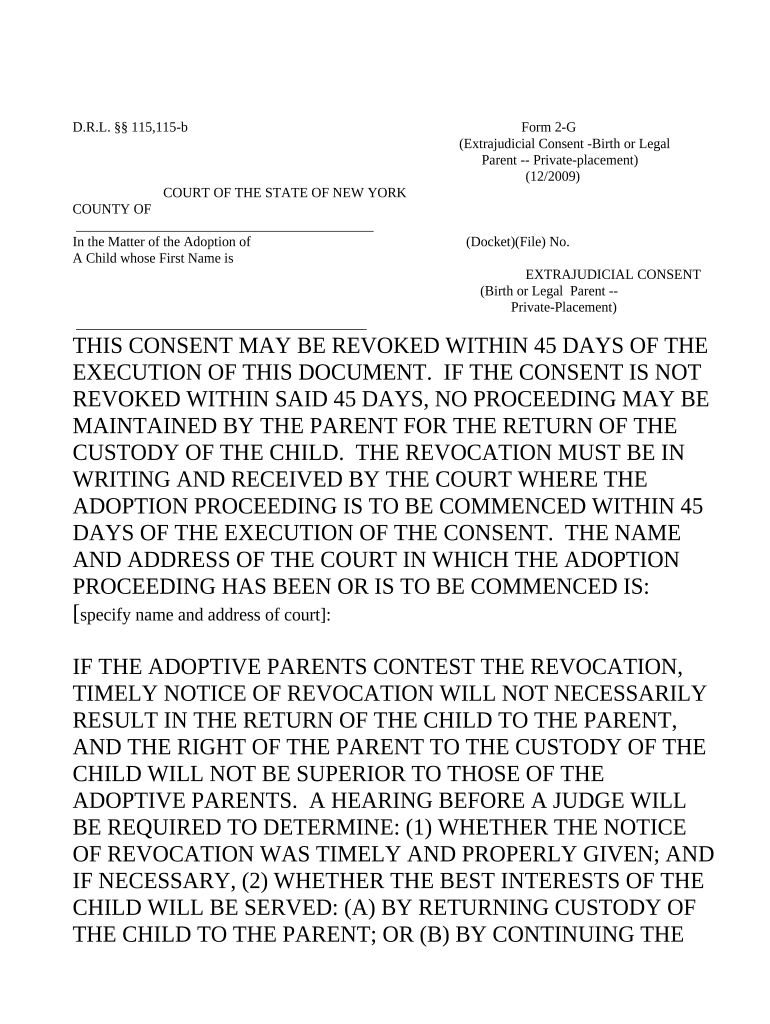
New York Extrajudicial Consent for Adoption
What the New York Extrajudicial Consent for Adoption Is
Why a Proper Extrajudicial Consent Matters
An extrajudicial consent documents parental agreement in a clear, court-admissible form, reducing delay and dispute in adoption proceedings. When properly executed it establishes consent evidence, helps agencies verify legal standing, and can streamline subsequent judicial adoption review.
Who Prepares and Signs This Consent
Parents, licensed adoption agencies, placement social workers, and family attorneys are the primary users and signatories for this consent.
- Birth parent or legal guardian — executes consent and confirms identity and capacity to consent.
- Adoption agency representative — prepares forms, verifies supporting documents, and maintains records.
- Family or adoption attorney — reviews legal sufficiency, advises parties, and may file documents with the court.
Typical Roles Involved
Birth Parent
A birth parent signs to relinquish parental rights voluntarily or provide consent under New York law; they should supply government ID, confirm understanding of legal effect, and consider independent counsel because consent ends or limits parental legal claims.
Adoption Attorney
An adoption attorney advises parties on statutory requirements, prepares or reviews extrajudicial consent language, ensures compliance with New York statutes, and coordinates filing or agency submission to reduce the risk of later invalidation or procedural delay.
Consequences of Incorrect or Incomplete Consents
Common Preparation Mistakes
- Failing to use the statutory form or omitting required certification language can lead to rejection by agencies or courts and require re-execution.
- Using initials instead of full signatures, abbreviating names, or mismatching ID details often causes identity verification failures and delays.
- Skipping notarization or using remote notarization without meeting New York execution requirements risks later invalidation of the consent.
- Not providing full supporting documents (birth certificate, parental rights orders) can prevent acceptance and trigger additional court involvement.
Step-by-Step: Completing and Executing the Consent
-
01Prepare Form: Use statutory New York consent form or agency template.
-
02Verify Identity: Collect government ID and confirm signer capacity.
-
03Notarize: Sign in notary presence and complete acknowledgement.
-
04Submit: File with agency or provide to counsel for court review.
How the Consent Moves from Signature to Record
-
Draft: Complete required fields and attach supporting documents.
-
Review: Attorney or agency reviews legal sufficiency and identity.
-
Execute: Signer appears before notary and dates document.
-
File/Store: Agency files with record or counsel retains original.
Configuring an Online Workflow for Consent Collection
| Field | Configuration |
|---|---|
| Signer Verification | Email link; optional SMS or knowledge-based verification |
| Document Fields | Signature, initials, date, notarization block |
| Storage | Encrypted storage with audit trail and versioning |
| Notifications | Automatic emails to parties on completion |
Technical Considerations for eSubmission and Integration
Digital submission needs signer authentication, secure storage, and compatibility with agency filing practices and notarization workflows.
- Integrations: Salesforce, NetSuite, Google Workspace support
- File Formats: PDF, DOCX, and printable notarization certificate
- Authentication: Email, SMS, KBA, or advanced options
Timelines and Typical Processing Windows
Immediate Filing:
Provide consent to agency upon child placement or request
Court Submission Window:
Submit original or certified copy per court instructions within agency timeframe
Notary Timing:
Signer must notarize at execution; delayed notarization may be invalid
Agency Review:
Agencies typically review within 7–30 days of receipt
Record Retention Start:
Retention begins on execution date or agency acceptance, whichever applies
eSignature Provider Comparison for Adoption Consent Workflows
| signNow | DocuSign | Adobe Sign | PandaDoc | HelloSign | |
|---|---|---|---|---|---|
| Starting Price | $8/user/mo | $15/user/mo | $14/user/mo | $19/user/mo | $15/user/mo |
| Free Trial | 7-day free trial | Varies by vendor | Varies by vendor | Varies by vendor | Varies by vendor |
| Bulk Send | Yes | Available on paid plans | Available on paid plans | Available on paid plans | Available on paid plans |
| Audit Trail | Yes | Yes | Yes | Yes | Yes |
| HIPAA Compliant | Yes | Varies by plan | Varies by plan | Varies by plan | Varies by plan |
| Envelope Cap | No envelope cap | 100 envelopes/user/year | Varies | Varies | Varies |
Frequently Asked Questions About New York Extrajudicial Consents
-
Can an extrajudicial consent be signed electronically?
Electronic signatures are generally valid under the ESIGN Act (15 U.S.C. ch. 96) and New York's ESRA (NY Tech Law §301–309), but family law documents including adoption consents may be excluded. Confirm with New York statute or court rules before relying on e-signature.
-
Is notarization required for the consent?
Notarization is typically required for extrajudicial consents in New York; a licensed notary must complete the acknowledgement and affix a seal. Remote online notarization acceptance depends on state and agency rules. An improper notarization risks invalidating the consent.
-
How does a parent revoke a previously given consent?
Revocation depends on timing and statutory provisions; New York law and agency policies determine whether and how a consent can be withdrawn. If court acceptance or final relinquishment has not occurred, prompt legal advice increases the chance of successful revocation.
-
Will agencies accept photocopies or certified copies?
Acceptance varies: some agencies accept certified or notarized copies, but courts often prefer originals for filing. Adoption agencies and clerks may require the original signed consent or a certified copy; always confirm the receiving body's requirements before submitting documents.
-
Are HIPAA or FERPA rules relevant to the consent?
If a consent references or attaches medical or student records, HIPAA or FERPA protections apply. Healthcare entities must comply with HIPAA retention and authorization rules (45 CFR §164.530(j)), while education records are governed by FERPA. Include required authorizations and limit disclosures accordingly.
-
What if the consent contains errors after signing?
Errors can lead to agency rejection, court delays, or claims the consent is invalid. Common fixes include re-execution with correct information, notarized affidavits explaining errors, or court motion to accept corrected documents; consult counsel to choose the proper remedy.